
Tips
How to Connect Garmin to Peloton: Step-by-Step Guide
How to Connect Garmin to Peloton: Step-by-Step Guide

As of March 2026, Garmin and Peloton support two-way workout sync. That means your Peloton rides can flow into Garmin Connect, your Garmin outdoor runs can count toward Peloton metrics, and you can use your Garmin watch for real-time heart rate data during Peloton workouts. It took years to get here, but the integration now works natively -- no third-party workarounds required.
There are actually two separate ways to connect Garmin to Peloton, and they do different things. The first is a Bluetooth or ANT+ heart rate broadcast: your Garmin watch sends your live heart rate to the Peloton screen in real time during a ride or class. The second is the two-way account sync: Peloton workouts export automatically to Garmin Connect, and Garmin activities can feed back into Peloton. You can use one or both depending on what you want.
This guide covers both methods step by step, what data actually transfers, and the most common connection problems with their fixes.
Key Takeaways
Method 1 (Bluetooth heart rate broadcast) works during any Peloton class and displays your Garmin heart rate live on the screen.
Method 2 (account sync, launched March 2026) automatically exports completed Peloton workouts to Garmin Connect, including heart rate traces, power data, and training load.
Both methods can be active simultaneously -- you do not have to choose.
Method 1: Broadcast Garmin Heart Rate to Peloton in Real Time
This method turns your Garmin watch into a heart rate monitor for your Peloton. Your heart rate shows on the Peloton screen live during class. This works with any Peloton hardware (Bike, Bike+, Tread, Row) and most modern Garmin watches with Bluetooth heart rate broadcasting.
Step 1: Enable Heart Rate Broadcasting on Your Garmin Watch
On your Garmin watch, go to Settings > Sensors & Accessories > Heart Rate (the exact path varies by model -- on some models it is under Wireless or Connectivity).
Enable Broadcast Heart Rate or Broadcast During Activity.
On some Garmin models, broadcasting only works during an active workout. Start a workout (any type) on the watch before connecting to Peloton.
Step 2: Connect via the Peloton Touchscreen
On the Peloton screen, go to Settings > Device Settings > Bluetooth.
Select Heart Rate Monitor and tap Add Device.
Your Garmin watch should appear in the scan results. Tap it to pair.
If you have an older Garmin model that broadcasts via ANT+ only, you will need an ANT+ dongle in the Peloton's USB port.
Once paired, your heart rate from the Garmin watch appears on the Peloton screen during class. The connection persists -- you should not need to re-pair each session, though you will need to start the workout on your watch to trigger the broadcast.
Method 2: Set Up Two-Way Account Sync (Launched March 2026)
The account sync integration connects your Peloton account to Garmin Connect directly. When you complete a Peloton ride or class, the full workout data -- heart rate, cadence, power, training load -- exports to Garmin Connect automatically within minutes. No manual steps after setup.
Step 1: Connect from the Peloton App
Open the Peloton app on your phone.
Go to your Profile tab (bottom right corner).
Tap Permissions (or Settings > Connected Apps on some versions).
Select Garmin Connect from the list of supported services.
Tap Connect and authorize the connection. This opens a Garmin login screen where you sign in with your Garmin Connect credentials.
Step 2: Configure What Gets Synced
After connecting, return to the Garmin Connect settings in the Peloton app.
Toggle Write to Garmin Connect on to export Peloton workouts to Garmin automatically.
If available, toggle Read from Garmin Connect to import Garmin outdoor activities into Peloton (this feeds your Peloton weekly minutes and activity streaks).
From this point, every completed Peloton class syncs to Garmin Connect automatically. You will see it in your Activities list in the Garmin Connect app, with full heart rate trace, cadence, and training load data.
What Data Transfers Between Garmin and Peloton
Peloton to Garmin Connect (via account sync):
Total workout time and duration
Full heart rate trace and heart rate zones
Cadence trace (cycling classes)
Power trace and output (Peloton Bike and Bike+)
Training Effect and Exercise Load (Garmin calculates these from the imported HR data)
Activity type (Cycling, Running, Strength, etc.)
The imported data counts toward Garmin's training load calculations, Body Battery, and recovery metrics. If you use Garmin sleep tracking, your Peloton rides now factor into how Garmin assesses your recovery overnight.
Garmin to Peloton (via account sync): Outdoor and gym activities from Garmin Connect flow into your Peloton activity history and count toward weekly active minutes. This means a Garmin-tracked outdoor run counts toward your Peloton streak.
Common Connection Problems and Fixes
Garmin watch not showing up during Peloton Bluetooth scan: Make sure the workout is actively running on your Garmin watch -- heart rate broadcasting often requires an active activity to function. Also check that the watch has Broadcast Heart Rate enabled in its settings. If the watch has been paired to Peloton before, delete the pairing and re-scan.
Peloton workouts not appearing in Garmin Connect: After completing a class, wait 5-10 minutes for the sync to process. If the workout still does not appear, check that the Garmin Connect toggle in Peloton's Connected Apps settings is turned on. Re-authorizing the connection (disconnect and reconnect from the Peloton app) often resolves stuck syncs.
Garmin showing "No Heart Rate" during Peloton class: The watch needs to be broadcasting and within Bluetooth range (within a few feet). Some Garmin models require the workout type to match for broadcasting to work. Try starting a "Cycling" or "Indoor Cycling" activity on the watch to ensure the sensor is active.
For general Garmin connectivity issues not specific to Peloton, the full troubleshooting steps are in our guide on Garmin not connecting to phone. And if you are setting up Garmin with Apple Health at the same time, see our guide on how to connect Garmin to Apple Health.
Planning Your Training Around Both Platforms
With two-way sync active, your Garmin Connect data now reflects your full training load -- Peloton rides included. That changes how Garmin's recovery metrics work. Your Body Battery score and training load calculations incorporate the Peloton workouts, which means the system is finally seeing your actual training volume.
That data becomes genuinely useful when it feeds into how you plan the rest of your week. If Tuesday's hard Peloton ride shows as high exercise load in Garmin Connect, Wednesday is not the day to schedule another intense session -- even if you feel fine in the morning.
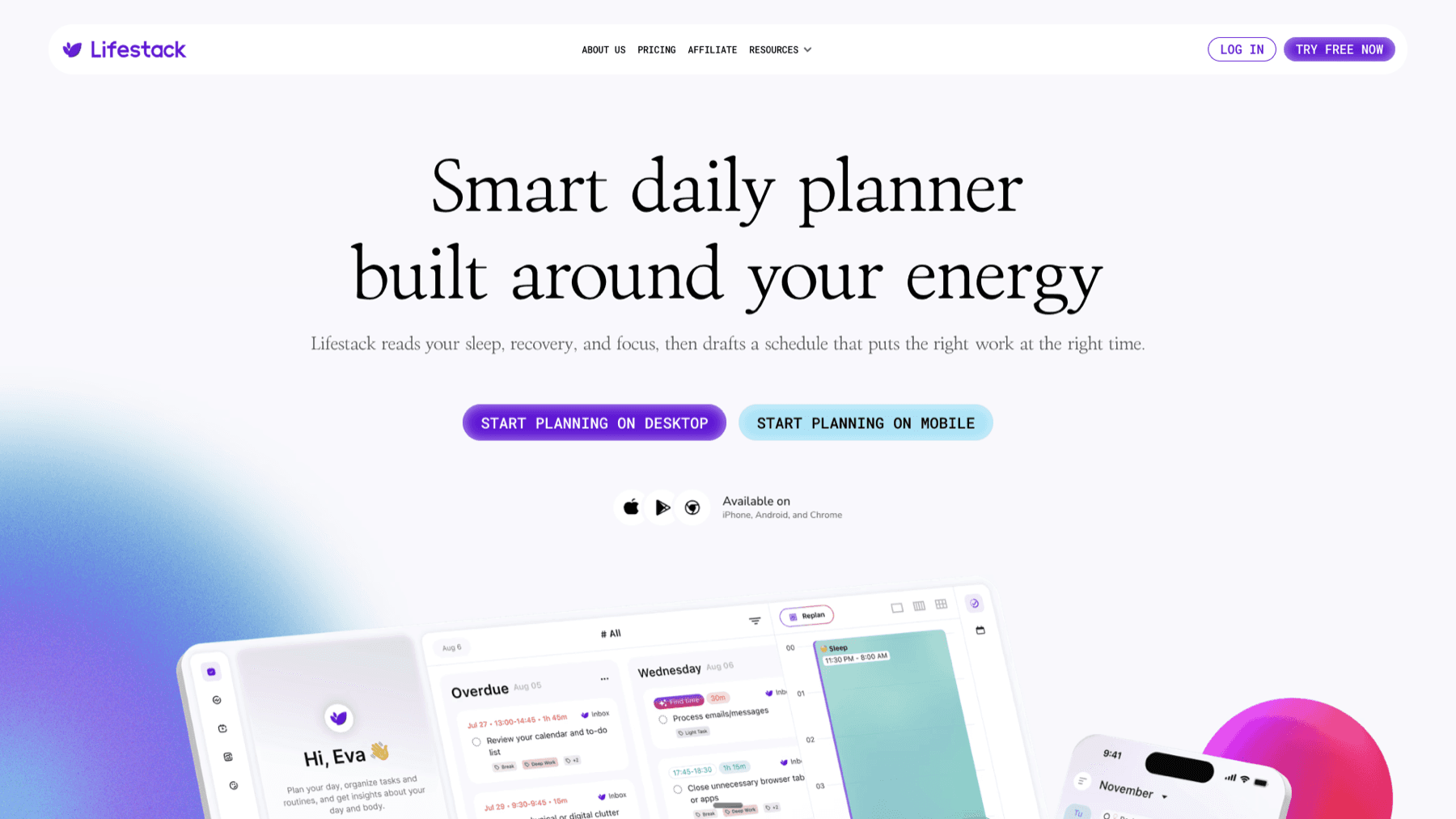
Lifestack reads that Garmin data -- sleep scores, Body Battery, training load -- and uses it to plan your day. When a hard ride has pushed your training load high, Lifestack adjusts tomorrow's schedule automatically, protecting recovery time rather than stacking obligations on a depleted day. It is the practical application of energy-based scheduling without manually tracking everything. And if you are also using the Garmin Connect calendar to manage your training plan, Lifestack sits alongside that -- knowing your planned workouts and planning around them. Lifestack starts at $49.99/year with a 7-day free trial.
FAQ
Can I use my Garmin watch as a heart rate monitor for Peloton?
Yes. Enable heart rate broadcasting on your Garmin watch and pair it via Bluetooth in the Peloton screen's Settings. Your live heart rate will appear on screen during classes. Most modern Garmin watches with Bluetooth heart rate broadcasting support this.
Does Garmin Connect sync with Peloton automatically?
Yes, since March 2026. Connect your Garmin Connect account to Peloton via the Peloton app's Connected Apps section. After setup, completed Peloton workouts export to Garmin Connect automatically, and Garmin activities can feed back into Peloton.
What data syncs from Peloton to Garmin Connect?
The sync transfers workout duration, full heart rate trace and zones, cadence (cycling), power output (Bike/Bike+), activity type, and training load data. Garmin calculates Training Effect and Exercise Load from the imported heart rate data.
Does my Peloton ride count toward Garmin training load?
Yes, with the two-way sync active. Imported Peloton rides show as Activities in Garmin Connect and contribute to training load, Body Battery recovery calculations, and Exercise Load metrics.
Can I connect Garmin to Peloton without the two-way sync?
Yes. The heart rate broadcasting method (Method 1) connects your Garmin watch as a live heart rate monitor without linking your accounts at all. It is a Bluetooth connection during the workout only -- no account authorization required. The two-way sync and the heart rate broadcast are independent features.
Does connecting Garmin to Peloton require a Garmin Connect account?
Heart rate broadcasting does not. The two-way account sync does require a Garmin Connect account for the authorization step. If you do not have one, it is free to create at connect.garmin.com before setting up the sync.
As of March 2026, Garmin and Peloton support two-way workout sync. That means your Peloton rides can flow into Garmin Connect, your Garmin outdoor runs can count toward Peloton metrics, and you can use your Garmin watch for real-time heart rate data during Peloton workouts. It took years to get here, but the integration now works natively -- no third-party workarounds required.
There are actually two separate ways to connect Garmin to Peloton, and they do different things. The first is a Bluetooth or ANT+ heart rate broadcast: your Garmin watch sends your live heart rate to the Peloton screen in real time during a ride or class. The second is the two-way account sync: Peloton workouts export automatically to Garmin Connect, and Garmin activities can feed back into Peloton. You can use one or both depending on what you want.
This guide covers both methods step by step, what data actually transfers, and the most common connection problems with their fixes.
Key Takeaways
Method 1 (Bluetooth heart rate broadcast) works during any Peloton class and displays your Garmin heart rate live on the screen.
Method 2 (account sync, launched March 2026) automatically exports completed Peloton workouts to Garmin Connect, including heart rate traces, power data, and training load.
Both methods can be active simultaneously -- you do not have to choose.
Method 1: Broadcast Garmin Heart Rate to Peloton in Real Time
This method turns your Garmin watch into a heart rate monitor for your Peloton. Your heart rate shows on the Peloton screen live during class. This works with any Peloton hardware (Bike, Bike+, Tread, Row) and most modern Garmin watches with Bluetooth heart rate broadcasting.
Step 1: Enable Heart Rate Broadcasting on Your Garmin Watch
On your Garmin watch, go to Settings > Sensors & Accessories > Heart Rate (the exact path varies by model -- on some models it is under Wireless or Connectivity).
Enable Broadcast Heart Rate or Broadcast During Activity.
On some Garmin models, broadcasting only works during an active workout. Start a workout (any type) on the watch before connecting to Peloton.
Step 2: Connect via the Peloton Touchscreen
On the Peloton screen, go to Settings > Device Settings > Bluetooth.
Select Heart Rate Monitor and tap Add Device.
Your Garmin watch should appear in the scan results. Tap it to pair.
If you have an older Garmin model that broadcasts via ANT+ only, you will need an ANT+ dongle in the Peloton's USB port.
Once paired, your heart rate from the Garmin watch appears on the Peloton screen during class. The connection persists -- you should not need to re-pair each session, though you will need to start the workout on your watch to trigger the broadcast.
Method 2: Set Up Two-Way Account Sync (Launched March 2026)
The account sync integration connects your Peloton account to Garmin Connect directly. When you complete a Peloton ride or class, the full workout data -- heart rate, cadence, power, training load -- exports to Garmin Connect automatically within minutes. No manual steps after setup.
Step 1: Connect from the Peloton App
Open the Peloton app on your phone.
Go to your Profile tab (bottom right corner).
Tap Permissions (or Settings > Connected Apps on some versions).
Select Garmin Connect from the list of supported services.
Tap Connect and authorize the connection. This opens a Garmin login screen where you sign in with your Garmin Connect credentials.
Step 2: Configure What Gets Synced
After connecting, return to the Garmin Connect settings in the Peloton app.
Toggle Write to Garmin Connect on to export Peloton workouts to Garmin automatically.
If available, toggle Read from Garmin Connect to import Garmin outdoor activities into Peloton (this feeds your Peloton weekly minutes and activity streaks).
From this point, every completed Peloton class syncs to Garmin Connect automatically. You will see it in your Activities list in the Garmin Connect app, with full heart rate trace, cadence, and training load data.
What Data Transfers Between Garmin and Peloton
Peloton to Garmin Connect (via account sync):
Total workout time and duration
Full heart rate trace and heart rate zones
Cadence trace (cycling classes)
Power trace and output (Peloton Bike and Bike+)
Training Effect and Exercise Load (Garmin calculates these from the imported HR data)
Activity type (Cycling, Running, Strength, etc.)
The imported data counts toward Garmin's training load calculations, Body Battery, and recovery metrics. If you use Garmin sleep tracking, your Peloton rides now factor into how Garmin assesses your recovery overnight.
Garmin to Peloton (via account sync): Outdoor and gym activities from Garmin Connect flow into your Peloton activity history and count toward weekly active minutes. This means a Garmin-tracked outdoor run counts toward your Peloton streak.
Common Connection Problems and Fixes
Garmin watch not showing up during Peloton Bluetooth scan: Make sure the workout is actively running on your Garmin watch -- heart rate broadcasting often requires an active activity to function. Also check that the watch has Broadcast Heart Rate enabled in its settings. If the watch has been paired to Peloton before, delete the pairing and re-scan.
Peloton workouts not appearing in Garmin Connect: After completing a class, wait 5-10 minutes for the sync to process. If the workout still does not appear, check that the Garmin Connect toggle in Peloton's Connected Apps settings is turned on. Re-authorizing the connection (disconnect and reconnect from the Peloton app) often resolves stuck syncs.
Garmin showing "No Heart Rate" during Peloton class: The watch needs to be broadcasting and within Bluetooth range (within a few feet). Some Garmin models require the workout type to match for broadcasting to work. Try starting a "Cycling" or "Indoor Cycling" activity on the watch to ensure the sensor is active.
For general Garmin connectivity issues not specific to Peloton, the full troubleshooting steps are in our guide on Garmin not connecting to phone. And if you are setting up Garmin with Apple Health at the same time, see our guide on how to connect Garmin to Apple Health.
Planning Your Training Around Both Platforms
With two-way sync active, your Garmin Connect data now reflects your full training load -- Peloton rides included. That changes how Garmin's recovery metrics work. Your Body Battery score and training load calculations incorporate the Peloton workouts, which means the system is finally seeing your actual training volume.
That data becomes genuinely useful when it feeds into how you plan the rest of your week. If Tuesday's hard Peloton ride shows as high exercise load in Garmin Connect, Wednesday is not the day to schedule another intense session -- even if you feel fine in the morning.
Lifestack reads that Garmin data -- sleep scores, Body Battery, training load -- and uses it to plan your day. When a hard ride has pushed your training load high, Lifestack adjusts tomorrow's schedule automatically, protecting recovery time rather than stacking obligations on a depleted day. It is the practical application of energy-based scheduling without manually tracking everything. And if you are also using the Garmin Connect calendar to manage your training plan, Lifestack sits alongside that -- knowing your planned workouts and planning around them. Lifestack starts at $49.99/year with a 7-day free trial.
FAQ
Can I use my Garmin watch as a heart rate monitor for Peloton?
Yes. Enable heart rate broadcasting on your Garmin watch and pair it via Bluetooth in the Peloton screen's Settings. Your live heart rate will appear on screen during classes. Most modern Garmin watches with Bluetooth heart rate broadcasting support this.
Does Garmin Connect sync with Peloton automatically?
Yes, since March 2026. Connect your Garmin Connect account to Peloton via the Peloton app's Connected Apps section. After setup, completed Peloton workouts export to Garmin Connect automatically, and Garmin activities can feed back into Peloton.
What data syncs from Peloton to Garmin Connect?
The sync transfers workout duration, full heart rate trace and zones, cadence (cycling), power output (Bike/Bike+), activity type, and training load data. Garmin calculates Training Effect and Exercise Load from the imported heart rate data.
Does my Peloton ride count toward Garmin training load?
Yes, with the two-way sync active. Imported Peloton rides show as Activities in Garmin Connect and contribute to training load, Body Battery recovery calculations, and Exercise Load metrics.
Can I connect Garmin to Peloton without the two-way sync?
Yes. The heart rate broadcasting method (Method 1) connects your Garmin watch as a live heart rate monitor without linking your accounts at all. It is a Bluetooth connection during the workout only -- no account authorization required. The two-way sync and the heart rate broadcast are independent features.
Does connecting Garmin to Peloton require a Garmin Connect account?
Heart rate broadcasting does not. The two-way account sync does require a Garmin Connect account for the authorization step. If you do not have one, it is free to create at connect.garmin.com before setting up the sync.

FOLLOW ON
FOLLOW ON
FOLLOW ON



Copyright 2026 © Lifestack. All rights reserved
Copyright 2026 © Lifestack. All rights reserved

