
Tips
Apple Health Period Tracking: A Complete Guide
Apple Health Period Tracking: A Complete Guide

The period tracking feature in Apple Health is more capable than most people realize. Beyond logging start and end dates, it tracks symptoms, flow levels, moods, basal body temperature, and cervical mucus - and it uses all of this to generate increasingly accurate cycle predictions over time. If you've been treating it as a simple period reminder, you're leaving a lot of useful data on the table.
Apple Health's cycle tracking is built into the Health app on iPhone and can be enhanced with Apple Watch, which adds passive resting heart rate and wrist temperature data that improves prediction accuracy without requiring any active logging. The data stays on your device by default, doesn't require a subscription, and connects to other health apps through HealthKit.
This guide walks through how to set it up, what to log, what the predictions mean, and how to use cycle data beyond just knowing when your period is coming. For a broader overview of everything the Health app tracks, the Apple Health app guide covers the full feature set.
Key Takeaways
Apple Health's cycle tracking is built into the Health app - go to Cycle Tracking in the Browse tab to get started. It requires no additional app or subscription.
The more consistently you log data (start and end dates, symptoms, flow level), the more accurate Apple's predictions become over time.
Apple Watch Series 8 and later add wrist temperature sensing that tracks temperature changes across your cycle, improving ovulation timing predictions without manual logging.
How to Set Up Cycle Tracking in Apple Health
Open the Health app on your iPhone, tap Browse at the bottom, then scroll down to Cycle Tracking and tap it. If it's your first time, you'll be prompted to enter your period start date and approximate cycle length. If you're not sure of your average cycle length, 28 days is the default starting point - the app will refine this as you log more data.
From the Cycle Tracking screen, you can log today's status: whether your period has started, the flow level (light, medium, heavy, spotting), and any symptoms. There's also a calendar view showing your logged period days (in pink) and predicted future periods (highlighted). Tap any date to log data for that day.
Notifications: Apple Health can send you period and fertile window reminders in advance. These are configurable from the Options button in the Cycle Tracking screen. Setting reminders for 2 days before predicted period start and 2 days into your predicted fertile window makes the feature genuinely useful for planning rather than just retroactive logging.
What to Log for Best Accuracy
At minimum, log your period start and end dates consistently. This is the core data that drives predictions. Even if you log nothing else, consistent start and end date logging over 3-6 cycles gives Apple Health enough data to predict your cycle accurately for most people with regular cycles.
Flow level logging helps the app understand what's normal for you and flags unusual changes. Light, medium, and heavy flow all count as period days; spotting is tracked separately. This distinction matters for the app's cycle boundary detection.
Symptoms: Apple Health tracks a wide range of cycle-related symptoms - cramps, bloating, mood changes, headaches, tender breasts, fatigue, acne, and more. Logging these consistently builds a personalized picture of your symptom patterns across the cycle, which you can review in the cycle log view to see which symptoms consistently occur in which phase. This is genuinely useful for planning demanding weeks around your cycle. See the sleep during your period guide and why you're so tired on your period for how these symptoms connect to energy patterns.
Basal body temperature (BBT): If you're tracking for fertility awareness or trying to conceive, logging your morning BBT (taken before getting out of bed with a basal thermometer) confirms ovulation in retrospect - temperature rises slightly after ovulation and remains higher through the luteal phase. This requires a separate basal thermometer and consistent morning logging before getting up.
How Apple Health Predicts Your Period
Apple Health uses your logged cycle history to calculate your average cycle length and standard deviation. It then predicts your next period start based on when your last period ended plus your average cycle length. The prediction window shown in the calendar represents the confidence interval - a narrow band means consistent cycles, a wider band means more variability.
Over time (usually 3-6 cycles), predictions become more accurate as the app builds a better model of your personal cycle. For the first few cycles, treat predictions as approximate. After 6+ cycles of consistent logging, predictions are often accurate to within 1-2 days for people with regular cycles.
Fertile window predictions use a backward calculation from the predicted period start. The app estimates ovulation as approximately 14 days before the next expected period (the luteal phase length is relatively consistent at around 14 days even when overall cycle length varies). The fertile window is shown as the 6 days up to and including estimated ovulation day. This is a statistical estimate, not a confirmed ovulation test - for precision fertility tracking, logging BBT or using an ovulation predictor kit provides more reliable ovulation confirmation.
Apple Watch and Cycle Tracking
With Apple Watch Series 8 or later (or Ultra, Ultra 2, or the new SE), you get wrist temperature sensing that Apple Health uses to refine ovulation predictions. The watch tracks your nighttime wrist temperature continuously, and after two cycles of data collection, it can retrospectively identify temperature shifts associated with ovulation. This is called "retrospective ovulation estimates" in the Health app and shows up as a small temperature graph in the Cycle Tracking view.
The watch also contributes resting heart rate data to the cycle log. Resting heart rate tends to run slightly higher in the luteal phase (after ovulation), which is another passive signal the app uses. You don't need to do anything to enable this - if you wear your watch overnight, the data syncs automatically.
Even without an Apple Watch, the cycle tracking feature works well through manual logging. The watch adds passive data that improves predictions and reduces logging burden, but it's not required. The Apple Watch health features guide covers everything the watch contributes to Health.
Privacy: Where Your Data Goes
Apple Health data is stored locally on your iPhone by default, encrypted and inaccessible to Apple without your explicit opt-in. iCloud Health backup is optional and end-to-end encrypted (not accessible even to Apple). Third-party apps that request access to cycle data via HealthKit only get the specific categories you approve - each app requests specific data types, and you can review and revoke access in Settings, Health, Apps & Devices.
Apple Health does not sell your health data to advertisers. This is different from many standalone period tracking apps, some of which have faced scrutiny for data sharing practices. If privacy is a priority, Apple Health is one of the more defensible options because all analysis happens on-device rather than in the cloud.
In the US, Reproductive Health Data is flagged by Apple as "Sensitive Data" with additional protections: Apple Health won't share it with apps that have access to other health categories unless you specifically grant Reproductive Health access separately. The best apps that work with Apple Health guide covers which third-party apps connect to your cycle data responsibly.
Using Cycle Data to Plan Your Energy
Your menstrual cycle directly affects your energy, focus, and cognitive performance. The follicular phase (from period start to ovulation) is generally associated with higher energy and better focus as estrogen rises. The luteal phase (after ovulation) brings progesterone elevation, which can increase fatigue, reduce concentration, and affect sleep quality. The specific pattern varies by person, but most people notice consistent energy trends tied to their cycle once they start tracking.
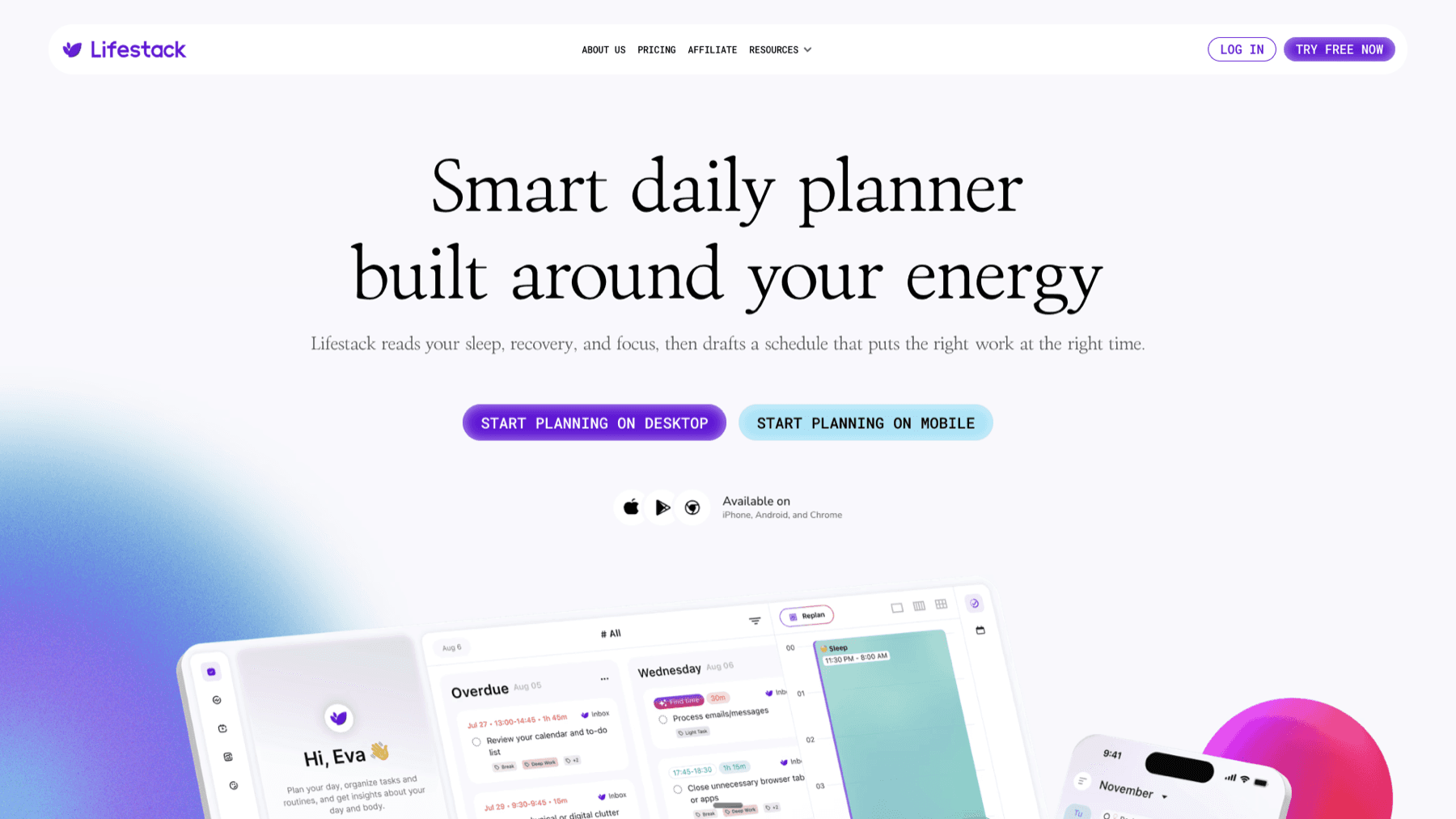
Lifestack tracks your energy patterns and auto-schedules your tasks into time blocks that align with your genuine alertness - not just what your calendar says. For people whose energy follows clear cycle patterns, this means your highest-demand work (presentations, deep problem-solving, important decisions) can be scheduled during phases when you're historically at your sharpest. The energy-based scheduling guide covers how the system learns your patterns, and the female hormones and circadian rhythm research covers the science behind cycle-energy connections. Lifestack is $9.99/month or $49.99/year with a 7-day free trial. The menstrual cycle tracking guide covers third-party apps if you want more detailed cycle analytics than Apple Health provides.
Frequently Asked Questions
Can I use Apple Health cycle tracking without an Apple Watch?
Yes. The Health app cycle tracking works entirely through manual logging on iPhone. An Apple Watch contributes passive temperature and heart rate data that improves prediction accuracy, but you can get accurate predictions from manual logging alone after 3-6 consistent cycles. If you have an older Apple Watch (Series 7 or earlier), you won't get wrist temperature data, but heart rate data still contributes.
How long until Apple Health period predictions are accurate?
Most people see reasonable predictions after 3 cycles of consistent start/end date logging. After 6 cycles, predictions are usually accurate to 1-2 days for people with regular cycles. If your cycles are irregular (varying by more than 7-9 days cycle to cycle), predictions will have wider windows and less precision. This isn't a limitation of Apple Health specifically - irregular cycles are harder to predict with any method.
What's the difference between Apple Health and dedicated period tracking apps like Clue or Flo?
Apple Health is more private and tightly integrated with the iOS ecosystem, but dedicated apps like Clue offer more detailed symptom logging, better cycle phase explanations, and more sophisticated fertility charting. For most people who want basic period tracking and predictions without a separate app, Apple Health is sufficient. For fertility awareness method (FAM) users or people wanting detailed cycle analytics, a dedicated app typically provides more. The period tracker guide compares the main options.
Can my doctor access my Apple Health cycle data?
Only if you share it with them directly. Apple Health can generate a Health Records PDF export, which you can choose to share. Some healthcare providers also integrate with Apple Health through apps that request specific data categories - but this always requires your explicit authorization. Data doesn't flow to healthcare providers automatically.
What should I do if my predictions are consistently off?
First, make sure you're logging both start and end dates - logging only start dates produces less accurate predictions. Second, review whether you have at least 3-6 cycles of data. Third, if your cycles are genuinely irregular, consider logging more symptoms (BBT, cervical mucus) to give the app more signals. If predictions remain off after several cycles, a dedicated app with a larger historical dataset and more sophisticated irregular-cycle modeling may work better than Apple Health for your situation.
The period tracking feature in Apple Health is more capable than most people realize. Beyond logging start and end dates, it tracks symptoms, flow levels, moods, basal body temperature, and cervical mucus - and it uses all of this to generate increasingly accurate cycle predictions over time. If you've been treating it as a simple period reminder, you're leaving a lot of useful data on the table.
Apple Health's cycle tracking is built into the Health app on iPhone and can be enhanced with Apple Watch, which adds passive resting heart rate and wrist temperature data that improves prediction accuracy without requiring any active logging. The data stays on your device by default, doesn't require a subscription, and connects to other health apps through HealthKit.
This guide walks through how to set it up, what to log, what the predictions mean, and how to use cycle data beyond just knowing when your period is coming. For a broader overview of everything the Health app tracks, the Apple Health app guide covers the full feature set.
Key Takeaways
Apple Health's cycle tracking is built into the Health app - go to Cycle Tracking in the Browse tab to get started. It requires no additional app or subscription.
The more consistently you log data (start and end dates, symptoms, flow level), the more accurate Apple's predictions become over time.
Apple Watch Series 8 and later add wrist temperature sensing that tracks temperature changes across your cycle, improving ovulation timing predictions without manual logging.
How to Set Up Cycle Tracking in Apple Health
Open the Health app on your iPhone, tap Browse at the bottom, then scroll down to Cycle Tracking and tap it. If it's your first time, you'll be prompted to enter your period start date and approximate cycle length. If you're not sure of your average cycle length, 28 days is the default starting point - the app will refine this as you log more data.
From the Cycle Tracking screen, you can log today's status: whether your period has started, the flow level (light, medium, heavy, spotting), and any symptoms. There's also a calendar view showing your logged period days (in pink) and predicted future periods (highlighted). Tap any date to log data for that day.
Notifications: Apple Health can send you period and fertile window reminders in advance. These are configurable from the Options button in the Cycle Tracking screen. Setting reminders for 2 days before predicted period start and 2 days into your predicted fertile window makes the feature genuinely useful for planning rather than just retroactive logging.
What to Log for Best Accuracy
At minimum, log your period start and end dates consistently. This is the core data that drives predictions. Even if you log nothing else, consistent start and end date logging over 3-6 cycles gives Apple Health enough data to predict your cycle accurately for most people with regular cycles.
Flow level logging helps the app understand what's normal for you and flags unusual changes. Light, medium, and heavy flow all count as period days; spotting is tracked separately. This distinction matters for the app's cycle boundary detection.
Symptoms: Apple Health tracks a wide range of cycle-related symptoms - cramps, bloating, mood changes, headaches, tender breasts, fatigue, acne, and more. Logging these consistently builds a personalized picture of your symptom patterns across the cycle, which you can review in the cycle log view to see which symptoms consistently occur in which phase. This is genuinely useful for planning demanding weeks around your cycle. See the sleep during your period guide and why you're so tired on your period for how these symptoms connect to energy patterns.
Basal body temperature (BBT): If you're tracking for fertility awareness or trying to conceive, logging your morning BBT (taken before getting out of bed with a basal thermometer) confirms ovulation in retrospect - temperature rises slightly after ovulation and remains higher through the luteal phase. This requires a separate basal thermometer and consistent morning logging before getting up.
How Apple Health Predicts Your Period
Apple Health uses your logged cycle history to calculate your average cycle length and standard deviation. It then predicts your next period start based on when your last period ended plus your average cycle length. The prediction window shown in the calendar represents the confidence interval - a narrow band means consistent cycles, a wider band means more variability.
Over time (usually 3-6 cycles), predictions become more accurate as the app builds a better model of your personal cycle. For the first few cycles, treat predictions as approximate. After 6+ cycles of consistent logging, predictions are often accurate to within 1-2 days for people with regular cycles.
Fertile window predictions use a backward calculation from the predicted period start. The app estimates ovulation as approximately 14 days before the next expected period (the luteal phase length is relatively consistent at around 14 days even when overall cycle length varies). The fertile window is shown as the 6 days up to and including estimated ovulation day. This is a statistical estimate, not a confirmed ovulation test - for precision fertility tracking, logging BBT or using an ovulation predictor kit provides more reliable ovulation confirmation.
Apple Watch and Cycle Tracking
With Apple Watch Series 8 or later (or Ultra, Ultra 2, or the new SE), you get wrist temperature sensing that Apple Health uses to refine ovulation predictions. The watch tracks your nighttime wrist temperature continuously, and after two cycles of data collection, it can retrospectively identify temperature shifts associated with ovulation. This is called "retrospective ovulation estimates" in the Health app and shows up as a small temperature graph in the Cycle Tracking view.
The watch also contributes resting heart rate data to the cycle log. Resting heart rate tends to run slightly higher in the luteal phase (after ovulation), which is another passive signal the app uses. You don't need to do anything to enable this - if you wear your watch overnight, the data syncs automatically.
Even without an Apple Watch, the cycle tracking feature works well through manual logging. The watch adds passive data that improves predictions and reduces logging burden, but it's not required. The Apple Watch health features guide covers everything the watch contributes to Health.
Privacy: Where Your Data Goes
Apple Health data is stored locally on your iPhone by default, encrypted and inaccessible to Apple without your explicit opt-in. iCloud Health backup is optional and end-to-end encrypted (not accessible even to Apple). Third-party apps that request access to cycle data via HealthKit only get the specific categories you approve - each app requests specific data types, and you can review and revoke access in Settings, Health, Apps & Devices.
Apple Health does not sell your health data to advertisers. This is different from many standalone period tracking apps, some of which have faced scrutiny for data sharing practices. If privacy is a priority, Apple Health is one of the more defensible options because all analysis happens on-device rather than in the cloud.
In the US, Reproductive Health Data is flagged by Apple as "Sensitive Data" with additional protections: Apple Health won't share it with apps that have access to other health categories unless you specifically grant Reproductive Health access separately. The best apps that work with Apple Health guide covers which third-party apps connect to your cycle data responsibly.
Using Cycle Data to Plan Your Energy
Your menstrual cycle directly affects your energy, focus, and cognitive performance. The follicular phase (from period start to ovulation) is generally associated with higher energy and better focus as estrogen rises. The luteal phase (after ovulation) brings progesterone elevation, which can increase fatigue, reduce concentration, and affect sleep quality. The specific pattern varies by person, but most people notice consistent energy trends tied to their cycle once they start tracking.
Lifestack tracks your energy patterns and auto-schedules your tasks into time blocks that align with your genuine alertness - not just what your calendar says. For people whose energy follows clear cycle patterns, this means your highest-demand work (presentations, deep problem-solving, important decisions) can be scheduled during phases when you're historically at your sharpest. The energy-based scheduling guide covers how the system learns your patterns, and the female hormones and circadian rhythm research covers the science behind cycle-energy connections. Lifestack is $9.99/month or $49.99/year with a 7-day free trial. The menstrual cycle tracking guide covers third-party apps if you want more detailed cycle analytics than Apple Health provides.
Frequently Asked Questions
Can I use Apple Health cycle tracking without an Apple Watch?
Yes. The Health app cycle tracking works entirely through manual logging on iPhone. An Apple Watch contributes passive temperature and heart rate data that improves prediction accuracy, but you can get accurate predictions from manual logging alone after 3-6 consistent cycles. If you have an older Apple Watch (Series 7 or earlier), you won't get wrist temperature data, but heart rate data still contributes.
How long until Apple Health period predictions are accurate?
Most people see reasonable predictions after 3 cycles of consistent start/end date logging. After 6 cycles, predictions are usually accurate to 1-2 days for people with regular cycles. If your cycles are irregular (varying by more than 7-9 days cycle to cycle), predictions will have wider windows and less precision. This isn't a limitation of Apple Health specifically - irregular cycles are harder to predict with any method.
What's the difference between Apple Health and dedicated period tracking apps like Clue or Flo?
Apple Health is more private and tightly integrated with the iOS ecosystem, but dedicated apps like Clue offer more detailed symptom logging, better cycle phase explanations, and more sophisticated fertility charting. For most people who want basic period tracking and predictions without a separate app, Apple Health is sufficient. For fertility awareness method (FAM) users or people wanting detailed cycle analytics, a dedicated app typically provides more. The period tracker guide compares the main options.
Can my doctor access my Apple Health cycle data?
Only if you share it with them directly. Apple Health can generate a Health Records PDF export, which you can choose to share. Some healthcare providers also integrate with Apple Health through apps that request specific data categories - but this always requires your explicit authorization. Data doesn't flow to healthcare providers automatically.
What should I do if my predictions are consistently off?
First, make sure you're logging both start and end dates - logging only start dates produces less accurate predictions. Second, review whether you have at least 3-6 cycles of data. Third, if your cycles are genuinely irregular, consider logging more symptoms (BBT, cervical mucus) to give the app more signals. If predictions remain off after several cycles, a dedicated app with a larger historical dataset and more sophisticated irregular-cycle modeling may work better than Apple Health for your situation.

FOLLOW ON
FOLLOW ON
FOLLOW ON


Copyright 2026 © Lifestack. All rights reserved
Copyright 2026 © Lifestack. All rights reserved

