
Device
Apple Watch SE 3 vs SE 2: Is the Upgrade Worth It?
Apple Watch SE 3 vs SE 2: Is the Upgrade Worth It?

The Apple Watch SE has always been Apple's answer to one question: what's the least expensive Apple Watch worth buying? The SE 2 launched in 2022 and held that position for three years. The SE 3 arrived in September 2025 with the same starting price and a meaningful list of upgrades.
If you're choosing between buying a new SE 3 or finding a discounted SE 2, the answer is straightforward: the SE 3 is the better watch at the same price. If you already own an SE 2 and are wondering whether to upgrade, the calculation depends on whether you'll use the new health features and whether the Always-On display matters to you.
This comparison covers every meaningful difference and skips the spec-sheet noise that doesn't translate to real-world experience.
Key Takeaways
The SE 3 adds Always-On Display, sleep apnea detection, wrist temperature sensing, and the S10 chip for the same $249 starting price as the SE 2 at launch.
Cellular models of the SE 3 support 5G. The SE 2 topped out at 4G LTE.
SE 2 owners: upgrading is worth it for the AOD and sleep apnea detection. Skip it if you use your watch mostly for step counting and notifications.
Quick Verdict
Apple Watch SE 2: Still capable if you find it deeply discounted (under $150). No longer sold new by Apple.
Apple Watch SE 3: The clear buy at $249. More chip power, more storage, meaningful health additions, same price.
Apple Watch SE 3 Overview
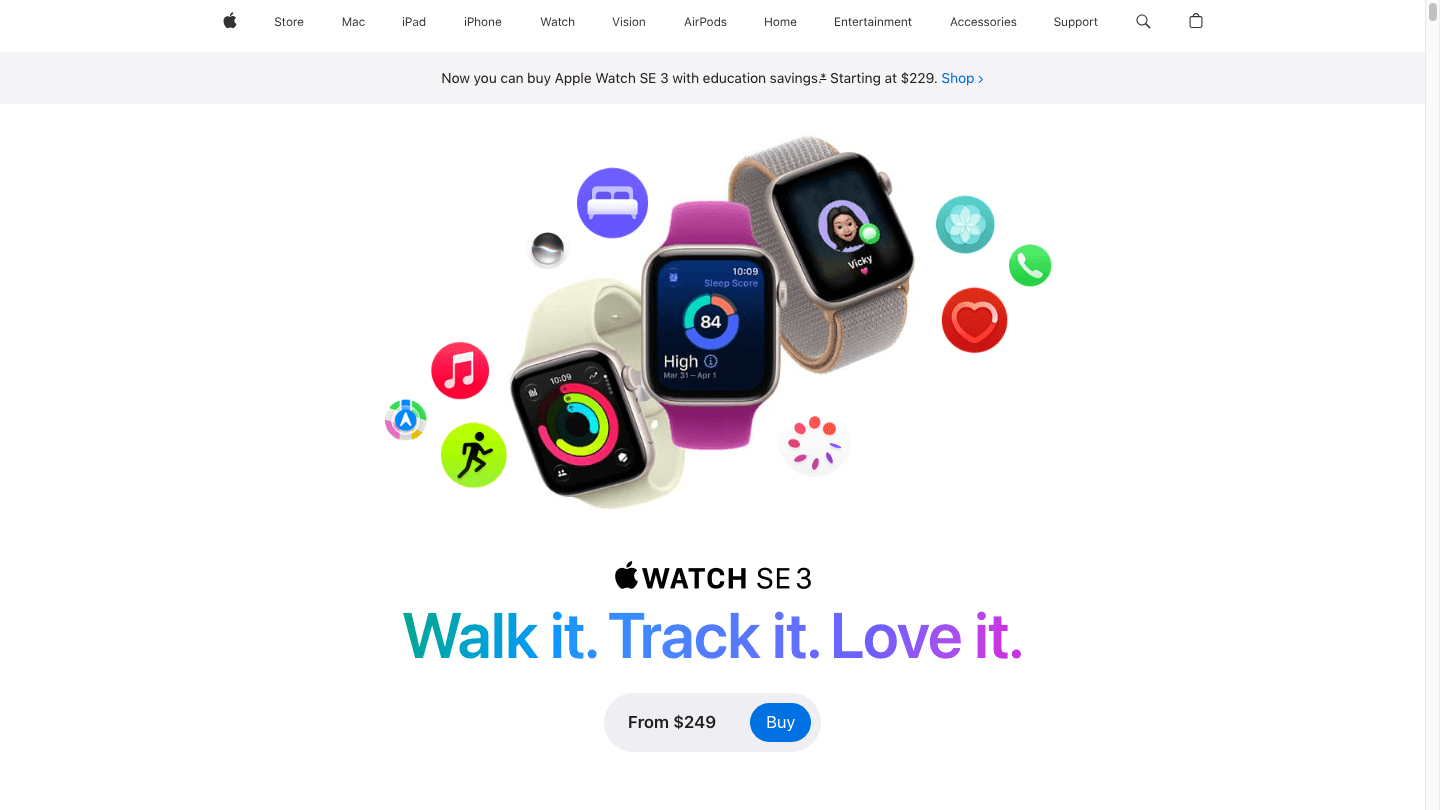
The Apple Watch SE 3 represents a more significant generational jump than Apple usually delivers for the SE line. Historically the SE has been a feature-stripped version of the flagship watch. The SE 3 closes that gap considerably.
The S10 chip is the same silicon in the Series 11 and Ultra 3, two generations ahead of the SE 2's S8. Processing is noticeably faster for Siri, workout summaries, and app launches. The doubled storage (64GB vs 32GB) means more room for music, podcasts, and apps offline.
More significantly, Apple brought the Always-On Display to the SE for the first time. The SE 2's display required a wrist raise to activate, which broke the watch-face illusion and made it feel like a budget product. The SE 3's AOD shows time, complications, and workout data continuously. Battery life with AOD enabled is similar to the SE 2 without it: around 18 hours.
New Health Features on SE 3
Sleep Apnea Detection: The SE 3 can detect signs of moderate to severe sleep apnea. The feature requires wearing the watch for at least 10 nights over 30 days to generate a result. FDA-cleared, and genuinely useful for users who haven't had a sleep study done.
Wrist Temperature Sensing: Tracks overnight body temperature deviation from your personal baseline. Flags potential illness and contributes to menstrual cycle tracking in the Health app. The SE 2 had no temperature sensor.
Crash Detection and Fall Detection: Both present on the SE 3. The SE 2 had fall detection but not crash detection.
Apple Watch SE 2 Overview
The SE 2 launched in September 2022 with the S8 chip, 32GB of storage, and 4G LTE connectivity. Apple has discontinued it as a new product, but it remains widely available from third-party sellers at discounted prices, often in the $150-$200 range.
What the SE 2 does right: it runs the same watchOS as the SE 3, so software features are largely identical. The fitness tracking, heart rate monitoring, GPS accuracy, and integration with iPhone are the same. For basic use (step counting, notifications, workout tracking, Apple Pay), the SE 2 is more than adequate.
What it misses: no Always-On Display, no sleep apnea detection, no wrist temperature, no 5G, half the storage, and two chip generations of performance behind the SE 3.
Head-to-Head: SE 3 vs SE 2
Display
The SE 3 brings Always-On Display. The SE 2 has none. For practical use, AOD means you glance at your wrist and see the time without raising your arm. It's a small convenience that accumulates over thousands of daily glances. The crack resistance on the SE 3's Ion-X glass is also rated 4x higher, which matters for rough wear or outdoor activity.
Health Monitoring
Sleep apnea detection is the SE 3's standout health addition. For users in the 30-65 age range where undiagnosed sleep apnea is common, this feature alone can justify the upgrade. For a detailed breakdown of how Apple Watch sleep features work, see our guide to the best Apple Watch sleep apps and how accurate the Apple Watch sleep tracker is.
Wrist temperature tracking is subtler but useful. It flags overnight deviations that correlate with illness, jet lag, or menstrual cycle phases. The SE 2's lack of a temperature sensor means it couldn't contribute to this data at all.
Performance and Storage
The S10 chip in the SE 3 makes the watch feel faster in every interaction: Siri responses, switching apps, workout start times, and notification processing. For most tasks, the S8 in the SE 2 is adequate, but the gap shows up over time, especially as watchOS updates continue to be tuned for newer silicon. The storage jump from 32GB to 64GB matters most for music and podcast libraries stored on-device.
Connectivity
5G on the SE 3 cellular model supports faster download speeds for offline content, lower latency on calls, and better coverage in areas where LTE is spotty. For most users in urban areas, 4G LTE on the SE 2 was sufficient. 5G becomes more relevant as carrier infrastructure improves in suburban and rural areas.
Battery Life
Both watches are rated for 18 hours of standard use. With the SE 3's AOD enabled, real-world life is similar or slightly shorter. Fast charging is available on both: 15 minutes charges enough for a full night of sleep tracking. This is meaningfully useful if you forget to charge during the day.
Who Should Buy Which?
Buy SE 3 if: You're buying new, you want AOD, sleep apnea detection interests you, or you use an iPhone 13 or newer. The SE 3 is the default choice at the same price as the SE 2's launch.
Buy SE 2 (secondhand) if: You find it under $150 and your primary use is step counting, notifications, and Apple Pay. The health features you'll miss are real but not essential for casual use.
Upgrade SE 2 to SE 3 if: The Always-On Display or sleep apnea detection is something you've actively wished for. Skip the upgrade if you're happy with what your SE 2 currently does.
For a broader comparison in the Apple Watch lineup, see our Apple Watch Series 11 review and the Series 11 vs Series 10 comparison. If you're deciding between Apple Watch and other platforms, our Garmin vs Apple Watch guide covers the key tradeoffs.
Whichever watch you land on, the data it collects is most useful when it informs actual planning. Lifestack reads your Apple Watch's activity and sleep data and builds your schedule around it, time-blocking deep work and recovery when your body actually supports each.
Pricing: Apple Watch SE 3: from $249 (40mm GPS). 44mm adds $30. Cellular adds $100 to each. Apple Watch SE 2: discontinued new; available secondhand for $150-$200.
Frequently Asked Questions
Is the Apple Watch SE 3 worth upgrading from SE 2?
Yes, if Always-On Display or sleep apnea detection matter to you. No, if your SE 2 does everything you need. The S10 chip and doubled storage are improvements, but they're not reasons to upgrade if the existing watch is working well.
What is the price difference between SE 3 and SE 2?
The SE 3 starts at $249 new from Apple, the same price the SE 2 launched at in 2022. The SE 2 is no longer sold new by Apple; secondhand prices typically range from $150-$200 depending on condition.
Does Apple Watch SE 3 have Always-On Display?
Yes. The SE 3 is the first SE model to include Always-On Display. The SE 2 required a wrist raise to activate the screen.
Does Apple Watch SE 3 detect sleep apnea?
Yes. The SE 3 includes sleep apnea detection. It requires wearing the watch during sleep for at least 10 nights over 30 days and is FDA-cleared for detecting signs of moderate to severe sleep apnea. The SE 2 had no such feature. For the full picture on what Apple Watch tracks during sleep, see our guide to Apple Watch sleep mode.
Does Apple Watch SE 3 have a temperature sensor?
Yes. The SE 3 tracks overnight wrist temperature deviation. This feeds into menstrual cycle tracking and illness detection in the Health app. The SE 2 had no temperature sensor.
What chip does the Apple Watch SE 3 use?
The S10 chip, which is also in the Series 11 and Ultra 3. It's two generations ahead of the S8 in the SE 2, delivering noticeably faster performance and better battery efficiency. See our full Apple Watch SE 3 review for extended real-world testing results.
The Apple Watch SE has always been Apple's answer to one question: what's the least expensive Apple Watch worth buying? The SE 2 launched in 2022 and held that position for three years. The SE 3 arrived in September 2025 with the same starting price and a meaningful list of upgrades.
If you're choosing between buying a new SE 3 or finding a discounted SE 2, the answer is straightforward: the SE 3 is the better watch at the same price. If you already own an SE 2 and are wondering whether to upgrade, the calculation depends on whether you'll use the new health features and whether the Always-On display matters to you.
This comparison covers every meaningful difference and skips the spec-sheet noise that doesn't translate to real-world experience.
Key Takeaways
The SE 3 adds Always-On Display, sleep apnea detection, wrist temperature sensing, and the S10 chip for the same $249 starting price as the SE 2 at launch.
Cellular models of the SE 3 support 5G. The SE 2 topped out at 4G LTE.
SE 2 owners: upgrading is worth it for the AOD and sleep apnea detection. Skip it if you use your watch mostly for step counting and notifications.
Quick Verdict
Apple Watch SE 2: Still capable if you find it deeply discounted (under $150). No longer sold new by Apple.
Apple Watch SE 3: The clear buy at $249. More chip power, more storage, meaningful health additions, same price.
Apple Watch SE 3 Overview
The Apple Watch SE 3 represents a more significant generational jump than Apple usually delivers for the SE line. Historically the SE has been a feature-stripped version of the flagship watch. The SE 3 closes that gap considerably.
The S10 chip is the same silicon in the Series 11 and Ultra 3, two generations ahead of the SE 2's S8. Processing is noticeably faster for Siri, workout summaries, and app launches. The doubled storage (64GB vs 32GB) means more room for music, podcasts, and apps offline.
More significantly, Apple brought the Always-On Display to the SE for the first time. The SE 2's display required a wrist raise to activate, which broke the watch-face illusion and made it feel like a budget product. The SE 3's AOD shows time, complications, and workout data continuously. Battery life with AOD enabled is similar to the SE 2 without it: around 18 hours.
New Health Features on SE 3
Sleep Apnea Detection: The SE 3 can detect signs of moderate to severe sleep apnea. The feature requires wearing the watch for at least 10 nights over 30 days to generate a result. FDA-cleared, and genuinely useful for users who haven't had a sleep study done.
Wrist Temperature Sensing: Tracks overnight body temperature deviation from your personal baseline. Flags potential illness and contributes to menstrual cycle tracking in the Health app. The SE 2 had no temperature sensor.
Crash Detection and Fall Detection: Both present on the SE 3. The SE 2 had fall detection but not crash detection.
Apple Watch SE 2 Overview
The SE 2 launched in September 2022 with the S8 chip, 32GB of storage, and 4G LTE connectivity. Apple has discontinued it as a new product, but it remains widely available from third-party sellers at discounted prices, often in the $150-$200 range.
What the SE 2 does right: it runs the same watchOS as the SE 3, so software features are largely identical. The fitness tracking, heart rate monitoring, GPS accuracy, and integration with iPhone are the same. For basic use (step counting, notifications, workout tracking, Apple Pay), the SE 2 is more than adequate.
What it misses: no Always-On Display, no sleep apnea detection, no wrist temperature, no 5G, half the storage, and two chip generations of performance behind the SE 3.
Head-to-Head: SE 3 vs SE 2
Display
The SE 3 brings Always-On Display. The SE 2 has none. For practical use, AOD means you glance at your wrist and see the time without raising your arm. It's a small convenience that accumulates over thousands of daily glances. The crack resistance on the SE 3's Ion-X glass is also rated 4x higher, which matters for rough wear or outdoor activity.
Health Monitoring
Sleep apnea detection is the SE 3's standout health addition. For users in the 30-65 age range where undiagnosed sleep apnea is common, this feature alone can justify the upgrade. For a detailed breakdown of how Apple Watch sleep features work, see our guide to the best Apple Watch sleep apps and how accurate the Apple Watch sleep tracker is.
Wrist temperature tracking is subtler but useful. It flags overnight deviations that correlate with illness, jet lag, or menstrual cycle phases. The SE 2's lack of a temperature sensor means it couldn't contribute to this data at all.
Performance and Storage
The S10 chip in the SE 3 makes the watch feel faster in every interaction: Siri responses, switching apps, workout start times, and notification processing. For most tasks, the S8 in the SE 2 is adequate, but the gap shows up over time, especially as watchOS updates continue to be tuned for newer silicon. The storage jump from 32GB to 64GB matters most for music and podcast libraries stored on-device.
Connectivity
5G on the SE 3 cellular model supports faster download speeds for offline content, lower latency on calls, and better coverage in areas where LTE is spotty. For most users in urban areas, 4G LTE on the SE 2 was sufficient. 5G becomes more relevant as carrier infrastructure improves in suburban and rural areas.
Battery Life
Both watches are rated for 18 hours of standard use. With the SE 3's AOD enabled, real-world life is similar or slightly shorter. Fast charging is available on both: 15 minutes charges enough for a full night of sleep tracking. This is meaningfully useful if you forget to charge during the day.
Who Should Buy Which?
Buy SE 3 if: You're buying new, you want AOD, sleep apnea detection interests you, or you use an iPhone 13 or newer. The SE 3 is the default choice at the same price as the SE 2's launch.
Buy SE 2 (secondhand) if: You find it under $150 and your primary use is step counting, notifications, and Apple Pay. The health features you'll miss are real but not essential for casual use.
Upgrade SE 2 to SE 3 if: The Always-On Display or sleep apnea detection is something you've actively wished for. Skip the upgrade if you're happy with what your SE 2 currently does.
For a broader comparison in the Apple Watch lineup, see our Apple Watch Series 11 review and the Series 11 vs Series 10 comparison. If you're deciding between Apple Watch and other platforms, our Garmin vs Apple Watch guide covers the key tradeoffs.
Whichever watch you land on, the data it collects is most useful when it informs actual planning. Lifestack reads your Apple Watch's activity and sleep data and builds your schedule around it, time-blocking deep work and recovery when your body actually supports each.
Pricing: Apple Watch SE 3: from $249 (40mm GPS). 44mm adds $30. Cellular adds $100 to each. Apple Watch SE 2: discontinued new; available secondhand for $150-$200.
Frequently Asked Questions
Is the Apple Watch SE 3 worth upgrading from SE 2?
Yes, if Always-On Display or sleep apnea detection matter to you. No, if your SE 2 does everything you need. The S10 chip and doubled storage are improvements, but they're not reasons to upgrade if the existing watch is working well.
What is the price difference between SE 3 and SE 2?
The SE 3 starts at $249 new from Apple, the same price the SE 2 launched at in 2022. The SE 2 is no longer sold new by Apple; secondhand prices typically range from $150-$200 depending on condition.
Does Apple Watch SE 3 have Always-On Display?
Yes. The SE 3 is the first SE model to include Always-On Display. The SE 2 required a wrist raise to activate the screen.
Does Apple Watch SE 3 detect sleep apnea?
Yes. The SE 3 includes sleep apnea detection. It requires wearing the watch during sleep for at least 10 nights over 30 days and is FDA-cleared for detecting signs of moderate to severe sleep apnea. The SE 2 had no such feature. For the full picture on what Apple Watch tracks during sleep, see our guide to Apple Watch sleep mode.
Does Apple Watch SE 3 have a temperature sensor?
Yes. The SE 3 tracks overnight wrist temperature deviation. This feeds into menstrual cycle tracking and illness detection in the Health app. The SE 2 had no temperature sensor.
What chip does the Apple Watch SE 3 use?
The S10 chip, which is also in the Series 11 and Ultra 3. It's two generations ahead of the S8 in the SE 2, delivering noticeably faster performance and better battery efficiency. See our full Apple Watch SE 3 review for extended real-world testing results.



FOLLOW ON
FOLLOW ON
FOLLOW ON


Copyright 2026 © Lifestack. All rights reserved
Copyright 2026 © Lifestack. All rights reserved

