
Tips
Focusmate Pricing: Is It Worth It in 2026?
Focusmate Pricing: Is It Worth It in 2026?

Focusmate is a virtual coworking platform built on a simple idea: book a 25 or 50-minute session, get matched with a real person, state your intention on video, work in silence, and check in at the end. No community forums, no ambient music, no AI. Just two people holding each other accountable for staying on task.
If that sounds useful, it often is. The product has a real effect for people who struggle to start or sustain work alone. The question most people have before signing up is simple: what does Focusmate pricing actually look like, and is it worth paying for?
This guide breaks down every Focusmate plan, what each one includes, and how to decide whether the free tier is enough or the Plus plan earns its cost.
Key Takeaways
Focusmate has a genuinely useful free plan: 3 sessions per week at no cost, with no credit card required
The Plus plan costs $8/month billed annually or $12/month billed monthly, and removes the session limit entirely
Whether it's worth paying depends on how often you use it: casual users are well served by free, daily users typically find Plus pays for itself quickly
What Is Focusmate?
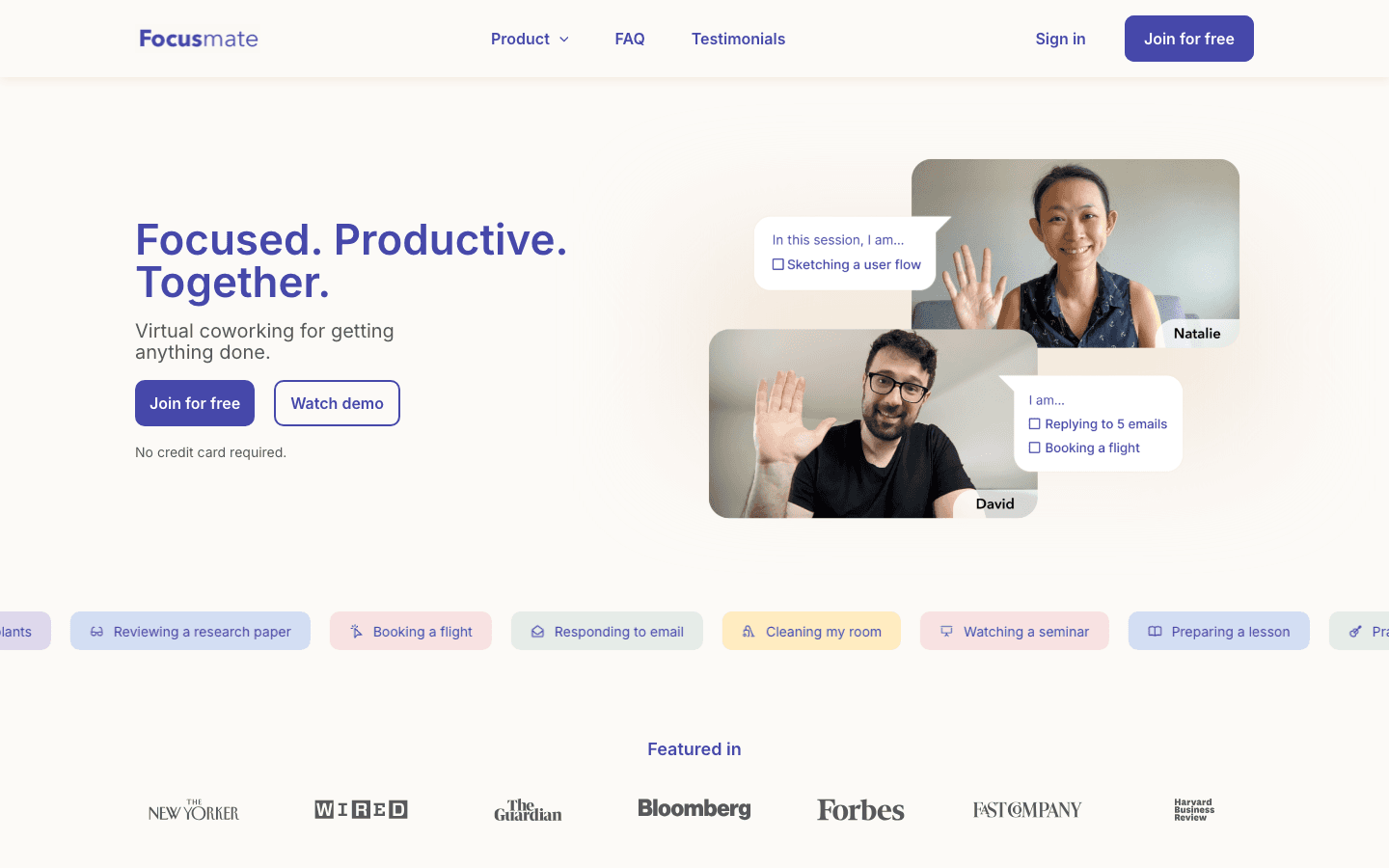
Focusmate is a virtual coworking app that pairs you with an accountability partner for a timed work session. You book a slot, a real person joins the video call at the scheduled time, you both say what you're working on, and you work in silence for the session length (25 or 50 minutes). At the end, you briefly check in on what you accomplished.
The product is built around a well-documented psychological effect: the presence of another person, even silently, increases task completion rates and reduces procrastination. It's sometimes called the "body double" effect, and it's particularly useful for people with ADHD, remote workers who find isolation demotivating, and anyone who struggles to start work without external structure.
Focusmate has been running since 2017 and has grown into a community of millions of users. The sessions are global and around-the-clock, so you can find a partner at most hours of the day.
Focusmate Pricing Plans
Free Plan: $0/month
The free plan gives you 3 sessions per week. No credit card required to get started.
Three sessions a week is more limited than it sounds if Focusmate becomes a daily habit. At roughly 25 to 50 minutes per session, you get somewhere between 75 and 150 minutes of structured work time per week on the free plan. That's enough to try the product and decide if the format works for you, but it will feel constraining if you want to use Focusmate every morning.
The free plan doesn't limit session length or the quality of your matches. You get the same experience as Plus users; you just get fewer of them per week.
Plus Plan: $8/month (annual) or $12/month (monthly)
The Plus plan removes the session limit entirely. Unlimited sessions per week, same experience as free.
At $8/month on the annual plan ($96/year), you're paying about $0.27 per day. If you use Focusmate five days a week, that's less than $0.40 per work session. For context, a single cup of coffee costs more. For anyone who uses Focusmate as a daily productivity anchor, the Plus plan is inexpensive relative to the value of protected focus time.
The monthly billing option at $12/month gives you flexibility to cancel after a trial period without the commitment of a year upfront.
Business Plan: Custom pricing
Focusmate offers an enterprise and team plan for organizations, learning communities, and businesses that want to roll out virtual coworking across a group. Pricing is custom and requires contacting Focusmate directly.
Is Focusmate Worth Paying For?
The free plan is genuinely good for light users. If you want two or three focused sessions per week to anchor specific projects, the free plan covers that without any payment.
The Plus plan is worth it when you're using Focusmate as a daily work habit. At $8/month annual, the cost is low enough that it's rarely the deciding factor. The real question is whether the format works for you at all. If you've used the free plan's 3 weekly sessions and found them helpful, upgrading to unlimited is a small commitment relative to the benefit of not rationing your sessions.
If you've tried the free plan and found the sessions only marginally helpful, upgrading won't fix that. The accountability mechanism works for certain kinds of people and certain kinds of tasks. It's most effective for tasks that require sustained, individual focus rather than collaborative or highly variable work. Time-blocking your schedule around Focusmate sessions tends to amplify the effect.
Who Focusmate Is Best For
Focusmate works best for people who have defined tasks but struggle to start them without external structure. That includes:
Remote workers who find home environments too low-accountability to sustain focus
Students working through reading lists, problem sets, or writing projects independently
Freelancers and solopreneurs who work alone and miss the ambient accountability of an office
People with ADHD who benefit from the body double effect for initiating tasks
It works less well for meetings-heavy days, collaborative work that requires back-and-forth, or tasks that are highly variable in what they demand from minute to minute. The value comes from sitting with a task for a protected window, which focusing on one thing makes possible.
Focusmate Alternative: Lifestack

Focusmate handles the accountability layer. It doesn't help you decide what to work on, when your best focus time is, or how to fit your project list into a week with meetings scattered across it. For that, you need a separate planning layer.
Lifestack is an AI-powered scheduler that fills that gap. It auto-schedules your tasks based on your energy levels and calendar availability, integrates with Google Calendar, and protects deep work time before reactive tasks fill the gaps. Where Focusmate gives you a partner for a session you've already found time for, Lifestack finds the time for you in the first place.
The two tools work well together: Lifestack schedules your focus blocks, and Focusmate provides the accountability structure within them. Energy-based scheduling means your most demanding work gets placed in your peak attention windows, so the time you're spending in Focusmate sessions is actually your best time, not whatever's left over.
Lifestack costs $7/month or $50/year. The annual plan includes a 7-day free trial. A lifetime plan is available at $120.
FAQ
How much does Focusmate cost?
Focusmate has a free plan (3 sessions per week, no credit card), a Plus plan at $8/month billed annually or $12/month billed monthly (unlimited sessions), and a Business plan at custom pricing for teams and organizations.
Is Focusmate free?
Yes. The free plan is genuinely functional, not a stripped-down trial. You get 3 full coworking sessions per week at no cost. If you need more than 3 sessions per week, the Plus plan adds unlimited sessions for $8/month (annual billing).
What do you get with Focusmate Plus?
Focusmate Plus removes the 3-session-per-week limit on the free plan. Everything else is the same: same matching system, same 25 and 50-minute session lengths, same global community. The only difference is unlimited sessions per week.
Can I cancel Focusmate Plus at any time?
Yes. If you sign up for the monthly plan at $12/month, you can cancel anytime. If you pay for the annual plan at $8/month (charged as a yearly fee), cancellation stops future renewals but you keep access through the end of the paid period.
What are the best Focusmate alternatives?
For virtual coworking specifically, Flow Club and Caveday offer similar accountability sessions, often with more curated community elements. For the planning and scheduling layer that determines what you bring to a focus session, AI planning assistants like Lifestack handle task scheduling around your calendar so you always know what to work on and when. The two categories address different problems and are more complementary than competitive.
How many Focusmate sessions should I do per day?
Most regular users find one to three sessions per day productive. More than that tends to feel mechanical rather than motivating. A deep work practice typically involves two to four hours of focused output per day, which maps to two to four 50-minute or four to eight 25-minute Focusmate sessions. Start with one daily session and add more if the format is working for you.
Focusmate is a virtual coworking platform built on a simple idea: book a 25 or 50-minute session, get matched with a real person, state your intention on video, work in silence, and check in at the end. No community forums, no ambient music, no AI. Just two people holding each other accountable for staying on task.
If that sounds useful, it often is. The product has a real effect for people who struggle to start or sustain work alone. The question most people have before signing up is simple: what does Focusmate pricing actually look like, and is it worth paying for?
This guide breaks down every Focusmate plan, what each one includes, and how to decide whether the free tier is enough or the Plus plan earns its cost.
Key Takeaways
Focusmate has a genuinely useful free plan: 3 sessions per week at no cost, with no credit card required
The Plus plan costs $8/month billed annually or $12/month billed monthly, and removes the session limit entirely
Whether it's worth paying depends on how often you use it: casual users are well served by free, daily users typically find Plus pays for itself quickly
What Is Focusmate?
Focusmate is a virtual coworking app that pairs you with an accountability partner for a timed work session. You book a slot, a real person joins the video call at the scheduled time, you both say what you're working on, and you work in silence for the session length (25 or 50 minutes). At the end, you briefly check in on what you accomplished.
The product is built around a well-documented psychological effect: the presence of another person, even silently, increases task completion rates and reduces procrastination. It's sometimes called the "body double" effect, and it's particularly useful for people with ADHD, remote workers who find isolation demotivating, and anyone who struggles to start work without external structure.
Focusmate has been running since 2017 and has grown into a community of millions of users. The sessions are global and around-the-clock, so you can find a partner at most hours of the day.
Focusmate Pricing Plans
Free Plan: $0/month
The free plan gives you 3 sessions per week. No credit card required to get started.
Three sessions a week is more limited than it sounds if Focusmate becomes a daily habit. At roughly 25 to 50 minutes per session, you get somewhere between 75 and 150 minutes of structured work time per week on the free plan. That's enough to try the product and decide if the format works for you, but it will feel constraining if you want to use Focusmate every morning.
The free plan doesn't limit session length or the quality of your matches. You get the same experience as Plus users; you just get fewer of them per week.
Plus Plan: $8/month (annual) or $12/month (monthly)
The Plus plan removes the session limit entirely. Unlimited sessions per week, same experience as free.
At $8/month on the annual plan ($96/year), you're paying about $0.27 per day. If you use Focusmate five days a week, that's less than $0.40 per work session. For context, a single cup of coffee costs more. For anyone who uses Focusmate as a daily productivity anchor, the Plus plan is inexpensive relative to the value of protected focus time.
The monthly billing option at $12/month gives you flexibility to cancel after a trial period without the commitment of a year upfront.
Business Plan: Custom pricing
Focusmate offers an enterprise and team plan for organizations, learning communities, and businesses that want to roll out virtual coworking across a group. Pricing is custom and requires contacting Focusmate directly.
Is Focusmate Worth Paying For?
The free plan is genuinely good for light users. If you want two or three focused sessions per week to anchor specific projects, the free plan covers that without any payment.
The Plus plan is worth it when you're using Focusmate as a daily work habit. At $8/month annual, the cost is low enough that it's rarely the deciding factor. The real question is whether the format works for you at all. If you've used the free plan's 3 weekly sessions and found them helpful, upgrading to unlimited is a small commitment relative to the benefit of not rationing your sessions.
If you've tried the free plan and found the sessions only marginally helpful, upgrading won't fix that. The accountability mechanism works for certain kinds of people and certain kinds of tasks. It's most effective for tasks that require sustained, individual focus rather than collaborative or highly variable work. Time-blocking your schedule around Focusmate sessions tends to amplify the effect.
Who Focusmate Is Best For
Focusmate works best for people who have defined tasks but struggle to start them without external structure. That includes:
Remote workers who find home environments too low-accountability to sustain focus
Students working through reading lists, problem sets, or writing projects independently
Freelancers and solopreneurs who work alone and miss the ambient accountability of an office
People with ADHD who benefit from the body double effect for initiating tasks
It works less well for meetings-heavy days, collaborative work that requires back-and-forth, or tasks that are highly variable in what they demand from minute to minute. The value comes from sitting with a task for a protected window, which focusing on one thing makes possible.
Focusmate Alternative: Lifestack
Focusmate handles the accountability layer. It doesn't help you decide what to work on, when your best focus time is, or how to fit your project list into a week with meetings scattered across it. For that, you need a separate planning layer.
Lifestack is an AI-powered scheduler that fills that gap. It auto-schedules your tasks based on your energy levels and calendar availability, integrates with Google Calendar, and protects deep work time before reactive tasks fill the gaps. Where Focusmate gives you a partner for a session you've already found time for, Lifestack finds the time for you in the first place.
The two tools work well together: Lifestack schedules your focus blocks, and Focusmate provides the accountability structure within them. Energy-based scheduling means your most demanding work gets placed in your peak attention windows, so the time you're spending in Focusmate sessions is actually your best time, not whatever's left over.
Lifestack costs $7/month or $50/year. The annual plan includes a 7-day free trial. A lifetime plan is available at $120.
FAQ
How much does Focusmate cost?
Focusmate has a free plan (3 sessions per week, no credit card), a Plus plan at $8/month billed annually or $12/month billed monthly (unlimited sessions), and a Business plan at custom pricing for teams and organizations.
Is Focusmate free?
Yes. The free plan is genuinely functional, not a stripped-down trial. You get 3 full coworking sessions per week at no cost. If you need more than 3 sessions per week, the Plus plan adds unlimited sessions for $8/month (annual billing).
What do you get with Focusmate Plus?
Focusmate Plus removes the 3-session-per-week limit on the free plan. Everything else is the same: same matching system, same 25 and 50-minute session lengths, same global community. The only difference is unlimited sessions per week.
Can I cancel Focusmate Plus at any time?
Yes. If you sign up for the monthly plan at $12/month, you can cancel anytime. If you pay for the annual plan at $8/month (charged as a yearly fee), cancellation stops future renewals but you keep access through the end of the paid period.
What are the best Focusmate alternatives?
For virtual coworking specifically, Flow Club and Caveday offer similar accountability sessions, often with more curated community elements. For the planning and scheduling layer that determines what you bring to a focus session, AI planning assistants like Lifestack handle task scheduling around your calendar so you always know what to work on and when. The two categories address different problems and are more complementary than competitive.
How many Focusmate sessions should I do per day?
Most regular users find one to three sessions per day productive. More than that tends to feel mechanical rather than motivating. A deep work practice typically involves two to four hours of focused output per day, which maps to two to four 50-minute or four to eight 25-minute Focusmate sessions. Start with one daily session and add more if the format is working for you.



FOLLOW ON
FOLLOW ON
FOLLOW ON


Copyright 2026 © Lifestack. All rights reserved
Copyright 2026 © Lifestack. All rights reserved

