
Tips
Samsung Health Sleep Tracking: How It Works and Tips
Samsung Health Sleep Tracking: How It Works and Tips

Samsung Health tracks your sleep automatically every night you wear your Galaxy Watch to bed. By morning you have a sleep score, a breakdown of your sleep stages, heart rate data, blood oxygen levels, and sometimes a snore detection report. For many people it is the most detailed sleep data they have ever seen -- and also the most confusing.
The sleep score is a number between 1 and 100. The sleep stages graph shows how much time you spent in light, deep, and REM sleep and when you woke up during the night. The sleep coaching program gives you a "sleep animal type" and assigns improvement missions. And the Energy Score -- added in recent Galaxy Watch firmware -- ties your sleep data to a readiness number for the day ahead.
This guide explains what all of it actually means, how accurate it is, and what you can do with the data to sleep better -- and plan your days better.
Key Takeaways
Samsung Health tracks four sleep stages (Awake, Light, Deep, REM) using heart rate variability and movement data from your Galaxy Watch.
Your sleep score is calculated from five factors: total sleep time, sleep cycles, physical recovery, mental recovery, and sleep consistency.
The data is most useful when you act on it -- pairing sleep scores with energy-aware scheduling lets you plan hard tasks on high-score days and protect recovery on low ones.
How Samsung Health Tracks Your Sleep
Samsung Health uses three sensors on your Galaxy Watch to monitor sleep: the accelerometer (movement), the optical heart rate sensor (pulse), and the SpO2 sensor (blood oxygen). Working together, these build a picture of your sleep stages throughout the night.
The watch detects sleep onset when movement drops off and heart rate falls into a resting range. From there, it uses heart rate variability patterns to distinguish between sleep stages. Deep sleep shows low, stable heart rate. REM sleep shows a raised, variable heart rate similar to light wakefulness. Light sleep sits between the two. When movement spikes and heart rate rises significantly, the watch records an Awake period.
Sleep tracking is automatic on Galaxy Watch models. You do not need to start a sleep session manually. The watch detects when you fall asleep and when you wake up, and the full report is available in the Samsung Health app within a few minutes of getting up.
Accuracy improves when the watch fits properly: positioned two fingers above the ulnar bone on your wrist, snug but not tight. A loose watch during sleep produces motion artifacts that corrupt heart rate readings and lead to incorrect stage classifications -- most commonly, stretches of deep sleep that are actually just periods of low movement.
What Your Sleep Score Means
Your Samsung Health sleep score runs from 1 to 100. Scores above 80 are considered Good. Scores between 60 and 79 are Fair. Below 60 is Poor. Samsung calculates the score from five factors, weighted roughly equally:
Total sleep time -- Sleeping too little or too much both reduce this component. The sweet spot for most adults is 7-9 hours.
Sleep cycles completed -- Each full sleep cycle (Light > Deep > REM) lasts around 90 minutes. More complete cycles equals a higher score.
Physical recovery -- Derived from heart rate and HRV during sleep. Higher HRV during sleep indicates your body is recovering from physical stress.
Mental recovery -- Based on REM sleep duration. REM is where emotional processing and memory consolidation happen. Too little REM reduces this component.
Sleep consistency -- How closely your sleep and wake times match your average pattern. Irregular schedules drag down this component even on nights when you get enough hours.
A single bad night does not tell you much. The trend over 7-30 days is what matters. Samsung Health's weekly and monthly views show whether your score is improving, declining, or stable -- and which of the five factors is dragging you down.
Sleep Stages Explained
Samsung Health tracks four sleep stages, displayed as a stacked bar graph in the app:
Awake: Periods when you were fully or partially conscious during the night. Brief awakenings (under 5 minutes) are normal and often forgotten by morning. Frequent long awakenings, especially in the early morning hours, can indicate stress, caffeine, or sleep apnea.
Light sleep: The entry phase of each sleep cycle. You are easier to wake up here. Light sleep is not "wasted" sleep -- it makes up roughly 50% of total sleep time and is essential for physical recovery. Too much light sleep relative to deep and REM can indicate that you are not reaching the deeper stages consistently.
Deep sleep: The physically restorative stage. Tissue repair, immune function, and growth hormone release happen primarily in deep sleep. Adults typically get 10-25% of total sleep as deep sleep. Deep sleep is concentrated in the first half of the night, so early bedtimes tend to yield more of it.
REM sleep: The mentally restorative stage. Dreams occur here, and so does memory consolidation and emotional regulation. REM sleep is concentrated in the second half of the night. Cutting sleep short -- whether by an alarm or just waking up early -- disproportionately cuts REM.
Sleep Coaching and Sleep Animal Types
After wearing your Galaxy Watch to bed for 7 consecutive nights, Samsung Health assigns you a sleep animal type based on your sleep patterns. The animals represent different sleep profile archetypes:
Lion -- Early riser, falls asleep and wakes up early, strong deep sleep in the first half of the night
Bear -- Average schedule, follows a natural light-dark cycle, most common type
Wolf -- Night owl, delayed sleep phase, more active in evenings
Dolphin -- Light sleeper, frequent awakenings, low deep sleep percentage
Your sleep animal is not a diagnosis or a fixed trait. It is a snapshot of your current patterns. Once you have your type, Samsung Health suggests a coaching program with weekly missions -- things like setting a consistent wake time, avoiding screens 90 minutes before bed, or tracking caffeine intake. These missions are designed to improve whichever components of your sleep score are weakest.
The sleep animal system also connects to your chronotype -- the biological timing of your alertness and energy during the day. Understanding your chronotype helps you schedule work around your natural peaks rather than against them. Our guide on ADHD chronotype goes deeper on this, and our piece on ADHD circadian rhythm covers how irregular sleep schedules affect cognitive function day-to-day.
Blood Oxygen and Snore Detection
On Galaxy Watch models with SpO2 sensors (Watch 4 and later), Samsung Health measures blood oxygen levels throughout the night. Normal SpO2 during sleep is 95% or above. Readings that consistently drop below 90% can indicate sleep apnea -- a condition where breathing repeatedly stops and starts during sleep.
In 2026, Samsung received regulatory approval in South Korea for three-level sleep apnea analysis on select Galaxy Watch and Galaxy Ring devices. The new algorithm counts breathing disturbances per hour and classifies results as mild, occasional, or frequent. This is not a medical device or a formal diagnosis, but it is a meaningful screening tool for people who wake feeling unrefreshed despite getting enough hours.
Snore detection uses the microphone on the Galaxy Watch to identify snoring sounds during sleep. It logs the timestamps and intensity of snoring episodes. Snoring paired with low SpO2 readings is a flag worth bringing to a doctor, since together they suggest obstructive sleep apnea rather than simple position-related snoring.
How to Improve Your Samsung Health Sleep Score
The sleep score gives you a baseline. Here is what actually moves it:
Fix your wake time first, not your bedtime. Sleep consistency is one of the five score factors, and consistency anchors to wake time more reliably than bedtime. Set an alarm for the same time every day -- including weekends -- and let your natural sleep pressure adjust your bedtime backward over time.
Protect your REM window. REM sleep builds in the second half of the night. If your mental recovery score is low, the most common fix is not going to bed earlier -- it is not waking up early. If your schedule forces early wake times, prioritize an earlier bedtime to preserve the back half of your sleep window.
Watch the deep sleep percentage. Alcohol, cannabis, and certain medications suppress deep sleep even when they help you fall asleep. If your physical recovery score is low and you use any of these, the data is pointing directly at the cause.
Wear the watch properly. Two fingers above the ulnar bone, snug fit. A loose watch producing motion artifacts is the single most common reason sleep stage data looks wrong in Samsung Health.
Use the coaching missions. Samsung Health's weekly missions are not arbitrary. They target the specific weaknesses in your sleep profile. If you are assigned a consistent wake time mission, that is because your sleep consistency component is dragging your score down. The missions are worth taking seriously for 4-6 weeks before evaluating whether the score is responding.
For a comparison of how Samsung's sleep tracking compares to other wearables, our guide on Garmin's sleep tracker covers what Garmin does differently with Body Battery and sleep stage classification. And the breakdown of Google Fit vs Samsung Health covers what each platform does better overall.
The Best Way to Actually Use Your Sleep Data
Tracking sleep is only useful if you do something with the data. Most people look at their score, feel vaguely good or bad about it, and move on. The more effective approach is to treat your sleep score as an input to how you plan the next day.
On nights when you score poorly -- low deep sleep, disrupted cycles, below-average HRV -- your capacity for demanding cognitive work the next day is reduced. Scheduling a marathon focus session or high-stakes meeting on a low-sleep morning sets you up for underperformance. The smarter move is to protect that morning for lower-stakes work and schedule recovery time.
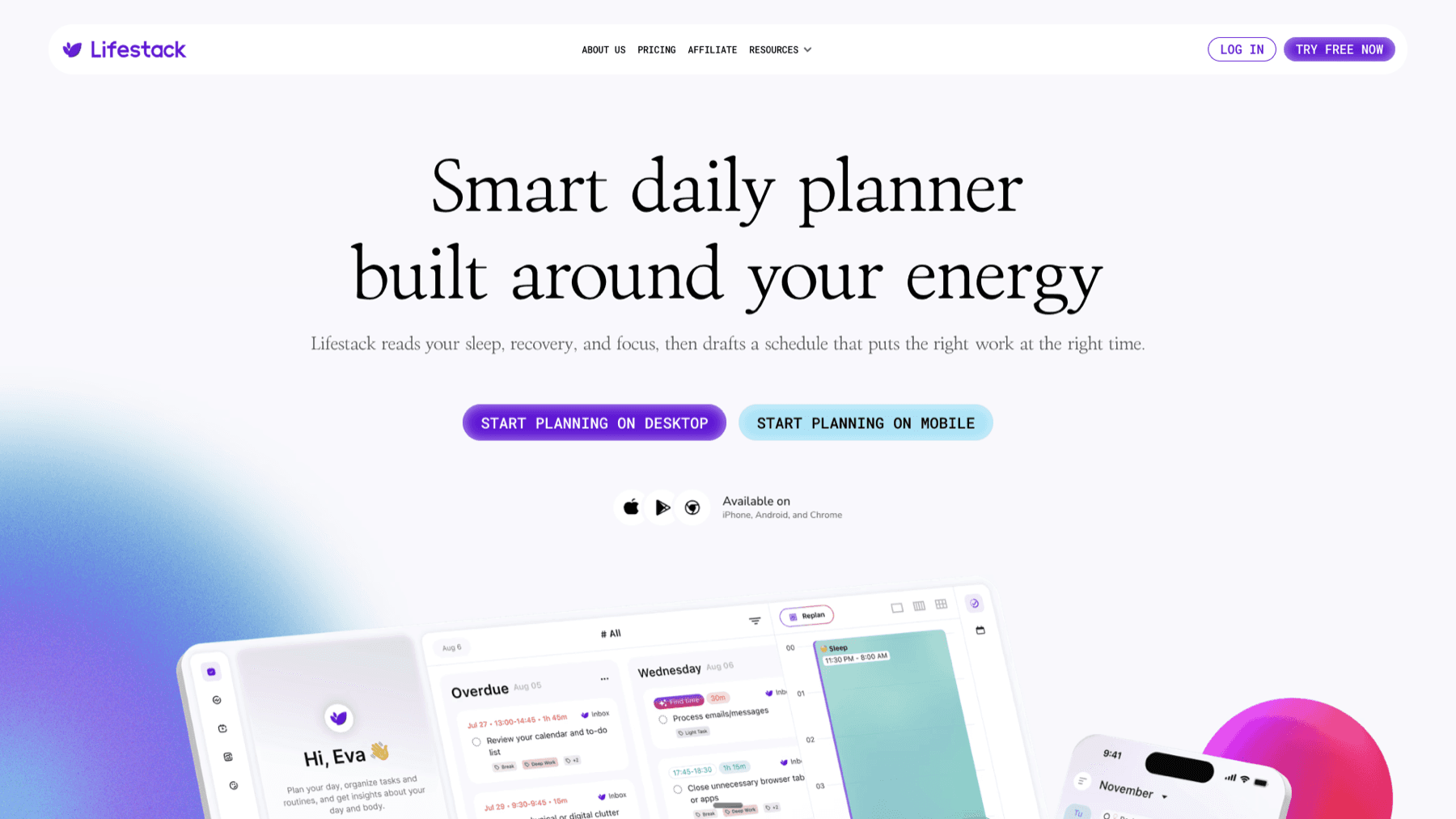
Lifestack is built to do this automatically. It reads your sleep data, energy levels, and calendar, then drafts a daily schedule that puts deep work when you have capacity and lighter tasks when you do not. If Samsung Health recorded a rough night, Lifestack accounts for that in tomorrow's plan rather than scheduling you as if every day were equal. It is the practical application of energy-based scheduling without having to manage the logic yourself. Lifestack is $9.99/month or $49.99/year with a 7-day free trial.
FAQ
How accurate is Samsung Health sleep tracking?
Samsung Health provides reasonably accurate sleep duration and stage estimates compared to other consumer wearables. It is less accurate than clinical polysomnography. The main accuracy limitation is distinguishing light sleep from brief wakeful periods, and the transition points between stages are approximate rather than precise.
Does Samsung Health track sleep without a Galaxy Watch?
The Samsung Health app on your phone can estimate sleep based on phone inactivity, but the quality is much lower than watch-based tracking. Phone-only sleep detection does not capture sleep stages, heart rate, blood oxygen, or snoring. For meaningful sleep data, a Galaxy Watch is required.
What is a good sleep score on Samsung Health?
Scores above 80 are rated Good. 60-79 is Fair. Below 60 is Poor. Most healthy adults who maintain a consistent schedule and get 7-9 hours average around 70-85. If your score is persistently below 60, the app will show you which of the five components is weakest.
Why does my Samsung Health sleep score seem wrong?
The most common causes are watch fit (too loose), inconsistent sleep times, or alcohol near bedtime suppressing deep sleep stages. The score reflects what the sensors captured, so if the watch was loose, the data will look worse than your actual sleep quality. Re-read the fit guidance and check whether the same nights correlate with specific behaviors.
Can Samsung Health detect sleep apnea?
On select Galaxy Watch and Galaxy Ring devices, Samsung Health can flag potential sleep apnea risk based on SpO2 and breathing disturbance patterns. The 2026 update introduced three-level classification (mild, occasional, frequent). It is a screening tool, not a diagnostic device -- if you get flagged repeatedly, talk to a doctor about a clinical sleep study.
Does Samsung Health share sleep data with other apps?
Samsung Health can share data with apps that integrate with it, including certain health and fitness platforms. Sleep data is also sometimes available through Samsung's Health Platform SDK for apps that request access. Specific integration support varies by app.
Samsung Health tracks your sleep automatically every night you wear your Galaxy Watch to bed. By morning you have a sleep score, a breakdown of your sleep stages, heart rate data, blood oxygen levels, and sometimes a snore detection report. For many people it is the most detailed sleep data they have ever seen -- and also the most confusing.
The sleep score is a number between 1 and 100. The sleep stages graph shows how much time you spent in light, deep, and REM sleep and when you woke up during the night. The sleep coaching program gives you a "sleep animal type" and assigns improvement missions. And the Energy Score -- added in recent Galaxy Watch firmware -- ties your sleep data to a readiness number for the day ahead.
This guide explains what all of it actually means, how accurate it is, and what you can do with the data to sleep better -- and plan your days better.
Key Takeaways
Samsung Health tracks four sleep stages (Awake, Light, Deep, REM) using heart rate variability and movement data from your Galaxy Watch.
Your sleep score is calculated from five factors: total sleep time, sleep cycles, physical recovery, mental recovery, and sleep consistency.
The data is most useful when you act on it -- pairing sleep scores with energy-aware scheduling lets you plan hard tasks on high-score days and protect recovery on low ones.
How Samsung Health Tracks Your Sleep
Samsung Health uses three sensors on your Galaxy Watch to monitor sleep: the accelerometer (movement), the optical heart rate sensor (pulse), and the SpO2 sensor (blood oxygen). Working together, these build a picture of your sleep stages throughout the night.
The watch detects sleep onset when movement drops off and heart rate falls into a resting range. From there, it uses heart rate variability patterns to distinguish between sleep stages. Deep sleep shows low, stable heart rate. REM sleep shows a raised, variable heart rate similar to light wakefulness. Light sleep sits between the two. When movement spikes and heart rate rises significantly, the watch records an Awake period.
Sleep tracking is automatic on Galaxy Watch models. You do not need to start a sleep session manually. The watch detects when you fall asleep and when you wake up, and the full report is available in the Samsung Health app within a few minutes of getting up.
Accuracy improves when the watch fits properly: positioned two fingers above the ulnar bone on your wrist, snug but not tight. A loose watch during sleep produces motion artifacts that corrupt heart rate readings and lead to incorrect stage classifications -- most commonly, stretches of deep sleep that are actually just periods of low movement.
What Your Sleep Score Means
Your Samsung Health sleep score runs from 1 to 100. Scores above 80 are considered Good. Scores between 60 and 79 are Fair. Below 60 is Poor. Samsung calculates the score from five factors, weighted roughly equally:
Total sleep time -- Sleeping too little or too much both reduce this component. The sweet spot for most adults is 7-9 hours.
Sleep cycles completed -- Each full sleep cycle (Light > Deep > REM) lasts around 90 minutes. More complete cycles equals a higher score.
Physical recovery -- Derived from heart rate and HRV during sleep. Higher HRV during sleep indicates your body is recovering from physical stress.
Mental recovery -- Based on REM sleep duration. REM is where emotional processing and memory consolidation happen. Too little REM reduces this component.
Sleep consistency -- How closely your sleep and wake times match your average pattern. Irregular schedules drag down this component even on nights when you get enough hours.
A single bad night does not tell you much. The trend over 7-30 days is what matters. Samsung Health's weekly and monthly views show whether your score is improving, declining, or stable -- and which of the five factors is dragging you down.
Sleep Stages Explained
Samsung Health tracks four sleep stages, displayed as a stacked bar graph in the app:
Awake: Periods when you were fully or partially conscious during the night. Brief awakenings (under 5 minutes) are normal and often forgotten by morning. Frequent long awakenings, especially in the early morning hours, can indicate stress, caffeine, or sleep apnea.
Light sleep: The entry phase of each sleep cycle. You are easier to wake up here. Light sleep is not "wasted" sleep -- it makes up roughly 50% of total sleep time and is essential for physical recovery. Too much light sleep relative to deep and REM can indicate that you are not reaching the deeper stages consistently.
Deep sleep: The physically restorative stage. Tissue repair, immune function, and growth hormone release happen primarily in deep sleep. Adults typically get 10-25% of total sleep as deep sleep. Deep sleep is concentrated in the first half of the night, so early bedtimes tend to yield more of it.
REM sleep: The mentally restorative stage. Dreams occur here, and so does memory consolidation and emotional regulation. REM sleep is concentrated in the second half of the night. Cutting sleep short -- whether by an alarm or just waking up early -- disproportionately cuts REM.
Sleep Coaching and Sleep Animal Types
After wearing your Galaxy Watch to bed for 7 consecutive nights, Samsung Health assigns you a sleep animal type based on your sleep patterns. The animals represent different sleep profile archetypes:
Lion -- Early riser, falls asleep and wakes up early, strong deep sleep in the first half of the night
Bear -- Average schedule, follows a natural light-dark cycle, most common type
Wolf -- Night owl, delayed sleep phase, more active in evenings
Dolphin -- Light sleeper, frequent awakenings, low deep sleep percentage
Your sleep animal is not a diagnosis or a fixed trait. It is a snapshot of your current patterns. Once you have your type, Samsung Health suggests a coaching program with weekly missions -- things like setting a consistent wake time, avoiding screens 90 minutes before bed, or tracking caffeine intake. These missions are designed to improve whichever components of your sleep score are weakest.
The sleep animal system also connects to your chronotype -- the biological timing of your alertness and energy during the day. Understanding your chronotype helps you schedule work around your natural peaks rather than against them. Our guide on ADHD chronotype goes deeper on this, and our piece on ADHD circadian rhythm covers how irregular sleep schedules affect cognitive function day-to-day.
Blood Oxygen and Snore Detection
On Galaxy Watch models with SpO2 sensors (Watch 4 and later), Samsung Health measures blood oxygen levels throughout the night. Normal SpO2 during sleep is 95% or above. Readings that consistently drop below 90% can indicate sleep apnea -- a condition where breathing repeatedly stops and starts during sleep.
In 2026, Samsung received regulatory approval in South Korea for three-level sleep apnea analysis on select Galaxy Watch and Galaxy Ring devices. The new algorithm counts breathing disturbances per hour and classifies results as mild, occasional, or frequent. This is not a medical device or a formal diagnosis, but it is a meaningful screening tool for people who wake feeling unrefreshed despite getting enough hours.
Snore detection uses the microphone on the Galaxy Watch to identify snoring sounds during sleep. It logs the timestamps and intensity of snoring episodes. Snoring paired with low SpO2 readings is a flag worth bringing to a doctor, since together they suggest obstructive sleep apnea rather than simple position-related snoring.
How to Improve Your Samsung Health Sleep Score
The sleep score gives you a baseline. Here is what actually moves it:
Fix your wake time first, not your bedtime. Sleep consistency is one of the five score factors, and consistency anchors to wake time more reliably than bedtime. Set an alarm for the same time every day -- including weekends -- and let your natural sleep pressure adjust your bedtime backward over time.
Protect your REM window. REM sleep builds in the second half of the night. If your mental recovery score is low, the most common fix is not going to bed earlier -- it is not waking up early. If your schedule forces early wake times, prioritize an earlier bedtime to preserve the back half of your sleep window.
Watch the deep sleep percentage. Alcohol, cannabis, and certain medications suppress deep sleep even when they help you fall asleep. If your physical recovery score is low and you use any of these, the data is pointing directly at the cause.
Wear the watch properly. Two fingers above the ulnar bone, snug fit. A loose watch producing motion artifacts is the single most common reason sleep stage data looks wrong in Samsung Health.
Use the coaching missions. Samsung Health's weekly missions are not arbitrary. They target the specific weaknesses in your sleep profile. If you are assigned a consistent wake time mission, that is because your sleep consistency component is dragging your score down. The missions are worth taking seriously for 4-6 weeks before evaluating whether the score is responding.
For a comparison of how Samsung's sleep tracking compares to other wearables, our guide on Garmin's sleep tracker covers what Garmin does differently with Body Battery and sleep stage classification. And the breakdown of Google Fit vs Samsung Health covers what each platform does better overall.
The Best Way to Actually Use Your Sleep Data
Tracking sleep is only useful if you do something with the data. Most people look at their score, feel vaguely good or bad about it, and move on. The more effective approach is to treat your sleep score as an input to how you plan the next day.
On nights when you score poorly -- low deep sleep, disrupted cycles, below-average HRV -- your capacity for demanding cognitive work the next day is reduced. Scheduling a marathon focus session or high-stakes meeting on a low-sleep morning sets you up for underperformance. The smarter move is to protect that morning for lower-stakes work and schedule recovery time.
Lifestack is built to do this automatically. It reads your sleep data, energy levels, and calendar, then drafts a daily schedule that puts deep work when you have capacity and lighter tasks when you do not. If Samsung Health recorded a rough night, Lifestack accounts for that in tomorrow's plan rather than scheduling you as if every day were equal. It is the practical application of energy-based scheduling without having to manage the logic yourself. Lifestack is $9.99/month or $49.99/year with a 7-day free trial.
FAQ
How accurate is Samsung Health sleep tracking?
Samsung Health provides reasonably accurate sleep duration and stage estimates compared to other consumer wearables. It is less accurate than clinical polysomnography. The main accuracy limitation is distinguishing light sleep from brief wakeful periods, and the transition points between stages are approximate rather than precise.
Does Samsung Health track sleep without a Galaxy Watch?
The Samsung Health app on your phone can estimate sleep based on phone inactivity, but the quality is much lower than watch-based tracking. Phone-only sleep detection does not capture sleep stages, heart rate, blood oxygen, or snoring. For meaningful sleep data, a Galaxy Watch is required.
What is a good sleep score on Samsung Health?
Scores above 80 are rated Good. 60-79 is Fair. Below 60 is Poor. Most healthy adults who maintain a consistent schedule and get 7-9 hours average around 70-85. If your score is persistently below 60, the app will show you which of the five components is weakest.
Why does my Samsung Health sleep score seem wrong?
The most common causes are watch fit (too loose), inconsistent sleep times, or alcohol near bedtime suppressing deep sleep stages. The score reflects what the sensors captured, so if the watch was loose, the data will look worse than your actual sleep quality. Re-read the fit guidance and check whether the same nights correlate with specific behaviors.
Can Samsung Health detect sleep apnea?
On select Galaxy Watch and Galaxy Ring devices, Samsung Health can flag potential sleep apnea risk based on SpO2 and breathing disturbance patterns. The 2026 update introduced three-level classification (mild, occasional, frequent). It is a screening tool, not a diagnostic device -- if you get flagged repeatedly, talk to a doctor about a clinical sleep study.
Does Samsung Health share sleep data with other apps?
Samsung Health can share data with apps that integrate with it, including certain health and fitness platforms. Sleep data is also sometimes available through Samsung's Health Platform SDK for apps that request access. Specific integration support varies by app.


FOLLOW ON
FOLLOW ON
FOLLOW ON



Copyright 2026 © Lifestack. All rights reserved
Copyright 2026 © Lifestack. All rights reserved

