
App
Best Pomodoro Timer Apps in 2026
Best Pomodoro Timer Apps in 2026

The Pomodoro technique works because it solves two real problems: starting tasks and stopping before you burn out. But the timer app you use matters more than most people think. The wrong one creates friction. The right one disappears into your workflow and just keeps you moving.
We tested the most-used Pomodoro timer apps across focus quality, task management integration, customization, and how well they handle the reality that not every focus session fits neatly into 25 minutes. Here's what we found.
Key Takeaways
Lifestack goes beyond timers: it schedules your focused blocks during your actual peak energy hours, so you're not forcing 25-minute sprints at 3 p.m. when your brain is already fading.
Focus To-Do is the best all-in-one if you want a traditional Pomodoro timer with solid task management built in.
Pomofocus is the fastest way to start a Pomodoro session with zero setup, from any browser.
Quick Guide
Lifestack - Best for energy-aware focus scheduling
Focus To-Do - Best for combined task management and Pomodoro
Forest - Best for staying off your phone during focus sessions
Pomofocus - Best free browser-based timer, zero friction
Toggl Track - Best for teams and time-tracking integration
How We Evaluated
Timer customization (interval flexibility beyond 25/5)
Task management integration
Energy and schedule awareness
Cross-platform availability
Pricing and free tier quality
Friction to start a session
1. Lifestack - Best for Energy-Aware Focus Scheduling
The only timer that knows when you should focus, not just how long.

Most Pomodoro apps treat time as uniform: 25 minutes is 25 minutes at 9 a.m. or 4 p.m. Lifestack takes a different approach. Its AI scheduler places focused work blocks during your peak energy windows automatically, which means your most demanding tasks land when your brain is actually ready for them, not just when the timer fires.
Instead of setting a manual Pomodoro timer, Lifestack auto-schedules focus sessions into open calendar slots that match your energy pattern. You can set custom work and break durations, but the real difference is that the timing is informed by your actual capacity throughout the day. It's closer to intelligent time-blocking than a traditional countdown timer, which makes it a better fit for people who find the rigid 25/5 structure doesn't match how they actually work.
AI-scheduled focus blocks based on energy level
Calendar integration (Google Calendar, Apple Calendar, Outlook)
Task scheduling with priority and deadline awareness
iOS and Android mobile apps plus Chrome extension
Automatically places deep work in high-energy windows
Reduces decision fatigue about when to focus
Works with your existing calendar without replacing it
No standalone countdown timer UI for people who want that
Requires a bit of setup to calibrate energy patterns
Pricing: $7/month or $50/year (7-day free trial on annual plan)
Best for: People who want their schedule to adapt to them, not just a countdown clock. Especially effective for ADHD and focus-related challenges where energy varies significantly.
2. Focus To-Do - Best Combined Timer and Task Manager
A full Pomodoro workflow from task list to focused session in one app.
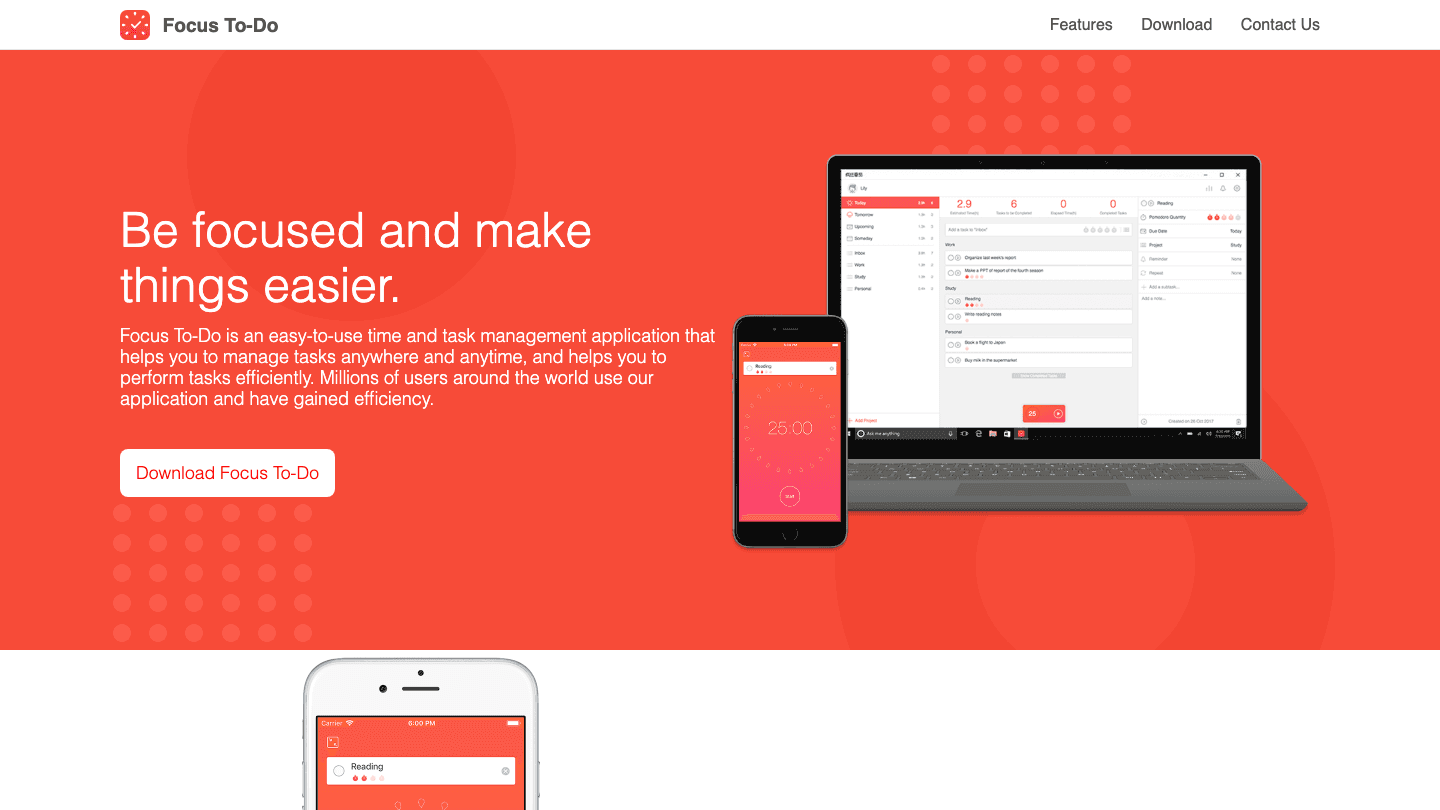
Focus To-Do solves the Pomodoro app's most common problem: the timer and your task list live in different places. With Focus To-Do, you add tasks, set estimated Pomodoros for each, start a session, and the timer runs against the specific task you're working on. Your history shows how many Pomodoros each project actually took.
It supports custom intervals, white noise, cross-device sync, and project organization. The interface is clean and the timer mechanics are solid. If you want a traditional Pomodoro experience with good task management built in, this is the most complete option at its price point.
Task management with Pomodoro estimates per task
Custom work and break durations
White noise and ambient sounds
Windows, Mac, iOS, and Android
Pricing: Free (premium available via in-app purchase)
Best for: People who want a structured Pomodoro workflow with task tracking across devices. Works well as a deep work tracker.
3. Forest - Best for Staying Off Your Phone
Gamified focus that actually works for phone addicts.

Forest takes a different approach to focus: plant a virtual tree when you start a session. If you leave the app, the tree dies. It sounds gimmicky, but the psychological effect is real. The visual stake changes the calculus of picking up your phone mid-session.
Forest is better at preventing phone distraction than it is as a Pomodoro productivity system. It has minimal task management, limited customization, and no meaningful energy awareness. But if phone distraction is your primary obstacle to focused work, it's more effective than a plain timer.
Gamified tree-growing visual during focus sessions
App blocking (Deep Focus) to prevent specific app use
Group focus mode for accountability with others
iOS and Android
Pricing: Free (Plus subscription available, pricing varies by region)
Best for: Anyone whose biggest focus problem is reflexively checking their phone during work sessions.
4. Pomofocus - Best Free Browser Timer
Zero setup. Open browser, click Start.
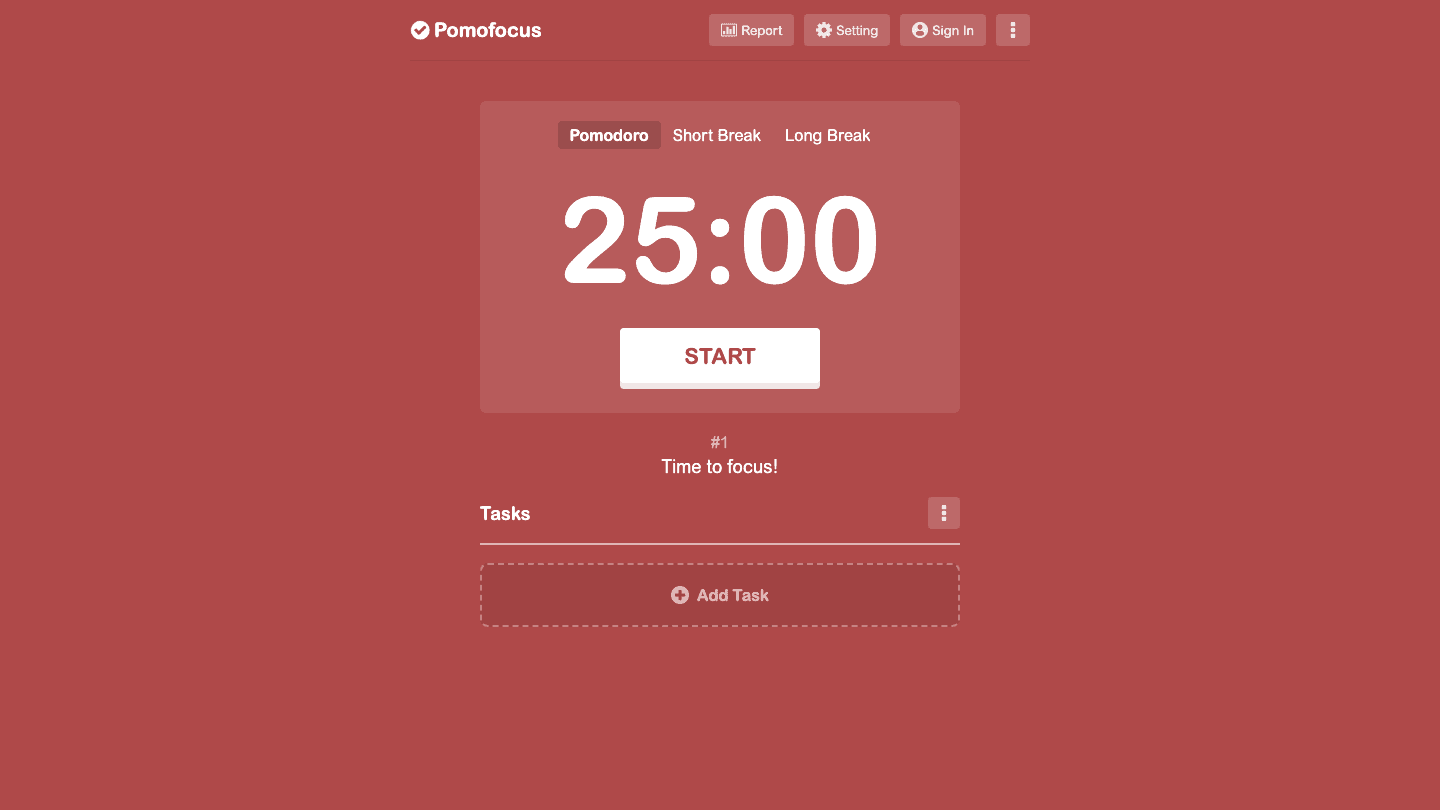
Pomofocus is the fastest way to run a Pomodoro session. Open the site, optionally add tasks, click Start. The interface is a large countdown on a red background that switches to green for breaks. There's no account required for basic use, no installation, no onboarding.
The free version handles everything a pure Pomodoro practitioner needs. Premium adds project reports and removes ads. It's the right tool when you want to start focusing in under 10 seconds with no friction whatsoever.
No signup required for core functionality
Task list with estimated Pomodoro counts
Customizable intervals and sounds
Browser-only (no mobile app)
Pricing: Free (premium tier available for reports and no-ads experience)
Best for: People who just want to start a timer right now without any setup or commitment.
5. Toggl Track - Best for Time Tracking Integration
Pomodoro inside a serious time-tracking platform.
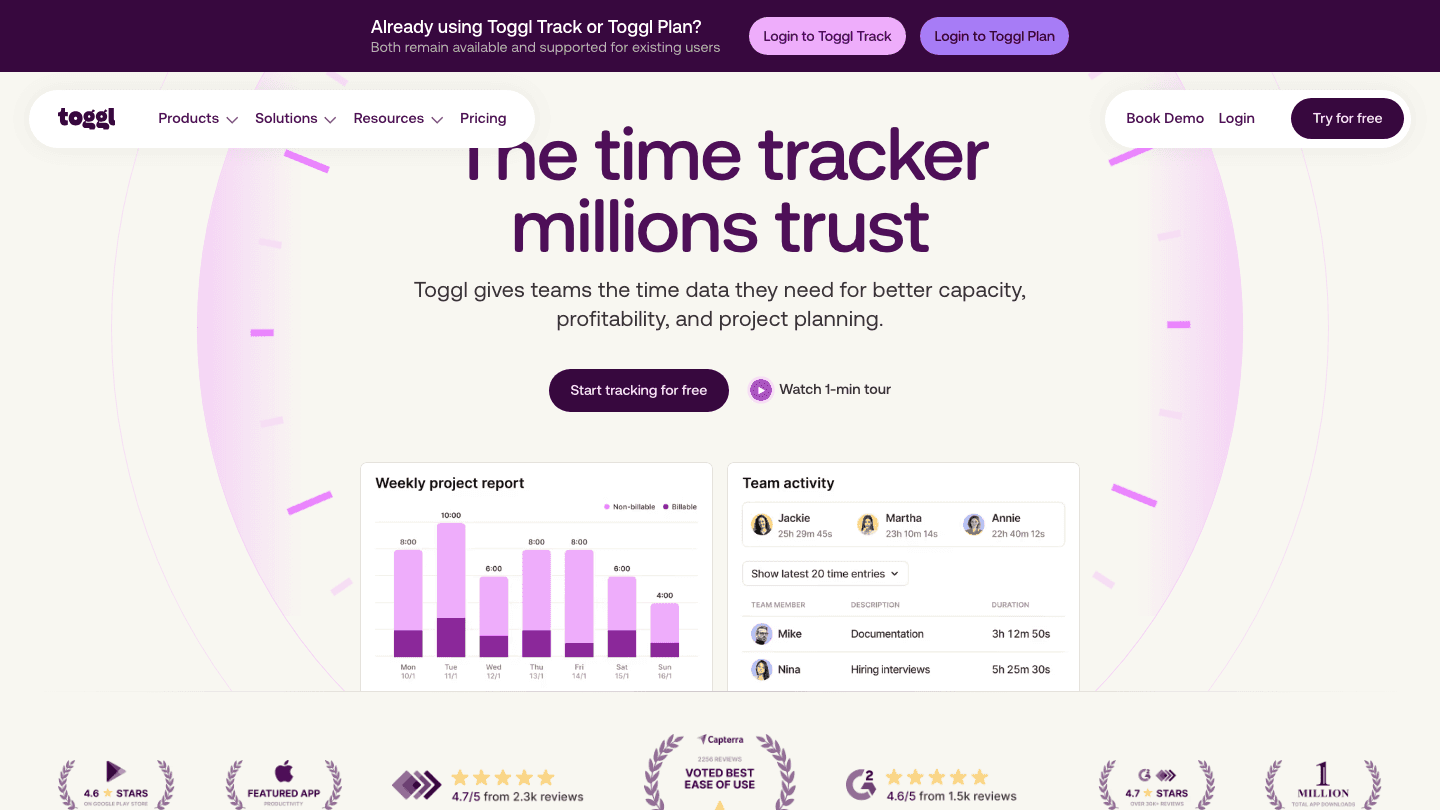
Toggl Track isn't primarily a Pomodoro app, but its Focus Mode adds countdown timers to what is already the most widely-used time tracking tool for freelancers and small teams. If you need to log billable hours alongside your focus sessions, or if your team uses Toggl for reporting, having the Pomodoro timer live inside the same tool removes a layer of app-switching.
The trade-off is that the Pomodoro experience is secondary to the time tracking. Configuration options are basic compared to dedicated timer apps. But the reporting and project management features around it are significantly more capable.
Focus Mode with countdown timers
Project and client tagging on every time entry
Team reporting and capacity planning
Web, iOS, Android, Mac, Windows, browser extension
Pricing: Free (Starter plan at $9/user/month for team features)
Best for: Freelancers and teams who already track time by project and want Pomodoro sessions to appear in their time logs automatically.
Which Pomodoro Timer Is Right for You?
You want your schedule to do the thinking: Lifestack. It places focus blocks when you actually have capacity, not just when you remember to set a timer.
You want a complete task + timer workflow: Focus To-Do. The best traditional Pomodoro experience with solid task management.
Your phone kills your focus sessions: Forest. The tree mechanic changes the phone-picking calculus in a way plain timers don't.
You want to start focusing in seconds with no setup: Pomofocus. Open browser, click Start.
You already use time tracking professionally: Toggl Track. Pomodoro sessions inside your existing time logging workflow.
Frequently Asked Questions
What is the best Pomodoro timer app?
The best Pomodoro timer depends on what you're optimizing for. Lifestack is the best if you want focus sessions scheduled around your actual energy levels. Focus To-Do is the best traditional Pomodoro timer with task management built in. Pomofocus is the best if you want zero friction and no setup cost.
What is the Pomodoro technique and how does it work?
The Pomodoro method involves working in focused intervals (typically 25 minutes) followed by short breaks (5 minutes), with a longer break after every four intervals. The structure helps with task initiation, reduces mental fatigue, and builds in forced rest periods. The name comes from the tomato-shaped kitchen timer the technique's creator used.
Should I use the standard 25-minute Pomodoro interval?
Not necessarily. 25 minutes is a starting point, not a requirement. Some people find 45 or 52 minutes works better for deep focus work before a break. The 50/10 variant is popular for longer concentration tasks. Experiment with intervals and adjust to where you naturally start losing focus.
Is there a Pomodoro timer that works with ADHD?
Yes. The key for ADHD is lower friction to start and flexibility in interval length. Lifestack helps by scheduling focus sessions during high-energy times so the motivation is higher at the start. The Pomodoro technique for ADHD guide covers what adjustments tend to work best.
What's the difference between a Pomodoro timer and time blocking?
A Pomodoro timer manages the duration of focus intervals in real time. Time blocking involves scheduling specific tasks into specific calendar slots in advance. Lifestack does both: it blocks focus time on your calendar and can guide interval-based work within those blocks. For deep work, combining both approaches tends to produce the best results.
Are Pomodoro apps free?
Most have free tiers that cover core functionality. Pomofocus and Focus To-Do are free at the basic level. Forest is free with a Plus subscription for advanced features. Toggl Track's free plan covers individual time tracking with Focus Mode included. Lifestack costs $7/month but includes a 7-day free trial on the annual plan. For a broader look at apps built for focus, that list covers both Pomodoro-style and other tools.
The Pomodoro technique works because it solves two real problems: starting tasks and stopping before you burn out. But the timer app you use matters more than most people think. The wrong one creates friction. The right one disappears into your workflow and just keeps you moving.
We tested the most-used Pomodoro timer apps across focus quality, task management integration, customization, and how well they handle the reality that not every focus session fits neatly into 25 minutes. Here's what we found.
Key Takeaways
Lifestack goes beyond timers: it schedules your focused blocks during your actual peak energy hours, so you're not forcing 25-minute sprints at 3 p.m. when your brain is already fading.
Focus To-Do is the best all-in-one if you want a traditional Pomodoro timer with solid task management built in.
Pomofocus is the fastest way to start a Pomodoro session with zero setup, from any browser.
Quick Guide
Lifestack - Best for energy-aware focus scheduling
Focus To-Do - Best for combined task management and Pomodoro
Forest - Best for staying off your phone during focus sessions
Pomofocus - Best free browser-based timer, zero friction
Toggl Track - Best for teams and time-tracking integration
How We Evaluated
Timer customization (interval flexibility beyond 25/5)
Task management integration
Energy and schedule awareness
Cross-platform availability
Pricing and free tier quality
Friction to start a session
1. Lifestack - Best for Energy-Aware Focus Scheduling
The only timer that knows when you should focus, not just how long.
Most Pomodoro apps treat time as uniform: 25 minutes is 25 minutes at 9 a.m. or 4 p.m. Lifestack takes a different approach. Its AI scheduler places focused work blocks during your peak energy windows automatically, which means your most demanding tasks land when your brain is actually ready for them, not just when the timer fires.
Instead of setting a manual Pomodoro timer, Lifestack auto-schedules focus sessions into open calendar slots that match your energy pattern. You can set custom work and break durations, but the real difference is that the timing is informed by your actual capacity throughout the day. It's closer to intelligent time-blocking than a traditional countdown timer, which makes it a better fit for people who find the rigid 25/5 structure doesn't match how they actually work.
AI-scheduled focus blocks based on energy level
Calendar integration (Google Calendar, Apple Calendar, Outlook)
Task scheduling with priority and deadline awareness
iOS and Android mobile apps plus Chrome extension
Automatically places deep work in high-energy windows
Reduces decision fatigue about when to focus
Works with your existing calendar without replacing it
No standalone countdown timer UI for people who want that
Requires a bit of setup to calibrate energy patterns
Pricing: $7/month or $50/year (7-day free trial on annual plan)
Best for: People who want their schedule to adapt to them, not just a countdown clock. Especially effective for ADHD and focus-related challenges where energy varies significantly.
2. Focus To-Do - Best Combined Timer and Task Manager
A full Pomodoro workflow from task list to focused session in one app.
Focus To-Do solves the Pomodoro app's most common problem: the timer and your task list live in different places. With Focus To-Do, you add tasks, set estimated Pomodoros for each, start a session, and the timer runs against the specific task you're working on. Your history shows how many Pomodoros each project actually took.
It supports custom intervals, white noise, cross-device sync, and project organization. The interface is clean and the timer mechanics are solid. If you want a traditional Pomodoro experience with good task management built in, this is the most complete option at its price point.
Task management with Pomodoro estimates per task
Custom work and break durations
White noise and ambient sounds
Windows, Mac, iOS, and Android
Pricing: Free (premium available via in-app purchase)
Best for: People who want a structured Pomodoro workflow with task tracking across devices. Works well as a deep work tracker.
3. Forest - Best for Staying Off Your Phone
Gamified focus that actually works for phone addicts.
Forest takes a different approach to focus: plant a virtual tree when you start a session. If you leave the app, the tree dies. It sounds gimmicky, but the psychological effect is real. The visual stake changes the calculus of picking up your phone mid-session.
Forest is better at preventing phone distraction than it is as a Pomodoro productivity system. It has minimal task management, limited customization, and no meaningful energy awareness. But if phone distraction is your primary obstacle to focused work, it's more effective than a plain timer.
Gamified tree-growing visual during focus sessions
App blocking (Deep Focus) to prevent specific app use
Group focus mode for accountability with others
iOS and Android
Pricing: Free (Plus subscription available, pricing varies by region)
Best for: Anyone whose biggest focus problem is reflexively checking their phone during work sessions.
4. Pomofocus - Best Free Browser Timer
Zero setup. Open browser, click Start.
Pomofocus is the fastest way to run a Pomodoro session. Open the site, optionally add tasks, click Start. The interface is a large countdown on a red background that switches to green for breaks. There's no account required for basic use, no installation, no onboarding.
The free version handles everything a pure Pomodoro practitioner needs. Premium adds project reports and removes ads. It's the right tool when you want to start focusing in under 10 seconds with no friction whatsoever.
No signup required for core functionality
Task list with estimated Pomodoro counts
Customizable intervals and sounds
Browser-only (no mobile app)
Pricing: Free (premium tier available for reports and no-ads experience)
Best for: People who just want to start a timer right now without any setup or commitment.
5. Toggl Track - Best for Time Tracking Integration
Pomodoro inside a serious time-tracking platform.
Toggl Track isn't primarily a Pomodoro app, but its Focus Mode adds countdown timers to what is already the most widely-used time tracking tool for freelancers and small teams. If you need to log billable hours alongside your focus sessions, or if your team uses Toggl for reporting, having the Pomodoro timer live inside the same tool removes a layer of app-switching.
The trade-off is that the Pomodoro experience is secondary to the time tracking. Configuration options are basic compared to dedicated timer apps. But the reporting and project management features around it are significantly more capable.
Focus Mode with countdown timers
Project and client tagging on every time entry
Team reporting and capacity planning
Web, iOS, Android, Mac, Windows, browser extension
Pricing: Free (Starter plan at $9/user/month for team features)
Best for: Freelancers and teams who already track time by project and want Pomodoro sessions to appear in their time logs automatically.
Which Pomodoro Timer Is Right for You?
You want your schedule to do the thinking: Lifestack. It places focus blocks when you actually have capacity, not just when you remember to set a timer.
You want a complete task + timer workflow: Focus To-Do. The best traditional Pomodoro experience with solid task management.
Your phone kills your focus sessions: Forest. The tree mechanic changes the phone-picking calculus in a way plain timers don't.
You want to start focusing in seconds with no setup: Pomofocus. Open browser, click Start.
You already use time tracking professionally: Toggl Track. Pomodoro sessions inside your existing time logging workflow.
Frequently Asked Questions
What is the best Pomodoro timer app?
The best Pomodoro timer depends on what you're optimizing for. Lifestack is the best if you want focus sessions scheduled around your actual energy levels. Focus To-Do is the best traditional Pomodoro timer with task management built in. Pomofocus is the best if you want zero friction and no setup cost.
What is the Pomodoro technique and how does it work?
The Pomodoro method involves working in focused intervals (typically 25 minutes) followed by short breaks (5 minutes), with a longer break after every four intervals. The structure helps with task initiation, reduces mental fatigue, and builds in forced rest periods. The name comes from the tomato-shaped kitchen timer the technique's creator used.
Should I use the standard 25-minute Pomodoro interval?
Not necessarily. 25 minutes is a starting point, not a requirement. Some people find 45 or 52 minutes works better for deep focus work before a break. The 50/10 variant is popular for longer concentration tasks. Experiment with intervals and adjust to where you naturally start losing focus.
Is there a Pomodoro timer that works with ADHD?
Yes. The key for ADHD is lower friction to start and flexibility in interval length. Lifestack helps by scheduling focus sessions during high-energy times so the motivation is higher at the start. The Pomodoro technique for ADHD guide covers what adjustments tend to work best.
What's the difference between a Pomodoro timer and time blocking?
A Pomodoro timer manages the duration of focus intervals in real time. Time blocking involves scheduling specific tasks into specific calendar slots in advance. Lifestack does both: it blocks focus time on your calendar and can guide interval-based work within those blocks. For deep work, combining both approaches tends to produce the best results.
Are Pomodoro apps free?
Most have free tiers that cover core functionality. Pomofocus and Focus To-Do are free at the basic level. Forest is free with a Plus subscription for advanced features. Toggl Track's free plan covers individual time tracking with Focus Mode included. Lifestack costs $7/month but includes a 7-day free trial on the annual plan. For a broader look at apps built for focus, that list covers both Pomodoro-style and other tools.



FOLLOW ON
FOLLOW ON
FOLLOW ON


Copyright 2026 © Lifestack. All rights reserved
Copyright 2026 © Lifestack. All rights reserved

