
App
ClickUp Pricing: Which Plan Is Right for You?
ClickUp Pricing: Which Plan Is Right for You?

ClickUp markets itself as the one app to replace them all. For teams juggling project management, docs, chat, and goals in one place, it often delivers on that promise. But its pricing has grown more complex over the years, and what looks like a straightforward four-tier structure now has AI add-ons layered on top that can double the per-user cost.
This guide breaks down every ClickUp plan available in 2026, what you actually get at each tier, and which type of user or team belongs on which plan. All prices below are billed annually unless noted.
If you're also looking at other productivity apps or trying to decide between tools, the comparison at the end will help you figure out whether ClickUp is the right fit at all.
Key Takeaways
ClickUp's core plans run $0 to $12/user/month (annually). The Free plan is genuinely usable for small teams. Business is the sweet spot for most paid users.
AI features cost extra: ClickUp Brain starts at $9/user/month on top of your plan, pushing a Business user to $21/user/month before Enterprise pricing.
For solo users or individuals who want AI-aware scheduling rather than team project management, a lighter app may serve better than ClickUp's full suite.
ClickUp Free Forever Plan
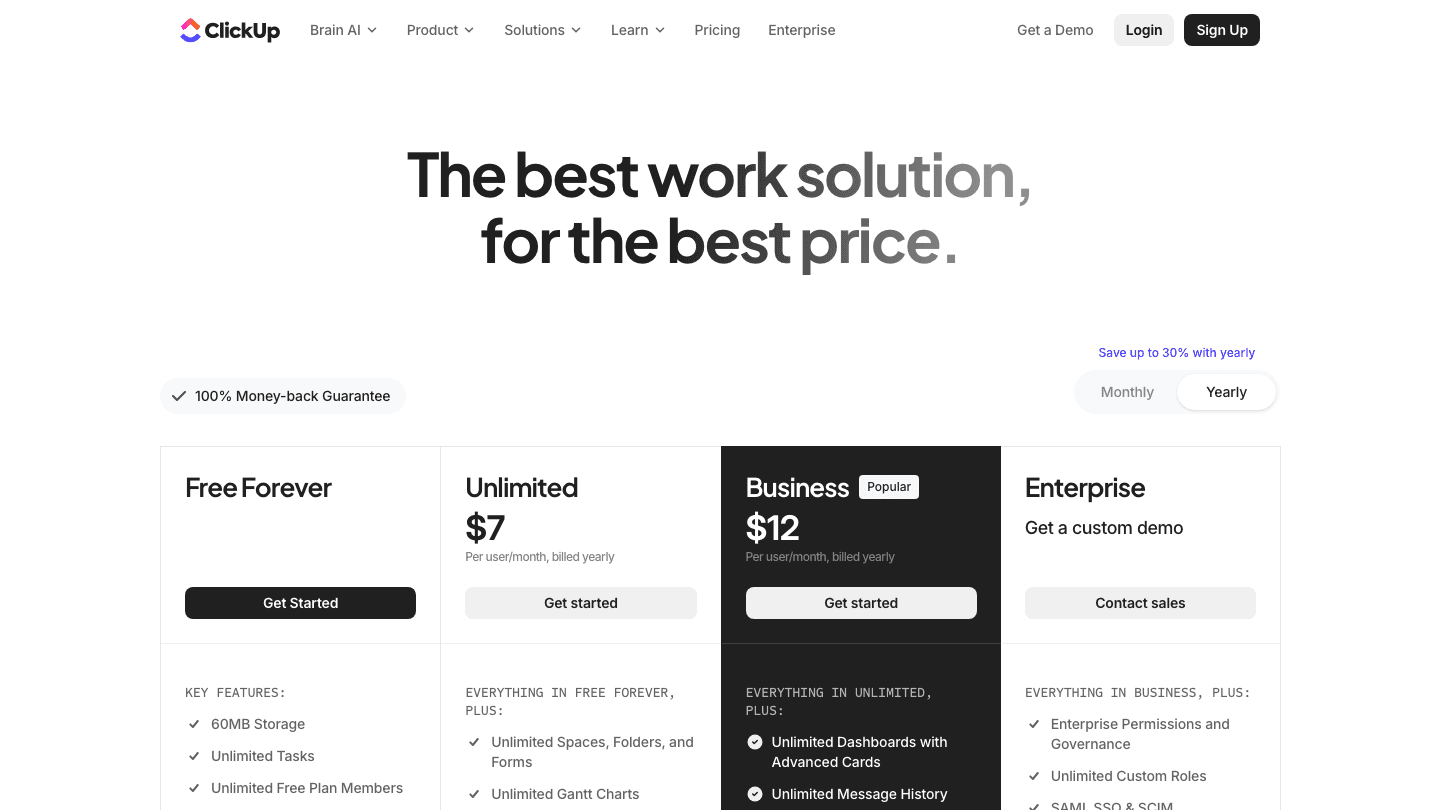
The Free Forever plan is more capable than most free tiers in the project management space. You get unlimited tasks and unlimited free plan members, which means no artificial limit on team size. Storage is capped at 60MB, and you're limited to one Form, basic custom fields, and no Gantt views.
For a solo user or a very small team just starting to get organized, the free plan is workable. You won't get native time tracking, Gantt charts, or integrations beyond the basics.
Unlimited tasks and members
60MB storage cap
Kanban, calendar, and list views
1 form, basic custom fields
In-app video recording
24/7 support
Best for: Individuals or tiny teams who want to try ClickUp before committing or who need basic task management without paying.
ClickUp Unlimited Plan ($7/user/month)
At $7/user/month billed annually, the Unlimited plan removes nearly all the Free plan's restrictions. Storage becomes unlimited, you get unlimited Spaces, Folders, and Forms, Gantt views unlock, and native time tracking is included. Integrations with external tools open up fully.
This plan makes sense for small teams that have outgrown the Free plan's storage or view limits. The jump from Free to Unlimited is usually the most impactful upgrade ClickUp offers.
Everything in Free Forever
Unlimited storage, spaces, folders, and forms
Gantt charts and native time tracking
Goals, portfolios, and resource management
All integrations
ClickUp Chat
Best for: Small teams of 2 to 10 who need proper project structure, time tracking, and integrations without enterprise overhead.
ClickUp Business Plan ($12/user/month)
Business is ClickUp's most popular paid tier and the plan most growing teams land on. At $12/user/month annually, it adds unlimited dashboards, advanced automation (5,000 runs/month), Google SSO, private whiteboards, timeline and workload views, and sprint management features.
The automation allowance is the real differentiator here. Teams using context switching reduction strategies often rely on automations to route tasks, send reminders, and keep workflows running without manual oversight. Five thousand runs per month is enough for most mid-size teams.
Everything in Unlimited
Unlimited dashboards
5,000 automations/month
Timeline, workload, and mind-map views
Google SSO and custom fields manager
Sprint points and velocity tracking
Private docs and whiteboards
Best for: Teams of 10 to 50 who need automation, workload management, and advanced reporting. This is the standard choice for product, ops, and marketing teams.
ClickUp Enterprise Plan (Custom Pricing)
Enterprise pricing is contact-sales-only. You'll get everything in Business plus enterprise-level permissions, unlimited custom roles, SAML SSO, audit logs, HIPAA and MSA compliance, data residency, 250,000 automations/month, and a dedicated customer success manager.
The compliance features (HIPAA, MSA, data residency) are what push organizations to Enterprise. If your team handles regulated data or needs contractual SLA guarantees, this is the tier. For everyone else, Business covers the feature set.
Best for: Large organizations with security, compliance, or contractual requirements.
ClickUp Brain AI Add-ons
ClickUp Brain is the AI layer on top of any paid plan. It comes in two tiers, and it's worth understanding before you budget.
Brain AI ($9/user/month): Unlimited AI assistant queries, AI chat, premium model access, writing assistance, and 1,500 AI Super Credits monthly. This is the entry-level AI add-on for teams who want AI-generated summaries, task suggestions, and writing help.
Everything AI ($28/user/month): Adds ambient AI answers, a notetaker, image generation, AI-powered fields and automations, and 5,000 Super Credits monthly. This is ClickUp's full AI stack and is built for teams that want AI deeply embedded into their workflow.
The implication: a Business user adding Brain AI pays $12 + $9 = $21/user/month. With Everything AI, that's $12 + $28 = $40/user/month. For a team of 10, Everything AI on Business runs $4,800/year before Enterprise pricing. Factor this in early when comparing ClickUp to alternatives.
Which ClickUp Plan Should You Choose?
Here's a practical breakdown by use case:
Solo user or freelancer: Free Forever or Unlimited ($7). You don't need Enterprise features. If you want structured time-blocking, Unlimited's Gantt and time-tracking make it worth $7.
Small startup team (2 to 10 people): Unlimited ($7/user). The upgrade from Free unlocks the features that matter most at this stage.
Growing company with complex workflows: Business ($12/user). The automation allowance and advanced views pay for themselves once your team has more than a few recurring workflows.
Enterprise or regulated industry: Enterprise. Non-negotiable if you need SAML SSO, HIPAA compliance, or data residency.
AI-first team: Business + Brain AI ($21/user) or Everything AI ($40/user). Budget accordingly.
Is ClickUp the Right Tool for You?
ClickUp is built for teams. Its strength is breadth: you get project management, docs, goals, time tracking, and now AI in one workspace. That breadth also creates a learning curve, and for individuals or small teams, much of the feature surface will go unused.
If you're an individual or managing your own schedule rather than a team's projects, Lifestack takes a different approach. It builds your daily plan around your energy levels, pulling from your calendar, tasks, and health data to schedule the right work at the right time. There's no per-user pricing at the team level because it's designed for personal productivity, not project management. Lifestack costs $7/month or $50/year.

If you find yourself using ClickUp mostly as a personal to-do list or daily schedule tool rather than for team projects, it may be more tool than you need. For people with ADHD or attention challenges, a simpler app that surfaces what to do next based on your energy state often works better than a feature-dense project management suite.
Frequently Asked Questions
What is ClickUp's pricing for 2026?
ClickUp offers four core plans: Free Forever ($0), Unlimited ($7/user/month billed annually), Business ($12/user/month billed annually), and Enterprise (custom pricing). AI features are available as add-ons starting at $9/user/month on top of any paid plan.
Is ClickUp free forever actually free?
Yes. ClickUp's Free Forever plan is genuinely free with no time limit. It includes unlimited tasks and unlimited users. The main restrictions are 60MB storage, limited custom fields, no Gantt views, and only one Form. For light use, it's a functional free tier.
How does ClickUp pricing compare to Asana?
Both tools start with a free tier and scale up to business and enterprise plans. See our Asana pricing breakdown for a full comparison. ClickUp's Unlimited plan ($7/user/month) is generally cheaper than Asana's comparable tier, and ClickUp offers more features in its free plan. Asana's interface tends to be simpler and has a shorter learning curve.
Can I use ClickUp for free as a solo user?
Yes. The Free Forever plan works well for solo users. If you want Gantt views, time tracking, or integrations, you'd need the Unlimited plan at $7/month. For solo productivity management, you might also consider whether a project management tool or a personal planning app better fits your needs.
Does ClickUp charge per user?
Yes, paid plans are priced per user per month. The Free Forever plan has no per-user cost. For Unlimited and Business, costs scale with the number of users on the workspace. Enterprise pricing is negotiated per contract.
Is ClickUp Business worth it?
For teams that need automation, advanced dashboards, and workload views, Business at $12/user/month is worth the upgrade from Unlimited. The 5,000 automation runs and unlimited dashboards create real time savings once your team has established workflows. If you're unsure, start with Unlimited and upgrade when you hit the automation or dashboard limits.
ClickUp markets itself as the one app to replace them all. For teams juggling project management, docs, chat, and goals in one place, it often delivers on that promise. But its pricing has grown more complex over the years, and what looks like a straightforward four-tier structure now has AI add-ons layered on top that can double the per-user cost.
This guide breaks down every ClickUp plan available in 2026, what you actually get at each tier, and which type of user or team belongs on which plan. All prices below are billed annually unless noted.
If you're also looking at other productivity apps or trying to decide between tools, the comparison at the end will help you figure out whether ClickUp is the right fit at all.
Key Takeaways
ClickUp's core plans run $0 to $12/user/month (annually). The Free plan is genuinely usable for small teams. Business is the sweet spot for most paid users.
AI features cost extra: ClickUp Brain starts at $9/user/month on top of your plan, pushing a Business user to $21/user/month before Enterprise pricing.
For solo users or individuals who want AI-aware scheduling rather than team project management, a lighter app may serve better than ClickUp's full suite.
ClickUp Free Forever Plan
The Free Forever plan is more capable than most free tiers in the project management space. You get unlimited tasks and unlimited free plan members, which means no artificial limit on team size. Storage is capped at 60MB, and you're limited to one Form, basic custom fields, and no Gantt views.
For a solo user or a very small team just starting to get organized, the free plan is workable. You won't get native time tracking, Gantt charts, or integrations beyond the basics.
Unlimited tasks and members
60MB storage cap
Kanban, calendar, and list views
1 form, basic custom fields
In-app video recording
24/7 support
Best for: Individuals or tiny teams who want to try ClickUp before committing or who need basic task management without paying.
ClickUp Unlimited Plan ($7/user/month)
At $7/user/month billed annually, the Unlimited plan removes nearly all the Free plan's restrictions. Storage becomes unlimited, you get unlimited Spaces, Folders, and Forms, Gantt views unlock, and native time tracking is included. Integrations with external tools open up fully.
This plan makes sense for small teams that have outgrown the Free plan's storage or view limits. The jump from Free to Unlimited is usually the most impactful upgrade ClickUp offers.
Everything in Free Forever
Unlimited storage, spaces, folders, and forms
Gantt charts and native time tracking
Goals, portfolios, and resource management
All integrations
ClickUp Chat
Best for: Small teams of 2 to 10 who need proper project structure, time tracking, and integrations without enterprise overhead.
ClickUp Business Plan ($12/user/month)
Business is ClickUp's most popular paid tier and the plan most growing teams land on. At $12/user/month annually, it adds unlimited dashboards, advanced automation (5,000 runs/month), Google SSO, private whiteboards, timeline and workload views, and sprint management features.
The automation allowance is the real differentiator here. Teams using context switching reduction strategies often rely on automations to route tasks, send reminders, and keep workflows running without manual oversight. Five thousand runs per month is enough for most mid-size teams.
Everything in Unlimited
Unlimited dashboards
5,000 automations/month
Timeline, workload, and mind-map views
Google SSO and custom fields manager
Sprint points and velocity tracking
Private docs and whiteboards
Best for: Teams of 10 to 50 who need automation, workload management, and advanced reporting. This is the standard choice for product, ops, and marketing teams.
ClickUp Enterprise Plan (Custom Pricing)
Enterprise pricing is contact-sales-only. You'll get everything in Business plus enterprise-level permissions, unlimited custom roles, SAML SSO, audit logs, HIPAA and MSA compliance, data residency, 250,000 automations/month, and a dedicated customer success manager.
The compliance features (HIPAA, MSA, data residency) are what push organizations to Enterprise. If your team handles regulated data or needs contractual SLA guarantees, this is the tier. For everyone else, Business covers the feature set.
Best for: Large organizations with security, compliance, or contractual requirements.
ClickUp Brain AI Add-ons
ClickUp Brain is the AI layer on top of any paid plan. It comes in two tiers, and it's worth understanding before you budget.
Brain AI ($9/user/month): Unlimited AI assistant queries, AI chat, premium model access, writing assistance, and 1,500 AI Super Credits monthly. This is the entry-level AI add-on for teams who want AI-generated summaries, task suggestions, and writing help.
Everything AI ($28/user/month): Adds ambient AI answers, a notetaker, image generation, AI-powered fields and automations, and 5,000 Super Credits monthly. This is ClickUp's full AI stack and is built for teams that want AI deeply embedded into their workflow.
The implication: a Business user adding Brain AI pays $12 + $9 = $21/user/month. With Everything AI, that's $12 + $28 = $40/user/month. For a team of 10, Everything AI on Business runs $4,800/year before Enterprise pricing. Factor this in early when comparing ClickUp to alternatives.
Which ClickUp Plan Should You Choose?
Here's a practical breakdown by use case:
Solo user or freelancer: Free Forever or Unlimited ($7). You don't need Enterprise features. If you want structured time-blocking, Unlimited's Gantt and time-tracking make it worth $7.
Small startup team (2 to 10 people): Unlimited ($7/user). The upgrade from Free unlocks the features that matter most at this stage.
Growing company with complex workflows: Business ($12/user). The automation allowance and advanced views pay for themselves once your team has more than a few recurring workflows.
Enterprise or regulated industry: Enterprise. Non-negotiable if you need SAML SSO, HIPAA compliance, or data residency.
AI-first team: Business + Brain AI ($21/user) or Everything AI ($40/user). Budget accordingly.
Is ClickUp the Right Tool for You?
ClickUp is built for teams. Its strength is breadth: you get project management, docs, goals, time tracking, and now AI in one workspace. That breadth also creates a learning curve, and for individuals or small teams, much of the feature surface will go unused.
If you're an individual or managing your own schedule rather than a team's projects, Lifestack takes a different approach. It builds your daily plan around your energy levels, pulling from your calendar, tasks, and health data to schedule the right work at the right time. There's no per-user pricing at the team level because it's designed for personal productivity, not project management. Lifestack costs $7/month or $50/year.
If you find yourself using ClickUp mostly as a personal to-do list or daily schedule tool rather than for team projects, it may be more tool than you need. For people with ADHD or attention challenges, a simpler app that surfaces what to do next based on your energy state often works better than a feature-dense project management suite.
Frequently Asked Questions
What is ClickUp's pricing for 2026?
ClickUp offers four core plans: Free Forever ($0), Unlimited ($7/user/month billed annually), Business ($12/user/month billed annually), and Enterprise (custom pricing). AI features are available as add-ons starting at $9/user/month on top of any paid plan.
Is ClickUp free forever actually free?
Yes. ClickUp's Free Forever plan is genuinely free with no time limit. It includes unlimited tasks and unlimited users. The main restrictions are 60MB storage, limited custom fields, no Gantt views, and only one Form. For light use, it's a functional free tier.
How does ClickUp pricing compare to Asana?
Both tools start with a free tier and scale up to business and enterprise plans. See our Asana pricing breakdown for a full comparison. ClickUp's Unlimited plan ($7/user/month) is generally cheaper than Asana's comparable tier, and ClickUp offers more features in its free plan. Asana's interface tends to be simpler and has a shorter learning curve.
Can I use ClickUp for free as a solo user?
Yes. The Free Forever plan works well for solo users. If you want Gantt views, time tracking, or integrations, you'd need the Unlimited plan at $7/month. For solo productivity management, you might also consider whether a project management tool or a personal planning app better fits your needs.
Does ClickUp charge per user?
Yes, paid plans are priced per user per month. The Free Forever plan has no per-user cost. For Unlimited and Business, costs scale with the number of users on the workspace. Enterprise pricing is negotiated per contract.
Is ClickUp Business worth it?
For teams that need automation, advanced dashboards, and workload views, Business at $12/user/month is worth the upgrade from Unlimited. The 5,000 automation runs and unlimited dashboards create real time savings once your team has established workflows. If you're unsure, start with Unlimited and upgrade when you hit the automation or dashboard limits.



FOLLOW ON
FOLLOW ON
FOLLOW ON


Copyright 2026 © Lifestack. All rights reserved
Copyright 2026 © Lifestack. All rights reserved

