
App
5 Best Productivity Apps for People with ADHD
5 Best Productivity Apps for People with ADHD

5 Best Productivity Apps for People with ADHD
ADHD makes typical productivity advice fall apart. A color-coded planner does not fix time blindness. A long to-do list does not solve task initiation. Most apps built for neurotypical brains assume you will just look at your calendar and start working, which is exactly the part that is hardest.
The apps that actually help share a few traits. They reduce the number of decisions you have to make before you start. They make time visible instead of abstract. And they do not punish you for missing a day. Some lean on visuals. Some lean on gamification. One leans on your actual energy levels instead of a fixed schedule.
We tested five apps built or adapted specifically for ADHD brains: a planner, a visual scheduler, an all-in-one task and habit tracker, a Pomodoro timer, and a gamified focus app. Each takes a different angle on the same problem, so the right pick depends less on which app is "best" and more on which kind of friction is slowing you down.
Key Takeaways
Lifestack is the only app here that schedules around your energy levels, not just your calendar, which targets ADHD time blindness and overbooking directly.
Visual planners like Tiimo help with task initiation by making the day concrete. Timer apps like Focus Keeper and Focus Friend help you start and sustain one task at a time.
Most of these apps work best paired together, for example a planner for the day plus a timer for individual focus blocks, rather than as a single all-in-one replacement.
Quick Guide
Lifestack, an AI daily planner that schedules tasks around your energy, not just your calendar
Tiimo, a visual daily planner with icons, colors, and countdown timers
Lunatask, an all-in-one task manager with habits, journaling, and mood tracking
Focus Keeper, a simple Pomodoro timer for structured work and break intervals
Focus Friend, a gamified focus timer where a character works alongside you
How We Evaluated
Energy and schedule awareness: does it adapt to your day, or just log it?
Task initiation support: does it lower the effort it takes to actually start?
Visual clarity: can you scan the day at a glance?
Setup complexity: how much work before it is actually useful?
Pricing and platform availability across iOS, Android, and web or desktop
1. Lifestack
Schedules your day around your energy, not just your calendar.

Lifestack is a daily planner that connects your calendar, tasks, and health data. Instead of treating every hour the same, it shows when your energy is likely to be high or low and suggests the best times for focused work, rest, or breaks. That distinction matters for ADHD task management, where the problem is rarely a lack of a to-do list. It is scheduling deep work for a window when you have no energy left to do it.
The AI can move tasks around automatically when your day changes, which cuts down on the manual replanning that usually causes people to abandon a planner within a week.
Key features
Syncs with wearables like Apple Watch, Oura, and Whoop
AI that plans your day or reshuffles tasks when things change
Energy map that highlights your peak focus windows
What works
Directly addresses time blindness by showing not just time, but when you will likely have the energy for a task
Reduces overload by letting the AI place tasks in realistic slots instead of stacking them back to back
Helps prevent burnout from the overbooking pattern common in ADHD daily planning
Limitations
Works best if you already wear a compatible device, though it is fully usable without one
Newer than some competitors, so it has fewer templates and third-party integrations
Pricing: $7 per month, or $50 per year with a 7-day free trial. A one-time lifetime plan is $120.
Best for: people with ADHD who want their schedule to adapt to their actual energy, not just their calendar.
2. Tiimo
A visual timeline that makes your day concrete instead of abstract.
Tiimo is a visual daily planner built to support ADHD, autism, and other executive function needs. Instead of a plain list, your day shows up as a timeline with icons and color blocks, so you can see the shape of the day rather than read it line by line.
Countdown timers attached to each task help with the moment right before starting, which is often where ADHD task initiation breaks down. Routines can also be broken into smaller visual steps, which helps with staying focused once you have actually begun.
Key features
Visual timeline layout you can see at a glance
Countdown timers for individual tasks
Custom icons, colors, and routines
What works
Visuals make an abstract schedule feel concrete
Timers help with starting and switching between tasks
Routines break bigger goals into small, visible steps
Limitations
Can feel limiting if you prefer free-form lists over a fixed timeline
Focused more on structure than automation, so you do the replanning yourself
Pricing: A free version is available. Tiimo Pro starts around $12 per month or $54 per year, with a 7-day trial on the yearly plan. Exact pricing varies slightly by platform and region.
Best for: people who think in pictures and need a visual, color-coded daily timeline.
3. Lunatask
One app for tasks, habits, journaling, and mood, so you stop juggling four apps.
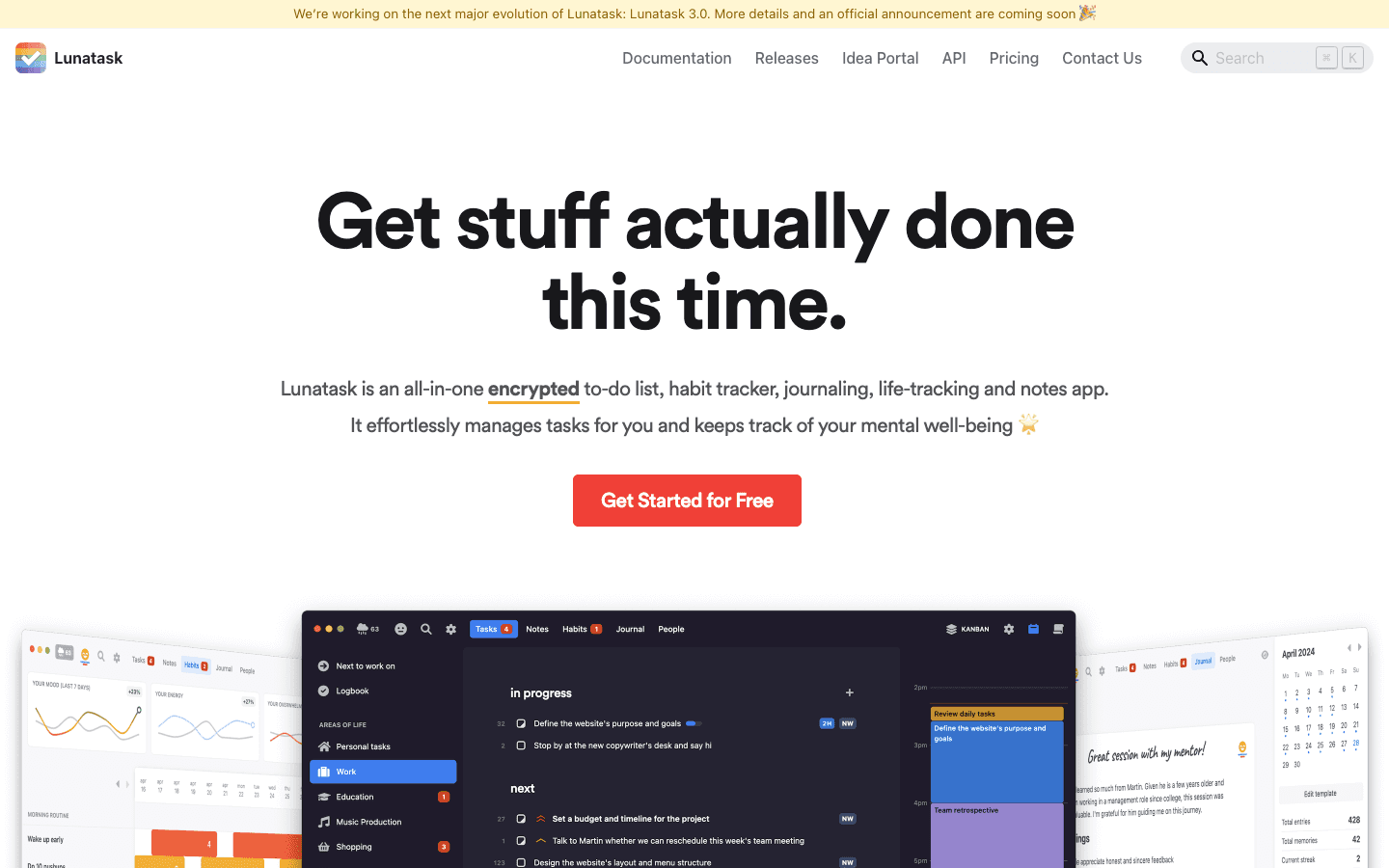
Lunatask calls itself an ADHD-friendly task manager, and it earns that by blending tasks, habits, journaling, and mood tracking into one place. Rather than showing you everything at once, it focuses on one area of life at a time to cut down on the overwhelm of an all-in-one tool. If you already use it, our guide to apps that pair well with Lunatask covers how to extend it further.
Key features
Automatically prioritizes tasks instead of leaving you to sort a flat list
Focuses on one life area at a time to reduce overwhelm
Includes journaling and habit tracking alongside tasks
What works
Cuts decision fatigue by suggesting what to do next instead of making you choose
Reduces app overload by offering tasks, habits, and journaling in one place
Gives you somewhere to capture stray thoughts quickly, which matters for ADHD time management
Limitations
Can feel like a lot if you try to use every feature at once
Calendar and automation integrations are limited compared to dedicated planners
Pricing: A free plan covers basic tasks and habits. Premium is $8 per month, or $6 per month billed annually. A one-time lifetime license is $300.
Best for: people who want one app for tasks, habits, and mood instead of juggling several tools.
4. Focus Keeper
A no-frills Pomodoro timer for when you just need to start.
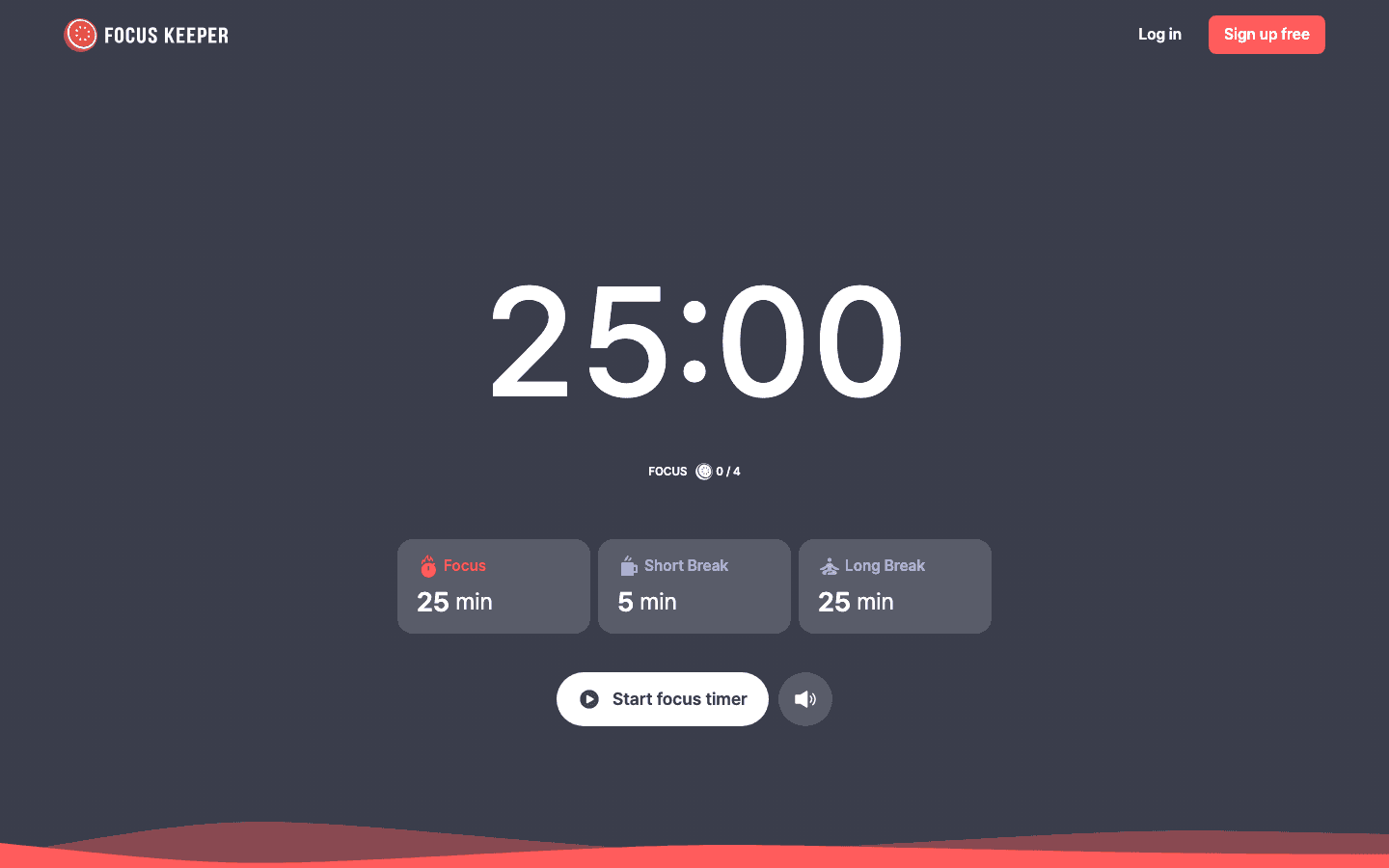
Focus Keeper is a timer app based on the Pomodoro method: short, defined work intervals followed by breaks. There is no planning layer and no task list to maintain. You pick a length, start the timer, and work until it ends.
That simplicity is the point. For a lot of ADHD brains, a 25-minute block feels far more achievable to commit to than "work on this until it is done."
Key features
Customizable work and break lengths
Simple interface with almost no setup
Basic progress tracking across sessions
What works
Short work blocks are easier to commit to than open-ended tasks
Frequent breaks help prevent burnout during long work sessions
The visible countdown gives you something concrete to anchor to
Limitations
Does not manage tasks or calendars, so you need something else for planning
The fixed interval structure will not suit every work style
Pricing: Free with in-app purchases. Pro pricing varies by platform, roughly $3.99 to $12.99 per month or $34.99 to $69.99 per year, with lifetime options starting around $99.99.
Best for: people who just need a dead-simple Pomodoro timer with zero setup.
5. Focus Friend
A gamified timer that makes starting a focus session feel less like a chore.
Focus Friend is a gamified focus app created by Hank Green. When you start a session, a character called a "bean" works alongside you. Stop early, and the bean's progress stops too, which adds a small layer of accountability that a plain timer does not have.
Key features
Visual feedback as your bean progresses through a session
Cosmetic rewards for decorating your bean's space
A Deep Focus mode that blocks distracting apps
What works
Gamification adds motivation to stick with a session you might otherwise abandon
Visual progress creates a light sense of accountability
App blocking removes one of the easiest distractions to fall into
Limitations
Only supports focus sessions, not full task or calendar management
The gamification some people find motivating, others will find distracting
Pricing: Free to download. Focus Friend Pro is $3.99 per month, $19.99 per year, or $39.99 for lifetime access.
Best for: people who need a playful nudge to start a session, not a full planning system.
Which ADHD Productivity App Is Right for You?
If overbooking and burnout are your biggest problem: Lifestack, because it schedules around your actual energy instead of a fixed calendar
If you think in pictures and need to see your day, not read it: Tiimo
If you want one app instead of four for tasks, habits, and mood: Lunatask
If you already know what to do and just need to start: Focus Keeper
If gamification is what actually keeps you accountable: Focus Friend
FAQ
What is the best productivity app for ADHD?
It depends on what is actually getting in your way. Lifestack tends to work best for people whose main problem is overbooking and burnout, since it schedules around your energy instead of a fixed calendar. Tiimo works well if you need a visual layout to make the day feel concrete.
Are ADHD apps worth it, or is a plain to-do list enough?
A plain list works for some people, but it tends to fail for ADHD specifically because it does not account for time blindness or task initiation. Apps built around those two problems, rather than just storage for tasks, tend to hold up longer.
What makes an app ADHD-friendly instead of just a regular productivity app?
The apps on this list reduce the number of decisions before you start, make time visible instead of abstract, and do not punish you for missing a day. A regular productivity app usually assumes you will just look at the plan and follow it, which is the part ADHD makes hard.
Can adults with ADHD use these apps, or are they built for kids?
All five are built for adults. None of them are designed as kid-focused tools, though the visual and gamified approaches in Tiimo and Focus Friend originated partly from autism and ADHD accessibility design, which tends to work well across ages.
Should I use one app or combine a few of these?
Combining them is common. A typical pairing is a planner like Lifestack or Tiimo for the shape of the day, plus a timer like Focus Keeper or Focus Friend for individual focus blocks. Start with one planner and one support tool, then adjust once you know what is actually missing.
Is there a free productivity app for ADHD?
Yes. Lunatask, Tiimo, Focus Keeper, and Focus Friend all have usable free tiers, with paid plans unlocking extra features like calendar sync or app blocking. Lifestack offers a 7-day free trial on its annual plan.
5 Best Productivity Apps for People with ADHD
ADHD makes typical productivity advice fall apart. A color-coded planner does not fix time blindness. A long to-do list does not solve task initiation. Most apps built for neurotypical brains assume you will just look at your calendar and start working, which is exactly the part that is hardest.
The apps that actually help share a few traits. They reduce the number of decisions you have to make before you start. They make time visible instead of abstract. And they do not punish you for missing a day. Some lean on visuals. Some lean on gamification. One leans on your actual energy levels instead of a fixed schedule.
We tested five apps built or adapted specifically for ADHD brains: a planner, a visual scheduler, an all-in-one task and habit tracker, a Pomodoro timer, and a gamified focus app. Each takes a different angle on the same problem, so the right pick depends less on which app is "best" and more on which kind of friction is slowing you down.
Key Takeaways
Lifestack is the only app here that schedules around your energy levels, not just your calendar, which targets ADHD time blindness and overbooking directly.
Visual planners like Tiimo help with task initiation by making the day concrete. Timer apps like Focus Keeper and Focus Friend help you start and sustain one task at a time.
Most of these apps work best paired together, for example a planner for the day plus a timer for individual focus blocks, rather than as a single all-in-one replacement.
Quick Guide
Lifestack, an AI daily planner that schedules tasks around your energy, not just your calendar
Tiimo, a visual daily planner with icons, colors, and countdown timers
Lunatask, an all-in-one task manager with habits, journaling, and mood tracking
Focus Keeper, a simple Pomodoro timer for structured work and break intervals
Focus Friend, a gamified focus timer where a character works alongside you
How We Evaluated
Energy and schedule awareness: does it adapt to your day, or just log it?
Task initiation support: does it lower the effort it takes to actually start?
Visual clarity: can you scan the day at a glance?
Setup complexity: how much work before it is actually useful?
Pricing and platform availability across iOS, Android, and web or desktop
1. Lifestack
Schedules your day around your energy, not just your calendar.
Lifestack is a daily planner that connects your calendar, tasks, and health data. Instead of treating every hour the same, it shows when your energy is likely to be high or low and suggests the best times for focused work, rest, or breaks. That distinction matters for ADHD task management, where the problem is rarely a lack of a to-do list. It is scheduling deep work for a window when you have no energy left to do it.
The AI can move tasks around automatically when your day changes, which cuts down on the manual replanning that usually causes people to abandon a planner within a week.
Key features
Syncs with wearables like Apple Watch, Oura, and Whoop
AI that plans your day or reshuffles tasks when things change
Energy map that highlights your peak focus windows
What works
Directly addresses time blindness by showing not just time, but when you will likely have the energy for a task
Reduces overload by letting the AI place tasks in realistic slots instead of stacking them back to back
Helps prevent burnout from the overbooking pattern common in ADHD daily planning
Limitations
Works best if you already wear a compatible device, though it is fully usable without one
Newer than some competitors, so it has fewer templates and third-party integrations
Pricing: $7 per month, or $50 per year with a 7-day free trial. A one-time lifetime plan is $120.
Best for: people with ADHD who want their schedule to adapt to their actual energy, not just their calendar.
2. Tiimo
A visual timeline that makes your day concrete instead of abstract.
Tiimo is a visual daily planner built to support ADHD, autism, and other executive function needs. Instead of a plain list, your day shows up as a timeline with icons and color blocks, so you can see the shape of the day rather than read it line by line.
Countdown timers attached to each task help with the moment right before starting, which is often where ADHD task initiation breaks down. Routines can also be broken into smaller visual steps, which helps with staying focused once you have actually begun.
Key features
Visual timeline layout you can see at a glance
Countdown timers for individual tasks
Custom icons, colors, and routines
What works
Visuals make an abstract schedule feel concrete
Timers help with starting and switching between tasks
Routines break bigger goals into small, visible steps
Limitations
Can feel limiting if you prefer free-form lists over a fixed timeline
Focused more on structure than automation, so you do the replanning yourself
Pricing: A free version is available. Tiimo Pro starts around $12 per month or $54 per year, with a 7-day trial on the yearly plan. Exact pricing varies slightly by platform and region.
Best for: people who think in pictures and need a visual, color-coded daily timeline.
3. Lunatask
One app for tasks, habits, journaling, and mood, so you stop juggling four apps.
Lunatask calls itself an ADHD-friendly task manager, and it earns that by blending tasks, habits, journaling, and mood tracking into one place. Rather than showing you everything at once, it focuses on one area of life at a time to cut down on the overwhelm of an all-in-one tool. If you already use it, our guide to apps that pair well with Lunatask covers how to extend it further.
Key features
Automatically prioritizes tasks instead of leaving you to sort a flat list
Focuses on one life area at a time to reduce overwhelm
Includes journaling and habit tracking alongside tasks
What works
Cuts decision fatigue by suggesting what to do next instead of making you choose
Reduces app overload by offering tasks, habits, and journaling in one place
Gives you somewhere to capture stray thoughts quickly, which matters for ADHD time management
Limitations
Can feel like a lot if you try to use every feature at once
Calendar and automation integrations are limited compared to dedicated planners
Pricing: A free plan covers basic tasks and habits. Premium is $8 per month, or $6 per month billed annually. A one-time lifetime license is $300.
Best for: people who want one app for tasks, habits, and mood instead of juggling several tools.
4. Focus Keeper
A no-frills Pomodoro timer for when you just need to start.
Focus Keeper is a timer app based on the Pomodoro method: short, defined work intervals followed by breaks. There is no planning layer and no task list to maintain. You pick a length, start the timer, and work until it ends.
That simplicity is the point. For a lot of ADHD brains, a 25-minute block feels far more achievable to commit to than "work on this until it is done."
Key features
Customizable work and break lengths
Simple interface with almost no setup
Basic progress tracking across sessions
What works
Short work blocks are easier to commit to than open-ended tasks
Frequent breaks help prevent burnout during long work sessions
The visible countdown gives you something concrete to anchor to
Limitations
Does not manage tasks or calendars, so you need something else for planning
The fixed interval structure will not suit every work style
Pricing: Free with in-app purchases. Pro pricing varies by platform, roughly $3.99 to $12.99 per month or $34.99 to $69.99 per year, with lifetime options starting around $99.99.
Best for: people who just need a dead-simple Pomodoro timer with zero setup.
5. Focus Friend
A gamified timer that makes starting a focus session feel less like a chore.
Focus Friend is a gamified focus app created by Hank Green. When you start a session, a character called a "bean" works alongside you. Stop early, and the bean's progress stops too, which adds a small layer of accountability that a plain timer does not have.
Key features
Visual feedback as your bean progresses through a session
Cosmetic rewards for decorating your bean's space
A Deep Focus mode that blocks distracting apps
What works
Gamification adds motivation to stick with a session you might otherwise abandon
Visual progress creates a light sense of accountability
App blocking removes one of the easiest distractions to fall into
Limitations
Only supports focus sessions, not full task or calendar management
The gamification some people find motivating, others will find distracting
Pricing: Free to download. Focus Friend Pro is $3.99 per month, $19.99 per year, or $39.99 for lifetime access.
Best for: people who need a playful nudge to start a session, not a full planning system.
Which ADHD Productivity App Is Right for You?
If overbooking and burnout are your biggest problem: Lifestack, because it schedules around your actual energy instead of a fixed calendar
If you think in pictures and need to see your day, not read it: Tiimo
If you want one app instead of four for tasks, habits, and mood: Lunatask
If you already know what to do and just need to start: Focus Keeper
If gamification is what actually keeps you accountable: Focus Friend
FAQ
What is the best productivity app for ADHD?
It depends on what is actually getting in your way. Lifestack tends to work best for people whose main problem is overbooking and burnout, since it schedules around your energy instead of a fixed calendar. Tiimo works well if you need a visual layout to make the day feel concrete.
Are ADHD apps worth it, or is a plain to-do list enough?
A plain list works for some people, but it tends to fail for ADHD specifically because it does not account for time blindness or task initiation. Apps built around those two problems, rather than just storage for tasks, tend to hold up longer.
What makes an app ADHD-friendly instead of just a regular productivity app?
The apps on this list reduce the number of decisions before you start, make time visible instead of abstract, and do not punish you for missing a day. A regular productivity app usually assumes you will just look at the plan and follow it, which is the part ADHD makes hard.
Can adults with ADHD use these apps, or are they built for kids?
All five are built for adults. None of them are designed as kid-focused tools, though the visual and gamified approaches in Tiimo and Focus Friend originated partly from autism and ADHD accessibility design, which tends to work well across ages.
Should I use one app or combine a few of these?
Combining them is common. A typical pairing is a planner like Lifestack or Tiimo for the shape of the day, plus a timer like Focus Keeper or Focus Friend for individual focus blocks. Start with one planner and one support tool, then adjust once you know what is actually missing.
Is there a free productivity app for ADHD?
Yes. Lunatask, Tiimo, Focus Keeper, and Focus Friend all have usable free tiers, with paid plans unlocking extra features like calendar sync or app blocking. Lifestack offers a 7-day free trial on its annual plan.



FOLLOW ON
FOLLOW ON
FOLLOW ON


Copyright 2026 © Lifestack. All rights reserved
Copyright 2026 © Lifestack. All rights reserved

