
App
ScreenZen Review: Does the Free App Actually Work?
ScreenZen Review: Does the Free App Actually Work?

Most productivity apps try to help you do more. ScreenZen tries to help you do less of one specific thing: mindlessly opening apps you did not consciously choose to open. The mechanism is simple: a delay screen that appears every time you open a flagged app, asking you to confirm whether you actually want to be there. It sounds almost too basic to work. Surprisingly often, it does.
ScreenZen is free, has no subscription, and relies on optional tips to sustain itself. In 2026, it carries 4.8 stars on the App Store and 4.8 on Google Play across 30,000-plus ratings. This review covers what it actually does, where it works, where it does not, and how it fits into a broader attention-management strategy.
Key Takeaways
ScreenZen inserts a configurable delay screen before flagged apps open, creating a moment of friction that interrupts automatic behavior
It is free with no subscription; optional one-time tips ($5-$40) support the developer
Most effective for habitual openers (social media, short video) rather than apps requiring total blocking
What Is ScreenZen?
ScreenZen is a screen time management app built around the concept of intentional friction. Rather than blocking apps outright, it intercepts them at the moment of opening and presents a delay screen before letting you through. The delay is configurable, from a few seconds to a full minute. The screen usually includes a prompt like "Why am I checking this?" and a countdown timer.
The theory is behavioral: most phone checking is automatic rather than deliberate. You pick up your phone and open Instagram before you have consciously decided to. By inserting a pause, ScreenZen breaks that automatic loop and gives your prefrontal cortex a chance to catch up with your thumb.
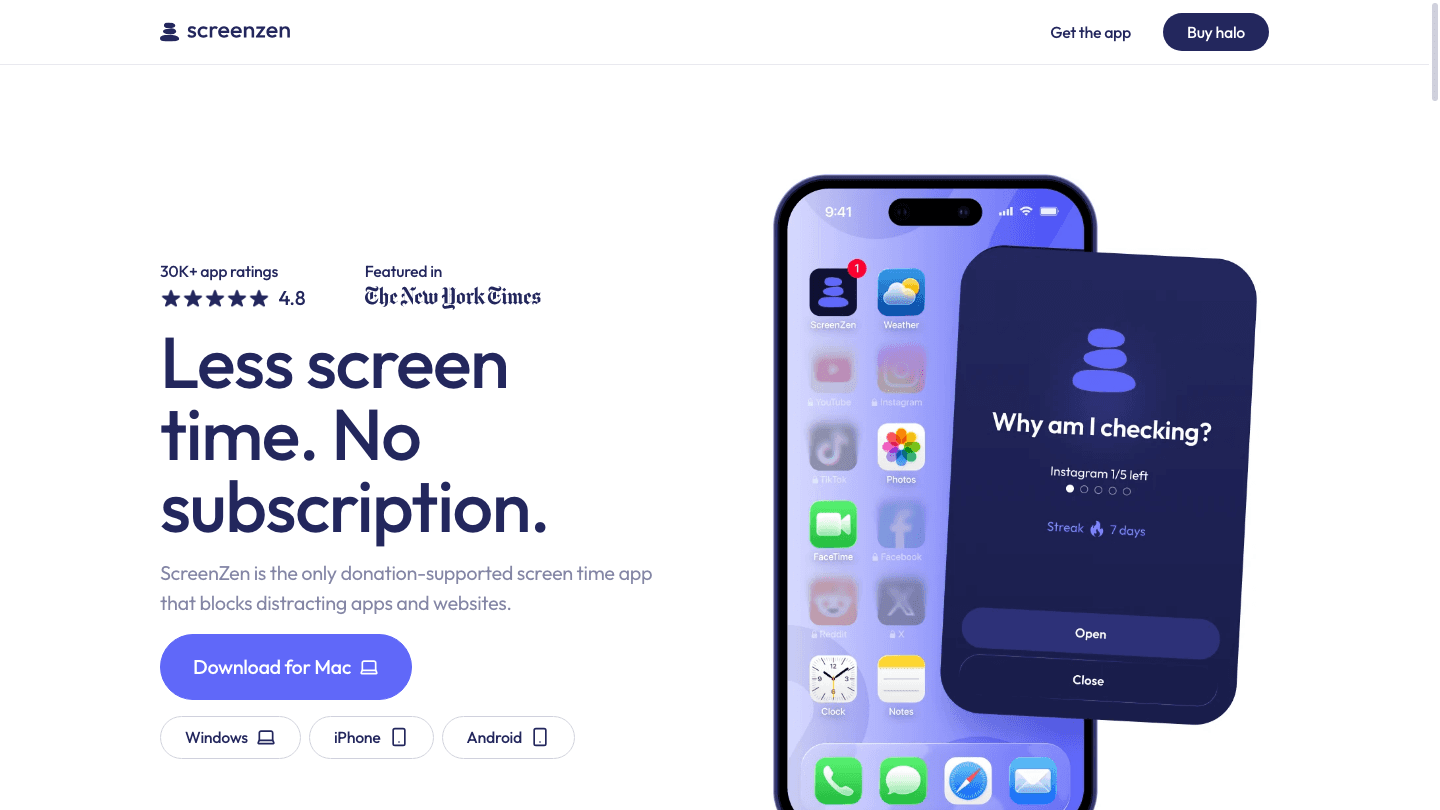
Available on iPhone, Android, and Mac (Windows support is in beta), ScreenZen works through iOS Screen Time or Android's Digital Wellbeing frameworks. It does not require a VPN or special device permissions beyond what those systems already provide.
Key Features
Per-app delay timers: Set different delay durations for each flagged app. Instagram might get 10 seconds; TikTok might get 45.
Daily open limits: Cap how many times you can open an app before ScreenZen blocks it for the rest of the day.
Escalating delays: The delay can grow longer with each consecutive open, making extended binge sessions increasingly inconvenient.
Time-based rules: Set free periods (e.g., no restrictions on weekends) or restriction windows (e.g., blocked after 9pm on weekdays).
Day-specific schedules: Different rules for different days of the week.
Website blocking: Block specific websites in addition to apps.
Custom delay messages: Personalize the prompt text to something meaningful to you.
How Effective Is ScreenZen?
The honest answer is: it depends on what you are trying to solve.
For habitual phone checking, ScreenZen works remarkably well. Multiple reviewers have reported dropping daily social media time by 50-70% within the first two weeks. The delay screen creates enough friction to catch unconscious opens, which are the majority of the problem. You still have full access; you just have to choose it.
For users who genuinely want to stop using an app entirely, ScreenZen is not a hard blocker. A determined person will wait out the delay. If you need a complete block for focus sessions, combining ScreenZen with a dedicated focus app or using its strict block mode for scheduled periods is more reliable.
It is particularly well-suited for ADHD-related phone dependency, where the challenge is not willpower but impulsive behavior. The delay interrupts the impulse and gives you a moment to redirect. This is why the app has strong engagement in ADHD communities online.
Pricing
ScreenZen is genuinely free. There is no premium tier, no subscription, and no features locked behind a paywall. The developer offers optional one-time tips in the app: $5, $10, $20, or $40. This is a donation model rather than a commercial one. All features are available without tipping.
This is unusual in the productivity app space. Most app blockers for Android and iPhone charge monthly subscriptions in the $5-$15 range for comparable features. ScreenZen's tip-based model means there is no financial pressure to start and no cost if you stop using it.
Limitations
ScreenZen works through OS-level Screen Time APIs, which means it shares the same limitations as Apple's Screen Time and Google's Digital Wellbeing. On iOS in particular, the Screen Time framework has restrictions on what third-party apps can do, and workarounds occasionally break with OS updates.
The delay mechanism also has a known vulnerability: users who know the delay is coming can simply wait it out and proceed. For situations requiring hard blocks, this is not the right tool on its own. The escalating delay feature helps here, but determined users will bypass it.
There is no desktop browser extension, so if your distraction problem lives in a web browser rather than apps, ScreenZen addresses only part of the picture. For browser-based distraction, a website blocker tool covers the gap.
Who ScreenZen Is For
ScreenZen works best for people who want to reduce habitual phone checking without going cold turkey on apps. If you find yourself opening Instagram or TikTok dozens of times a day without meaning to, the delay friction addresses the specific mechanism driving that behavior.
It is less useful if you need hard blocks for deep work sessions or if phone use is intentional and controlled already. In those cases, the delay adds friction without solving anything that was actually broken.
Pairing ScreenZen with a Productivity Planner
Reducing mindless phone time creates recovered attention. The question is what to do with it.
Lifestack is an AI-powered daily planner that reads your sleep and energy data to build a schedule that puts your clearest focus windows to work. When ScreenZen cuts the time you spend doom-scrolling and Lifestack structures what replaces it, the combination creates a meaningful shift in how your day unfolds rather than just removing a bad habit.

Lifestack is available on iOS and Android. Pricing starts at $49.99 per year (7-day free trial) or $120 for lifetime access. Learn more about Lifestack. For more context on building a focused day, see our guide on energy-based scheduling.
Frequently Asked Questions
Is ScreenZen actually free?
Yes. ScreenZen is free with no subscription or premium tier. All features are available for free. The developer accepts optional one-time tips ($5, $10, $20, or $40) but there is no obligation to pay.
Does ScreenZen work on Android?
Yes. ScreenZen is available on both iPhone and Android. The Android version uses Google's Digital Wellbeing framework, similar to how the iOS version works through Apple's Screen Time API.
Can ScreenZen completely block an app?
ScreenZen can set a strict block that denies access entirely rather than just delaying it. It can also set daily open limits that trigger a full block for the rest of the day once the limit is reached. For casual use reduction, the delay mode is usually sufficient; for complete blocks, the strict mode handles it.
How is ScreenZen different from Apple Screen Time?
Apple Screen Time can set limits and blocks but offers no delay mechanism and no per-session prompting. ScreenZen's delay screen is the distinguishing feature: it creates a moment of friction and reflection that Screen Time does not provide. ScreenZen actually uses the Screen Time API under the hood on iOS.
Is ScreenZen good for ADHD?
Many users with ADHD report significant benefits from ScreenZen because the delay screen interrupts impulsive app-opening specifically, which is often the root pattern rather than deliberate choice. The momentary pause can be enough to redirect attention before the dopamine loop completes. Read more about ADHD and phone addiction for context.
Most productivity apps try to help you do more. ScreenZen tries to help you do less of one specific thing: mindlessly opening apps you did not consciously choose to open. The mechanism is simple: a delay screen that appears every time you open a flagged app, asking you to confirm whether you actually want to be there. It sounds almost too basic to work. Surprisingly often, it does.
ScreenZen is free, has no subscription, and relies on optional tips to sustain itself. In 2026, it carries 4.8 stars on the App Store and 4.8 on Google Play across 30,000-plus ratings. This review covers what it actually does, where it works, where it does not, and how it fits into a broader attention-management strategy.
Key Takeaways
ScreenZen inserts a configurable delay screen before flagged apps open, creating a moment of friction that interrupts automatic behavior
It is free with no subscription; optional one-time tips ($5-$40) support the developer
Most effective for habitual openers (social media, short video) rather than apps requiring total blocking
What Is ScreenZen?
ScreenZen is a screen time management app built around the concept of intentional friction. Rather than blocking apps outright, it intercepts them at the moment of opening and presents a delay screen before letting you through. The delay is configurable, from a few seconds to a full minute. The screen usually includes a prompt like "Why am I checking this?" and a countdown timer.
The theory is behavioral: most phone checking is automatic rather than deliberate. You pick up your phone and open Instagram before you have consciously decided to. By inserting a pause, ScreenZen breaks that automatic loop and gives your prefrontal cortex a chance to catch up with your thumb.
Available on iPhone, Android, and Mac (Windows support is in beta), ScreenZen works through iOS Screen Time or Android's Digital Wellbeing frameworks. It does not require a VPN or special device permissions beyond what those systems already provide.
Key Features
Per-app delay timers: Set different delay durations for each flagged app. Instagram might get 10 seconds; TikTok might get 45.
Daily open limits: Cap how many times you can open an app before ScreenZen blocks it for the rest of the day.
Escalating delays: The delay can grow longer with each consecutive open, making extended binge sessions increasingly inconvenient.
Time-based rules: Set free periods (e.g., no restrictions on weekends) or restriction windows (e.g., blocked after 9pm on weekdays).
Day-specific schedules: Different rules for different days of the week.
Website blocking: Block specific websites in addition to apps.
Custom delay messages: Personalize the prompt text to something meaningful to you.
How Effective Is ScreenZen?
The honest answer is: it depends on what you are trying to solve.
For habitual phone checking, ScreenZen works remarkably well. Multiple reviewers have reported dropping daily social media time by 50-70% within the first two weeks. The delay screen creates enough friction to catch unconscious opens, which are the majority of the problem. You still have full access; you just have to choose it.
For users who genuinely want to stop using an app entirely, ScreenZen is not a hard blocker. A determined person will wait out the delay. If you need a complete block for focus sessions, combining ScreenZen with a dedicated focus app or using its strict block mode for scheduled periods is more reliable.
It is particularly well-suited for ADHD-related phone dependency, where the challenge is not willpower but impulsive behavior. The delay interrupts the impulse and gives you a moment to redirect. This is why the app has strong engagement in ADHD communities online.
Pricing
ScreenZen is genuinely free. There is no premium tier, no subscription, and no features locked behind a paywall. The developer offers optional one-time tips in the app: $5, $10, $20, or $40. This is a donation model rather than a commercial one. All features are available without tipping.
This is unusual in the productivity app space. Most app blockers for Android and iPhone charge monthly subscriptions in the $5-$15 range for comparable features. ScreenZen's tip-based model means there is no financial pressure to start and no cost if you stop using it.
Limitations
ScreenZen works through OS-level Screen Time APIs, which means it shares the same limitations as Apple's Screen Time and Google's Digital Wellbeing. On iOS in particular, the Screen Time framework has restrictions on what third-party apps can do, and workarounds occasionally break with OS updates.
The delay mechanism also has a known vulnerability: users who know the delay is coming can simply wait it out and proceed. For situations requiring hard blocks, this is not the right tool on its own. The escalating delay feature helps here, but determined users will bypass it.
There is no desktop browser extension, so if your distraction problem lives in a web browser rather than apps, ScreenZen addresses only part of the picture. For browser-based distraction, a website blocker tool covers the gap.
Who ScreenZen Is For
ScreenZen works best for people who want to reduce habitual phone checking without going cold turkey on apps. If you find yourself opening Instagram or TikTok dozens of times a day without meaning to, the delay friction addresses the specific mechanism driving that behavior.
It is less useful if you need hard blocks for deep work sessions or if phone use is intentional and controlled already. In those cases, the delay adds friction without solving anything that was actually broken.
Pairing ScreenZen with a Productivity Planner
Reducing mindless phone time creates recovered attention. The question is what to do with it.
Lifestack is an AI-powered daily planner that reads your sleep and energy data to build a schedule that puts your clearest focus windows to work. When ScreenZen cuts the time you spend doom-scrolling and Lifestack structures what replaces it, the combination creates a meaningful shift in how your day unfolds rather than just removing a bad habit.
Lifestack is available on iOS and Android. Pricing starts at $49.99 per year (7-day free trial) or $120 for lifetime access. Learn more about Lifestack. For more context on building a focused day, see our guide on energy-based scheduling.
Frequently Asked Questions
Is ScreenZen actually free?
Yes. ScreenZen is free with no subscription or premium tier. All features are available for free. The developer accepts optional one-time tips ($5, $10, $20, or $40) but there is no obligation to pay.
Does ScreenZen work on Android?
Yes. ScreenZen is available on both iPhone and Android. The Android version uses Google's Digital Wellbeing framework, similar to how the iOS version works through Apple's Screen Time API.
Can ScreenZen completely block an app?
ScreenZen can set a strict block that denies access entirely rather than just delaying it. It can also set daily open limits that trigger a full block for the rest of the day once the limit is reached. For casual use reduction, the delay mode is usually sufficient; for complete blocks, the strict mode handles it.
How is ScreenZen different from Apple Screen Time?
Apple Screen Time can set limits and blocks but offers no delay mechanism and no per-session prompting. ScreenZen's delay screen is the distinguishing feature: it creates a moment of friction and reflection that Screen Time does not provide. ScreenZen actually uses the Screen Time API under the hood on iOS.
Is ScreenZen good for ADHD?
Many users with ADHD report significant benefits from ScreenZen because the delay screen interrupts impulsive app-opening specifically, which is often the root pattern rather than deliberate choice. The momentary pause can be enough to redirect attention before the dopamine loop completes. Read more about ADHD and phone addiction for context.



FOLLOW ON
FOLLOW ON
FOLLOW ON


Copyright 2026 © Lifestack. All rights reserved
Copyright 2026 © Lifestack. All rights reserved

