
App
Best Daily Organiser Apps in 2026
Best Daily Organiser Apps in 2026

A daily organiser app is only as useful as the decisions it helps you make. Most apps in this category do one thing well and everything else adequately. The ones worth using every day are the ones that match how you actually think: whether that's working from a simple task list, blocking time on a calendar, or building a schedule around your energy rather than just your hours.
We tested six daily organiser apps across different use cases: task capture, time blocking, AI scheduling, team collaboration, and habit integration. The six below represent a range of approaches and price points, from permanently free to premium-only. All pricing was verified at time of writing.
Key Takeaways
Lifestack is the strongest pick if you want an AI-powered organiser that builds your daily schedule around your energy levels, not just your available time slots.
Todoist and TickTick are the best pure task managers: reliable, cross-platform, and free to start. The right choice between them depends on whether you prefer simplicity or feature depth.
Sunsama is the most opinionated daily planner, designed specifically to prevent overcommitment. It's expensive but effective for people who consistently plan too much.
Quick Guide: Best Daily Organiser Apps
1. Lifestack: AI organiser that schedules tasks around your energy and focus windows
2. Todoist: Best-in-class task manager with natural language input and calendar sync
3. Notion: All-in-one workspace with databases, notes, and unlimited customisation
4. Sunsama: Intentional daily planner with time boxing and burnout prevention
5. TickTick: Task manager plus calendar plus habit tracker in one app
6. Any.do: Simple task list with smart daily planning and free forever tier
How We Evaluated These Apps
Ease of daily capture (frictionless task entry matters more than features you'll never use)
Calendar integration and time-blocking support
AI scheduling or prioritisation capabilities
Cross-platform consistency (iOS, Android, web, desktop)
Value at both the free and paid tiers
1. Lifestack: Best Overall Daily Organiser
AI scheduling that builds your day around your energy, not just your calendar

Most daily organiser apps treat all hours as equal. Lifestack doesn't. It connects to your calendar, tasks, and health data, identifies when your energy is naturally highest across the day, and builds a schedule that puts your most demanding work in your peak windows. Shallow tasks, meetings, and admin fill the natural dips. The result is a daily plan that works with your biology rather than against it.
This approach is particularly useful for anyone who finds that the same tasks feel completely different depending on when they do them. Energy-based scheduling isn't a new concept, but Lifestack automates it in a way that most people haven't experienced from a daily organiser before. The app runs on iOS and Android with a Chrome extension for desktop task capture, and it syncs with Google Calendar and Apple Calendar.
AI builds a daily schedule around your energy patterns and sleep data
Connects to Google Calendar, Apple Calendar, and Apple Health or Oura
Automatically reschedules tasks that didn't get done without manual drag-and-drop
Chrome extension for fast task capture from any web page
iOS and Android apps with a clean, minimal interface
What Works: The energy-aware scheduling is genuinely different from every other daily organiser in this list. If you've tried time-blocking and found it falls apart because your capacity changes day to day, Lifestack solves the exact problem you're experiencing.
Limitations: Less suited to teams that need shared project management or heavy collaboration. Works best as a personal scheduling layer on top of shared calendars rather than a team workspace replacement.
Pricing: $7/month or $50/year (7-day free trial on annual plan). lifestack.ai
Best for: Anyone who wants their daily organiser to do more than list tasks and tell them the time.
2. Todoist: Best Task Manager
Natural language task entry, powerful filters, rock-solid cross-platform sync

Todoist has been the standard-bearer for personal task management for years and has earned that position through consistent execution rather than flashy features. The natural language parser is the best in the category: type "call dentist Friday at 3pm p1" and it creates the task, sets the due date, time, and priority in one motion. The filter system is powerful enough that most people never exhaust its possibilities.
The app syncs instantly across every platform, including a desktop app, mobile, browser extension, and integrations with Slack, Google Calendar, and dozens of other tools. The free tier covers most individual users' needs. The Pro tier adds reminders, calendar layout, task durations, and more detailed reporting. Todoist is the right choice if you want a reliable daily task system that stays out of the way.
Best-in-class natural language task entry
Powerful filter and label system for custom views
Calendar layout with drag-and-drop scheduling (Pro)
Integrations with 80+ apps including Google Calendar and Slack
Available on every platform with fast, reliable sync
What Works: The core task capture is faster than any other app here. For people whose primary need is a frictionless inbox that stays organised, Todoist remains the benchmark.
Limitations: The calendar view feels bolted on compared to apps built around time blocking from the start. No energy-aware scheduling. Limited note-taking beyond task descriptions.
Pricing: Free (5 projects), Pro $6.99/month or $59.99/year (7-day trial). todoist.com
Best for: People who primarily need a fast, reliable task list that syncs everywhere and doesn't get in the way.
3. Notion: Best All-in-One Workspace
Databases, notes, tasks, and wikis in one customisable workspace

Notion is the most flexible tool in this list and, consequently, the one that requires the most setup. It can be a task manager, a note-taking app, a project tracker, a habit log, a personal wiki, or all five simultaneously, depending on how you configure it. The database system is the core of its power: you can build views of the same data as a list, calendar, kanban board, gallery, or table.
As a daily organiser specifically, Notion works best when you've built a system that fits your workflow. Out of the box, it requires meaningful customisation before it replaces a purpose-built task manager. The AI layer added in recent versions helps: it can summarise pages, generate task lists from notes, and fill in database fields automatically. If you're already living in Notion for notes and projects, building your daily planning routine inside it is a natural extension.
Flexible database system with multiple view types (list, calendar, kanban, gallery)
Notes and tasks in the same workspace
AI writing, summarisation, and task generation
Powerful templates for daily planning, habit tracking, and more
Generous free tier for individual use
What Works: Unmatched flexibility. If your organisation needs don't fit a pre-built tool's structure, Notion lets you build exactly what you need.
Limitations: The flexibility is also the friction. Notion requires real setup investment to use as a daily organiser, and mobile performance can lag behind purpose-built task apps.
Pricing: Free, Plus $10/month per member (20% off annually). notion.com
Best for: People who want a single workspace for notes, projects, and tasks, and are willing to invest time in building their system.
4. Sunsama: Best for Intentional Daily Planning
Daily rituals, time boxing, and a hard limit on how much you can plan each day
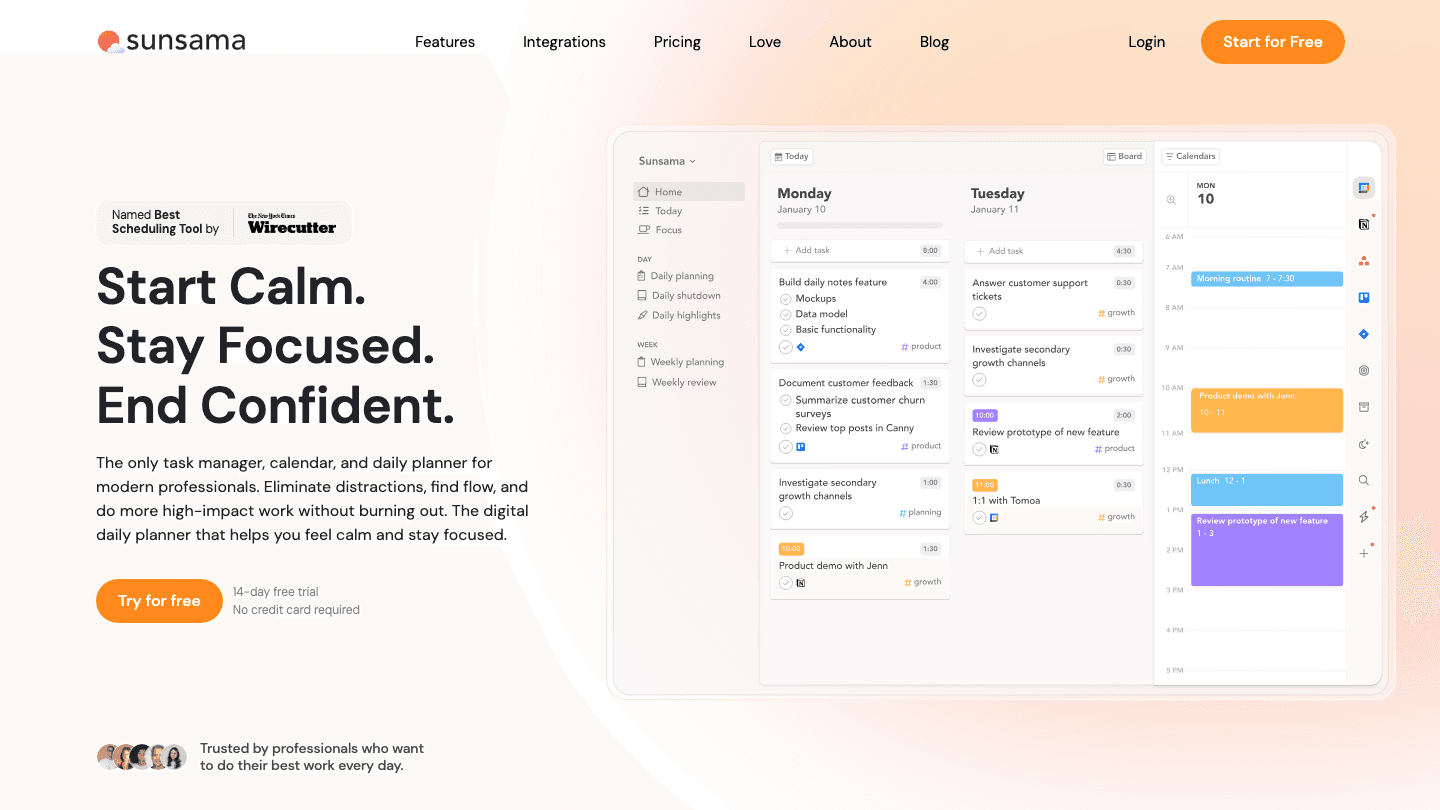
Sunsama is the most opinionated app in this list. It's built around the philosophy that most people plan too much and execute too little, and it structures the entire experience around daily rituals: a morning planning session where you pull tasks from connected tools (Trello, Asana, Linear, GitHub, Todoist), add time estimates, and commit to a realistic day. When your estimated time exceeds your available hours, the app surfaces that conflict before your day starts rather than after it's already derailed.
The time boxing approach is strict: each task gets a duration, and the daily timeline shows you exactly whether the day is feasible. Integrations with common project tools mean you don't need to re-enter work that lives elsewhere. The structured planning ritual Sunsama enforces is what its fans love most and what its detractors find too rigid. If daily overcommitment is a persistent problem for you, Sunsama addresses it more directly than any other app here.
Daily planning ritual with morning and evening check-ins
Time estimation built into every task
Integrations with Trello, Asana, Linear, GitHub, Todoist, and more
Weekly review with reflection prompts
Calendar sync with time blocking
What Works: The morning planning ritual creates a structured daily habit that most open-ended task managers don't. The overcommitment warning is the most practical burnout prevention feature in any daily organiser.
Limitations: Premium-only with no permanent free tier. At $17/month annually, it's the most expensive app in this list and requires consistent use of the rituals to justify the cost.
Pricing: $17/month billed annually or $22/month billed monthly (14-day free trial). sunsama.com
Best for: People who consistently overplan their days and want an app that structures the planning ritual to prevent it.
5. TickTick: Best for Tasks Plus Habits
Task manager, calendar, habit tracker, and Pomodoro timer in one app

TickTick packs more functionality into a single app than anything else in this list. It's a task manager with natural language input, a calendar view, a built-in Pomodoro timer, a habit tracker, a whiteboard for quick brainstorming, and a focus mode. For people who want to consolidate multiple apps into one, it's the obvious candidate.
The calendar view is better than Todoist's: you can drag tasks directly onto the calendar timeline and see your day as a combined view of calendar events and tasks. The habit tracker integrates with the task system rather than sitting in a separate silo. The Pomodoro timer shows session counts on each task. Where TickTick sometimes struggles is the breadth of features introducing some interface complexity that purpose-built apps avoid.
Task management with natural language due dates and priorities
Calendar view with drag-and-drop time blocking
Built-in habit tracker with streaks
Pomodoro timer integrated with tasks
Available on all platforms including watchOS and Apple Watch
What Works: The all-in-one approach means fewer apps to manage. The calendar integration is the best among pure task managers.
Limitations: The breadth can feel overwhelming for users who want simplicity. The free tier is more limited than Todoist's free offering.
Pricing: Free, Premium $4.99/month or $49.99/year. ticktick.com
Best for: People who want to replace multiple apps (task manager + habit tracker + calendar + timer) with one.
6. Any.do: Best Free Daily Organiser
Clean task management with a free tier that actually covers daily needs
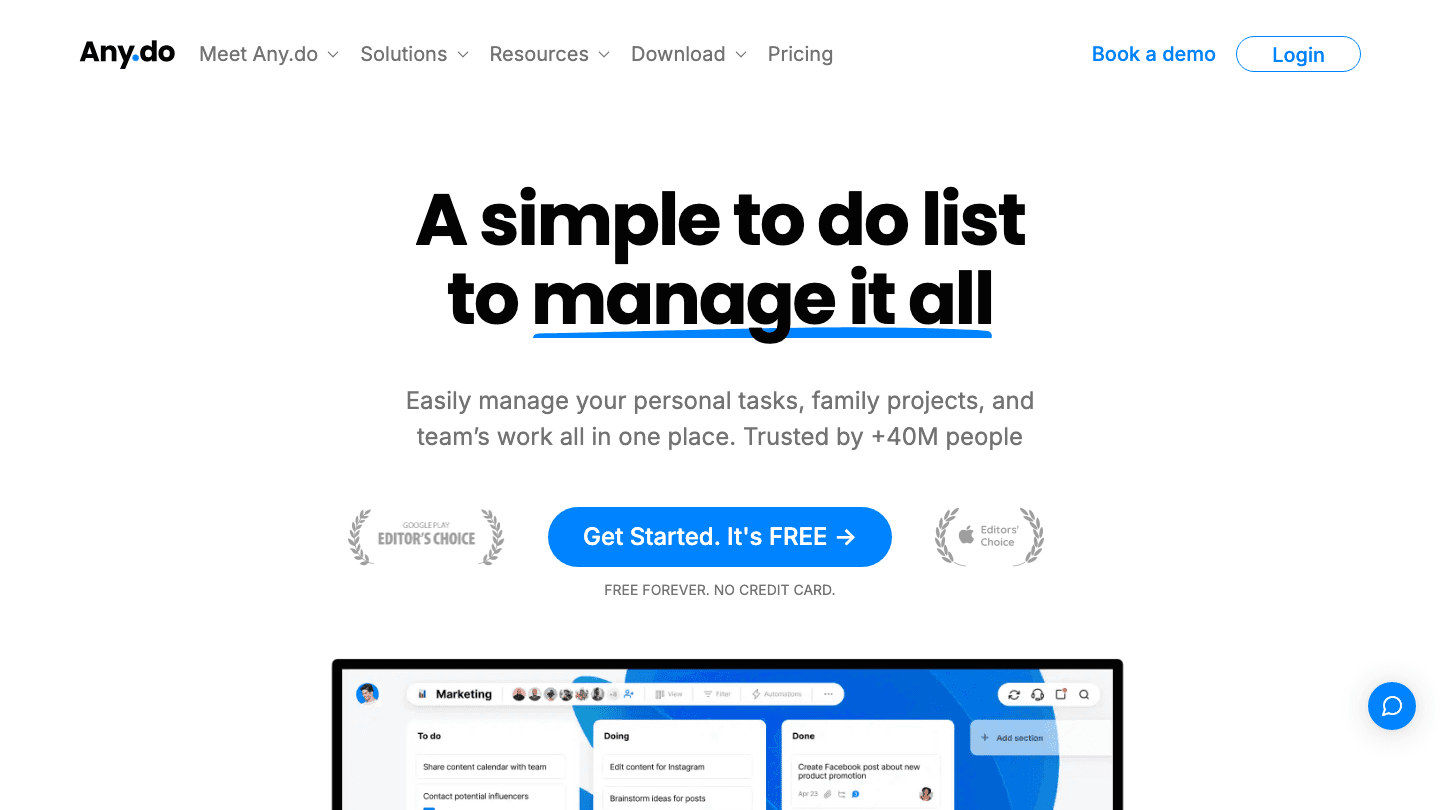
Any.do keeps things simple: tasks, lists, reminders, a calendar view, and a daily planning feature called "My Day" that surfaces your most important tasks each morning. The free tier includes cross-device sync and everything most individual users need for daily organisation. The clean interface and low learning curve make it the easiest entry point in this list.
The premium tier adds recurring tasks, WhatsApp reminders, AI task suggestions, colour tags, and location reminders. Any.do also has a family sharing plan that makes it the most sensible option for household task management: shared grocery lists, family projects, and tasks assigned to specific people. For a straightforward weekly planning system without spending money, Any.do is the most functional free option here.
Clean, minimal task management with My Day daily planner
Calendar integration with Google and Apple Calendar
WhatsApp reminders (Premium)
AI task suggestions and smart scheduling (Premium)
Family sharing for household task management
What Works: The free tier is genuinely useful, not a preview. The family sharing tier is the best household task organiser in this group.
Limitations: Less powerful than Todoist for complex personal task management. AI features are behind the premium paywall.
Pricing: Free forever; Premium $4.99/month billed annually or $7.99/month. any.do
Best for: Individuals or families who want a clean, free daily organiser without committing to a premium subscription.
Which Daily Organiser App Is Right for You?
For AI scheduling that adapts to your energy: Lifestack. It's the only organiser here that treats your energy levels as a scheduling input, not an afterthought.
For the fastest task capture and best filter system: Todoist. It's been the benchmark for pure task management for a reason.
For a single workspace combining notes, tasks, and databases: Notion. Highest setup effort, highest flexibility ceiling.
For structured daily rituals and anti-overcommitment: Sunsama. Expensive, but it solves a specific problem better than anyone else.
For tasks, habits, and timers in one app: TickTick. Best all-in-one, especially if you also want a built-in habit tracker.
For a free daily organiser that actually works: Any.do. The cleanest free option, with a solid family sharing plan as a bonus.
FAQ
What is the best free daily organiser app?
Any.do offers the most functional free tier: cross-device sync, a daily planner view, calendar integration, and basic task management with no time limit. Todoist's free tier is also strong, covering up to 5 projects with full natural language input. Notion is free for individuals and covers unlimited blocks and pages.
What's the difference between a daily organiser app and a task manager?
A task manager captures and stores tasks. A daily organiser helps you decide which tasks to do today and in what order. Good daily organisers pull from your task backlog, account for your calendar, and help you build a realistic daily plan. Apps like Sunsama and Lifestack are explicitly daily organisers. Todoist and Any.do are primarily task managers with some daily planning features added.
Are daily organiser apps useful for people with ADHD?
Yes, with the right choice. People with ADHD tend to benefit most from apps that provide structure without friction: fast task capture, clear daily views, and gentle prioritisation. Lifestack's energy-aware scheduling is particularly useful since it accounts for the variability in focus and capacity that ADHD creates. See our guide to ADHD daily planner apps for a more specific breakdown.
Is Notion good as a daily organiser?
Yes, if you're willing to build the system. Notion's flexibility means it can be an excellent daily organiser, but it requires more initial setup than any other app in this list. Purpose-built daily planners like Sunsama or Lifestack are faster to get value from out of the box. Notion shines when your daily planning is intertwined with notes, reference material, and project documentation that you want to keep in one place.
How do I choose between Todoist and TickTick?
Todoist if you want the cleanest, fastest task manager with the best natural language parsing. TickTick if you also want a habit tracker, Pomodoro timer, and a stronger built-in calendar view. Both are excellent. Todoist's free tier covers more than TickTick's. TickTick's paid tier has more features for the price.
Can a daily organiser app help with work-life balance?
Indirectly, yes. Apps like Sunsama specifically include features designed to prevent overcommitment: time estimates, daily capacity warnings, and end-of-day rituals. Lifestack protects your personal energy by scheduling demanding work during your natural peak hours, leaving room for recovery in lower-energy windows. A good daily planning routine supported by the right app makes work boundaries more visible and easier to maintain.
A daily organiser app is only as useful as the decisions it helps you make. Most apps in this category do one thing well and everything else adequately. The ones worth using every day are the ones that match how you actually think: whether that's working from a simple task list, blocking time on a calendar, or building a schedule around your energy rather than just your hours.
We tested six daily organiser apps across different use cases: task capture, time blocking, AI scheduling, team collaboration, and habit integration. The six below represent a range of approaches and price points, from permanently free to premium-only. All pricing was verified at time of writing.
Key Takeaways
Lifestack is the strongest pick if you want an AI-powered organiser that builds your daily schedule around your energy levels, not just your available time slots.
Todoist and TickTick are the best pure task managers: reliable, cross-platform, and free to start. The right choice between them depends on whether you prefer simplicity or feature depth.
Sunsama is the most opinionated daily planner, designed specifically to prevent overcommitment. It's expensive but effective for people who consistently plan too much.
Quick Guide: Best Daily Organiser Apps
1. Lifestack: AI organiser that schedules tasks around your energy and focus windows
2. Todoist: Best-in-class task manager with natural language input and calendar sync
3. Notion: All-in-one workspace with databases, notes, and unlimited customisation
4. Sunsama: Intentional daily planner with time boxing and burnout prevention
5. TickTick: Task manager plus calendar plus habit tracker in one app
6. Any.do: Simple task list with smart daily planning and free forever tier
How We Evaluated These Apps
Ease of daily capture (frictionless task entry matters more than features you'll never use)
Calendar integration and time-blocking support
AI scheduling or prioritisation capabilities
Cross-platform consistency (iOS, Android, web, desktop)
Value at both the free and paid tiers
1. Lifestack: Best Overall Daily Organiser
AI scheduling that builds your day around your energy, not just your calendar
Most daily organiser apps treat all hours as equal. Lifestack doesn't. It connects to your calendar, tasks, and health data, identifies when your energy is naturally highest across the day, and builds a schedule that puts your most demanding work in your peak windows. Shallow tasks, meetings, and admin fill the natural dips. The result is a daily plan that works with your biology rather than against it.
This approach is particularly useful for anyone who finds that the same tasks feel completely different depending on when they do them. Energy-based scheduling isn't a new concept, but Lifestack automates it in a way that most people haven't experienced from a daily organiser before. The app runs on iOS and Android with a Chrome extension for desktop task capture, and it syncs with Google Calendar and Apple Calendar.
AI builds a daily schedule around your energy patterns and sleep data
Connects to Google Calendar, Apple Calendar, and Apple Health or Oura
Automatically reschedules tasks that didn't get done without manual drag-and-drop
Chrome extension for fast task capture from any web page
iOS and Android apps with a clean, minimal interface
What Works: The energy-aware scheduling is genuinely different from every other daily organiser in this list. If you've tried time-blocking and found it falls apart because your capacity changes day to day, Lifestack solves the exact problem you're experiencing.
Limitations: Less suited to teams that need shared project management or heavy collaboration. Works best as a personal scheduling layer on top of shared calendars rather than a team workspace replacement.
Pricing: $7/month or $50/year (7-day free trial on annual plan). lifestack.ai
Best for: Anyone who wants their daily organiser to do more than list tasks and tell them the time.
2. Todoist: Best Task Manager
Natural language task entry, powerful filters, rock-solid cross-platform sync
Todoist has been the standard-bearer for personal task management for years and has earned that position through consistent execution rather than flashy features. The natural language parser is the best in the category: type "call dentist Friday at 3pm p1" and it creates the task, sets the due date, time, and priority in one motion. The filter system is powerful enough that most people never exhaust its possibilities.
The app syncs instantly across every platform, including a desktop app, mobile, browser extension, and integrations with Slack, Google Calendar, and dozens of other tools. The free tier covers most individual users' needs. The Pro tier adds reminders, calendar layout, task durations, and more detailed reporting. Todoist is the right choice if you want a reliable daily task system that stays out of the way.
Best-in-class natural language task entry
Powerful filter and label system for custom views
Calendar layout with drag-and-drop scheduling (Pro)
Integrations with 80+ apps including Google Calendar and Slack
Available on every platform with fast, reliable sync
What Works: The core task capture is faster than any other app here. For people whose primary need is a frictionless inbox that stays organised, Todoist remains the benchmark.
Limitations: The calendar view feels bolted on compared to apps built around time blocking from the start. No energy-aware scheduling. Limited note-taking beyond task descriptions.
Pricing: Free (5 projects), Pro $6.99/month or $59.99/year (7-day trial). todoist.com
Best for: People who primarily need a fast, reliable task list that syncs everywhere and doesn't get in the way.
3. Notion: Best All-in-One Workspace
Databases, notes, tasks, and wikis in one customisable workspace
Notion is the most flexible tool in this list and, consequently, the one that requires the most setup. It can be a task manager, a note-taking app, a project tracker, a habit log, a personal wiki, or all five simultaneously, depending on how you configure it. The database system is the core of its power: you can build views of the same data as a list, calendar, kanban board, gallery, or table.
As a daily organiser specifically, Notion works best when you've built a system that fits your workflow. Out of the box, it requires meaningful customisation before it replaces a purpose-built task manager. The AI layer added in recent versions helps: it can summarise pages, generate task lists from notes, and fill in database fields automatically. If you're already living in Notion for notes and projects, building your daily planning routine inside it is a natural extension.
Flexible database system with multiple view types (list, calendar, kanban, gallery)
Notes and tasks in the same workspace
AI writing, summarisation, and task generation
Powerful templates for daily planning, habit tracking, and more
Generous free tier for individual use
What Works: Unmatched flexibility. If your organisation needs don't fit a pre-built tool's structure, Notion lets you build exactly what you need.
Limitations: The flexibility is also the friction. Notion requires real setup investment to use as a daily organiser, and mobile performance can lag behind purpose-built task apps.
Pricing: Free, Plus $10/month per member (20% off annually). notion.com
Best for: People who want a single workspace for notes, projects, and tasks, and are willing to invest time in building their system.
4. Sunsama: Best for Intentional Daily Planning
Daily rituals, time boxing, and a hard limit on how much you can plan each day
Sunsama is the most opinionated app in this list. It's built around the philosophy that most people plan too much and execute too little, and it structures the entire experience around daily rituals: a morning planning session where you pull tasks from connected tools (Trello, Asana, Linear, GitHub, Todoist), add time estimates, and commit to a realistic day. When your estimated time exceeds your available hours, the app surfaces that conflict before your day starts rather than after it's already derailed.
The time boxing approach is strict: each task gets a duration, and the daily timeline shows you exactly whether the day is feasible. Integrations with common project tools mean you don't need to re-enter work that lives elsewhere. The structured planning ritual Sunsama enforces is what its fans love most and what its detractors find too rigid. If daily overcommitment is a persistent problem for you, Sunsama addresses it more directly than any other app here.
Daily planning ritual with morning and evening check-ins
Time estimation built into every task
Integrations with Trello, Asana, Linear, GitHub, Todoist, and more
Weekly review with reflection prompts
Calendar sync with time blocking
What Works: The morning planning ritual creates a structured daily habit that most open-ended task managers don't. The overcommitment warning is the most practical burnout prevention feature in any daily organiser.
Limitations: Premium-only with no permanent free tier. At $17/month annually, it's the most expensive app in this list and requires consistent use of the rituals to justify the cost.
Pricing: $17/month billed annually or $22/month billed monthly (14-day free trial). sunsama.com
Best for: People who consistently overplan their days and want an app that structures the planning ritual to prevent it.
5. TickTick: Best for Tasks Plus Habits
Task manager, calendar, habit tracker, and Pomodoro timer in one app
TickTick packs more functionality into a single app than anything else in this list. It's a task manager with natural language input, a calendar view, a built-in Pomodoro timer, a habit tracker, a whiteboard for quick brainstorming, and a focus mode. For people who want to consolidate multiple apps into one, it's the obvious candidate.
The calendar view is better than Todoist's: you can drag tasks directly onto the calendar timeline and see your day as a combined view of calendar events and tasks. The habit tracker integrates with the task system rather than sitting in a separate silo. The Pomodoro timer shows session counts on each task. Where TickTick sometimes struggles is the breadth of features introducing some interface complexity that purpose-built apps avoid.
Task management with natural language due dates and priorities
Calendar view with drag-and-drop time blocking
Built-in habit tracker with streaks
Pomodoro timer integrated with tasks
Available on all platforms including watchOS and Apple Watch
What Works: The all-in-one approach means fewer apps to manage. The calendar integration is the best among pure task managers.
Limitations: The breadth can feel overwhelming for users who want simplicity. The free tier is more limited than Todoist's free offering.
Pricing: Free, Premium $4.99/month or $49.99/year. ticktick.com
Best for: People who want to replace multiple apps (task manager + habit tracker + calendar + timer) with one.
6. Any.do: Best Free Daily Organiser
Clean task management with a free tier that actually covers daily needs
Any.do keeps things simple: tasks, lists, reminders, a calendar view, and a daily planning feature called "My Day" that surfaces your most important tasks each morning. The free tier includes cross-device sync and everything most individual users need for daily organisation. The clean interface and low learning curve make it the easiest entry point in this list.
The premium tier adds recurring tasks, WhatsApp reminders, AI task suggestions, colour tags, and location reminders. Any.do also has a family sharing plan that makes it the most sensible option for household task management: shared grocery lists, family projects, and tasks assigned to specific people. For a straightforward weekly planning system without spending money, Any.do is the most functional free option here.
Clean, minimal task management with My Day daily planner
Calendar integration with Google and Apple Calendar
WhatsApp reminders (Premium)
AI task suggestions and smart scheduling (Premium)
Family sharing for household task management
What Works: The free tier is genuinely useful, not a preview. The family sharing tier is the best household task organiser in this group.
Limitations: Less powerful than Todoist for complex personal task management. AI features are behind the premium paywall.
Pricing: Free forever; Premium $4.99/month billed annually or $7.99/month. any.do
Best for: Individuals or families who want a clean, free daily organiser without committing to a premium subscription.
Which Daily Organiser App Is Right for You?
For AI scheduling that adapts to your energy: Lifestack. It's the only organiser here that treats your energy levels as a scheduling input, not an afterthought.
For the fastest task capture and best filter system: Todoist. It's been the benchmark for pure task management for a reason.
For a single workspace combining notes, tasks, and databases: Notion. Highest setup effort, highest flexibility ceiling.
For structured daily rituals and anti-overcommitment: Sunsama. Expensive, but it solves a specific problem better than anyone else.
For tasks, habits, and timers in one app: TickTick. Best all-in-one, especially if you also want a built-in habit tracker.
For a free daily organiser that actually works: Any.do. The cleanest free option, with a solid family sharing plan as a bonus.
FAQ
What is the best free daily organiser app?
Any.do offers the most functional free tier: cross-device sync, a daily planner view, calendar integration, and basic task management with no time limit. Todoist's free tier is also strong, covering up to 5 projects with full natural language input. Notion is free for individuals and covers unlimited blocks and pages.
What's the difference between a daily organiser app and a task manager?
A task manager captures and stores tasks. A daily organiser helps you decide which tasks to do today and in what order. Good daily organisers pull from your task backlog, account for your calendar, and help you build a realistic daily plan. Apps like Sunsama and Lifestack are explicitly daily organisers. Todoist and Any.do are primarily task managers with some daily planning features added.
Are daily organiser apps useful for people with ADHD?
Yes, with the right choice. People with ADHD tend to benefit most from apps that provide structure without friction: fast task capture, clear daily views, and gentle prioritisation. Lifestack's energy-aware scheduling is particularly useful since it accounts for the variability in focus and capacity that ADHD creates. See our guide to ADHD daily planner apps for a more specific breakdown.
Is Notion good as a daily organiser?
Yes, if you're willing to build the system. Notion's flexibility means it can be an excellent daily organiser, but it requires more initial setup than any other app in this list. Purpose-built daily planners like Sunsama or Lifestack are faster to get value from out of the box. Notion shines when your daily planning is intertwined with notes, reference material, and project documentation that you want to keep in one place.
How do I choose between Todoist and TickTick?
Todoist if you want the cleanest, fastest task manager with the best natural language parsing. TickTick if you also want a habit tracker, Pomodoro timer, and a stronger built-in calendar view. Both are excellent. Todoist's free tier covers more than TickTick's. TickTick's paid tier has more features for the price.
Can a daily organiser app help with work-life balance?
Indirectly, yes. Apps like Sunsama specifically include features designed to prevent overcommitment: time estimates, daily capacity warnings, and end-of-day rituals. Lifestack protects your personal energy by scheduling demanding work during your natural peak hours, leaving room for recovery in lower-energy windows. A good daily planning routine supported by the right app makes work boundaries more visible and easier to maintain.



FOLLOW ON
FOLLOW ON
FOLLOW ON


Copyright 2026 © Lifestack. All rights reserved
Copyright 2026 © Lifestack. All rights reserved

