
Tips
Garmin Connect Training Plans: Complete Guide
Garmin Connect Training Plans: Complete Guide

If you own a Garmin watch, you already have access to one of the most structured training systems in fitness. Garmin Connect training plans are built into the app at no extra cost, and they cover everything from your first 5K to completing a full triathlon. The question most people run into is: how do you actually use them?
This guide walks through exactly how Garmin Connect training plans work, what types are available, how Garmin Coach adapts to your performance, and how to get a plan synced to your watch and running in under ten minutes.
We'll also cover what happens when life gets in the way and you miss a workout. Spoiler: the system handles it better than you'd expect.
What Are Garmin Connect Training Plans?
Garmin Connect training plans are structured workout schedules that live inside the Garmin Connect app. You pick a goal (finish a 10K, complete a century ride, build a strength base) and a target date, and the system generates a week-by-week training schedule tailored to that goal. Each planned workout appears directly on your Garmin watch so you don't have to remember what's on the schedule each morning.
Unlike a PDF training plan you'd download from a running website, these plans connect to your actual biometric data. Your Body Battery, VO2 max estimate, training load, and recovery metrics all feed into how the plan adapts over time.
The plans are free and included with any compatible Garmin device. There's no subscription required beyond the standard Garmin Connect account.
Garmin Coach: Adaptive Plans Built In
Garmin Coach is the adaptive training system inside Garmin Connect. It goes further than a static training plan. Where a traditional plan gives you the same workouts regardless of how Monday's run felt, Garmin Coach recalibrates based on your actual data.
The running coach options are Jeff Galloway, Greg McMillan, and Amy Parkerson-Mitchell. Each has a different coaching philosophy. Galloway uses run-walk intervals and is a great fit for beginners. McMillan emphasizes speed development and suits runners chasing a goal time. Parkerson-Mitchell builds consistent aerobic base and works well for first-timers tackling longer distances.
The adaptive layer pulls from your VO2 max, lactate threshold estimate, training load, sleep quality, and stress data. If you had poor sleep before a tempo run, the plan may ease the intensity. If you crushed your last interval session, it may push the next one harder. The adjustments happen automatically, without you having to log anything extra.
Garmin Coach plans are structured around periodization: a base phase for aerobic foundation, a build phase for fitness gains, a peak phase for top performance, a taper leading into race week, and a race prep block for the final few days. It mirrors what a human running coach would design.
Training Plan Types and Distances
Garmin Connect covers five main sport categories, each with its own plan library.
Running plans include 5K, 10K, half marathon, and full marathon goals. Time frames range from 8 weeks (for a 5K with a base already built) to 20 weeks for a marathon from scratch. Plans include easy runs, long runs, tempo runs, interval sessions, recovery runs, and race-pace workouts.
Cycling plans target century rides, gran fondos, metric centuries, mountain biking events, and time trials. Plan length runs from 6 to 30 weeks depending on the event and your starting fitness level.
Triathlon plans cover sprint, Olympic, and half-distance events. These include brick workouts (back-to-back swim-bike or bike-run sessions) that simulate race-day transitions.
Strength plans focus on gym-based training with progressive overload built in.
Fitness plans are the most flexible. They cover general fitness goals across 20-plus activity types, useful if you're not training for a specific event but want a structured approach to staying active.
For more on how different Garmin watches handle training metrics, see our Garmin watch series comparison.
How to Set Up a Garmin Connect Training Plan
The setup takes less than ten minutes once your watch is paired.
Open Garmin Connect on your phone or desktop and navigate to Training and Planning
Choose your sport and goal (5K, 10K, half marathon, marathon, cycling event, etc.)
Select your coach for running plans, or browse the available plan library for other sports
Set your target finish time or select "Just Finish" if completing the event is the goal
Enter your race date. Garmin requires at least 8 weeks for a 5K and 12 to 16 weeks for longer distances
Choose your available training days, typically 3 to 5 per week
Confirm and sync. The plan transfers to your watch automatically over Bluetooth
Once active, the plan shows up in your Garmin Connect calendar view. Each workout day shows the type and duration of that session. If you use Garmin Connect's calendar export, you can also pull the training schedule into Google or Apple Calendar with an ICS feed. Our Garmin Connect calendar guide covers the sync setup step by step.
How Plans Sync to Your Garmin Watch
After you set up a plan, your watch receives the scheduled workouts the next time Garmin Connect syncs. On most watches, this happens automatically when your phone is nearby with Bluetooth on. If a workout doesn't appear, open Garmin Connect, go to your profile, and tap the sync button manually.
On your watch, the upcoming workout shows up as a suggestion. For Garmin Coach plans, you'll see it labeled as a suggested workout for the day. Tap to start, and your watch guides you through the structure: warmup, main set with pace or heart rate targets, cooldown. It tells you when to speed up or slow down and tracks your effort against the target in real time.
Watches with training load and recovery time features (like the Forerunner 165 and higher-end models) will also show how the workout fits into your current training load. If you're already carrying a heavy load from the week, the watch notes it before you start.
What Happens When You Miss a Workout
Life happens. Garmin Coach was built with the assumption that you won't complete every session on the schedule.
When you skip a workout, the plan doesn't just move on. It recalibrates. Easy sessions may be dropped to protect your bigger training priorities. If you miss a key interval workout, the system may move it, shorten it, or adjust the intensity on the next attempt based on your current recovery state.
The same logic applies when you overperform. If you run a tempo session significantly faster than the target pace, Garmin Coach takes that as a signal to adjust future sessions upward. The plan isn't static; it tracks your trajectory.
Static training plans from PDF guides have no mechanism for this. If you miss week 4, you're guessing whether to repeat it or push forward. Garmin Coach removes that guesswork.
How to Schedule Training Around Your Real Life
The harder challenge isn't setting up the plan. It's fitting 5 training days into a week that already has work, meetings, and family commitments. That's where many training plans fall apart.
Garmin Connect lets you designate which days are available for training, but it doesn't see your calendar. It doesn't know that you have back-to-back meetings on Tuesday or that Thursday evening is your only open window this week. That scheduling layer still falls to you.
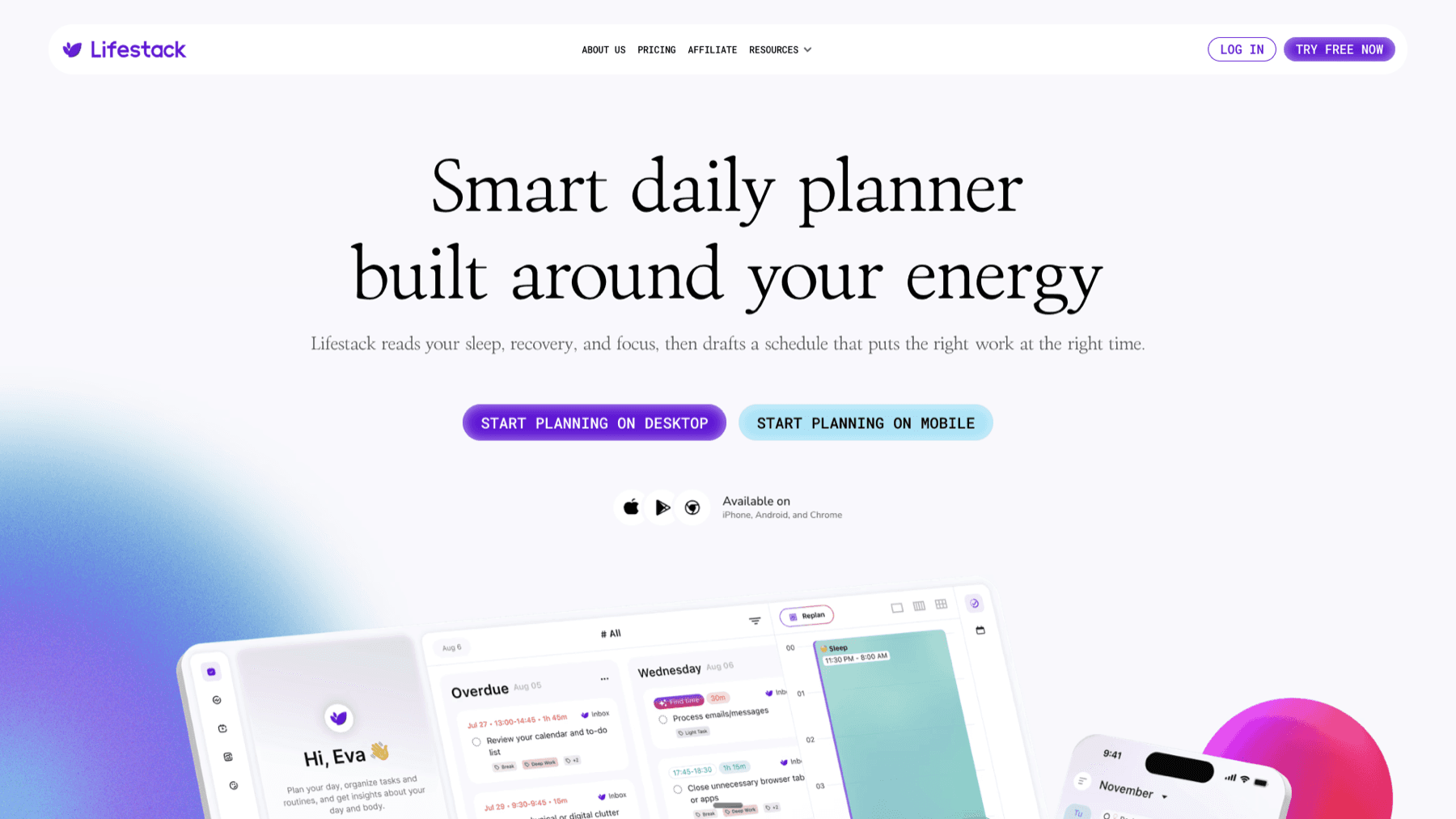
Lifestack is an AI scheduling app that connects to your Garmin data and builds your daily schedule around your actual energy and recovery state. It reads your Body Battery score and HRV metrics and uses them to decide when to place demanding tasks versus light ones. If you have a hard interval session on the schedule, Lifestack can front-load your focused work in the morning and clear the afternoon for the run. For more on how this works, see our guide on the best apps to use with Garmin.
The result is a full-day schedule where your training fits into the actual gaps in your day, not just the ones you optimistically set when you first configured the plan. For athletes juggling work and training, that difference adds up over a 16-week training block. You can also explore how activity tracking apps integrate with this kind of intelligent scheduling.
Best Tool for Garmin Training Plan Scheduling
If you want your training plan to actually stick, Lifestack is the tool that connects the Garmin Connect data you're already generating to the rest of your day. It syncs with your Garmin Body Battery, reads your recovery status, and builds a daily plan that puts your hardest work (whether that's a tempo run or a focused work session) when your energy is at its peak. Athletes using Strava alongside Garmin can also check out the best apps to use with Strava for a broader look at training ecosystem tools.
Pricing: $9.99/month, $49.99/year (7-day free trial on annual plan), or $120 lifetime. No permanent free tier.
Frequently Asked Questions
Are Garmin Connect training plans free?
Yes. All Garmin Connect training plans, including Garmin Coach, are free and included with any compatible Garmin device. No subscription is required beyond a standard Garmin Connect account.
How long are Garmin Connect training plans?
Plan length depends on the event and your starting fitness. 5K plans start at 8 weeks. 10K and half marathon plans typically run 10 to 14 weeks. Full marathon plans are usually 16 to 20 weeks. Cycling plans range from 6 to 30 weeks.
Can I use Garmin Connect training plans without a race date?
Garmin Coach requires you to enter a goal event date to generate a plan. If you don't have a specific race, you can enter a future date several months out and treat the plan as ongoing structured training rather than race prep.
What Garmin watches support training plans?
Most Garmin GPS watches from the Forerunner, Fenix, Epix, Instinct, Venu, and Vivoactive lines support Garmin Connect training plans. The specific features (like adaptive Garmin Coach) may vary by model. Check the Garmin watch comparison guide for a model-by-model breakdown.
Can I do multiple Garmin training plans at once?
Garmin Coach supports one active plan at a time per sport. You could technically run a running plan alongside a strength plan, but the system is designed around a primary goal event and a single plan is usually cleaner to follow.
How do I cancel or change a Garmin training plan?
In Garmin Connect, go to Training and Planning, find your active plan, and select the option to modify or remove it. You can change your goal time, adjust your race date, or end the plan entirely at any point. Changes sync to your watch on the next connection.
If you own a Garmin watch, you already have access to one of the most structured training systems in fitness. Garmin Connect training plans are built into the app at no extra cost, and they cover everything from your first 5K to completing a full triathlon. The question most people run into is: how do you actually use them?
This guide walks through exactly how Garmin Connect training plans work, what types are available, how Garmin Coach adapts to your performance, and how to get a plan synced to your watch and running in under ten minutes.
We'll also cover what happens when life gets in the way and you miss a workout. Spoiler: the system handles it better than you'd expect.
What Are Garmin Connect Training Plans?
Garmin Connect training plans are structured workout schedules that live inside the Garmin Connect app. You pick a goal (finish a 10K, complete a century ride, build a strength base) and a target date, and the system generates a week-by-week training schedule tailored to that goal. Each planned workout appears directly on your Garmin watch so you don't have to remember what's on the schedule each morning.
Unlike a PDF training plan you'd download from a running website, these plans connect to your actual biometric data. Your Body Battery, VO2 max estimate, training load, and recovery metrics all feed into how the plan adapts over time.
The plans are free and included with any compatible Garmin device. There's no subscription required beyond the standard Garmin Connect account.
Garmin Coach: Adaptive Plans Built In
Garmin Coach is the adaptive training system inside Garmin Connect. It goes further than a static training plan. Where a traditional plan gives you the same workouts regardless of how Monday's run felt, Garmin Coach recalibrates based on your actual data.
The running coach options are Jeff Galloway, Greg McMillan, and Amy Parkerson-Mitchell. Each has a different coaching philosophy. Galloway uses run-walk intervals and is a great fit for beginners. McMillan emphasizes speed development and suits runners chasing a goal time. Parkerson-Mitchell builds consistent aerobic base and works well for first-timers tackling longer distances.
The adaptive layer pulls from your VO2 max, lactate threshold estimate, training load, sleep quality, and stress data. If you had poor sleep before a tempo run, the plan may ease the intensity. If you crushed your last interval session, it may push the next one harder. The adjustments happen automatically, without you having to log anything extra.
Garmin Coach plans are structured around periodization: a base phase for aerobic foundation, a build phase for fitness gains, a peak phase for top performance, a taper leading into race week, and a race prep block for the final few days. It mirrors what a human running coach would design.
Training Plan Types and Distances
Garmin Connect covers five main sport categories, each with its own plan library.
Running plans include 5K, 10K, half marathon, and full marathon goals. Time frames range from 8 weeks (for a 5K with a base already built) to 20 weeks for a marathon from scratch. Plans include easy runs, long runs, tempo runs, interval sessions, recovery runs, and race-pace workouts.
Cycling plans target century rides, gran fondos, metric centuries, mountain biking events, and time trials. Plan length runs from 6 to 30 weeks depending on the event and your starting fitness level.
Triathlon plans cover sprint, Olympic, and half-distance events. These include brick workouts (back-to-back swim-bike or bike-run sessions) that simulate race-day transitions.
Strength plans focus on gym-based training with progressive overload built in.
Fitness plans are the most flexible. They cover general fitness goals across 20-plus activity types, useful if you're not training for a specific event but want a structured approach to staying active.
For more on how different Garmin watches handle training metrics, see our Garmin watch series comparison.
How to Set Up a Garmin Connect Training Plan
The setup takes less than ten minutes once your watch is paired.
Open Garmin Connect on your phone or desktop and navigate to Training and Planning
Choose your sport and goal (5K, 10K, half marathon, marathon, cycling event, etc.)
Select your coach for running plans, or browse the available plan library for other sports
Set your target finish time or select "Just Finish" if completing the event is the goal
Enter your race date. Garmin requires at least 8 weeks for a 5K and 12 to 16 weeks for longer distances
Choose your available training days, typically 3 to 5 per week
Confirm and sync. The plan transfers to your watch automatically over Bluetooth
Once active, the plan shows up in your Garmin Connect calendar view. Each workout day shows the type and duration of that session. If you use Garmin Connect's calendar export, you can also pull the training schedule into Google or Apple Calendar with an ICS feed. Our Garmin Connect calendar guide covers the sync setup step by step.
How Plans Sync to Your Garmin Watch
After you set up a plan, your watch receives the scheduled workouts the next time Garmin Connect syncs. On most watches, this happens automatically when your phone is nearby with Bluetooth on. If a workout doesn't appear, open Garmin Connect, go to your profile, and tap the sync button manually.
On your watch, the upcoming workout shows up as a suggestion. For Garmin Coach plans, you'll see it labeled as a suggested workout for the day. Tap to start, and your watch guides you through the structure: warmup, main set with pace or heart rate targets, cooldown. It tells you when to speed up or slow down and tracks your effort against the target in real time.
Watches with training load and recovery time features (like the Forerunner 165 and higher-end models) will also show how the workout fits into your current training load. If you're already carrying a heavy load from the week, the watch notes it before you start.
What Happens When You Miss a Workout
Life happens. Garmin Coach was built with the assumption that you won't complete every session on the schedule.
When you skip a workout, the plan doesn't just move on. It recalibrates. Easy sessions may be dropped to protect your bigger training priorities. If you miss a key interval workout, the system may move it, shorten it, or adjust the intensity on the next attempt based on your current recovery state.
The same logic applies when you overperform. If you run a tempo session significantly faster than the target pace, Garmin Coach takes that as a signal to adjust future sessions upward. The plan isn't static; it tracks your trajectory.
Static training plans from PDF guides have no mechanism for this. If you miss week 4, you're guessing whether to repeat it or push forward. Garmin Coach removes that guesswork.
How to Schedule Training Around Your Real Life
The harder challenge isn't setting up the plan. It's fitting 5 training days into a week that already has work, meetings, and family commitments. That's where many training plans fall apart.
Garmin Connect lets you designate which days are available for training, but it doesn't see your calendar. It doesn't know that you have back-to-back meetings on Tuesday or that Thursday evening is your only open window this week. That scheduling layer still falls to you.
Lifestack is an AI scheduling app that connects to your Garmin data and builds your daily schedule around your actual energy and recovery state. It reads your Body Battery score and HRV metrics and uses them to decide when to place demanding tasks versus light ones. If you have a hard interval session on the schedule, Lifestack can front-load your focused work in the morning and clear the afternoon for the run. For more on how this works, see our guide on the best apps to use with Garmin.
The result is a full-day schedule where your training fits into the actual gaps in your day, not just the ones you optimistically set when you first configured the plan. For athletes juggling work and training, that difference adds up over a 16-week training block. You can also explore how activity tracking apps integrate with this kind of intelligent scheduling.
Best Tool for Garmin Training Plan Scheduling
If you want your training plan to actually stick, Lifestack is the tool that connects the Garmin Connect data you're already generating to the rest of your day. It syncs with your Garmin Body Battery, reads your recovery status, and builds a daily plan that puts your hardest work (whether that's a tempo run or a focused work session) when your energy is at its peak. Athletes using Strava alongside Garmin can also check out the best apps to use with Strava for a broader look at training ecosystem tools.
Pricing: $9.99/month, $49.99/year (7-day free trial on annual plan), or $120 lifetime. No permanent free tier.
Frequently Asked Questions
Are Garmin Connect training plans free?
Yes. All Garmin Connect training plans, including Garmin Coach, are free and included with any compatible Garmin device. No subscription is required beyond a standard Garmin Connect account.
How long are Garmin Connect training plans?
Plan length depends on the event and your starting fitness. 5K plans start at 8 weeks. 10K and half marathon plans typically run 10 to 14 weeks. Full marathon plans are usually 16 to 20 weeks. Cycling plans range from 6 to 30 weeks.
Can I use Garmin Connect training plans without a race date?
Garmin Coach requires you to enter a goal event date to generate a plan. If you don't have a specific race, you can enter a future date several months out and treat the plan as ongoing structured training rather than race prep.
What Garmin watches support training plans?
Most Garmin GPS watches from the Forerunner, Fenix, Epix, Instinct, Venu, and Vivoactive lines support Garmin Connect training plans. The specific features (like adaptive Garmin Coach) may vary by model. Check the Garmin watch comparison guide for a model-by-model breakdown.
Can I do multiple Garmin training plans at once?
Garmin Coach supports one active plan at a time per sport. You could technically run a running plan alongside a strength plan, but the system is designed around a primary goal event and a single plan is usually cleaner to follow.
How do I cancel or change a Garmin training plan?
In Garmin Connect, go to Training and Planning, find your active plan, and select the option to modify or remove it. You can change your goal time, adjust your race date, or end the plan entirely at any point. Changes sync to your watch on the next connection.


FOLLOW ON
FOLLOW ON
FOLLOW ON



Copyright 2026 © Lifestack. All rights reserved
Copyright 2026 © Lifestack. All rights reserved

