
App
Motion AI Alternatives: 6 Better Options for 2026
Motion AI Alternatives: 6 Better Options for 2026
What is Motion AI (usemotion)?
Motion is a popular AI-powered productivity tool designed to help busy professionals manage their schedules and tasks. It aims to automate the planning process by intelligently scheduling tasks and meetings into your calendar. By analyzing your to-do list and deadlines, Motion attempts to find the optimal time for each item, reducing the mental overhead of manual scheduling. It's a powerful tool for those looking to streamline their day and ensure important tasks don't fall through the cracks.
Key features often highlighted include:
Automated Task Scheduling: Motion automatically places tasks into your calendar based on priority and deadlines.
Meeting Management: It helps find optimal times for meetings, considering attendees' availability.
Project Planning: Assists in breaking down larger projects into manageable tasks and scheduling them.
While Motion offers significant automation, many users find themselves seeking alternatives that offer a more nuanced approach to scheduling, especially when considering personal well-being and energy levels.
Why Motion Alternatives? Schedule Needs to Take Health into Account to Avoid Burnout
The modern professional's schedule is often a complex juggling act. While tools like Motion can help organize this chaos, a purely task-driven approach can sometimes lead to burnout. The reality is that our energy levels fluctuate throughout the day and week, and a rigid schedule that doesn't account for this can be counterproductive.
This is where the need for Motion alternatives becomes apparent. The ideal scheduler should not only manage your tasks but also respect your personal rhythms. Consider these points:
Energy-Based Scheduling: Understanding when you're most productive for deep work versus administrative tasks is crucial. An AI scheduler that can factor in your personal energy cycles can significantly boost efficiency and reduce stress. Why energy-based planning beats time blocking explains why this matters more than most schedulers acknowledge.
Preventing Over-Scheduling: Simply filling every available slot can lead to a feeling of being constantly rushed. Alternatives that allow for buffer time and acknowledge the need for breaks are essential for sustainable productivity.
Holistic Well-being: A truly effective daily planner integrates not just work tasks but also personal appointments, exercise, and even downtime, recognizing that these are all vital components of a balanced and productive life.
By choosing an alternative that prioritizes these aspects, you can move beyond just managing your time to truly optimizing your energy and focus.
1. Lifestack AI: Energy-Aware Planning Built for Focus
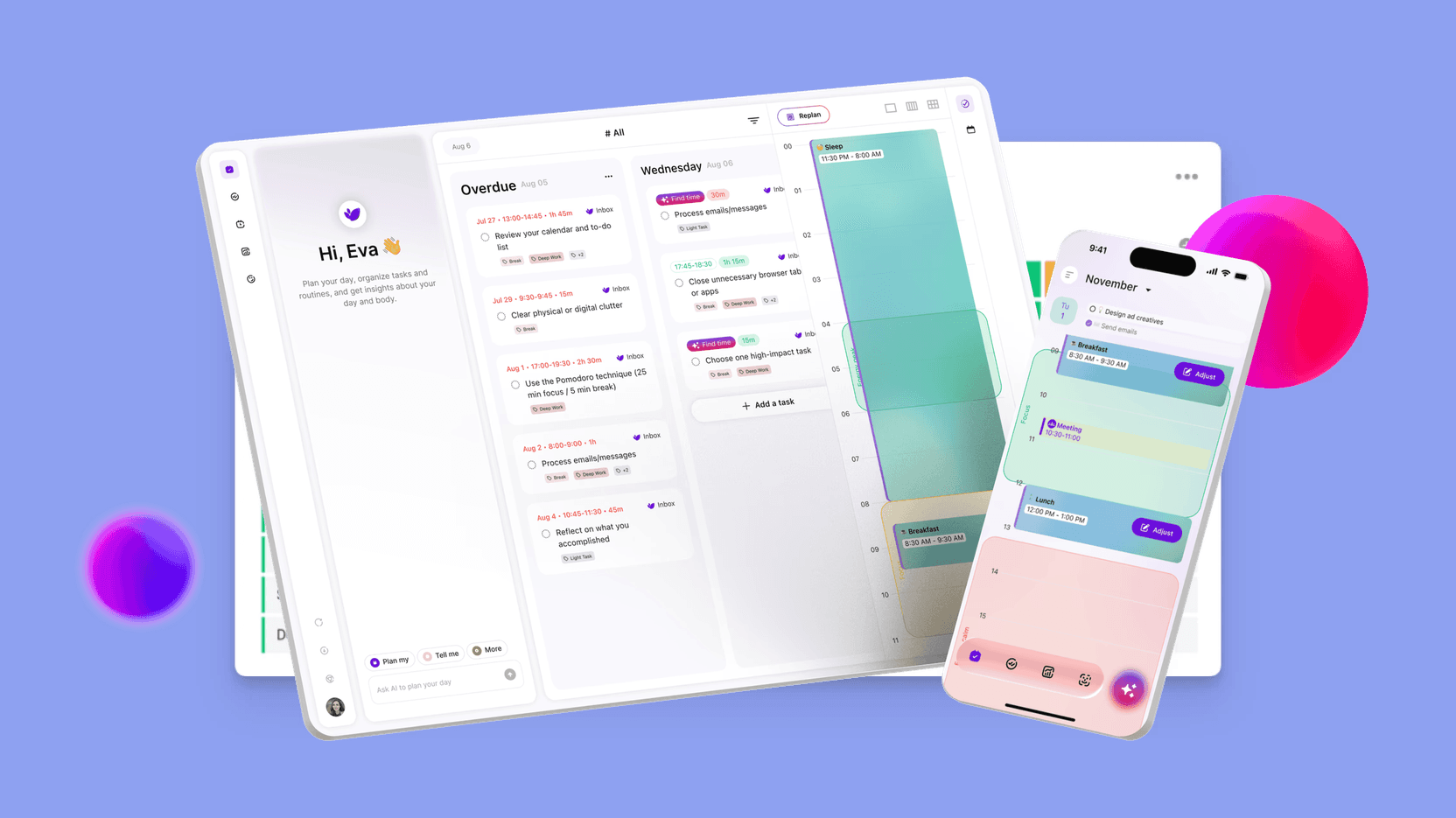
Lifestack AI is designed to help you do your best work without burning out. Instead of treating your calendar as a static list of tasks, it brings together your schedule, to-dos, and health data to create a plan that actually works for your body and mind.
This is productivity that adapts to you, not the other way around.
Key Features That Set Lifestack Apart
AI-Powered Smart Scheduling (Calendar + Tasks + Health): Lifestack intelligently combines your calendar, task list, and health data to automatically build a realistic daily plan. It schedules tasks and routines based on your energy and recovery levels — so you stay productive without overloading yourself. Learn how Lifestack works.
Energy Visualization: With Lifestack's energy heatmaps, you can clearly see when you're at your most focused and when you need rest. This makes it easy to align deep work with peak energy periods and reserve lighter tasks for low-energy moments, turning guesswork into clarity.
Assistant Planner for Daily Wellbeing: Beyond scheduling, Lifestack acts as a daily support system by offering personalized suggestions for sleep and meals based on your routine. It helps you maintain better habits and recovery, ensuring your productivity is backed by real wellbeing, not just willpower.
A Smarter Way to Plan Your Day
With seamless integration into your existing calendar, Lifestack fits naturally into your workflow while quietly optimizing it in the background. The result is a day that feels more structured, more intentional, and far less overwhelming.
Lifestack AI isn't just about getting things done — it's about helping you work in a way that's sustainable long-term. By aligning your tasks with your energy and supporting your overall wellbeing, it becomes a true partner in building focus, balance, and high performance.
Pricing: $7/month or $50/year
2. Sunsama: Ritual-Driven Planning Across Tasks and Calendar
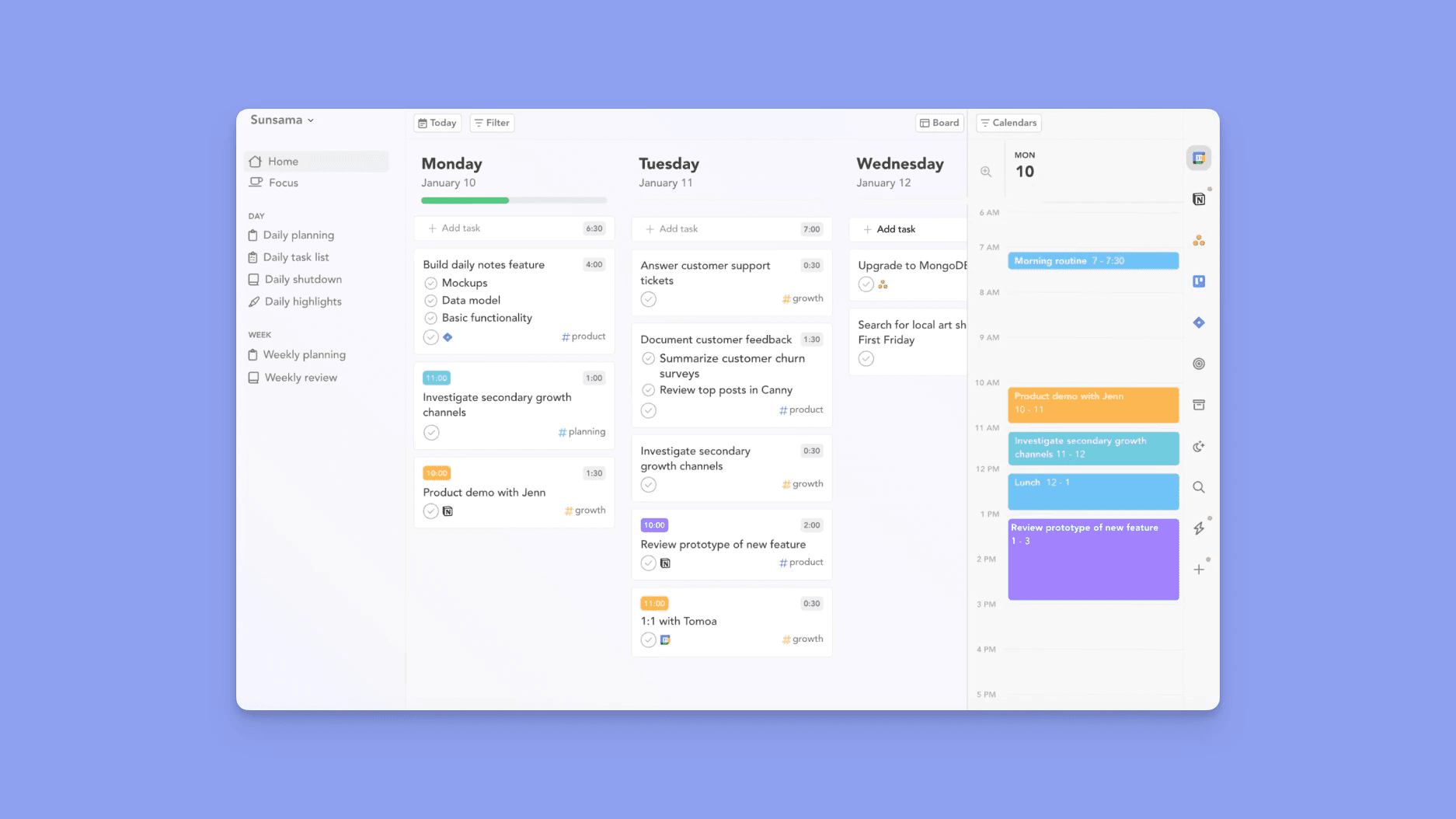
Sunsama offers a refreshing take on daily planning by focusing on creating intentional work rituals. It's designed for professionals who value a structured yet flexible approach to their day, integrating tasks, meetings, and personal time into a cohesive workflow.
Key aspects of Sunsama include:
Daily Planning Rituals: Sunsama encourages you to start and end your day with a dedicated planning session, helping you set intentions and review your progress.
Task Management Integration: It pulls tasks from various sources (like Asana, Trello, Jira) and allows you to drag and drop them into your daily plan.
Calendar Sync: Sunsama syncs with your Google Calendar and Outlook Calendar, providing a unified view of your commitments.
While not strictly an AI scheduler in the same vein as Lifestack, Sunsama's emphasis on mindful planning and its ability to integrate with your existing tools make it a strong contender for those who want more control over their daily planner. It helps you be more deliberate about how you spend your time, which is crucial for avoiding burnout.
Pricing: $22/month or $17/month billed annually
3. Akiflow: Command-Palette Scheduling with Deep Integrations
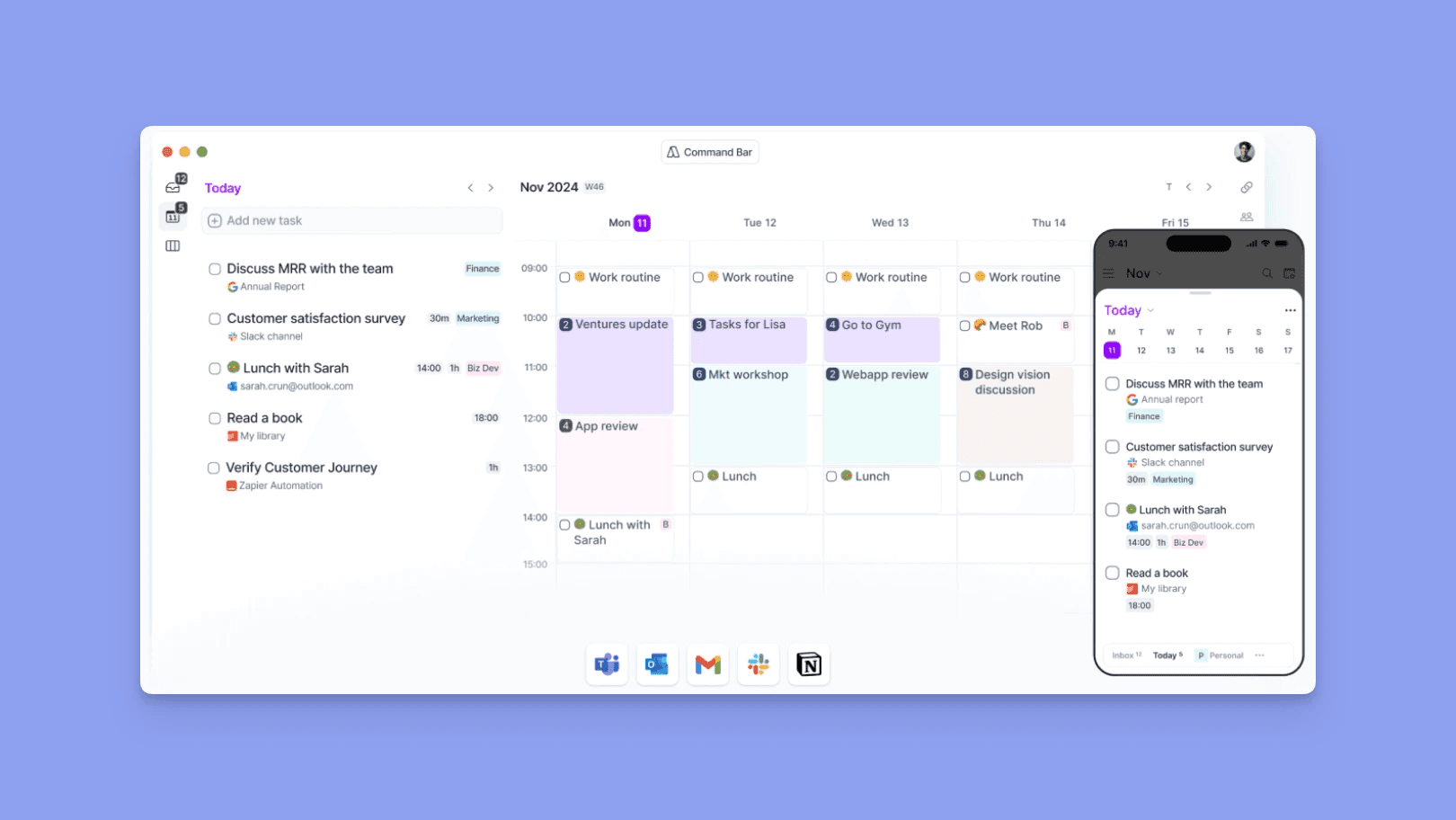
Akiflow is built for speed and efficiency, offering a powerful command palette that allows you to quickly schedule tasks, meetings, and events. It's an excellent choice for professionals who thrive on keyboard shortcuts and seamless integration with their favorite productivity apps.
Akiflow's strengths lie in:
Command Palette: Access all your tasks, calendar events, and actions through a single, fast interface.
Extensive Integrations: Connects with a wide range of task managers (Todoist, Asana, etc.) and calendars.
Time Blocking: Easily block out time for focused work or specific tasks directly in your calendar.
While Akiflow's AI capabilities are more focused on efficient input and organization rather than predictive scheduling, its ability to quickly turn your to-do list into scheduled blocks makes it a highly effective daily planner for those who want to minimize context switching.
Pricing: $34/month or $19/month billed annually
4. Morgen: Unified Workspace That Syncs Calendars, Tasks, and Focus Blocks
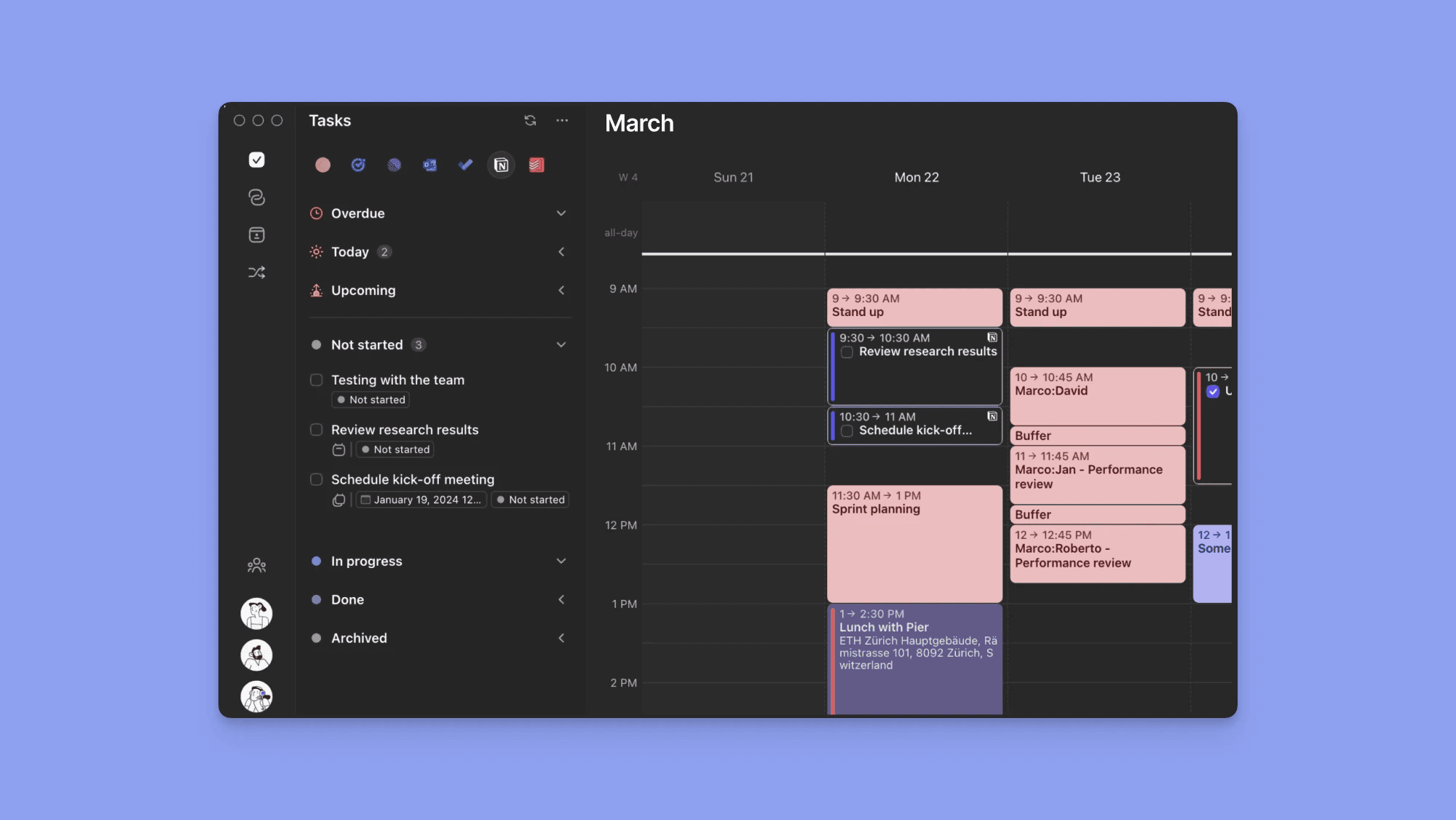
Morgen aims to be your all-in-one productivity hub, bringing together your calendars, tasks, and focus time into a single, intuitive interface. It's designed to reduce the friction of managing multiple tools and help you maintain a clear overview of your day.
Morgen's core features include:
Unified Calendar View: See all your calendars (Google, Outlook, etc.) in one place.
Task Management: Integrates with popular task managers and offers its own task list.
Focus Blocks: Schedule dedicated time for deep work, ensuring your most important tasks get the attention they deserve.
Morgen's strength lies in its ability to consolidate your digital workspace, making it easier to plan your day and protect your focus time. It acts as a central point for all your productivity needs, simplifying the process of using an AI scheduler or a manual daily planner.
Pricing: $30/month or $15/month billed annually
5. Reclaim: Automation That Protects Time with Buffers
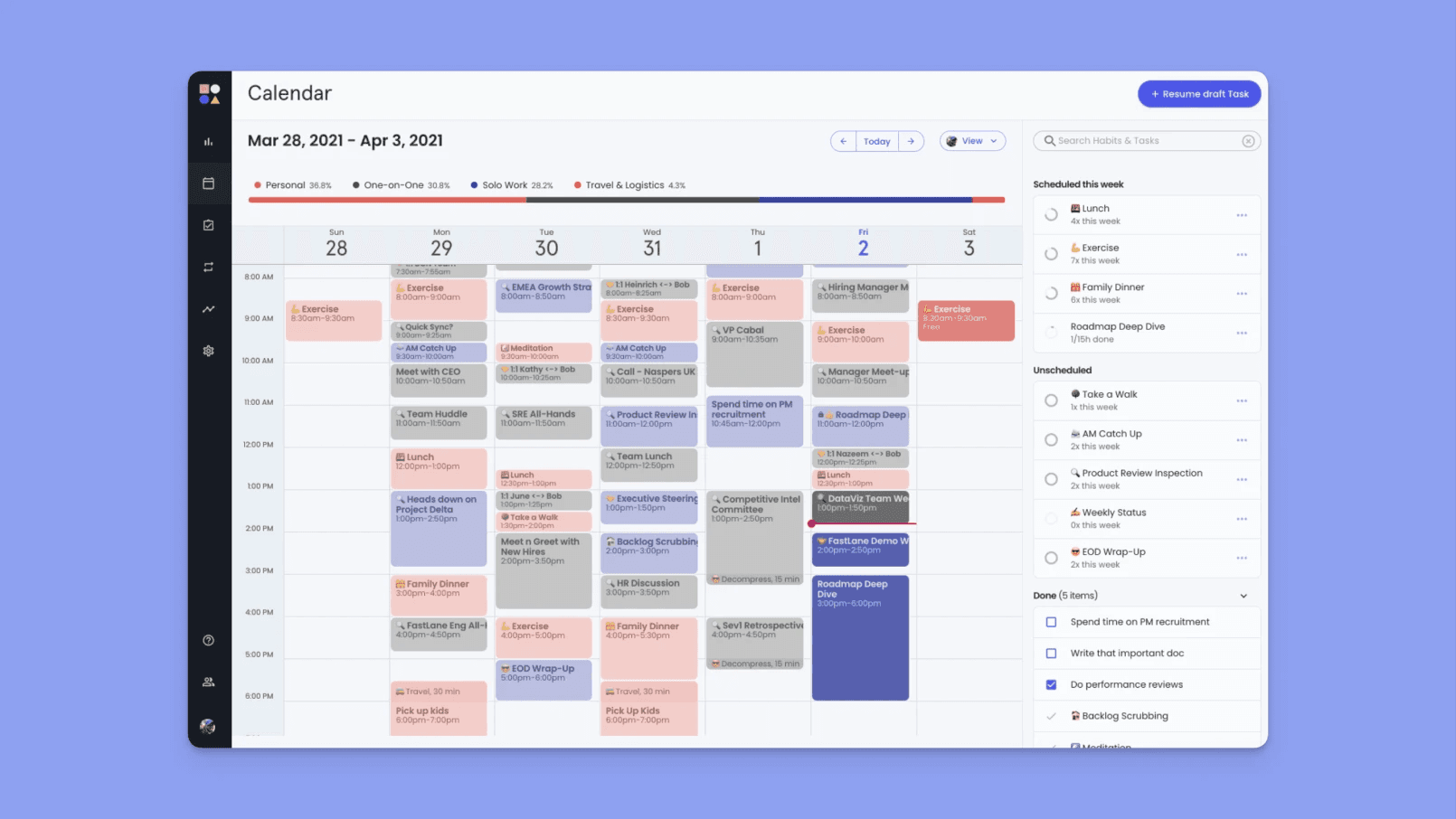
Reclaim is a smart scheduling tool that focuses on automating the creation of buffer time and habits in your calendar. It's particularly effective for protecting your focus time and ensuring you have adequate transition periods between meetings and tasks.
Reclaim's key benefits include:
Habit Scheduling: Automatically finds time for recurring habits like exercise, meditation, or learning.
Travel Time Buffers: Adds automatic travel time to your calendar events, preventing back-to-back scheduling.
Smart Rescheduling: If your schedule changes, Reclaim intelligently adjusts your habits and buffer times to accommodate.
Reclaim excels at adding a layer of intelligent automation that respects your time and energy. By proactively scheduling in buffers and habits, it helps prevent the feeling of being constantly rushed and ensures you have the breathing room needed to be productive and avoid burnout.
Pricing: Free (Lite tier), $10/seat/month (Starter), $15/seat/month (Business)
6. Monday.com: Visual Boards with Automation for Repeated Workflows
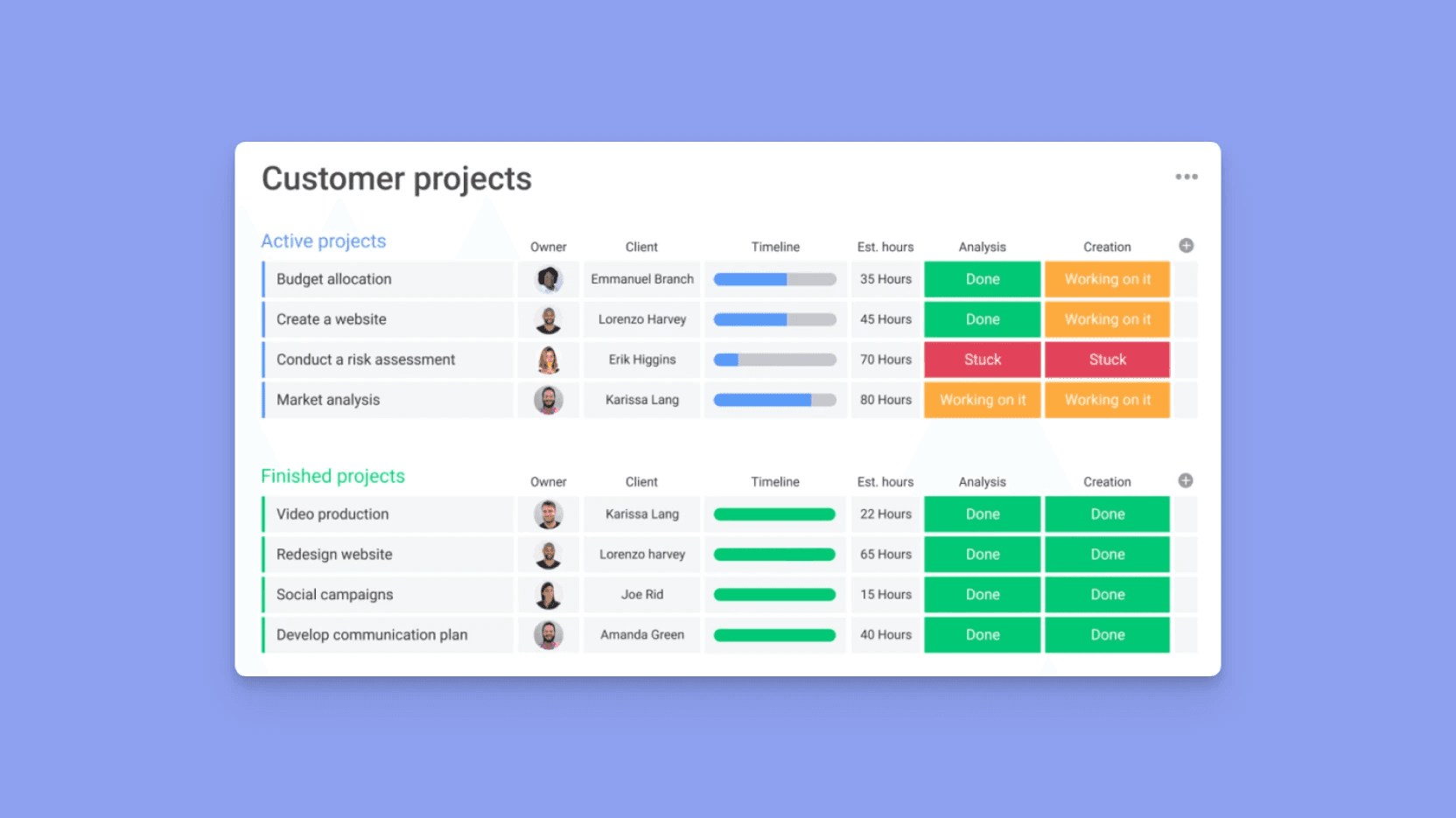
Monday.com is a versatile work operating system that offers a highly visual and customizable platform for managing projects, workflows, and tasks. While not a dedicated AI scheduler in the same way as Lifestack, its robust automation capabilities can be leveraged to create highly efficient scheduling systems for recurring tasks and projects.
Key features relevant to scheduling include:
Visual Boards: Organize tasks and projects in a way that makes sense for your team or personal workflow.
Automation Rules: Set up custom automations to move tasks, send notifications, or update statuses based on triggers.
Calendar View: Visualize your schedule and deadlines directly on your boards.
For professionals who manage complex projects or have repeatable workflows, Monday.com can be configured to act as a powerful daily planner. By setting up automations, you can streamline the process of assigning tasks, scheduling follow-ups, and managing deadlines, freeing up mental energy for more strategic work.
Pricing: Free plan available; paid plans from $9/seat/month
Looking for more? See our roundup of daily planner apps worth trying, or if ADHD is a factor, our guide to the best AI assistants for ADHD covers how energy-aware scheduling changes the game for focus and consistency. You can also read about task management strategies for ADHD that go beyond simple to-do lists.
Frequently Asked Questions
What is the best Motion AI alternative?
Lifestack is the strongest Motion AI alternative for most users because it goes beyond auto-scheduling to account for energy. Motion fills your calendar with tasks based on deadlines. Lifestack places tasks in the hours when your brain is actually sharp — a meaningful difference for sustained productivity and avoiding burnout.
Is there a free Motion AI alternative?
Goblin Tools is free and handles task breakdown, which is one of the things Motion's auto-scheduler is meant to solve. Reclaim.ai has a free Lite tier with basic habit and focus block protection. Lifestack offers a 7-day free trial. None of the full AI auto-schedulers are entirely free, but the trial is enough to validate fit before committing.
What is the difference between Motion AI and Lifestack?
Motion schedules around time — it fills open slots based on deadlines and duration. Lifestack schedules around energy — it places demanding tasks in your peak cognitive hours and lighter tasks elsewhere. For users who have tried Motion and found their schedule technically full but cognitively wrong, that difference is the whole point.
Is Motion AI worth the price?
Motion at $19/month is useful if your main problem is a heavy task backlog with hard deadlines and no time to manually plan. It's less useful if your problem is using the wrong hours for the wrong tasks, or if your days are less deadline-driven and more energy-dependent. For the latter, Lifestack at $7/month is better value.
What is the best Motion AI alternative for ADHD?
Lifestack. ADHD productivity breaks down most often at the intersection of energy and scheduling — medication windows, hyperfocus cycles, afternoon crashes. Motion doesn't know about any of that. Lifestack builds your schedule around those patterns. See the full AI assistants for ADHD comparison for more detail.
Can I use Lifestack alongside my existing calendar?
Yes. Lifestack integrates with your existing calendar rather than replacing it. It layers energy-aware scheduling on top of what you already have, so switching doesn't require rebuilding your workflow from scratch.
What is Motion AI (usemotion)?
Motion is a popular AI-powered productivity tool designed to help busy professionals manage their schedules and tasks. It aims to automate the planning process by intelligently scheduling tasks and meetings into your calendar. By analyzing your to-do list and deadlines, Motion attempts to find the optimal time for each item, reducing the mental overhead of manual scheduling. It's a powerful tool for those looking to streamline their day and ensure important tasks don't fall through the cracks.
Key features often highlighted include:
Automated Task Scheduling: Motion automatically places tasks into your calendar based on priority and deadlines.
Meeting Management: It helps find optimal times for meetings, considering attendees' availability.
Project Planning: Assists in breaking down larger projects into manageable tasks and scheduling them.
While Motion offers significant automation, many users find themselves seeking alternatives that offer a more nuanced approach to scheduling, especially when considering personal well-being and energy levels.
Why Motion Alternatives? Schedule Needs to Take Health into Account to Avoid Burnout
The modern professional's schedule is often a complex juggling act. While tools like Motion can help organize this chaos, a purely task-driven approach can sometimes lead to burnout. The reality is that our energy levels fluctuate throughout the day and week, and a rigid schedule that doesn't account for this can be counterproductive.
This is where the need for Motion alternatives becomes apparent. The ideal scheduler should not only manage your tasks but also respect your personal rhythms. Consider these points:
Energy-Based Scheduling: Understanding when you're most productive for deep work versus administrative tasks is crucial. An AI scheduler that can factor in your personal energy cycles can significantly boost efficiency and reduce stress. Why energy-based planning beats time blocking explains why this matters more than most schedulers acknowledge.
Preventing Over-Scheduling: Simply filling every available slot can lead to a feeling of being constantly rushed. Alternatives that allow for buffer time and acknowledge the need for breaks are essential for sustainable productivity.
Holistic Well-being: A truly effective daily planner integrates not just work tasks but also personal appointments, exercise, and even downtime, recognizing that these are all vital components of a balanced and productive life.
By choosing an alternative that prioritizes these aspects, you can move beyond just managing your time to truly optimizing your energy and focus.
1. Lifestack AI: Energy-Aware Planning Built for Focus
Lifestack AI is designed to help you do your best work without burning out. Instead of treating your calendar as a static list of tasks, it brings together your schedule, to-dos, and health data to create a plan that actually works for your body and mind.
This is productivity that adapts to you, not the other way around.
Key Features That Set Lifestack Apart
AI-Powered Smart Scheduling (Calendar + Tasks + Health): Lifestack intelligently combines your calendar, task list, and health data to automatically build a realistic daily plan. It schedules tasks and routines based on your energy and recovery levels — so you stay productive without overloading yourself. Learn how Lifestack works.
Energy Visualization: With Lifestack's energy heatmaps, you can clearly see when you're at your most focused and when you need rest. This makes it easy to align deep work with peak energy periods and reserve lighter tasks for low-energy moments, turning guesswork into clarity.
Assistant Planner for Daily Wellbeing: Beyond scheduling, Lifestack acts as a daily support system by offering personalized suggestions for sleep and meals based on your routine. It helps you maintain better habits and recovery, ensuring your productivity is backed by real wellbeing, not just willpower.
A Smarter Way to Plan Your Day
With seamless integration into your existing calendar, Lifestack fits naturally into your workflow while quietly optimizing it in the background. The result is a day that feels more structured, more intentional, and far less overwhelming.
Lifestack AI isn't just about getting things done — it's about helping you work in a way that's sustainable long-term. By aligning your tasks with your energy and supporting your overall wellbeing, it becomes a true partner in building focus, balance, and high performance.
Pricing: $7/month or $50/year
2. Sunsama: Ritual-Driven Planning Across Tasks and Calendar
Sunsama offers a refreshing take on daily planning by focusing on creating intentional work rituals. It's designed for professionals who value a structured yet flexible approach to their day, integrating tasks, meetings, and personal time into a cohesive workflow.
Key aspects of Sunsama include:
Daily Planning Rituals: Sunsama encourages you to start and end your day with a dedicated planning session, helping you set intentions and review your progress.
Task Management Integration: It pulls tasks from various sources (like Asana, Trello, Jira) and allows you to drag and drop them into your daily plan.
Calendar Sync: Sunsama syncs with your Google Calendar and Outlook Calendar, providing a unified view of your commitments.
While not strictly an AI scheduler in the same vein as Lifestack, Sunsama's emphasis on mindful planning and its ability to integrate with your existing tools make it a strong contender for those who want more control over their daily planner. It helps you be more deliberate about how you spend your time, which is crucial for avoiding burnout.
Pricing: $22/month or $17/month billed annually
3. Akiflow: Command-Palette Scheduling with Deep Integrations
Akiflow is built for speed and efficiency, offering a powerful command palette that allows you to quickly schedule tasks, meetings, and events. It's an excellent choice for professionals who thrive on keyboard shortcuts and seamless integration with their favorite productivity apps.
Akiflow's strengths lie in:
Command Palette: Access all your tasks, calendar events, and actions through a single, fast interface.
Extensive Integrations: Connects with a wide range of task managers (Todoist, Asana, etc.) and calendars.
Time Blocking: Easily block out time for focused work or specific tasks directly in your calendar.
While Akiflow's AI capabilities are more focused on efficient input and organization rather than predictive scheduling, its ability to quickly turn your to-do list into scheduled blocks makes it a highly effective daily planner for those who want to minimize context switching.
Pricing: $34/month or $19/month billed annually
4. Morgen: Unified Workspace That Syncs Calendars, Tasks, and Focus Blocks
Morgen aims to be your all-in-one productivity hub, bringing together your calendars, tasks, and focus time into a single, intuitive interface. It's designed to reduce the friction of managing multiple tools and help you maintain a clear overview of your day.
Morgen's core features include:
Unified Calendar View: See all your calendars (Google, Outlook, etc.) in one place.
Task Management: Integrates with popular task managers and offers its own task list.
Focus Blocks: Schedule dedicated time for deep work, ensuring your most important tasks get the attention they deserve.
Morgen's strength lies in its ability to consolidate your digital workspace, making it easier to plan your day and protect your focus time. It acts as a central point for all your productivity needs, simplifying the process of using an AI scheduler or a manual daily planner.
Pricing: $30/month or $15/month billed annually
5. Reclaim: Automation That Protects Time with Buffers
Reclaim is a smart scheduling tool that focuses on automating the creation of buffer time and habits in your calendar. It's particularly effective for protecting your focus time and ensuring you have adequate transition periods between meetings and tasks.
Reclaim's key benefits include:
Habit Scheduling: Automatically finds time for recurring habits like exercise, meditation, or learning.
Travel Time Buffers: Adds automatic travel time to your calendar events, preventing back-to-back scheduling.
Smart Rescheduling: If your schedule changes, Reclaim intelligently adjusts your habits and buffer times to accommodate.
Reclaim excels at adding a layer of intelligent automation that respects your time and energy. By proactively scheduling in buffers and habits, it helps prevent the feeling of being constantly rushed and ensures you have the breathing room needed to be productive and avoid burnout.
Pricing: Free (Lite tier), $10/seat/month (Starter), $15/seat/month (Business)
6. Monday.com: Visual Boards with Automation for Repeated Workflows
Monday.com is a versatile work operating system that offers a highly visual and customizable platform for managing projects, workflows, and tasks. While not a dedicated AI scheduler in the same way as Lifestack, its robust automation capabilities can be leveraged to create highly efficient scheduling systems for recurring tasks and projects.
Key features relevant to scheduling include:
Visual Boards: Organize tasks and projects in a way that makes sense for your team or personal workflow.
Automation Rules: Set up custom automations to move tasks, send notifications, or update statuses based on triggers.
Calendar View: Visualize your schedule and deadlines directly on your boards.
For professionals who manage complex projects or have repeatable workflows, Monday.com can be configured to act as a powerful daily planner. By setting up automations, you can streamline the process of assigning tasks, scheduling follow-ups, and managing deadlines, freeing up mental energy for more strategic work.
Pricing: Free plan available; paid plans from $9/seat/month
Looking for more? See our roundup of daily planner apps worth trying, or if ADHD is a factor, our guide to the best AI assistants for ADHD covers how energy-aware scheduling changes the game for focus and consistency. You can also read about task management strategies for ADHD that go beyond simple to-do lists.
Frequently Asked Questions
What is the best Motion AI alternative?
Lifestack is the strongest Motion AI alternative for most users because it goes beyond auto-scheduling to account for energy. Motion fills your calendar with tasks based on deadlines. Lifestack places tasks in the hours when your brain is actually sharp — a meaningful difference for sustained productivity and avoiding burnout.
Is there a free Motion AI alternative?
Goblin Tools is free and handles task breakdown, which is one of the things Motion's auto-scheduler is meant to solve. Reclaim.ai has a free Lite tier with basic habit and focus block protection. Lifestack offers a 7-day free trial. None of the full AI auto-schedulers are entirely free, but the trial is enough to validate fit before committing.
What is the difference between Motion AI and Lifestack?
Motion schedules around time — it fills open slots based on deadlines and duration. Lifestack schedules around energy — it places demanding tasks in your peak cognitive hours and lighter tasks elsewhere. For users who have tried Motion and found their schedule technically full but cognitively wrong, that difference is the whole point.
Is Motion AI worth the price?
Motion at $19/month is useful if your main problem is a heavy task backlog with hard deadlines and no time to manually plan. It's less useful if your problem is using the wrong hours for the wrong tasks, or if your days are less deadline-driven and more energy-dependent. For the latter, Lifestack at $7/month is better value.
What is the best Motion AI alternative for ADHD?
Lifestack. ADHD productivity breaks down most often at the intersection of energy and scheduling — medication windows, hyperfocus cycles, afternoon crashes. Motion doesn't know about any of that. Lifestack builds your schedule around those patterns. See the full AI assistants for ADHD comparison for more detail.
Can I use Lifestack alongside my existing calendar?
Yes. Lifestack integrates with your existing calendar rather than replacing it. It layers energy-aware scheduling on top of what you already have, so switching doesn't require rebuilding your workflow from scratch.



FOLLOW ON
FOLLOW ON
FOLLOW ON


Copyright 2026 © Lifestack. All rights reserved
Copyright 2026 © Lifestack. All rights reserved

