
App
Todoist Review: Is It Still Worth It in 2026?
Todoist Review: Is It Still Worth It in 2026?

Todoist has been around since 2007. That alone is a remarkable record in a market where task apps launch and die within a product cycle. Eighteen years in, it has 50 million users and still earns "best to-do list app" mentions in nearly every productivity roundup.
But the task management space has changed. AI tools now offer to think for you, not just store what you tell them. So the real question for 2026 isn't whether Todoist is good. It's whether its particular strengths still match what most people actually need.
We used Todoist as our primary task manager for four weeks, testing everything from daily capture to complex project management. Here's the honest picture.
Key Takeaways
Natural language task entry is the fastest in the category, bar none. Type "submit report Friday at 3pm #Work p1" and it does exactly what you'd expect.
The free plan is genuinely functional for individuals with simple workflows. The Pro plan adds the features most daily users actually want.
Todoist captures and organizes tasks exceptionally well. It doesn't help you decide when to do them or match them to your energy levels.
What Is Todoist
Todoist is a cross-platform task manager built around inbox capture, project organization, and natural language scheduling. It works on iOS, Android, Mac, Windows, the web, and via browser extensions. Your tasks sync instantly across every device.
The company behind it, Doist, has operated independently since 2007 without outside funding. That's reflected in the product: it's methodical, stable, and improves steadily rather than pivoting aggressively. There are no surprise acquisitions, no sudden feature removals.
Interface and Navigation
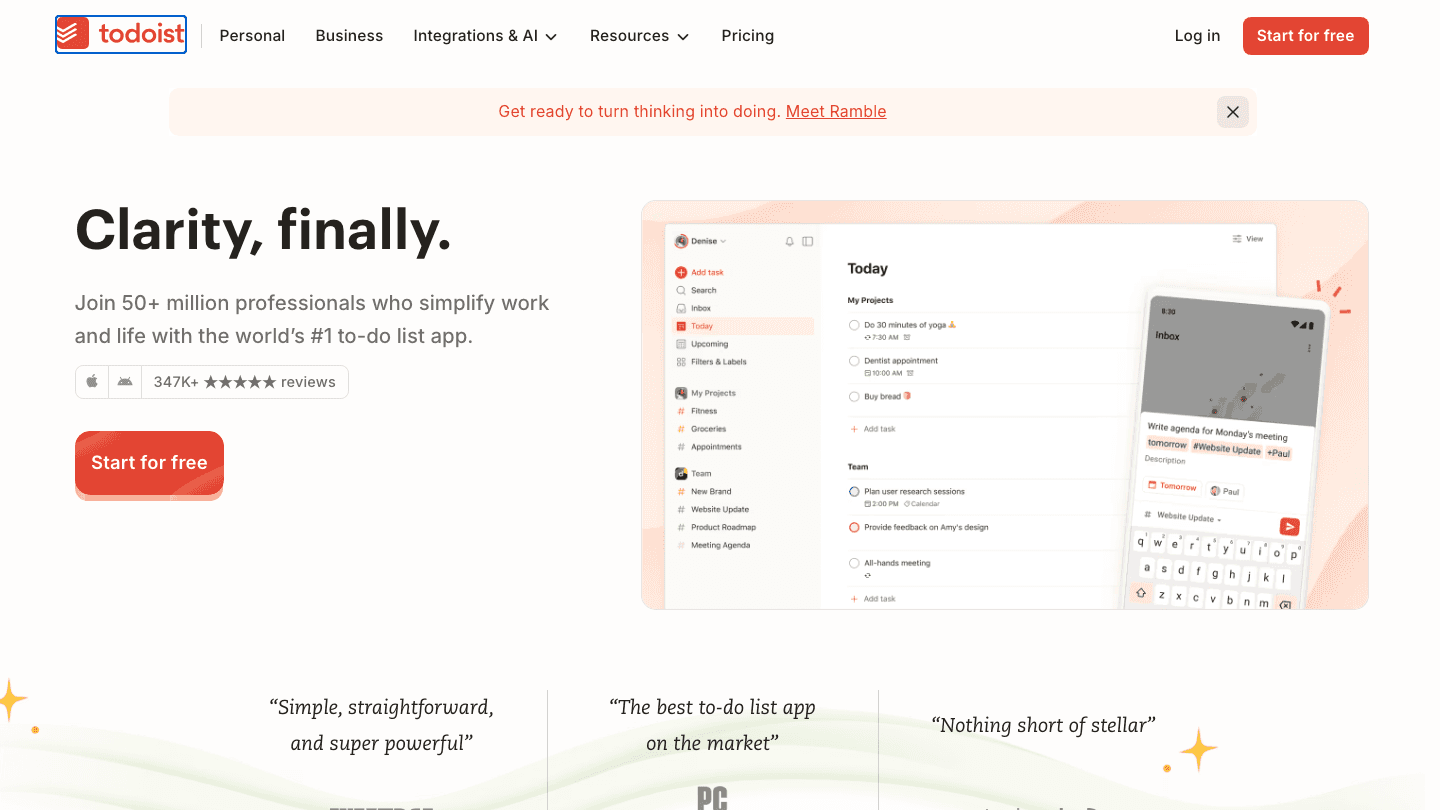
The interface is deliberately clean. Left sidebar for projects and filters, main panel for tasks, and a quick-add bar accessible from anywhere with a keyboard shortcut. Nothing about the design fights you.
The Today and Upcoming views are the heart of daily use. Today shows everything due now. Upcoming gives a rolling 7-day calendar view of what's ahead. Both are scannable in seconds and don't bury high-priority items.
Mobile apps maintain full feature parity with the desktop, which isn't a given in this category. Swipe-to-complete works well, and the widget for quick task entry on iOS is one of the better implementations on the App Store.
Natural Language Task Entry
This is Todoist's defining feature and it's still best in class. You type tasks the way you'd say them out loud, and the parser handles the rest:
"Call dentist tomorrow at 2pm" creates a task with that exact due date and time
"Review Q3 budget every Monday #Work p2" sets a weekly recurrence in the Work project at priority 2
"Pick up kids in 45 minutes" sets a reminder 45 minutes from now
The parser handles natural recurrence phrases, priority flags, project assignments, and labels all in a single input line. No menus, no dropdowns. You stay in flow rather than stopping to configure.
Competitors like Microsoft To Do and Apple Reminders have added natural language parsing in recent years, but Todoist's implementation handles edge cases more reliably and works across more languages.
AI Features: Ramble and Task Assist
Todoist added two AI features in 2025 that are worth knowing about.
Ramble is a voice capture tool. You speak your thoughts, Ramble transcribes them, and then Todoist's AI sorts them into organized tasks. For people who think out loud or find typing while commuting impractical, this is genuinely useful. A one-minute voice dump of "I need to follow up with Jordan about the contract, prep for Thursday's board meeting, and schedule the team retrospective before end of month" becomes three properly formatted tasks.
Task Assist is a lighter-touch feature that suggests how to break a large task into smaller steps. Type "Launch new product line," and Task Assist proposes sub-tasks like "Define target audience," "Create product brief," and "Schedule kickoff." The suggestions are generic but functional as a starting point.
Neither feature replaces strategic thinking. They reduce friction in the capture phase, not the decision phase.
Integrations
Todoist connects to a solid list of tools: Google Calendar, Outlook, Slack, Microsoft Teams, Jira, GitHub, Zapier, and more recently, Claude. The Google Calendar integration is two-way, which means tasks with due times show up on your calendar and calendar events appear in Todoist's Upcoming view.
If you manage tasks across Apple's ecosystem, it also connects cleanly with Reminders via Siri Shortcuts. For people who want to build a broader productivity stack, see our picks for the best apps for executive functioning that pair well with a task manager like Todoist.
Pricing
Todoist raised its prices in December 2025, the first increase since 2022:
Free: 5 active projects, 3 filter views, basic reminders, 5MB file uploads
Pro: $5/month billed annually ($60/year), or $7/month billed monthly. Adds 300 projects, unlimited filters, full history, custom reminders, deadlines, task duration tracking, and full Ramble access
Business: $8/user/month billed annually, or $10/user/month billed monthly. Adds team inbox, admin controls, role-based permissions, and team analytics
At $5/month on annual billing, Pro remains a reasonable value for daily users. Monthly billing at $7 is harder to justify against competitors like TickTick, which offers a comparable feature set at $2.99/month.
Where Todoist Falls Short
Todoist is an exceptional task inbox. It is not a scheduler. The distinction matters more as work gets more complex.
Todoist tells you what you need to do. It does not tell you when to do it, accounting for your energy levels, cognitive load, or the kind of work a task requires. A task marked "p1 due Friday" sits in your list until you move it. Prioritization is entirely manual.
There's also no built-in time tracking and no Pomodoro timer, which means you'll need additional tools if you want to measure focus time or work in structured intervals. For teams managing complex projects with dependencies, Notion or ClickUp offer more depth, though they sacrifice Todoist's simplicity in the process.
The Karma system (points for completing tasks) is either motivating or noise, depending on your personality. You can turn it off, but its presence signals that Todoist still leans toward habit-formation framing rather than cognitive load management.
How Todoist Compares: The AI-Scheduling Gap

If Todoist's main gap is that it doesn't schedule, Lifestack fills exactly that space. Where Todoist captures what you need to do, Lifestack decides when you should do it based on your actual energy curve throughout the day.
Lifestack reads your tasks, calendar, and if you use an Apple Watch or Oura Ring, your health data, then auto-schedules deep work during your peak hours and lighter tasks when your energy is lower. If you have a bad night's sleep, it adjusts. If a meeting runs long, it recalculates. The two tools can coexist: use Todoist as your capture layer and sync tasks to Lifestack for intelligent scheduling. This is what energy-based scheduling looks like in a real workflow. For anyone whose task list keeps growing but never shrinks, this approach can change how your day actually feels. Lifestack costs $50/year or $10/month with a 7-day free trial. If you have ADHD and find static lists paralysing, the ADHD planning guide explains why energy-aware scheduling outperforms priority-ranked to-do lists for variable-focus brains. For other app options in this space, see our list of the best mobile apps for ADHD.
Who Should Use Todoist
Individuals who capture dozens of tasks daily and want the fastest possible input method
Professionals managing multiple projects who need clear inbox-to-project organization without the overhead of a full project management tool
Users who live in Google Calendar or Outlook and want a task layer that syncs cleanly with their calendar
Teams under 25 people doing task coordination rather than complex project management
Todoist is a less strong fit if you want automatic scheduling, habit tracking with visual streaks (TickTick handles this better), or project management with Gantt charts and dependencies. For the habit tracking angle, our best habit tracker planner apps guide covers the alternatives.
The Bottom Line
Todoist earns its reputation. The natural language parser, the cross-device sync, and the clean design add up to a task manager that stays out of your way while keeping you organized. At $5/month on annual billing, the Pro plan is a fair price for what you get.
The limitation is by design: Todoist is a capture and organization tool, not an AI scheduler. If your primary problem is forgetting what you need to do, Todoist solves it. If your primary problem is never getting to the things you've captured, you'll want to pair it with something that handles scheduling, or switch to a tool that does both.
Frequently Asked Questions
Is Todoist free?
Yes. The free plan allows 5 active projects, 3 filter views, and basic reminders. It's functional for simple personal workflows. The Pro plan at $5/month adds unlimited projects, custom reminders, and AI features like Ramble.
What makes Todoist different from Apple Reminders or Microsoft To Do?
Todoist's natural language parsing is more powerful and handles complex recurrences and multi-attribute tasks in a single line. It also works consistently across all platforms, not just within one operating system's ecosystem.
Does Todoist work with Google Calendar?
Yes. The Google Calendar integration is two-way: tasks with due times appear as calendar events, and calendar events appear in Todoist's Upcoming view. Pro plan required for full two-way sync.
Is Todoist good for ADHD?
Todoist's quick capture and clean interface reduce friction, which helps. But its static task lists can become overwhelming if you have many items. Pairing Todoist with an energy-aware scheduler like Lifestack can help bridge the gap between having a list and actually working through it.
What is Todoist Ramble?
Ramble is Todoist's AI voice capture feature, available on Pro plans. You speak a stream of thoughts, and Ramble transcribes and organizes them into individual tasks automatically. Useful for capturing ideas while driving, walking, or when typing isn't practical.
How does Todoist pricing compare to competitors?
Todoist Pro is $5/month on annual billing. TickTick Pro is $2.99/month. Things 3 is a one-time $49.99 purchase. Microsoft To Do is free. For the most feature-complete experience at the best price, annual Todoist Pro holds up. Monthly billing at $7 is where competitors start looking more attractive.
Todoist has been around since 2007. That alone is a remarkable record in a market where task apps launch and die within a product cycle. Eighteen years in, it has 50 million users and still earns "best to-do list app" mentions in nearly every productivity roundup.
But the task management space has changed. AI tools now offer to think for you, not just store what you tell them. So the real question for 2026 isn't whether Todoist is good. It's whether its particular strengths still match what most people actually need.
We used Todoist as our primary task manager for four weeks, testing everything from daily capture to complex project management. Here's the honest picture.
Key Takeaways
Natural language task entry is the fastest in the category, bar none. Type "submit report Friday at 3pm #Work p1" and it does exactly what you'd expect.
The free plan is genuinely functional for individuals with simple workflows. The Pro plan adds the features most daily users actually want.
Todoist captures and organizes tasks exceptionally well. It doesn't help you decide when to do them or match them to your energy levels.
What Is Todoist
Todoist is a cross-platform task manager built around inbox capture, project organization, and natural language scheduling. It works on iOS, Android, Mac, Windows, the web, and via browser extensions. Your tasks sync instantly across every device.
The company behind it, Doist, has operated independently since 2007 without outside funding. That's reflected in the product: it's methodical, stable, and improves steadily rather than pivoting aggressively. There are no surprise acquisitions, no sudden feature removals.
Interface and Navigation
The interface is deliberately clean. Left sidebar for projects and filters, main panel for tasks, and a quick-add bar accessible from anywhere with a keyboard shortcut. Nothing about the design fights you.
The Today and Upcoming views are the heart of daily use. Today shows everything due now. Upcoming gives a rolling 7-day calendar view of what's ahead. Both are scannable in seconds and don't bury high-priority items.
Mobile apps maintain full feature parity with the desktop, which isn't a given in this category. Swipe-to-complete works well, and the widget for quick task entry on iOS is one of the better implementations on the App Store.
Natural Language Task Entry
This is Todoist's defining feature and it's still best in class. You type tasks the way you'd say them out loud, and the parser handles the rest:
"Call dentist tomorrow at 2pm" creates a task with that exact due date and time
"Review Q3 budget every Monday #Work p2" sets a weekly recurrence in the Work project at priority 2
"Pick up kids in 45 minutes" sets a reminder 45 minutes from now
The parser handles natural recurrence phrases, priority flags, project assignments, and labels all in a single input line. No menus, no dropdowns. You stay in flow rather than stopping to configure.
Competitors like Microsoft To Do and Apple Reminders have added natural language parsing in recent years, but Todoist's implementation handles edge cases more reliably and works across more languages.
AI Features: Ramble and Task Assist
Todoist added two AI features in 2025 that are worth knowing about.
Ramble is a voice capture tool. You speak your thoughts, Ramble transcribes them, and then Todoist's AI sorts them into organized tasks. For people who think out loud or find typing while commuting impractical, this is genuinely useful. A one-minute voice dump of "I need to follow up with Jordan about the contract, prep for Thursday's board meeting, and schedule the team retrospective before end of month" becomes three properly formatted tasks.
Task Assist is a lighter-touch feature that suggests how to break a large task into smaller steps. Type "Launch new product line," and Task Assist proposes sub-tasks like "Define target audience," "Create product brief," and "Schedule kickoff." The suggestions are generic but functional as a starting point.
Neither feature replaces strategic thinking. They reduce friction in the capture phase, not the decision phase.
Integrations
Todoist connects to a solid list of tools: Google Calendar, Outlook, Slack, Microsoft Teams, Jira, GitHub, Zapier, and more recently, Claude. The Google Calendar integration is two-way, which means tasks with due times show up on your calendar and calendar events appear in Todoist's Upcoming view.
If you manage tasks across Apple's ecosystem, it also connects cleanly with Reminders via Siri Shortcuts. For people who want to build a broader productivity stack, see our picks for the best apps for executive functioning that pair well with a task manager like Todoist.
Pricing
Todoist raised its prices in December 2025, the first increase since 2022:
Free: 5 active projects, 3 filter views, basic reminders, 5MB file uploads
Pro: $5/month billed annually ($60/year), or $7/month billed monthly. Adds 300 projects, unlimited filters, full history, custom reminders, deadlines, task duration tracking, and full Ramble access
Business: $8/user/month billed annually, or $10/user/month billed monthly. Adds team inbox, admin controls, role-based permissions, and team analytics
At $5/month on annual billing, Pro remains a reasonable value for daily users. Monthly billing at $7 is harder to justify against competitors like TickTick, which offers a comparable feature set at $2.99/month.
Where Todoist Falls Short
Todoist is an exceptional task inbox. It is not a scheduler. The distinction matters more as work gets more complex.
Todoist tells you what you need to do. It does not tell you when to do it, accounting for your energy levels, cognitive load, or the kind of work a task requires. A task marked "p1 due Friday" sits in your list until you move it. Prioritization is entirely manual.
There's also no built-in time tracking and no Pomodoro timer, which means you'll need additional tools if you want to measure focus time or work in structured intervals. For teams managing complex projects with dependencies, Notion or ClickUp offer more depth, though they sacrifice Todoist's simplicity in the process.
The Karma system (points for completing tasks) is either motivating or noise, depending on your personality. You can turn it off, but its presence signals that Todoist still leans toward habit-formation framing rather than cognitive load management.
How Todoist Compares: The AI-Scheduling Gap
If Todoist's main gap is that it doesn't schedule, Lifestack fills exactly that space. Where Todoist captures what you need to do, Lifestack decides when you should do it based on your actual energy curve throughout the day.
Lifestack reads your tasks, calendar, and if you use an Apple Watch or Oura Ring, your health data, then auto-schedules deep work during your peak hours and lighter tasks when your energy is lower. If you have a bad night's sleep, it adjusts. If a meeting runs long, it recalculates. The two tools can coexist: use Todoist as your capture layer and sync tasks to Lifestack for intelligent scheduling. This is what energy-based scheduling looks like in a real workflow. For anyone whose task list keeps growing but never shrinks, this approach can change how your day actually feels. Lifestack costs $50/year or $10/month with a 7-day free trial. If you have ADHD and find static lists paralysing, the ADHD planning guide explains why energy-aware scheduling outperforms priority-ranked to-do lists for variable-focus brains. For other app options in this space, see our list of the best mobile apps for ADHD.
Who Should Use Todoist
Individuals who capture dozens of tasks daily and want the fastest possible input method
Professionals managing multiple projects who need clear inbox-to-project organization without the overhead of a full project management tool
Users who live in Google Calendar or Outlook and want a task layer that syncs cleanly with their calendar
Teams under 25 people doing task coordination rather than complex project management
Todoist is a less strong fit if you want automatic scheduling, habit tracking with visual streaks (TickTick handles this better), or project management with Gantt charts and dependencies. For the habit tracking angle, our best habit tracker planner apps guide covers the alternatives.
The Bottom Line
Todoist earns its reputation. The natural language parser, the cross-device sync, and the clean design add up to a task manager that stays out of your way while keeping you organized. At $5/month on annual billing, the Pro plan is a fair price for what you get.
The limitation is by design: Todoist is a capture and organization tool, not an AI scheduler. If your primary problem is forgetting what you need to do, Todoist solves it. If your primary problem is never getting to the things you've captured, you'll want to pair it with something that handles scheduling, or switch to a tool that does both.
Frequently Asked Questions
Is Todoist free?
Yes. The free plan allows 5 active projects, 3 filter views, and basic reminders. It's functional for simple personal workflows. The Pro plan at $5/month adds unlimited projects, custom reminders, and AI features like Ramble.
What makes Todoist different from Apple Reminders or Microsoft To Do?
Todoist's natural language parsing is more powerful and handles complex recurrences and multi-attribute tasks in a single line. It also works consistently across all platforms, not just within one operating system's ecosystem.
Does Todoist work with Google Calendar?
Yes. The Google Calendar integration is two-way: tasks with due times appear as calendar events, and calendar events appear in Todoist's Upcoming view. Pro plan required for full two-way sync.
Is Todoist good for ADHD?
Todoist's quick capture and clean interface reduce friction, which helps. But its static task lists can become overwhelming if you have many items. Pairing Todoist with an energy-aware scheduler like Lifestack can help bridge the gap between having a list and actually working through it.
What is Todoist Ramble?
Ramble is Todoist's AI voice capture feature, available on Pro plans. You speak a stream of thoughts, and Ramble transcribes and organizes them into individual tasks automatically. Useful for capturing ideas while driving, walking, or when typing isn't practical.
How does Todoist pricing compare to competitors?
Todoist Pro is $5/month on annual billing. TickTick Pro is $2.99/month. Things 3 is a one-time $49.99 purchase. Microsoft To Do is free. For the most feature-complete experience at the best price, annual Todoist Pro holds up. Monthly billing at $7 is where competitors start looking more attractive.



FOLLOW ON
FOLLOW ON
FOLLOW ON


Copyright 2026 © Lifestack. All rights reserved
Copyright 2026 © Lifestack. All rights reserved

