
App
Akiflow Pricing: Is It Worth $19/Month?
Akiflow Pricing: Is It Worth $19/Month?

Akiflow is a time-blocking and task management app built for busy professionals. It pulls tasks from your existing tools (Gmail, Slack, Asana, Todoist, Linear, and over 2,000 more via integrations) into a single unified inbox, then helps you assign them to time blocks on your calendar. The promise is that it saves you two hours daily by cutting out the context-switching between apps.
At $34/month billed monthly or $19/month billed annually, Akiflow is on the premium end of personal productivity apps. This guide breaks down exactly what you get, who the pricing makes sense for, and how it compares to alternatives including Lifestack.
Key Takeaways
Akiflow has only one plan (Pro). There is no free tier, only a 7-day free trial.
The annual plan at $19/month ($228/year) is 44% cheaper than monthly billing at $34/month.
Akiflow is built for professionals managing tasks across multiple tools, not for individuals who use one calendar and a simple task list.
Akiflow Pricing Plans Explained
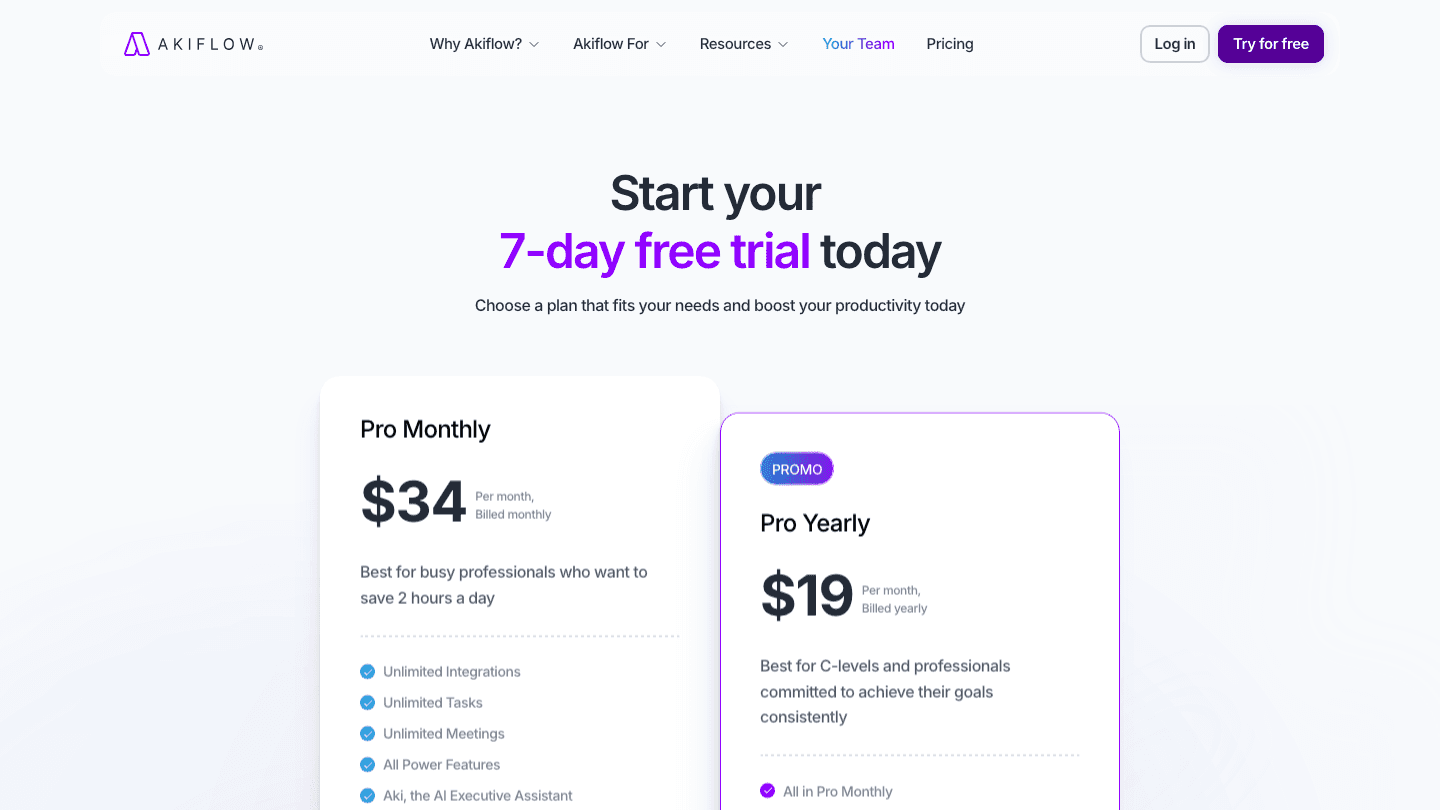
Akiflow offers two billing options for its single Pro plan. There are no feature differences between them, only price.
Pro Monthly: $34/month. This is the standard monthly billing option. It's the highest cost and best for users who want to try the full product before committing annually, or who need short-term access.
Pro Yearly: $19/month, billed as $228/year. This is the recommended option for anyone intending to use Akiflow long-term. The 44% discount over monthly billing makes the annual plan significantly better value.
Both plans include a 7-day free trial with full feature access and no payment required upfront. Cancel within 7 days and you won't be charged.
Is There a Free Version of Akiflow?
No. Akiflow does not offer a free tier. The only way to use Akiflow without paying is through the 7-day free trial. After that, the monthly or annual Pro plan is required.
Students and researchers can contact the Akiflow support team for possible discounts. Teams can contact sales for custom team pricing. Neither of these is publicly documented with specific pricing.
What You Get with Akiflow
The Pro plan includes everything Akiflow offers. The core use case is consolidating tasks from different tools into one planning interface and assigning them to calendar time blocks.
Unlimited integrations: Connect Gmail, Slack, Asana, Todoist, Linear, Notion, and many more. Tasks and items pull into a unified inbox.
Unlimited tasks: No cap on how many tasks you can manage or schedule.
Unlimited meetings: Calendar sync and meeting management with no limit.
All power features: Multi-tool context switching reduction, time-blocking workflows, keyboard shortcuts, and daily planning rituals.
Aki, the AI Executive Assistant: AI that helps draft schedules, suggests time blocks, and assists with prioritization.
Free 1:1 onboarding call: A personalized setup session with the Akiflow team.
Is Akiflow Worth the Price?
At $19/month, Akiflow is significantly more expensive than most personal productivity apps. The value case depends entirely on your specific situation.
Akiflow is worth it if:
You actively use 3 or more tools (Slack, Gmail, Asana, Linear, etc.) and spend significant time switching between them to track what to work on.
You struggle with time blocking because tasks live in too many places.
Your daily schedule is mostly meeting-heavy and you need a fast way to block the remaining time for focused work.
You're a knowledge worker whose hourly output matters, where saving even one hour per week from the $19 plan makes it rational.
Akiflow may not be worth it if:
You use one or two tools and don't have a multi-tool consolidation problem.
You're looking for a personal planner or scheduler rather than a task aggregation platform.
Budget is a constraint. Comparable project management tools and personal planners exist at lower price points.
Akiflow vs Lifestack: Which Is Right for You?
Akiflow and Lifestack both approach daily planning, but from different angles.
Akiflow pulls tasks from your existing tools into a planning layer. Its strength is integration breadth. If your tasks live in Asana, Linear, Gmail, and Slack simultaneously, Akiflow solves the consolidation problem that is otherwise a real daily overhead.

Lifestack takes a different approach. Rather than aggregating tasks from external tools, it builds your daily schedule around your energy levels by reading sleep data, recovery metrics, and activity patterns from your wearable or phone. The result is a daily plan that reflects not just what's on your task list but what you're actually capable of at different times of day. This is the concept behind personal energy management.
The practical difference: Akiflow is for someone drowning in tasks across multiple platforms who needs consolidation and fast time-blocking. Lifestack is for someone who wants their schedule to adapt to how they feel, not just what's on the list. Lifestack costs $7/month or $50/year, about a third of Akiflow's annual price.
For someone who needs both capabilities, the tools don't conflict. Akiflow can consolidate and Lifestack can schedule around energy.
Frequently Asked Questions
How much does Akiflow cost per month?
Akiflow costs $34/month on the monthly plan or $19/month on the annual plan (billed as $228/year). There is no free tier, but a 7-day free trial is available with full feature access.
Does Akiflow have a free plan?
No. Akiflow does not offer a permanent free plan. There is a 7-day free trial that provides full access to all Pro features without requiring a payment upfront. After the trial, a paid plan is required to continue.
What is Akiflow used for?
Akiflow is a time-blocking and task management app that aggregates tasks from multiple productivity tools (Gmail, Slack, Asana, Linear, Notion, and more) into a single inbox. It then helps you assign those tasks to specific time blocks on your calendar, reducing the daily overhead of managing multiple task sources. See our ClickUp pricing breakdown for a comparison with another tool in this space.
Is Akiflow worth the money?
For professionals who use many productivity tools simultaneously and spend significant time context-switching between them, Akiflow often pays for itself. For someone with a simpler workflow (one calendar, one task list, basic time blocking), the $19/month annual plan may be more than needed. Compare it against what you're currently paying for individual tools it could replace.
Can I use Akiflow for free?
Only during the 7-day free trial. After that period, Akiflow requires a paid subscription. Students and researchers can contact support@akiflow.com for possible discounts. There is no freemium tier available to the general public.
Akiflow is a time-blocking and task management app built for busy professionals. It pulls tasks from your existing tools (Gmail, Slack, Asana, Todoist, Linear, and over 2,000 more via integrations) into a single unified inbox, then helps you assign them to time blocks on your calendar. The promise is that it saves you two hours daily by cutting out the context-switching between apps.
At $34/month billed monthly or $19/month billed annually, Akiflow is on the premium end of personal productivity apps. This guide breaks down exactly what you get, who the pricing makes sense for, and how it compares to alternatives including Lifestack.
Key Takeaways
Akiflow has only one plan (Pro). There is no free tier, only a 7-day free trial.
The annual plan at $19/month ($228/year) is 44% cheaper than monthly billing at $34/month.
Akiflow is built for professionals managing tasks across multiple tools, not for individuals who use one calendar and a simple task list.
Akiflow Pricing Plans Explained
Akiflow offers two billing options for its single Pro plan. There are no feature differences between them, only price.
Pro Monthly: $34/month. This is the standard monthly billing option. It's the highest cost and best for users who want to try the full product before committing annually, or who need short-term access.
Pro Yearly: $19/month, billed as $228/year. This is the recommended option for anyone intending to use Akiflow long-term. The 44% discount over monthly billing makes the annual plan significantly better value.
Both plans include a 7-day free trial with full feature access and no payment required upfront. Cancel within 7 days and you won't be charged.
Is There a Free Version of Akiflow?
No. Akiflow does not offer a free tier. The only way to use Akiflow without paying is through the 7-day free trial. After that, the monthly or annual Pro plan is required.
Students and researchers can contact the Akiflow support team for possible discounts. Teams can contact sales for custom team pricing. Neither of these is publicly documented with specific pricing.
What You Get with Akiflow
The Pro plan includes everything Akiflow offers. The core use case is consolidating tasks from different tools into one planning interface and assigning them to calendar time blocks.
Unlimited integrations: Connect Gmail, Slack, Asana, Todoist, Linear, Notion, and many more. Tasks and items pull into a unified inbox.
Unlimited tasks: No cap on how many tasks you can manage or schedule.
Unlimited meetings: Calendar sync and meeting management with no limit.
All power features: Multi-tool context switching reduction, time-blocking workflows, keyboard shortcuts, and daily planning rituals.
Aki, the AI Executive Assistant: AI that helps draft schedules, suggests time blocks, and assists with prioritization.
Free 1:1 onboarding call: A personalized setup session with the Akiflow team.
Is Akiflow Worth the Price?
At $19/month, Akiflow is significantly more expensive than most personal productivity apps. The value case depends entirely on your specific situation.
Akiflow is worth it if:
You actively use 3 or more tools (Slack, Gmail, Asana, Linear, etc.) and spend significant time switching between them to track what to work on.
You struggle with time blocking because tasks live in too many places.
Your daily schedule is mostly meeting-heavy and you need a fast way to block the remaining time for focused work.
You're a knowledge worker whose hourly output matters, where saving even one hour per week from the $19 plan makes it rational.
Akiflow may not be worth it if:
You use one or two tools and don't have a multi-tool consolidation problem.
You're looking for a personal planner or scheduler rather than a task aggregation platform.
Budget is a constraint. Comparable project management tools and personal planners exist at lower price points.
Akiflow vs Lifestack: Which Is Right for You?
Akiflow and Lifestack both approach daily planning, but from different angles.
Akiflow pulls tasks from your existing tools into a planning layer. Its strength is integration breadth. If your tasks live in Asana, Linear, Gmail, and Slack simultaneously, Akiflow solves the consolidation problem that is otherwise a real daily overhead.
Lifestack takes a different approach. Rather than aggregating tasks from external tools, it builds your daily schedule around your energy levels by reading sleep data, recovery metrics, and activity patterns from your wearable or phone. The result is a daily plan that reflects not just what's on your task list but what you're actually capable of at different times of day. This is the concept behind personal energy management.
The practical difference: Akiflow is for someone drowning in tasks across multiple platforms who needs consolidation and fast time-blocking. Lifestack is for someone who wants their schedule to adapt to how they feel, not just what's on the list. Lifestack costs $7/month or $50/year, about a third of Akiflow's annual price.
For someone who needs both capabilities, the tools don't conflict. Akiflow can consolidate and Lifestack can schedule around energy.
Frequently Asked Questions
How much does Akiflow cost per month?
Akiflow costs $34/month on the monthly plan or $19/month on the annual plan (billed as $228/year). There is no free tier, but a 7-day free trial is available with full feature access.
Does Akiflow have a free plan?
No. Akiflow does not offer a permanent free plan. There is a 7-day free trial that provides full access to all Pro features without requiring a payment upfront. After the trial, a paid plan is required to continue.
What is Akiflow used for?
Akiflow is a time-blocking and task management app that aggregates tasks from multiple productivity tools (Gmail, Slack, Asana, Linear, Notion, and more) into a single inbox. It then helps you assign those tasks to specific time blocks on your calendar, reducing the daily overhead of managing multiple task sources. See our ClickUp pricing breakdown for a comparison with another tool in this space.
Is Akiflow worth the money?
For professionals who use many productivity tools simultaneously and spend significant time context-switching between them, Akiflow often pays for itself. For someone with a simpler workflow (one calendar, one task list, basic time blocking), the $19/month annual plan may be more than needed. Compare it against what you're currently paying for individual tools it could replace.
Can I use Akiflow for free?
Only during the 7-day free trial. After that period, Akiflow requires a paid subscription. Students and researchers can contact support@akiflow.com for possible discounts. There is no freemium tier available to the general public.



FOLLOW ON
FOLLOW ON
FOLLOW ON


Copyright 2026 © Lifestack. All rights reserved
Copyright 2026 © Lifestack. All rights reserved

