
App
ClickUp vs monday.com: Which Should You Choose?
ClickUp vs monday.com: Which Should You Choose?

ClickUp and monday.com both want to be the last project management tool your team will ever need. They each have aggressive free tiers, 15+ project views, and deep automation. The pitch sounds nearly identical until you dig into the details.
I tested both tools across a content team workflow, a product sprint, and a personal task setup to find where each one actually pulls ahead. The short version: ClickUp gives you more for less money, especially on the free plan. Monday.com is easier to configure and has a more polished onboarding experience, which matters a lot for teams that don't want to spend a week setting things up.
Below is a side-by-side breakdown of how they compare on the features that will actually affect your daily work, along with a quick note on a third option if your real problem is personal scheduling rather than team coordination.
Key Takeaways
ClickUp's free plan supports unlimited members; monday.com's free plan caps at 2 seats.
monday.com is faster to set up and easier to onboard a non-technical team onto.
ClickUp offers more built-in features (native chat, time tracking, docs) without requiring add-ons or higher tiers.
Quick Verdict
ClickUp: Best for feature-hungry teams who want everything in one place, especially those working with tighter budgets.
monday.com: Best for teams that prioritize a clean interface and want a tool they can hand to a non-technical stakeholder without training.
ClickUp Overview
The everything-platform that packs more features into a free plan than most tools put in their paid tiers.

ClickUp has been on a mission to replace every other SaaS tool your team uses. That ambition shows up everywhere: 15+ project views, a native chat that replaces Slack, built-in docs that rival Notion, time tracking without an add-on, and AI (Brain) that can write, summarize, and analyze work. The free plan is one of the most generous available, with unlimited members and most core features available without paying.
The main downside is that all this power comes with a steep learning curve. ClickUp's interface can feel overwhelming the first time you open it. The nesting structure (Spaces, Folders, Lists, Tasks) takes time to set up correctly, and many teams end up configuring it poorly before they understand how it's meant to work. The AI features, while impressive, are priced separately on an add-on model, which adds cost complexity.
What Works
Free plan supports unlimited members and most core features
Native chat, docs, and time tracking without add-ons
15+ views including Whiteboard, Gantt, and custom dashboards
Strong automation engine available across all paid tiers
1,000+ integrations, available even on free
Limitations
Initial setup is complex; poorly configured workspaces are common
AI is an optional add-on, not included in base plan pricing
Performance can lag on large workspaces
Feature overload can get in the way of simple workflows
Pricing: Free forever (unlimited members), Unlimited $7/user/month (annual) or $8.40 monthly, Business $12/user/month (annual) or $14.40 monthly, Enterprise (custom). AI Brain add-on from $9/user/month (annual).
Best for: Growing teams that want an all-in-one platform without paying for multiple tools, and who don't mind investing in setup.
monday.com Overview
A polished, visual work platform designed to get teams running fast without a long configuration phase.
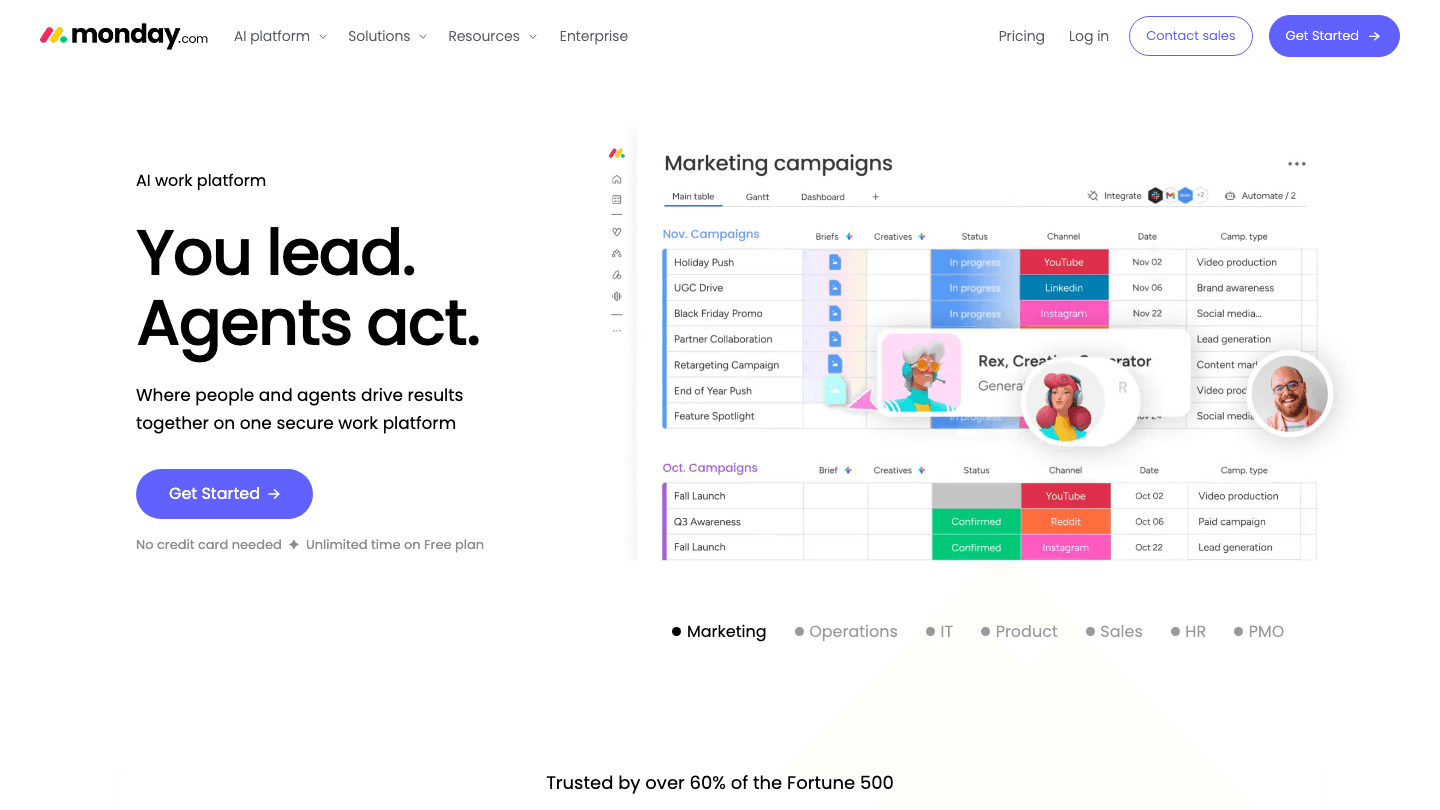
monday.com trades ClickUp's feature depth for a smoother experience out of the box. The interface is clean, the templates are excellent, and new users consistently say it's the easiest project management tool they've ever onboarded onto. That's a real competitive advantage when you're trying to get a 20-person team off spreadsheets and onto a shared platform.
The AI is now built into the platform rather than treated as a separate add-on, included on Standard plans and above. The WorkCanvas feature (monday's take on whiteboards) has improved considerably, and the reporting and dashboard capabilities are strong for teams managing multiple projects at once.
The free plan is the weakest part: 2-seat limit, no automations, and capped task counts make it essentially just a trial. For small teams, that means jumping straight to a paid tier, which starts at $9/user/month billed annually.
What Works
Best-in-class onboarding and template library
AI included in Standard+ plans (not a separate add-on)
13+ views including Gantt, Timeline, Workload, and WorkCanvas
Polished interface that non-technical stakeholders can use without training
Strong cross-project reporting and dashboards
Limitations
Free plan is limited to 2 seats and lacks automations
No native chat built in (third-party integrations only)
Gets expensive quickly for larger teams on the Pro tier
Some advanced features require higher-tier plans
Pricing: Free (2 seats), Basic $9/user/month (annual), Standard $12/user/month (annual), Pro $19/user/month (annual, most popular), Enterprise (custom).
Best for: Teams that want fast setup, a clean interface, and don't need built-in chat or docs.
Head-to-Head: ClickUp vs monday.com
Free plan: ClickUp wins by a wide margin. Unlimited members vs monday.com's 2-seat cap.
Ease of setup: monday.com wins. Templates, onboarding flow, and interface clarity are consistently better.
Built-in features: ClickUp wins. Chat, docs, and time tracking are native; monday.com requires third-party tools for chat.
AI: monday.com is simpler to use (included on Standard+); ClickUp's AI is more powerful but priced separately.
Views: Roughly equal. ClickUp has 15+; monday.com has 13+. Both cover the core views most teams need.
Pricing for small teams: ClickUp is cheaper. monday.com's free plan limitations push small teams to paid tiers sooner.
Integrations: ClickUp wins. 1,000+ integrations available even on free; monday.com limits integrations on lower tiers.
Performance: monday.com tends to feel snappier on large workspaces.
One thing neither tool does is schedule tasks into your calendar for you. Both are excellent at organizing and tracking work. Neither one will look at your available time and automatically slot a task into Tuesday at 2pm. If that's the gap you're trying to fill, that's a different category of tool.
Which Should You Choose?
Choose ClickUp if your team is cost-conscious, wants one platform to replace Slack and Notion alongside project management, or needs a generous free tier while you're getting started.
Choose monday.com if onboarding speed matters, your team includes non-technical stakeholders, or you'd rather pay a bit more for an interface that doesn't require a setup guide.
For more detail on what ClickUp costs at each tier, see our full ClickUp pricing breakdown. If you're also evaluating AI-native tools, our guide to AI project management tools covers more options, including tools that go beyond organizing and actually schedule work for you. And if ADHD or focus is a factor in how your team works, our ADHD project management guide covers tools suited for that context.
What About AI Scheduling?
If you're a solo professional or small team managing your own calendar alongside your projects, there's a different kind of tool worth considering. Lifestack connects your task list and calendar, then automatically schedules tasks into your day based on when you actually have time. It doesn't replace a project management tool for team coordination, but it solves the scheduling problem that ClickUp and monday.com both leave open.
The core idea is that task lists tell you what needs to happen; a scheduler tells you when it will. Lifestack's auto-scheduling handles that second step, using your calendar to find real windows and block time before the day fills up. For a comparison of AI-powered personal task tools, see our best AI task manager roundup.
Pricing: $7/month, $50/year (most popular), or $120 as a one-time lifetime purchase.
Frequently Asked Questions
Is ClickUp or monday.com better for small teams?
ClickUp is better for small teams on a budget. The free plan supports unlimited members with most core features included. monday.com's free plan caps at 2 seats, which means small teams often end up on a paid tier right away.
Does ClickUp have better AI than monday.com?
ClickUp's AI (Brain) is more capable and deeply integrated across the platform, but it's priced as a separate add-on starting at $9/user/month. monday.com's AI is included on Standard plans and above, making it simpler to budget for even if it's less powerful.
Can ClickUp replace monday.com?
For most use cases, yes. ClickUp covers everything monday.com does plus native chat, docs, and time tracking. The trade-off is a more complex setup and a longer onboarding curve. Teams that value speed-to-productive over feature depth often prefer monday.com.
Which has more project views: ClickUp or monday.com?
ClickUp has 15+ views vs monday.com's 13+. Both cover the key ones: List, Board (Kanban), Calendar, Timeline/Gantt, and dashboards. ClickUp's Whiteboard and monday.com's WorkCanvas are equivalent takes on the same concept.
Is monday.com worth the price for small teams?
It depends. If your team values a clean interface and fast setup, the Standard tier at $12/user/month is reasonable. But if you're budget-conscious or need more than 2 seats before you're ready to pay, ClickUp's free plan is the better starting point.
Do ClickUp and monday.com integrate with each other?
Not natively, but through tools like Zapier or Unito you can sync data between them. In practice, teams rarely run both simultaneously. The more common scenario is migrating from one to the other as team needs change.
ClickUp and monday.com both want to be the last project management tool your team will ever need. They each have aggressive free tiers, 15+ project views, and deep automation. The pitch sounds nearly identical until you dig into the details.
I tested both tools across a content team workflow, a product sprint, and a personal task setup to find where each one actually pulls ahead. The short version: ClickUp gives you more for less money, especially on the free plan. Monday.com is easier to configure and has a more polished onboarding experience, which matters a lot for teams that don't want to spend a week setting things up.
Below is a side-by-side breakdown of how they compare on the features that will actually affect your daily work, along with a quick note on a third option if your real problem is personal scheduling rather than team coordination.
Key Takeaways
ClickUp's free plan supports unlimited members; monday.com's free plan caps at 2 seats.
monday.com is faster to set up and easier to onboard a non-technical team onto.
ClickUp offers more built-in features (native chat, time tracking, docs) without requiring add-ons or higher tiers.
Quick Verdict
ClickUp: Best for feature-hungry teams who want everything in one place, especially those working with tighter budgets.
monday.com: Best for teams that prioritize a clean interface and want a tool they can hand to a non-technical stakeholder without training.
ClickUp Overview
The everything-platform that packs more features into a free plan than most tools put in their paid tiers.
ClickUp has been on a mission to replace every other SaaS tool your team uses. That ambition shows up everywhere: 15+ project views, a native chat that replaces Slack, built-in docs that rival Notion, time tracking without an add-on, and AI (Brain) that can write, summarize, and analyze work. The free plan is one of the most generous available, with unlimited members and most core features available without paying.
The main downside is that all this power comes with a steep learning curve. ClickUp's interface can feel overwhelming the first time you open it. The nesting structure (Spaces, Folders, Lists, Tasks) takes time to set up correctly, and many teams end up configuring it poorly before they understand how it's meant to work. The AI features, while impressive, are priced separately on an add-on model, which adds cost complexity.
What Works
Free plan supports unlimited members and most core features
Native chat, docs, and time tracking without add-ons
15+ views including Whiteboard, Gantt, and custom dashboards
Strong automation engine available across all paid tiers
1,000+ integrations, available even on free
Limitations
Initial setup is complex; poorly configured workspaces are common
AI is an optional add-on, not included in base plan pricing
Performance can lag on large workspaces
Feature overload can get in the way of simple workflows
Pricing: Free forever (unlimited members), Unlimited $7/user/month (annual) or $8.40 monthly, Business $12/user/month (annual) or $14.40 monthly, Enterprise (custom). AI Brain add-on from $9/user/month (annual).
Best for: Growing teams that want an all-in-one platform without paying for multiple tools, and who don't mind investing in setup.
monday.com Overview
A polished, visual work platform designed to get teams running fast without a long configuration phase.
monday.com trades ClickUp's feature depth for a smoother experience out of the box. The interface is clean, the templates are excellent, and new users consistently say it's the easiest project management tool they've ever onboarded onto. That's a real competitive advantage when you're trying to get a 20-person team off spreadsheets and onto a shared platform.
The AI is now built into the platform rather than treated as a separate add-on, included on Standard plans and above. The WorkCanvas feature (monday's take on whiteboards) has improved considerably, and the reporting and dashboard capabilities are strong for teams managing multiple projects at once.
The free plan is the weakest part: 2-seat limit, no automations, and capped task counts make it essentially just a trial. For small teams, that means jumping straight to a paid tier, which starts at $9/user/month billed annually.
What Works
Best-in-class onboarding and template library
AI included in Standard+ plans (not a separate add-on)
13+ views including Gantt, Timeline, Workload, and WorkCanvas
Polished interface that non-technical stakeholders can use without training
Strong cross-project reporting and dashboards
Limitations
Free plan is limited to 2 seats and lacks automations
No native chat built in (third-party integrations only)
Gets expensive quickly for larger teams on the Pro tier
Some advanced features require higher-tier plans
Pricing: Free (2 seats), Basic $9/user/month (annual), Standard $12/user/month (annual), Pro $19/user/month (annual, most popular), Enterprise (custom).
Best for: Teams that want fast setup, a clean interface, and don't need built-in chat or docs.
Head-to-Head: ClickUp vs monday.com
Free plan: ClickUp wins by a wide margin. Unlimited members vs monday.com's 2-seat cap.
Ease of setup: monday.com wins. Templates, onboarding flow, and interface clarity are consistently better.
Built-in features: ClickUp wins. Chat, docs, and time tracking are native; monday.com requires third-party tools for chat.
AI: monday.com is simpler to use (included on Standard+); ClickUp's AI is more powerful but priced separately.
Views: Roughly equal. ClickUp has 15+; monday.com has 13+. Both cover the core views most teams need.
Pricing for small teams: ClickUp is cheaper. monday.com's free plan limitations push small teams to paid tiers sooner.
Integrations: ClickUp wins. 1,000+ integrations available even on free; monday.com limits integrations on lower tiers.
Performance: monday.com tends to feel snappier on large workspaces.
One thing neither tool does is schedule tasks into your calendar for you. Both are excellent at organizing and tracking work. Neither one will look at your available time and automatically slot a task into Tuesday at 2pm. If that's the gap you're trying to fill, that's a different category of tool.
Which Should You Choose?
Choose ClickUp if your team is cost-conscious, wants one platform to replace Slack and Notion alongside project management, or needs a generous free tier while you're getting started.
Choose monday.com if onboarding speed matters, your team includes non-technical stakeholders, or you'd rather pay a bit more for an interface that doesn't require a setup guide.
For more detail on what ClickUp costs at each tier, see our full ClickUp pricing breakdown. If you're also evaluating AI-native tools, our guide to AI project management tools covers more options, including tools that go beyond organizing and actually schedule work for you. And if ADHD or focus is a factor in how your team works, our ADHD project management guide covers tools suited for that context.
What About AI Scheduling?
If you're a solo professional or small team managing your own calendar alongside your projects, there's a different kind of tool worth considering. Lifestack connects your task list and calendar, then automatically schedules tasks into your day based on when you actually have time. It doesn't replace a project management tool for team coordination, but it solves the scheduling problem that ClickUp and monday.com both leave open.
The core idea is that task lists tell you what needs to happen; a scheduler tells you when it will. Lifestack's auto-scheduling handles that second step, using your calendar to find real windows and block time before the day fills up. For a comparison of AI-powered personal task tools, see our best AI task manager roundup.
Pricing: $7/month, $50/year (most popular), or $120 as a one-time lifetime purchase.
Frequently Asked Questions
Is ClickUp or monday.com better for small teams?
ClickUp is better for small teams on a budget. The free plan supports unlimited members with most core features included. monday.com's free plan caps at 2 seats, which means small teams often end up on a paid tier right away.
Does ClickUp have better AI than monday.com?
ClickUp's AI (Brain) is more capable and deeply integrated across the platform, but it's priced as a separate add-on starting at $9/user/month. monday.com's AI is included on Standard plans and above, making it simpler to budget for even if it's less powerful.
Can ClickUp replace monday.com?
For most use cases, yes. ClickUp covers everything monday.com does plus native chat, docs, and time tracking. The trade-off is a more complex setup and a longer onboarding curve. Teams that value speed-to-productive over feature depth often prefer monday.com.
Which has more project views: ClickUp or monday.com?
ClickUp has 15+ views vs monday.com's 13+. Both cover the key ones: List, Board (Kanban), Calendar, Timeline/Gantt, and dashboards. ClickUp's Whiteboard and monday.com's WorkCanvas are equivalent takes on the same concept.
Is monday.com worth the price for small teams?
It depends. If your team values a clean interface and fast setup, the Standard tier at $12/user/month is reasonable. But if you're budget-conscious or need more than 2 seats before you're ready to pay, ClickUp's free plan is the better starting point.
Do ClickUp and monday.com integrate with each other?
Not natively, but through tools like Zapier or Unito you can sync data between them. In practice, teams rarely run both simultaneously. The more common scenario is migrating from one to the other as team needs change.



FOLLOW ON
FOLLOW ON
FOLLOW ON


Copyright 2026 © Lifestack. All rights reserved
Copyright 2026 © Lifestack. All rights reserved

