
Tips
Goblin Tools: The ADHD App That Breaks Down Any Task
Goblin Tools: The ADHD App That Breaks Down Any Task

There's a free website called Goblin Tools that a lot of ADHD people have never heard of, and a lot of the ones who have heard of it don't use it nearly enough. The site was built by a solo developer, is completely free, and solves specific ADHD pain points better than most expensive apps: breaking tasks into smaller steps, rewriting emails when you can't find the right tone, and getting explanations for confusing things without feeling stupid for asking.
Goblin Tools is a collection of small, specialized AI tools. Each one does one thing. That's intentional. ADHD brains often do better with a focused tool for a specific problem than with a Swiss Army knife that requires learning a whole system. You open the one that matches the problem you're having right now.
Here's what each tool does, who it's useful for, and how to actually get value from it rather than opening it once and forgetting it exists.
Key Takeaways
Goblin Tools is free and requires no account, which removes the biggest barrier to actually using it
Magic To-Do is the most valuable feature for ADHD task initiation and planning
Goblin Tools pairs well with a daily planning app; use it to break tasks down, then schedule them somewhere with deadlines and reminders
What Is Goblin Tools?
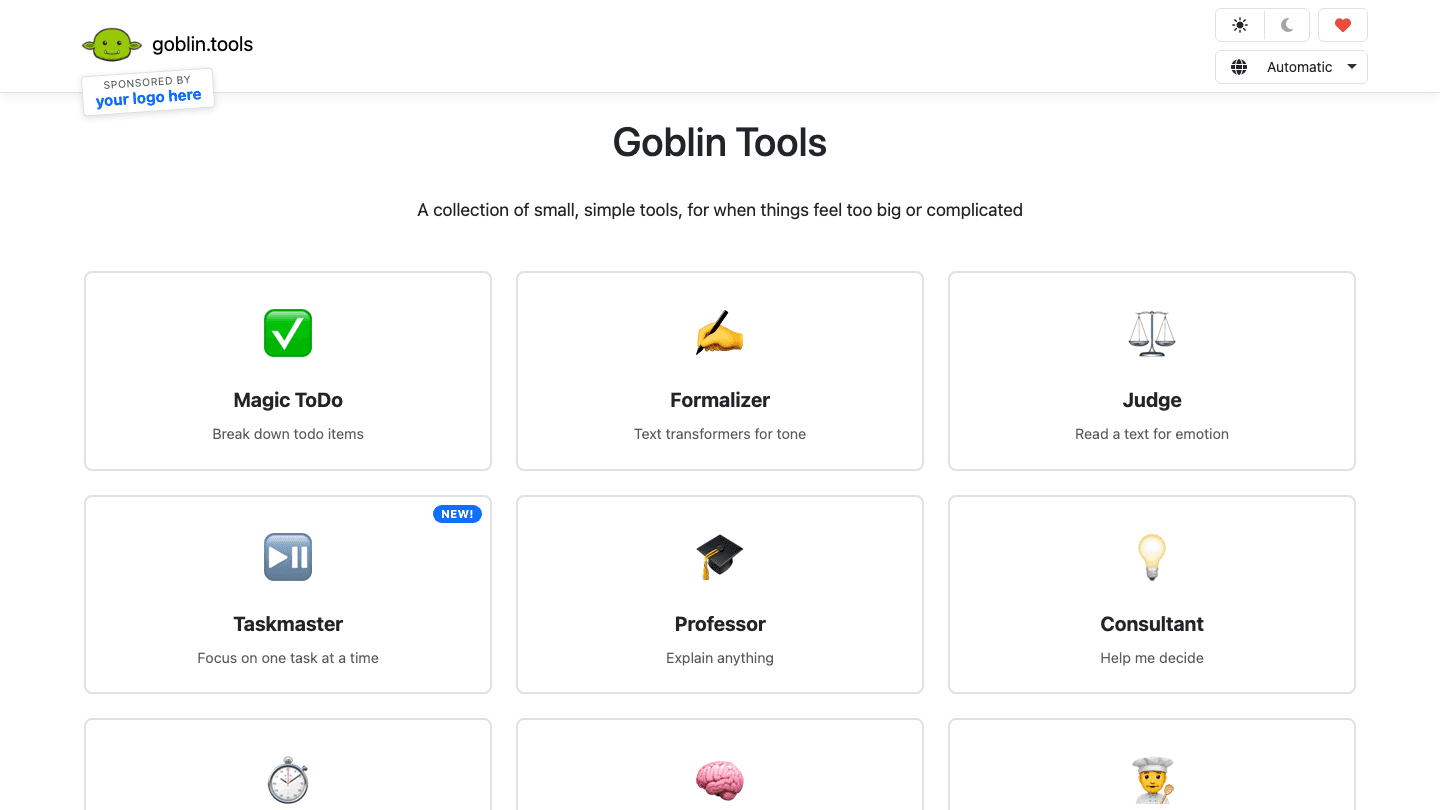
Goblin Tools is a web-based collection of AI-powered mini tools designed for people who find tasks overwhelming. The site was built by developer Svelte and went viral on TikTok and Reddit in 2023 after ADHD communities discovered it. Since then it has added more tools and gained a substantial following among neurodivergent users.
You don't need to create an account. You don't need to pay. You open the site, pick a tool, and use it. The design is minimal and the tools are simple by choice. Each one is small enough to actually start using without a tutorial.
Magic To-Do: Breaking Tasks Down When They Feel Too Big
Magic To-Do is the most popular tool on the site, and for good reason. You type a task, like "do my taxes" or "clean the kitchen," and the tool breaks it into smaller, more manageable sub-steps. You can then click each sub-step to break it down further, recursively, until the tasks feel small enough to actually start.
This directly addresses one of the core challenges with ADHD task initiation. Big, vague tasks are hard to start because the brain can't identify the first action. "Do my taxes" isn't a task, it's a project. "Gather your W-2 forms from the folder on your desk" is a task. Magic To-Do finds those concrete first steps automatically.
A practical way to use it: dump every big task on your list into Magic To-Do at the start of the week. Break each one down until the sub-steps feel doable. Then move those sub-steps into your actual task manager with deadlines and reminders attached. Goblin Tools does the breakdown; your planner app handles the scheduling.
Works for any kind of task, personal or professional
Adjustable "spiciness" slider controls how granularly it breaks things down
Each sub-task can be broken down further by clicking it
Free and requires no login
Taskmaster: Focusing on One Thing at a Time
Taskmaster is a newer addition that shows you one task at a time from a list you create. You add your tasks, and the tool hides everything except the current one. When you finish, you mark it done and the next one appears.
For ADHD brains that struggle with list anxiety, seeing 15 things at once can make it impossible to start anything. Taskmaster addresses this by collapsing the list to a single item. It won't reschedule anything or set reminders, but as a temporary blinders tool for getting into a focused work session, it's useful. Pair it with a dedicated ADHD focus app for timed sessions.
Formalizer: Rewriting Text When Tone Is Hard
Executive dysfunction often makes email writing painful. You know what you want to say but getting the tone right, formal enough for work, casual enough for a friend, not too direct, not too passive, takes cognitive effort that isn't always available.
Formalizer takes text you've written and rewrites it across a tone spectrum: from formal business language to very casual, or anywhere in between. Paste your draft, pick the tone you need, and get a rewrite. This works well for emails, Slack messages, feedback responses, or any text where tone matters more than content.
ADHD communication styles often read as either too blunt or too rambly in writing. Formalizer bridges that gap without requiring you to figure out the right words yourself.
Judge: Reading Emotional Text Without Spiraling
Judge analyzes a piece of text (an email, a message, a performance review) and tells you the emotional tone of it: is this passive-aggressive? Is it friendly? Neutral? Negative? The tool gives you an objective read without you having to interpret the emotional subtext yourself.
For ADHD people who experience rejection sensitive dysphoria or who tend to interpret neutral messages as hostile, Judge provides a second opinion that doesn't come from your own heightened emotional state. Paste the text, get a read. If the tool says the tone is neutral or positive, that's useful information to have before spending an hour catastrophizing about what a one-line email meant.
Professor: Explaining Anything Without Judgment
Professor takes a concept, a word, a term, or any piece of text and explains it clearly. You can set the complexity level so it explains like you're a professional in the field or like you've never heard the topic before. No question is too basic.
This is useful for ADHD learners who don't understand something but feel embarrassed to ask, for people processing complex information after reading, or for anyone who needs a concept explained in plain language. Type the thing you don't understand and get a clear explanation without judgment. Use the complexity slider to match the depth to what you actually need.
Consultant: Making Decisions When You're Stuck
Consultant helps with decisions by asking you to describe the situation and what you're weighing. It then gives you an analysis and a recommendation. This is less about making the decision for you and more about giving you a structured second opinion when your own thinking has gone in circles.
Decision fatigue and analysis paralysis are common ADHD experiences. When you've been going back and forth on something for an hour and can't get unstuck, Consultant gives you something to react to rather than a blank slate to fill. Sometimes having a concrete recommendation to agree or disagree with is easier than generating one from scratch.
Best Planner to Pair with Goblin Tools
Goblin Tools breaks tasks down. It doesn't schedule them, remind you about them, or help you decide when to do them. That's where a dedicated AI planner app comes in.
Lifestack is the natural companion to Goblin Tools. Use Magic To-Do to break a big task into concrete steps, then drop those steps into Lifestack with a deadline. Lifestack's AI scheduler will find a time for each sub-task based on your energy levels throughout the day, so the work actually gets scheduled rather than sitting on a list waiting for the right moment that never comes.
This workflow removes two major ADHD task paralysis triggers: the "this task is too big to start" problem (solved by Magic To-Do) and the "I don't know when I'll do this" problem (solved by Lifestack's auto-scheduling). Together, they cover the full pipeline from vague idea to scheduled action.
Is Goblin Tools Free?
Yes, Goblin Tools is entirely free. No account is required to use any of the tools. The site has a small donation button for people who want to support the developer, but there's no paywall, no free tier vs. paid tier, and no email required. You open the site and start using it.
Frequently Asked Questions
What is Goblin Tools?
Goblin Tools is a free website with a collection of AI-powered tools designed for people who find everyday tasks overwhelming. The most popular feature is Magic To-Do, which breaks large tasks into smaller, concrete steps. Other tools handle tone correction, decision-making, text explanation, and focused task display.
Is Goblin Tools good for ADHD?
Yes. Goblin Tools was built specifically with neurodiverse users in mind. Magic To-Do addresses the ADHD task initiation problem directly by turning vague, overwhelming tasks into small, concrete actions. The Judge tool helps with rejection sensitive dysphoria by providing an objective read on emotional text. Formalizer helps with communication difficulties.
Is Goblin Tools free?
Completely free. No account required, no paid tier, no credit card. The developer accepts optional donations via a button on the site, but all features are available without payment.
How do I use Magic To-Do in Goblin Tools?
Go to goblin.tools and click Magic To-Do. Type a task in the input field (any task, even vague ones like "deal with my inbox"). Click the magic wand button and the tool will generate a list of smaller steps. Click any step to break it down further. Adjust the spiciness slider to control how granularly it breaks things down. Move the sub-tasks into your planner app to schedule them.
What is the best way to use Goblin Tools with a planner app?
Use Goblin Tools at the planning stage and a dedicated ADHD planner app for the scheduling stage. Run big or complex tasks through Magic To-Do to get concrete sub-steps, then add those sub-steps to your planner with deadlines. Lifestack's AI scheduling will find time for each one automatically.
Does Goblin Tools have a mobile app?
No dedicated mobile app exists as of 2026, but the website works on mobile browsers. The interface is simple enough to use on a phone screen, though Magic To-Do is easier to use on a tablet or desktop where you can see the full breakdown without a lot of scrolling.
There's a free website called Goblin Tools that a lot of ADHD people have never heard of, and a lot of the ones who have heard of it don't use it nearly enough. The site was built by a solo developer, is completely free, and solves specific ADHD pain points better than most expensive apps: breaking tasks into smaller steps, rewriting emails when you can't find the right tone, and getting explanations for confusing things without feeling stupid for asking.
Goblin Tools is a collection of small, specialized AI tools. Each one does one thing. That's intentional. ADHD brains often do better with a focused tool for a specific problem than with a Swiss Army knife that requires learning a whole system. You open the one that matches the problem you're having right now.
Here's what each tool does, who it's useful for, and how to actually get value from it rather than opening it once and forgetting it exists.
Key Takeaways
Goblin Tools is free and requires no account, which removes the biggest barrier to actually using it
Magic To-Do is the most valuable feature for ADHD task initiation and planning
Goblin Tools pairs well with a daily planning app; use it to break tasks down, then schedule them somewhere with deadlines and reminders
What Is Goblin Tools?
Goblin Tools is a web-based collection of AI-powered mini tools designed for people who find tasks overwhelming. The site was built by developer Svelte and went viral on TikTok and Reddit in 2023 after ADHD communities discovered it. Since then it has added more tools and gained a substantial following among neurodivergent users.
You don't need to create an account. You don't need to pay. You open the site, pick a tool, and use it. The design is minimal and the tools are simple by choice. Each one is small enough to actually start using without a tutorial.
Magic To-Do: Breaking Tasks Down When They Feel Too Big
Magic To-Do is the most popular tool on the site, and for good reason. You type a task, like "do my taxes" or "clean the kitchen," and the tool breaks it into smaller, more manageable sub-steps. You can then click each sub-step to break it down further, recursively, until the tasks feel small enough to actually start.
This directly addresses one of the core challenges with ADHD task initiation. Big, vague tasks are hard to start because the brain can't identify the first action. "Do my taxes" isn't a task, it's a project. "Gather your W-2 forms from the folder on your desk" is a task. Magic To-Do finds those concrete first steps automatically.
A practical way to use it: dump every big task on your list into Magic To-Do at the start of the week. Break each one down until the sub-steps feel doable. Then move those sub-steps into your actual task manager with deadlines and reminders attached. Goblin Tools does the breakdown; your planner app handles the scheduling.
Works for any kind of task, personal or professional
Adjustable "spiciness" slider controls how granularly it breaks things down
Each sub-task can be broken down further by clicking it
Free and requires no login
Taskmaster: Focusing on One Thing at a Time
Taskmaster is a newer addition that shows you one task at a time from a list you create. You add your tasks, and the tool hides everything except the current one. When you finish, you mark it done and the next one appears.
For ADHD brains that struggle with list anxiety, seeing 15 things at once can make it impossible to start anything. Taskmaster addresses this by collapsing the list to a single item. It won't reschedule anything or set reminders, but as a temporary blinders tool for getting into a focused work session, it's useful. Pair it with a dedicated ADHD focus app for timed sessions.
Formalizer: Rewriting Text When Tone Is Hard
Executive dysfunction often makes email writing painful. You know what you want to say but getting the tone right, formal enough for work, casual enough for a friend, not too direct, not too passive, takes cognitive effort that isn't always available.
Formalizer takes text you've written and rewrites it across a tone spectrum: from formal business language to very casual, or anywhere in between. Paste your draft, pick the tone you need, and get a rewrite. This works well for emails, Slack messages, feedback responses, or any text where tone matters more than content.
ADHD communication styles often read as either too blunt or too rambly in writing. Formalizer bridges that gap without requiring you to figure out the right words yourself.
Judge: Reading Emotional Text Without Spiraling
Judge analyzes a piece of text (an email, a message, a performance review) and tells you the emotional tone of it: is this passive-aggressive? Is it friendly? Neutral? Negative? The tool gives you an objective read without you having to interpret the emotional subtext yourself.
For ADHD people who experience rejection sensitive dysphoria or who tend to interpret neutral messages as hostile, Judge provides a second opinion that doesn't come from your own heightened emotional state. Paste the text, get a read. If the tool says the tone is neutral or positive, that's useful information to have before spending an hour catastrophizing about what a one-line email meant.
Professor: Explaining Anything Without Judgment
Professor takes a concept, a word, a term, or any piece of text and explains it clearly. You can set the complexity level so it explains like you're a professional in the field or like you've never heard the topic before. No question is too basic.
This is useful for ADHD learners who don't understand something but feel embarrassed to ask, for people processing complex information after reading, or for anyone who needs a concept explained in plain language. Type the thing you don't understand and get a clear explanation without judgment. Use the complexity slider to match the depth to what you actually need.
Consultant: Making Decisions When You're Stuck
Consultant helps with decisions by asking you to describe the situation and what you're weighing. It then gives you an analysis and a recommendation. This is less about making the decision for you and more about giving you a structured second opinion when your own thinking has gone in circles.
Decision fatigue and analysis paralysis are common ADHD experiences. When you've been going back and forth on something for an hour and can't get unstuck, Consultant gives you something to react to rather than a blank slate to fill. Sometimes having a concrete recommendation to agree or disagree with is easier than generating one from scratch.
Best Planner to Pair with Goblin Tools
Goblin Tools breaks tasks down. It doesn't schedule them, remind you about them, or help you decide when to do them. That's where a dedicated AI planner app comes in.
Lifestack is the natural companion to Goblin Tools. Use Magic To-Do to break a big task into concrete steps, then drop those steps into Lifestack with a deadline. Lifestack's AI scheduler will find a time for each sub-task based on your energy levels throughout the day, so the work actually gets scheduled rather than sitting on a list waiting for the right moment that never comes.
This workflow removes two major ADHD task paralysis triggers: the "this task is too big to start" problem (solved by Magic To-Do) and the "I don't know when I'll do this" problem (solved by Lifestack's auto-scheduling). Together, they cover the full pipeline from vague idea to scheduled action.
Is Goblin Tools Free?
Yes, Goblin Tools is entirely free. No account is required to use any of the tools. The site has a small donation button for people who want to support the developer, but there's no paywall, no free tier vs. paid tier, and no email required. You open the site and start using it.
Frequently Asked Questions
What is Goblin Tools?
Goblin Tools is a free website with a collection of AI-powered tools designed for people who find everyday tasks overwhelming. The most popular feature is Magic To-Do, which breaks large tasks into smaller, concrete steps. Other tools handle tone correction, decision-making, text explanation, and focused task display.
Is Goblin Tools good for ADHD?
Yes. Goblin Tools was built specifically with neurodiverse users in mind. Magic To-Do addresses the ADHD task initiation problem directly by turning vague, overwhelming tasks into small, concrete actions. The Judge tool helps with rejection sensitive dysphoria by providing an objective read on emotional text. Formalizer helps with communication difficulties.
Is Goblin Tools free?
Completely free. No account required, no paid tier, no credit card. The developer accepts optional donations via a button on the site, but all features are available without payment.
How do I use Magic To-Do in Goblin Tools?
Go to goblin.tools and click Magic To-Do. Type a task in the input field (any task, even vague ones like "deal with my inbox"). Click the magic wand button and the tool will generate a list of smaller steps. Click any step to break it down further. Adjust the spiciness slider to control how granularly it breaks things down. Move the sub-tasks into your planner app to schedule them.
What is the best way to use Goblin Tools with a planner app?
Use Goblin Tools at the planning stage and a dedicated ADHD planner app for the scheduling stage. Run big or complex tasks through Magic To-Do to get concrete sub-steps, then add those sub-steps to your planner with deadlines. Lifestack's AI scheduling will find time for each one automatically.
Does Goblin Tools have a mobile app?
No dedicated mobile app exists as of 2026, but the website works on mobile browsers. The interface is simple enough to use on a phone screen, though Magic To-Do is easier to use on a tablet or desktop where you can see the full breakdown without a lot of scrolling.



FOLLOW ON
FOLLOW ON
FOLLOW ON


Copyright 2026 © Lifestack. All rights reserved
Copyright 2026 © Lifestack. All rights reserved

