
App
Joplin vs Obsidian: Which Should You Use in 2026?
Joplin vs Obsidian: Which Should You Use in 2026?

Joplin and Obsidian sit at opposite ends of the note-taking philosophy spectrum. Joplin is designed to be simple, portable, and reliably functional for people who want their notes organized in notebooks without a steep learning curve. Obsidian is built for people who want to build a thinking network, connecting ideas across a vault using bidirectional links, graph visualization, and a deep plugin ecosystem.
They're both free to use locally, both use Markdown, and both have strong privacy stories. But they're not interchangeable. The right choice depends entirely on how you think about your notes and what you want to do with them. Here's the full comparison.
Key Takeaways
Joplin is better if you want a simple, notebook-style organizer that syncs reliably and works the same everywhere. Obsidian is better if you want to build a connected knowledge base with deep linking and plugins.
Obsidian is free for personal local use with paid optional sync ($4-5/month). Joplin's app is free; cloud sync starts at around $3.30/month. Both offer self-hosted alternatives.
Neither app is built for task management or daily planning, though both have workarounds for it.
Quick Verdict
Joplin: Best for people who want an open-source Evernote replacement with straightforward notebook organization and reliable sync across devices
Obsidian: Best for researchers, writers, and anyone building a long-term personal knowledge base with connected ideas
Joplin Overview
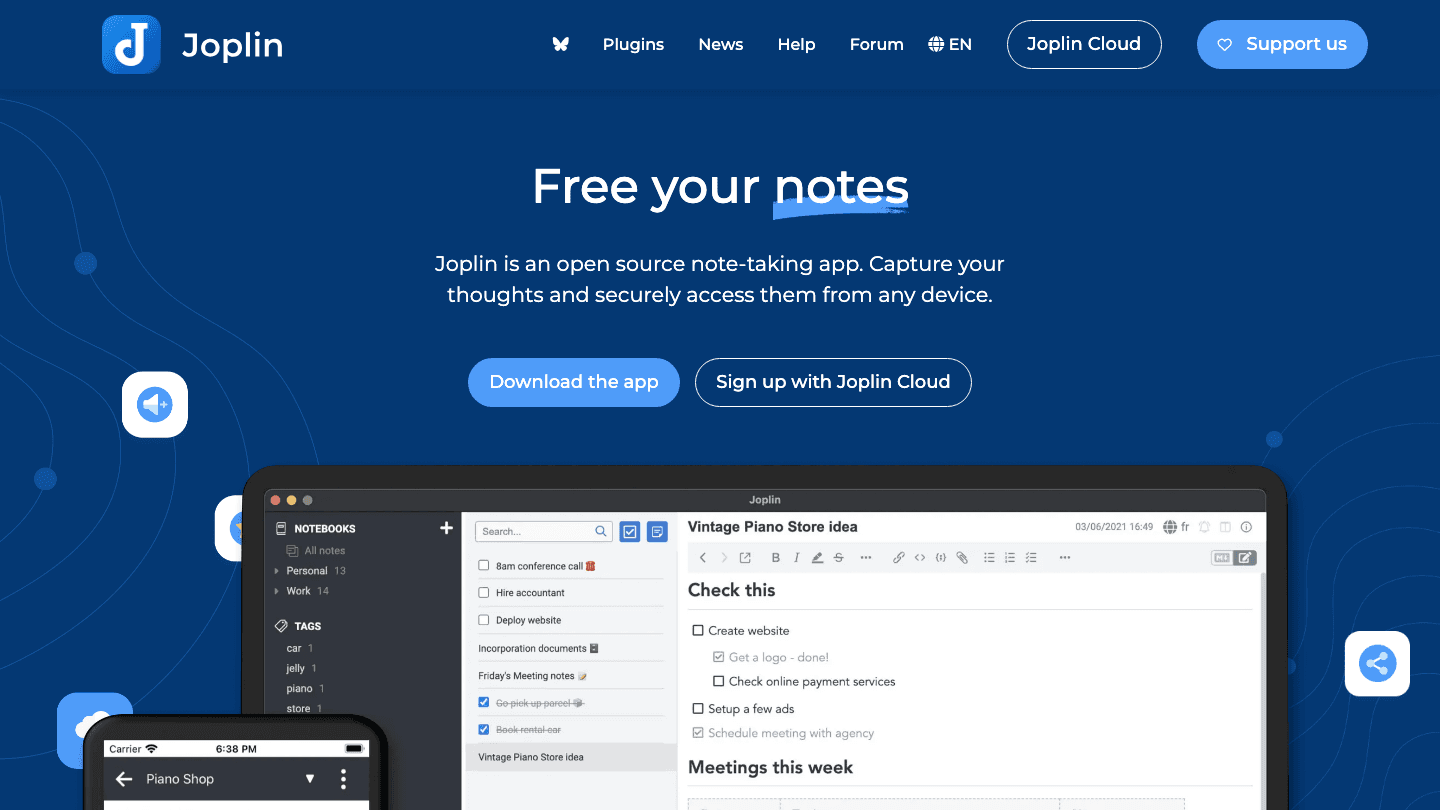
Joplin is an open-source note-taking app that launched in 2017 as a privacy-focused, self-hostable alternative to Evernote. It uses a familiar notebook and tag structure, supports Markdown (with a WYSIWYG option), and syncs via any WebDAV server, Dropbox, OneDrive, Nextcloud, or Joplin's own cloud service.
The interface is functional rather than pretty. Joplin's design prioritizes reliability and compatibility over aesthetic polish. It runs on Windows, macOS, Linux, iOS, and Android. Web clipper is available for Chrome and Firefox. Notes are stored as plain Markdown files and can be exported at any time, making it easy to migrate away from if your needs change.
What Works
Fully open-source with no vendor lock-in
Flexible sync (bring your own WebDAV, Dropbox, or OneDrive)
Encryption (end-to-end when using Joplin Cloud or E2EE-capable sync targets)
Web clipper for saving web content directly
Notebook hierarchy is intuitive and familiar
Plugin ecosystem that expands functionality without requiring technical knowledge
Limitations
Desktop UI looks dated compared to modern note apps
No native bidirectional linking or graph view
Mobile apps are functional but behind the desktop experience
Joplin Cloud pricing is in euros, which can create minor confusion for USD users
Pricing: App is free and open-source. Joplin Cloud sync from €2.99/month (~$3.30) with a 14-day free trial. Self-hosted sync via WebDAV, Dropbox, OneDrive, or Nextcloud is free.
Obsidian Overview
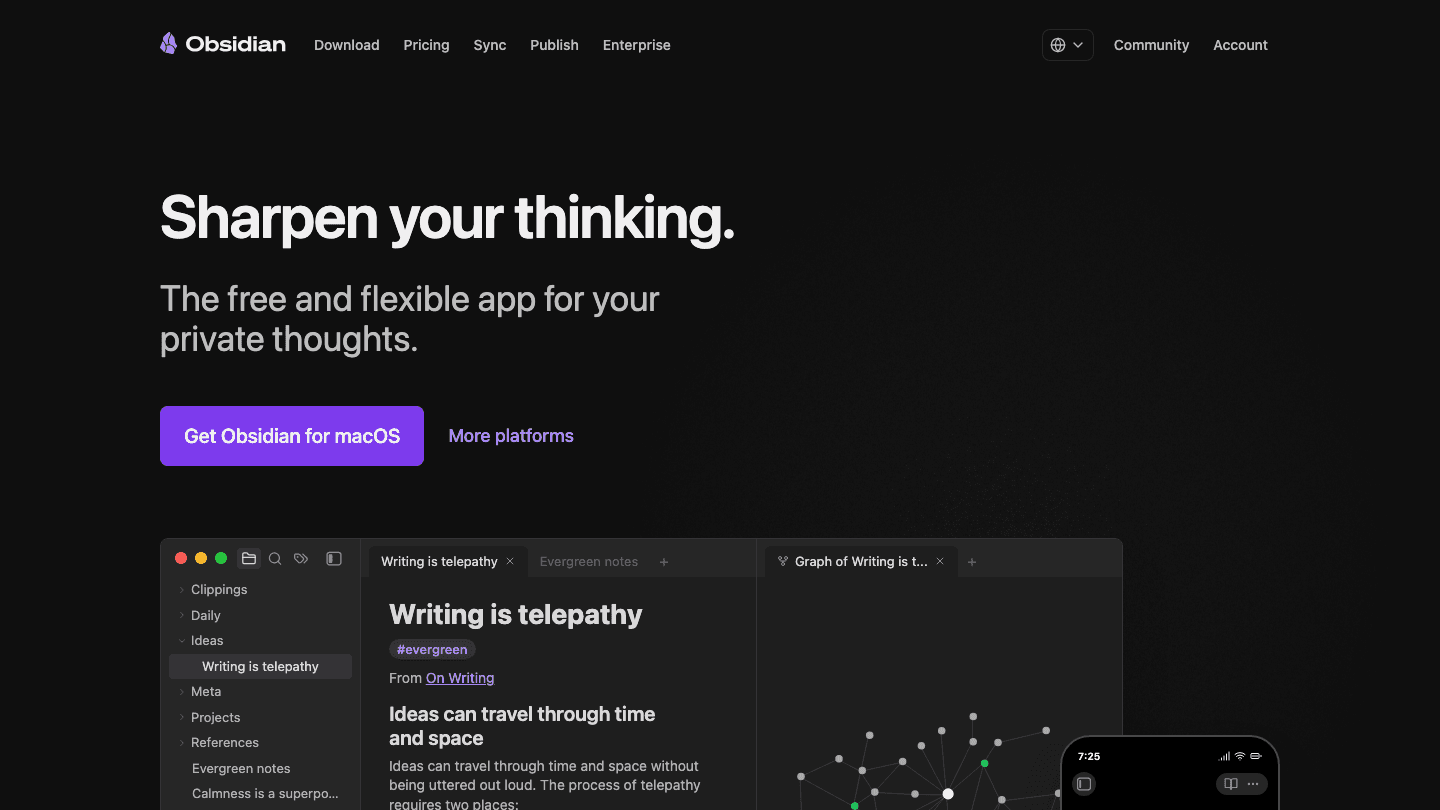
Obsidian stores notes as plain Markdown files in a local folder called a vault. No account required, no cloud by default, no data leaving your device. The core product is genuinely free for personal use, and the files are yours completely. This is a fundamentally different model from most note apps, which store your data on their servers.
Obsidian's defining feature is bidirectional linking: any note can link to any other note, and Obsidian tracks which notes link back to each other. A graph view visualizes these connections across your entire vault. Over time, a well-maintained Obsidian vault becomes a personal knowledge graph where ideas from different domains surface connections you wouldn't have made manually. See also how it compares in our Obsidian vs Notion roundup and our look at second brain apps.
What Works
Files are plain Markdown stored locally (total ownership, works offline forever)
Bidirectional links and graph view for building a connected knowledge base
Exceptional plugin ecosystem with hundreds of community plugins
Canvas mode for spatial thinking and visual organization
Strong Markdown support with LaTeX, callouts, embeds, and tables
Active community with templates and workflows for almost any use case
Limitations
Sync costs extra ($4/month annually for Obsidian Sync)
High learning curve if you want to use the full feature set
Mobile experience is weaker than desktop, particularly on Android
No WYSIWYG for users uncomfortable with raw Markdown
Setup requires more intentionality than Joplin's out-of-the-box experience
Pricing: Free for personal local use. Obsidian Sync: $5/month or $4/month billed annually. Obsidian Publish (for public sites): $10/month or $8/month annually. Commercial license: $50/user/year.
Head-to-Head Comparison
Sync and Storage
Joplin is more flexible on sync out of the box: WebDAV, Dropbox, OneDrive, Nextcloud, and Joplin Cloud all work with minimal setup. Obsidian's official sync is clean and fast but costs extra. Many Obsidian users self-sync via iCloud (Mac/iOS), Syncthing (cross-platform), or Git, which are free but require more technical setup.
Privacy and Data Ownership
Both are strong on privacy. Obsidian stores files locally by default, so nothing leaves your machine unless you explicitly enable sync. Joplin offers end-to-end encryption on Joplin Cloud and optionally on third-party sync targets. If privacy is a primary concern, both are far better choices than cloud-first alternatives like Evernote or Notion. See privacy-focused Google Keep alternatives for context on what these apps replace.
Organization
Joplin uses notebooks and tags (familiar, hierarchical). Obsidian uses folders, tags, and links (flexible, flat or hierarchical). Obsidian is better for connecting ideas across domains. Joplin is better for people who want traditional folder-style organization without needing to think about it. If you're familiar with the PARA method, Obsidian's folder structure maps cleanly to it.
Plugin Ecosystem
Obsidian wins this clearly. It has hundreds of community plugins covering task management, spaced repetition, daily notes, Kanban, calendars, and almost any workflow you can imagine. Joplin has a plugin ecosystem but it's smaller and less actively developed. Check out how Obsidian handles tasks via its most popular task plugin for a sense of the depth available.
Learning Curve
Joplin is simpler to get into. It behaves mostly like any other note app. Obsidian can be used simply, but its real value only emerges with investment in how you structure your vault and which plugins you install. Obsidian without deliberate setup is just a Markdown editor. With it, it's a knowledge management system.
Mobile Experience
Joplin's mobile apps are stable and functional but not polished. Obsidian Mobile has improved significantly but still lags behind the desktop in fluidity. If you primarily use a phone to capture notes and review on desktop, both work. If you want a rich mobile editing experience, neither is exceptional.
Collaboration
Neither is built for team collaboration. Obsidian Sync supports shared vaults, but the workflow is better for personal use than for teams. Joplin has no real-time collaboration features. For team note-taking, look at alternatives like NotebookLM alternatives instead.
Which Should You Choose?
Choose Joplin if: you want a simple, open-source Evernote replacement with flexible sync options, notebook-style organization, and no learning curve
Choose Obsidian if: you want to build a long-term personal knowledge base, work in connected ideas, and are willing to invest time in setup for a system that scales with your thinking
Choose Joplin if: you need end-to-end encrypted sync without paying extra for it (via Joplin Cloud's built-in E2EE)
Choose Obsidian if: you want the largest plugin ecosystem and don't mind configuring your own sync
Choose either over both if: you need real-time collaboration or a mobile-first experience. Neither is optimized for those cases.
If you use either Joplin or Obsidian for capturing tasks and want those tasks to actually get scheduled in your week, Lifestack integrates with most task systems and can auto-schedule your task list around your energy levels and calendar. It doesn't replace your notes app, but it bridges the gap between having notes and actually doing what's in them.
Frequently Asked Questions
Is Joplin better than Obsidian?
Neither is objectively better. Joplin is better for simple notebook-style organization, reliable sync with multiple backend options, and out-of-the-box usability. Obsidian is better for building a connected personal knowledge base with powerful plugins and local file ownership. The right choice depends on what you want from a note app.
Can I use Joplin and Obsidian together?
Yes, because both use Markdown. You could write notes in either and potentially read them in the other. In practice, they serve different purposes well enough that most people commit to one. The file formats are compatible; the organizational philosophies are not.
Does Obsidian have sync?
Yes, but it costs extra. Obsidian Sync is $5/month or $4/month billed annually. Many users avoid this cost by syncing their vault via iCloud, Syncthing, or Git, which require more technical setup but are free.
Is Joplin truly free?
The Joplin app is free and open-source. Cloud sync (Joplin Cloud) starts at €2.99/month (~$3.30). Self-hosted sync via WebDAV, Dropbox, OneDrive, or Nextcloud is free if you have those services already.
Which is better for ADHD users?
Joplin's simpler interface tends to be less overwhelming for ADHD users who find Obsidian's plugin ecosystem and vault-building process distracting. However, Obsidian's daily notes workflow and task plugins are popular in ADHD productivity communities. The honest answer is: whichever one you'll actually use consistently. Start with Joplin for a lower barrier to entry.
Joplin and Obsidian sit at opposite ends of the note-taking philosophy spectrum. Joplin is designed to be simple, portable, and reliably functional for people who want their notes organized in notebooks without a steep learning curve. Obsidian is built for people who want to build a thinking network, connecting ideas across a vault using bidirectional links, graph visualization, and a deep plugin ecosystem.
They're both free to use locally, both use Markdown, and both have strong privacy stories. But they're not interchangeable. The right choice depends entirely on how you think about your notes and what you want to do with them. Here's the full comparison.
Key Takeaways
Joplin is better if you want a simple, notebook-style organizer that syncs reliably and works the same everywhere. Obsidian is better if you want to build a connected knowledge base with deep linking and plugins.
Obsidian is free for personal local use with paid optional sync ($4-5/month). Joplin's app is free; cloud sync starts at around $3.30/month. Both offer self-hosted alternatives.
Neither app is built for task management or daily planning, though both have workarounds for it.
Quick Verdict
Joplin: Best for people who want an open-source Evernote replacement with straightforward notebook organization and reliable sync across devices
Obsidian: Best for researchers, writers, and anyone building a long-term personal knowledge base with connected ideas
Joplin Overview
Joplin is an open-source note-taking app that launched in 2017 as a privacy-focused, self-hostable alternative to Evernote. It uses a familiar notebook and tag structure, supports Markdown (with a WYSIWYG option), and syncs via any WebDAV server, Dropbox, OneDrive, Nextcloud, or Joplin's own cloud service.
The interface is functional rather than pretty. Joplin's design prioritizes reliability and compatibility over aesthetic polish. It runs on Windows, macOS, Linux, iOS, and Android. Web clipper is available for Chrome and Firefox. Notes are stored as plain Markdown files and can be exported at any time, making it easy to migrate away from if your needs change.
What Works
Fully open-source with no vendor lock-in
Flexible sync (bring your own WebDAV, Dropbox, or OneDrive)
Encryption (end-to-end when using Joplin Cloud or E2EE-capable sync targets)
Web clipper for saving web content directly
Notebook hierarchy is intuitive and familiar
Plugin ecosystem that expands functionality without requiring technical knowledge
Limitations
Desktop UI looks dated compared to modern note apps
No native bidirectional linking or graph view
Mobile apps are functional but behind the desktop experience
Joplin Cloud pricing is in euros, which can create minor confusion for USD users
Pricing: App is free and open-source. Joplin Cloud sync from €2.99/month (~$3.30) with a 14-day free trial. Self-hosted sync via WebDAV, Dropbox, OneDrive, or Nextcloud is free.
Obsidian Overview
Obsidian stores notes as plain Markdown files in a local folder called a vault. No account required, no cloud by default, no data leaving your device. The core product is genuinely free for personal use, and the files are yours completely. This is a fundamentally different model from most note apps, which store your data on their servers.
Obsidian's defining feature is bidirectional linking: any note can link to any other note, and Obsidian tracks which notes link back to each other. A graph view visualizes these connections across your entire vault. Over time, a well-maintained Obsidian vault becomes a personal knowledge graph where ideas from different domains surface connections you wouldn't have made manually. See also how it compares in our Obsidian vs Notion roundup and our look at second brain apps.
What Works
Files are plain Markdown stored locally (total ownership, works offline forever)
Bidirectional links and graph view for building a connected knowledge base
Exceptional plugin ecosystem with hundreds of community plugins
Canvas mode for spatial thinking and visual organization
Strong Markdown support with LaTeX, callouts, embeds, and tables
Active community with templates and workflows for almost any use case
Limitations
Sync costs extra ($4/month annually for Obsidian Sync)
High learning curve if you want to use the full feature set
Mobile experience is weaker than desktop, particularly on Android
No WYSIWYG for users uncomfortable with raw Markdown
Setup requires more intentionality than Joplin's out-of-the-box experience
Pricing: Free for personal local use. Obsidian Sync: $5/month or $4/month billed annually. Obsidian Publish (for public sites): $10/month or $8/month annually. Commercial license: $50/user/year.
Head-to-Head Comparison
Sync and Storage
Joplin is more flexible on sync out of the box: WebDAV, Dropbox, OneDrive, Nextcloud, and Joplin Cloud all work with minimal setup. Obsidian's official sync is clean and fast but costs extra. Many Obsidian users self-sync via iCloud (Mac/iOS), Syncthing (cross-platform), or Git, which are free but require more technical setup.
Privacy and Data Ownership
Both are strong on privacy. Obsidian stores files locally by default, so nothing leaves your machine unless you explicitly enable sync. Joplin offers end-to-end encryption on Joplin Cloud and optionally on third-party sync targets. If privacy is a primary concern, both are far better choices than cloud-first alternatives like Evernote or Notion. See privacy-focused Google Keep alternatives for context on what these apps replace.
Organization
Joplin uses notebooks and tags (familiar, hierarchical). Obsidian uses folders, tags, and links (flexible, flat or hierarchical). Obsidian is better for connecting ideas across domains. Joplin is better for people who want traditional folder-style organization without needing to think about it. If you're familiar with the PARA method, Obsidian's folder structure maps cleanly to it.
Plugin Ecosystem
Obsidian wins this clearly. It has hundreds of community plugins covering task management, spaced repetition, daily notes, Kanban, calendars, and almost any workflow you can imagine. Joplin has a plugin ecosystem but it's smaller and less actively developed. Check out how Obsidian handles tasks via its most popular task plugin for a sense of the depth available.
Learning Curve
Joplin is simpler to get into. It behaves mostly like any other note app. Obsidian can be used simply, but its real value only emerges with investment in how you structure your vault and which plugins you install. Obsidian without deliberate setup is just a Markdown editor. With it, it's a knowledge management system.
Mobile Experience
Joplin's mobile apps are stable and functional but not polished. Obsidian Mobile has improved significantly but still lags behind the desktop in fluidity. If you primarily use a phone to capture notes and review on desktop, both work. If you want a rich mobile editing experience, neither is exceptional.
Collaboration
Neither is built for team collaboration. Obsidian Sync supports shared vaults, but the workflow is better for personal use than for teams. Joplin has no real-time collaboration features. For team note-taking, look at alternatives like NotebookLM alternatives instead.
Which Should You Choose?
Choose Joplin if: you want a simple, open-source Evernote replacement with flexible sync options, notebook-style organization, and no learning curve
Choose Obsidian if: you want to build a long-term personal knowledge base, work in connected ideas, and are willing to invest time in setup for a system that scales with your thinking
Choose Joplin if: you need end-to-end encrypted sync without paying extra for it (via Joplin Cloud's built-in E2EE)
Choose Obsidian if: you want the largest plugin ecosystem and don't mind configuring your own sync
Choose either over both if: you need real-time collaboration or a mobile-first experience. Neither is optimized for those cases.
If you use either Joplin or Obsidian for capturing tasks and want those tasks to actually get scheduled in your week, Lifestack integrates with most task systems and can auto-schedule your task list around your energy levels and calendar. It doesn't replace your notes app, but it bridges the gap between having notes and actually doing what's in them.
Frequently Asked Questions
Is Joplin better than Obsidian?
Neither is objectively better. Joplin is better for simple notebook-style organization, reliable sync with multiple backend options, and out-of-the-box usability. Obsidian is better for building a connected personal knowledge base with powerful plugins and local file ownership. The right choice depends on what you want from a note app.
Can I use Joplin and Obsidian together?
Yes, because both use Markdown. You could write notes in either and potentially read them in the other. In practice, they serve different purposes well enough that most people commit to one. The file formats are compatible; the organizational philosophies are not.
Does Obsidian have sync?
Yes, but it costs extra. Obsidian Sync is $5/month or $4/month billed annually. Many users avoid this cost by syncing their vault via iCloud, Syncthing, or Git, which require more technical setup but are free.
Is Joplin truly free?
The Joplin app is free and open-source. Cloud sync (Joplin Cloud) starts at €2.99/month (~$3.30). Self-hosted sync via WebDAV, Dropbox, OneDrive, or Nextcloud is free if you have those services already.
Which is better for ADHD users?
Joplin's simpler interface tends to be less overwhelming for ADHD users who find Obsidian's plugin ecosystem and vault-building process distracting. However, Obsidian's daily notes workflow and task plugins are popular in ADHD productivity communities. The honest answer is: whichever one you'll actually use consistently. Start with Joplin for a lower barrier to entry.



FOLLOW ON
FOLLOW ON
FOLLOW ON


Copyright 2026 © Lifestack. All rights reserved
Copyright 2026 © Lifestack. All rights reserved

