
App
Notion Calendar vs Google Calendar: Which Wins?
Notion Calendar vs Google Calendar: Which Wins?

At first glance, Notion Calendar and Google Calendar appear to be direct competitors. Both show your events on a grid, both sync across devices, and both are free. Dig a little deeper and you find something less intuitive: these apps aren't really competing at all.
Notion Calendar doesn't store its own events. It signs into your Google Calendar, Outlook, or iCloud account and displays a different interface on top of what's already there. When you open both apps side by side, you're looking at identical events rendered two different ways.
That distinction shapes everything about how to use them, what's worth comparing, and when it actually makes sense to switch. Here's what we found after using both for a full month.
Key Takeaways
Notion Calendar is a client app, not a calendar service. It displays your Google Calendar events in a keyboard-first, desktop-focused interface with Notion database integration.
Google Calendar is the underlying calendar service most people use. Its mobile apps are more capable, and its team-sharing and integration ecosystem is broader.
Many users do well running both: Google Calendar on mobile for quick event checks, Notion Calendar on desktop for deep planning sessions.
Quick Verdict
Notion Calendar: A better planning environment for desktop-primary Notion users who want keyboard shortcuts, scheduling links, and Notion doc linking.
Google Calendar: The better all-around calendar for mobile users, teams with admin needs, and anyone who relies on third-party integrations or calendar feeds.
Notion Calendar Overview
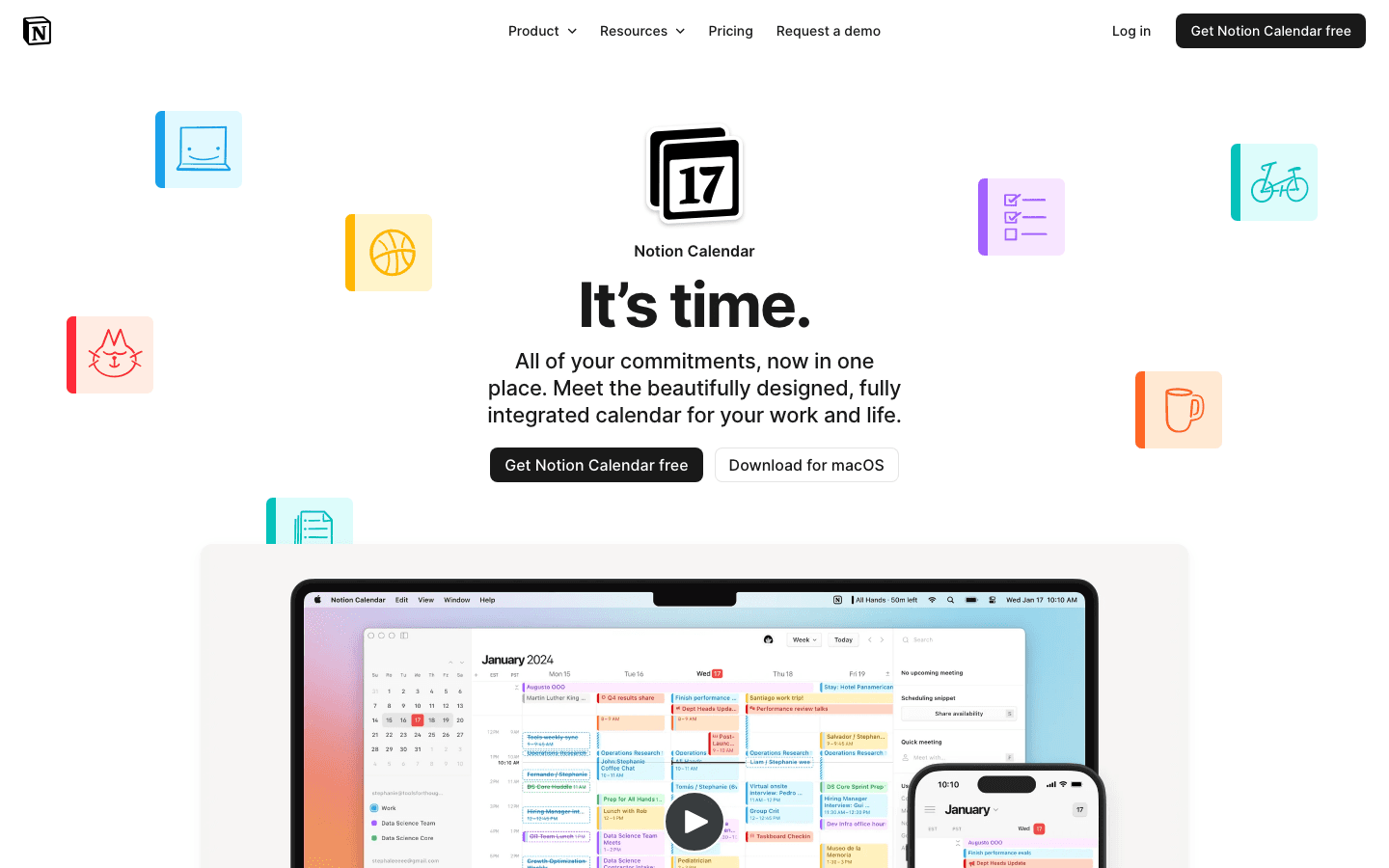
Notion Calendar launched in 2024 and became fully free in September 2026. Its core proposition is straightforward: connect your Google Calendar, Outlook, or iCloud account, and Notion Calendar gives you a cleaner, more keyboard-driven interface to manage what's already there.
The most interesting feature is the integration with Notion databases. You can attach Notion pages to calendar events, view and edit database rows directly within the calendar view, and pull Notion tasks into your schedule. For someone who already lives in Notion for notes and project management, this eliminates context-switching between the calendar and the workspace.
Scheduling links are another genuine differentiator. Notion Calendar includes a free booking link tool, letting contacts book time with you by sharing a URL. This directly replaces a paid Calendly subscription for individual users.
Notion Calendar strengths:
Keyboard-first workflow with extensive shortcuts for fast navigation
Free scheduling links (equivalent to Calendly's paid plan)
Drag-and-drop Notion document linking to events
Cleaner, quieter interface with less visual clutter than Google Calendar
Available on Mac, Windows, iOS, Android, and web
Notion Calendar limitations:
Mobile apps are functional but significantly less capable than the desktop experience
Notion database events are not visible in Google Calendar or any other calendar client
No calendar feed subscriptions (can't subscribe to public calendars via URL)
Requires an active Notion account even if you don't use Notion for anything else
Pricing: Free.
Google Calendar Overview

Google Calendar has been the default calendar for most of the internet since 2006. It's the infrastructure that Notion Calendar and dozens of other calendar clients connect to.
The personal version remains free with a Google account. For teams, Google Workspace Business Starter at $7/user/month adds admin controls, team calendars, rich sharing permissions, and access to the broader Google Workspace suite including Meet, Drive, and Docs.
What Google Calendar does best is breadth and polish. The mobile apps on iOS and Android are among the most refined calendar apps available. Integrations with Zoom, Slack, Salesforce, and hundreds of other tools work reliably out of the box. Calendar feed subscriptions let you follow public calendars for sports teams, holidays, or project timelines.
Google Calendar strengths:
Best-in-class mobile apps on both iOS and Android
Deep third-party integrations across the full enterprise software stack
Calendar feed subscriptions for public calendars
Enterprise-grade team sharing with admin controls and role permissions
Works across every platform and calendar client without compatibility issues
Google Calendar limitations:
Interface feels cluttered compared to newer calendar apps
No native scheduling link tool on the free tier (requires Workspace or third-party)
Limited keyboard navigation on desktop
No native integration with Notion or similar knowledge bases
Pricing: Free for personal use. Google Workspace from $7/user/month for teams.
Head-to-Head: Feature Breakdown
Platforms: Both run on Mac, Windows, iOS, Android, and web. Google Calendar's mobile app experience is significantly more capable; Notion Calendar's mobile app is a minimal companion.
Interface: Notion Calendar is quieter and faster for keyboard-driven users. Google Calendar has a more familiar layout and better discoverability for new users.
Notion integration: Only Notion Calendar supports linking Notion docs and databases to events. Google Calendar has no native Notion connection.
Team features: Google Calendar wins decisively. Admin controls, role-based permissions, and shared team calendars are enterprise-tested. Notion Calendar inherits whatever sharing settings your underlying account provides.
Third-party integrations: Google Calendar connects to hundreds of tools natively. Notion Calendar focuses on the Notion ecosystem and passes everything else through to the underlying Google or Outlook account.
Scheduling links: Notion Calendar includes free booking links. Google Calendar requires Google Workspace or a third-party tool for comparable functionality.
Calendar feeds: Google Calendar supports public calendar subscriptions via URL. Notion Calendar does not.
Pricing: Both are free for individuals. Google Calendar is more cost-effective for teams since Notion Calendar doesn't add a team pricing tier of its own.
Which Should You Choose?
Choose Notion Calendar if:
You already use Notion for notes, projects, or task management
You do most of your scheduling on a desktop or laptop
You want free booking links without paying for Calendly
You prefer a keyboard-first, quieter interface
Choose Google Calendar (or stay on it) if:
You primarily check and update your calendar on your phone
You manage shared team calendars or need admin controls
Your workflow depends on calendar feed subscriptions
You rely on integrations with tools beyond the Notion ecosystem
Many teams do well running both in parallel: Google Calendar as the actual calendar infrastructure and Notion Calendar as the desktop planning view. There's no conflict since Notion Calendar just reads from the same Google account. For a broader look at alternatives to both, see our guide to the best Google Calendar alternatives and our list of apps to use with Google Calendar if you want to extend what you already have. If you're looking for a calendar that syncs with daily planning tools, our daily planners that sync with Google Calendar guide covers the best options.
What Neither App Does: Intelligent Scheduling
Both Notion Calendar and Google Calendar show you what's on your schedule. Neither one helps you decide what to put there, or when to put it based on your energy levels and task priorities. If auto-scheduling your tasks and calendar blocks around your personal peak hours sounds useful, Lifestack connects to Google Calendar and handles that layer. The energy calendar guide explains how the approach works in practice. For people with ADHD who find empty calendar blocks easy to ignore, the ADHD planning guide covers why energy-first scheduling tends to stick better than time-blocking alone.
Frequently Asked Questions
Is Notion Calendar free?
Yes. Notion Calendar became fully free in September 2026. You need a Notion account to use it, but the personal Notion plan is also free.
Does Notion Calendar replace Google Calendar?
No. Notion Calendar connects to your Google Calendar account and displays its events differently. It doesn't store events independently. Deleting events in Notion Calendar removes them from Google Calendar.
Can I use Notion Calendar with Outlook?
Yes. Notion Calendar added Outlook integration in June 2026. You can connect both Google and Outlook accounts and view all events in a single calendar view.
Which is better for teams: Notion Calendar or Google Calendar?
Google Calendar is significantly better for teams. It has built-in admin controls, team calendar sharing, and role-based permissions. Notion Calendar's team functionality depends entirely on the underlying calendar account's sharing settings and lacks dedicated team admin features.
Does Google Calendar have a scheduling link feature?
Yes, but it's limited on the free tier. Google Workspace users get "Appointment Schedules" that function similarly to Calendly. Free Google Calendar users can share individual time slots but don't get a persistent booking page without an add-on or third-party tool.
Can I use both Notion Calendar and Google Calendar at the same time?
Yes, and many people do. A common setup is Notion Calendar on desktop for planning sessions and Google Calendar on mobile for quick event checks. Both display the same events since they connect to the same Google account.
At first glance, Notion Calendar and Google Calendar appear to be direct competitors. Both show your events on a grid, both sync across devices, and both are free. Dig a little deeper and you find something less intuitive: these apps aren't really competing at all.
Notion Calendar doesn't store its own events. It signs into your Google Calendar, Outlook, or iCloud account and displays a different interface on top of what's already there. When you open both apps side by side, you're looking at identical events rendered two different ways.
That distinction shapes everything about how to use them, what's worth comparing, and when it actually makes sense to switch. Here's what we found after using both for a full month.
Key Takeaways
Notion Calendar is a client app, not a calendar service. It displays your Google Calendar events in a keyboard-first, desktop-focused interface with Notion database integration.
Google Calendar is the underlying calendar service most people use. Its mobile apps are more capable, and its team-sharing and integration ecosystem is broader.
Many users do well running both: Google Calendar on mobile for quick event checks, Notion Calendar on desktop for deep planning sessions.
Quick Verdict
Notion Calendar: A better planning environment for desktop-primary Notion users who want keyboard shortcuts, scheduling links, and Notion doc linking.
Google Calendar: The better all-around calendar for mobile users, teams with admin needs, and anyone who relies on third-party integrations or calendar feeds.
Notion Calendar Overview
Notion Calendar launched in 2024 and became fully free in September 2026. Its core proposition is straightforward: connect your Google Calendar, Outlook, or iCloud account, and Notion Calendar gives you a cleaner, more keyboard-driven interface to manage what's already there.
The most interesting feature is the integration with Notion databases. You can attach Notion pages to calendar events, view and edit database rows directly within the calendar view, and pull Notion tasks into your schedule. For someone who already lives in Notion for notes and project management, this eliminates context-switching between the calendar and the workspace.
Scheduling links are another genuine differentiator. Notion Calendar includes a free booking link tool, letting contacts book time with you by sharing a URL. This directly replaces a paid Calendly subscription for individual users.
Notion Calendar strengths:
Keyboard-first workflow with extensive shortcuts for fast navigation
Free scheduling links (equivalent to Calendly's paid plan)
Drag-and-drop Notion document linking to events
Cleaner, quieter interface with less visual clutter than Google Calendar
Available on Mac, Windows, iOS, Android, and web
Notion Calendar limitations:
Mobile apps are functional but significantly less capable than the desktop experience
Notion database events are not visible in Google Calendar or any other calendar client
No calendar feed subscriptions (can't subscribe to public calendars via URL)
Requires an active Notion account even if you don't use Notion for anything else
Pricing: Free.
Google Calendar Overview
Google Calendar has been the default calendar for most of the internet since 2006. It's the infrastructure that Notion Calendar and dozens of other calendar clients connect to.
The personal version remains free with a Google account. For teams, Google Workspace Business Starter at $7/user/month adds admin controls, team calendars, rich sharing permissions, and access to the broader Google Workspace suite including Meet, Drive, and Docs.
What Google Calendar does best is breadth and polish. The mobile apps on iOS and Android are among the most refined calendar apps available. Integrations with Zoom, Slack, Salesforce, and hundreds of other tools work reliably out of the box. Calendar feed subscriptions let you follow public calendars for sports teams, holidays, or project timelines.
Google Calendar strengths:
Best-in-class mobile apps on both iOS and Android
Deep third-party integrations across the full enterprise software stack
Calendar feed subscriptions for public calendars
Enterprise-grade team sharing with admin controls and role permissions
Works across every platform and calendar client without compatibility issues
Google Calendar limitations:
Interface feels cluttered compared to newer calendar apps
No native scheduling link tool on the free tier (requires Workspace or third-party)
Limited keyboard navigation on desktop
No native integration with Notion or similar knowledge bases
Pricing: Free for personal use. Google Workspace from $7/user/month for teams.
Head-to-Head: Feature Breakdown
Platforms: Both run on Mac, Windows, iOS, Android, and web. Google Calendar's mobile app experience is significantly more capable; Notion Calendar's mobile app is a minimal companion.
Interface: Notion Calendar is quieter and faster for keyboard-driven users. Google Calendar has a more familiar layout and better discoverability for new users.
Notion integration: Only Notion Calendar supports linking Notion docs and databases to events. Google Calendar has no native Notion connection.
Team features: Google Calendar wins decisively. Admin controls, role-based permissions, and shared team calendars are enterprise-tested. Notion Calendar inherits whatever sharing settings your underlying account provides.
Third-party integrations: Google Calendar connects to hundreds of tools natively. Notion Calendar focuses on the Notion ecosystem and passes everything else through to the underlying Google or Outlook account.
Scheduling links: Notion Calendar includes free booking links. Google Calendar requires Google Workspace or a third-party tool for comparable functionality.
Calendar feeds: Google Calendar supports public calendar subscriptions via URL. Notion Calendar does not.
Pricing: Both are free for individuals. Google Calendar is more cost-effective for teams since Notion Calendar doesn't add a team pricing tier of its own.
Which Should You Choose?
Choose Notion Calendar if:
You already use Notion for notes, projects, or task management
You do most of your scheduling on a desktop or laptop
You want free booking links without paying for Calendly
You prefer a keyboard-first, quieter interface
Choose Google Calendar (or stay on it) if:
You primarily check and update your calendar on your phone
You manage shared team calendars or need admin controls
Your workflow depends on calendar feed subscriptions
You rely on integrations with tools beyond the Notion ecosystem
Many teams do well running both in parallel: Google Calendar as the actual calendar infrastructure and Notion Calendar as the desktop planning view. There's no conflict since Notion Calendar just reads from the same Google account. For a broader look at alternatives to both, see our guide to the best Google Calendar alternatives and our list of apps to use with Google Calendar if you want to extend what you already have. If you're looking for a calendar that syncs with daily planning tools, our daily planners that sync with Google Calendar guide covers the best options.
What Neither App Does: Intelligent Scheduling
Both Notion Calendar and Google Calendar show you what's on your schedule. Neither one helps you decide what to put there, or when to put it based on your energy levels and task priorities. If auto-scheduling your tasks and calendar blocks around your personal peak hours sounds useful, Lifestack connects to Google Calendar and handles that layer. The energy calendar guide explains how the approach works in practice. For people with ADHD who find empty calendar blocks easy to ignore, the ADHD planning guide covers why energy-first scheduling tends to stick better than time-blocking alone.
Frequently Asked Questions
Is Notion Calendar free?
Yes. Notion Calendar became fully free in September 2026. You need a Notion account to use it, but the personal Notion plan is also free.
Does Notion Calendar replace Google Calendar?
No. Notion Calendar connects to your Google Calendar account and displays its events differently. It doesn't store events independently. Deleting events in Notion Calendar removes them from Google Calendar.
Can I use Notion Calendar with Outlook?
Yes. Notion Calendar added Outlook integration in June 2026. You can connect both Google and Outlook accounts and view all events in a single calendar view.
Which is better for teams: Notion Calendar or Google Calendar?
Google Calendar is significantly better for teams. It has built-in admin controls, team calendar sharing, and role-based permissions. Notion Calendar's team functionality depends entirely on the underlying calendar account's sharing settings and lacks dedicated team admin features.
Does Google Calendar have a scheduling link feature?
Yes, but it's limited on the free tier. Google Workspace users get "Appointment Schedules" that function similarly to Calendly. Free Google Calendar users can share individual time slots but don't get a persistent booking page without an add-on or third-party tool.
Can I use both Notion Calendar and Google Calendar at the same time?
Yes, and many people do. A common setup is Notion Calendar on desktop for planning sessions and Google Calendar on mobile for quick event checks. Both display the same events since they connect to the same Google account.



FOLLOW ON
FOLLOW ON
FOLLOW ON


Copyright 2026 © Lifestack. All rights reserved
Copyright 2026 © Lifestack. All rights reserved

