
Tips
Notion Vision Board Template: A Complete Guide
Notion Vision Board Template: A Complete Guide

Most vision boards get made once, looked at twice, and forgotten. The Pinterest board fills up. The poster on the wall fades into background noise. The problem isn't the idea -- visualizing where you want to go is genuinely useful. The problem is that most vision boards are static objects in a world where your goals shift constantly.
A Notion vision board can be different. Not because Notion is magic, but because Notion is already where many people spend their productive time. When your vision board lives in the same workspace as your daily dashboard and your weekly planner, it stops being a separate thing you have to remember to open and starts showing up naturally in your workflow.
This guide walks through exactly how to build one -- the layout, the sections, what to put in each one, and how to structure it so it's still useful six months from now.
Key Takeaways
A good Notion vision board has distinct sections for different life areas (career, health, relationships, personal growth) rather than one undifferentiated image dump
Gallery views with cover images make the board visual; linked databases connect it to your actual goals and projects
The board only stays useful if it's tied to something you act on -- quarterly reviews, weekly check-ins, or a daily planning tool that references your longer-term goals
What to Include in Your Notion Vision Board
Before touching Notion, decide on your life areas. The most common structure for a vision board that covers everything without getting bloated:
Career and work: Job titles, projects, income goals, skills to develop, companies you want to work at or build
Health and body: Fitness goals, sleep targets, nutrition habits, races or events you want to complete
Relationships: Who you want to spend more time with, the kind of friendships you want to cultivate, relationship intentions
Financial: Savings targets, purchases that represent freedom (a home, travel, early retirement), debt payoff milestones
Personal growth: Books to read, skills to build, habits to establish, creative projects, things that scare you that you want to do anyway
Experiences and travel: Places to go, events to attend, experiences that feel out of reach right now
Environment: Where you want to live, what your home looks and feels like, your workspace
You don't need all seven. Pick the areas that matter most to you right now. A focused board with four sections you care about is more useful than eight sections you feel obligated to fill.
Setting Up the Layout in Notion
The visual backbone of a Notion vision board is a Gallery view database. Here's how to set it up:
Create a new page in Notion. Title it "Vision Board" or "[Year] Vision."
Type
/databaseand select "Database - Inline" or "Gallery" view from the options.In the database view selector, switch to "Gallery" if it isn't already.
In Gallery settings, set "Card Preview" to "Page Cover" -- this makes each card show its full image.
Turn off "Card Size" to "Small" or "Medium" depending on how dense you want the grid.
Add a "Life Area" select property with your chosen sections as options (Career, Health, Relationships, etc.).
Use the Filter option to create grouped views by Life Area, or use the "Group by" option to separate your cards into columns.
Each card in the gallery becomes one vision item. Set the card's cover image to the visual that represents that goal (photos you've saved, Unsplash images, screenshots). Write a short description inside the card page explaining why this matters and what it looks like when it's achieved.
Adding Images to Your Notion Vision Board
The images are what make it a vision board rather than just a goal list. A few ways to add visuals that actually look good:
Unsplash (free): Click on a card's cover area and select "Gallery" -- Notion has Unsplash built in. Search for a visual that represents the goal and add it directly.
Upload your own: Screenshots from Instagram, photos from trips you want to take, product shots of things you're working toward. Upload as the card cover or as an inline image inside the card page.
Pexels or Pinterest: Download images and upload directly. Pexels images are free for personal use; Pinterest images require right-click save.
Canva exports: Design vision board collages in Canva (free tier works fine) and export as JPG to upload as card covers. Useful for creating composite images that capture a vibe rather than a single thing.
Avoid the temptation to spend two hours finding the perfect image for each card. Good enough images that capture the feeling are better than a perfect board you haven't finished. You can always update them later.
The Properties That Make It Functional
A vision board that's just images is a mood board. What makes the Notion version more useful is adding properties that connect visuals to trackable intentions. Add these to your database:
Life Area (Select): Career, Health, Relationships, etc. Lets you filter the board to focus on one area at a time.
Timeframe (Select): 1 Year, 3 Years, 5 Years+, Ongoing. Separates near-term goals from longer-horizon ones.
Status (Select): Not Started, In Progress, Achieved. Lets you mark wins without deleting cards.
Notes (Text): A short line inside each card for why this matters or what it would feel like to achieve it. The "why" keeps goals from becoming abstract aspirations.
With these in place, you can filter to "In Progress" items for your quarterly review, or switch to a "1 Year" filter to focus only on what's immediately relevant. The board becomes a living document instead of a static image.
Structuring the Board for Long-Term Use
The most common failure mode for vision boards: you build it in January, feel good, and don't open it again until November. Here are the structural choices that prevent that.
Add it to your Notion sidebar as a favorite. Out of sight is out of mind. If your vision board isn't one click away from wherever you do your daily work, it won't get opened.
Link it from your dashboard. Create a "Vision" callout or linked database view on your main Notion dashboard that shows 3-5 cards from the vision board. Even a filtered gallery showing only "In Progress" items keeps the board in peripheral view without overwhelming the workspace.
Schedule quarterly reviews. Add a recurring reminder to review and update the board every 3 months. Status changes (something becomes "Achieved"), priorities shift, new things get added. The board should evolve with you, not stay frozen at January-you's goals.
Pair it with a habit tracker. Your Notion habit tracker can sit alongside the vision board as the operational layer -- the board shows the destination, the habit tracker shows the daily actions getting you there. The connection between daily habits and long-term vision is what keeps both relevant. ADHD-friendly goal setting especially benefits from this pairing, since bridging the gap between big vision and today's tasks is where most planning breaks down.
Turning Vision into Daily Action
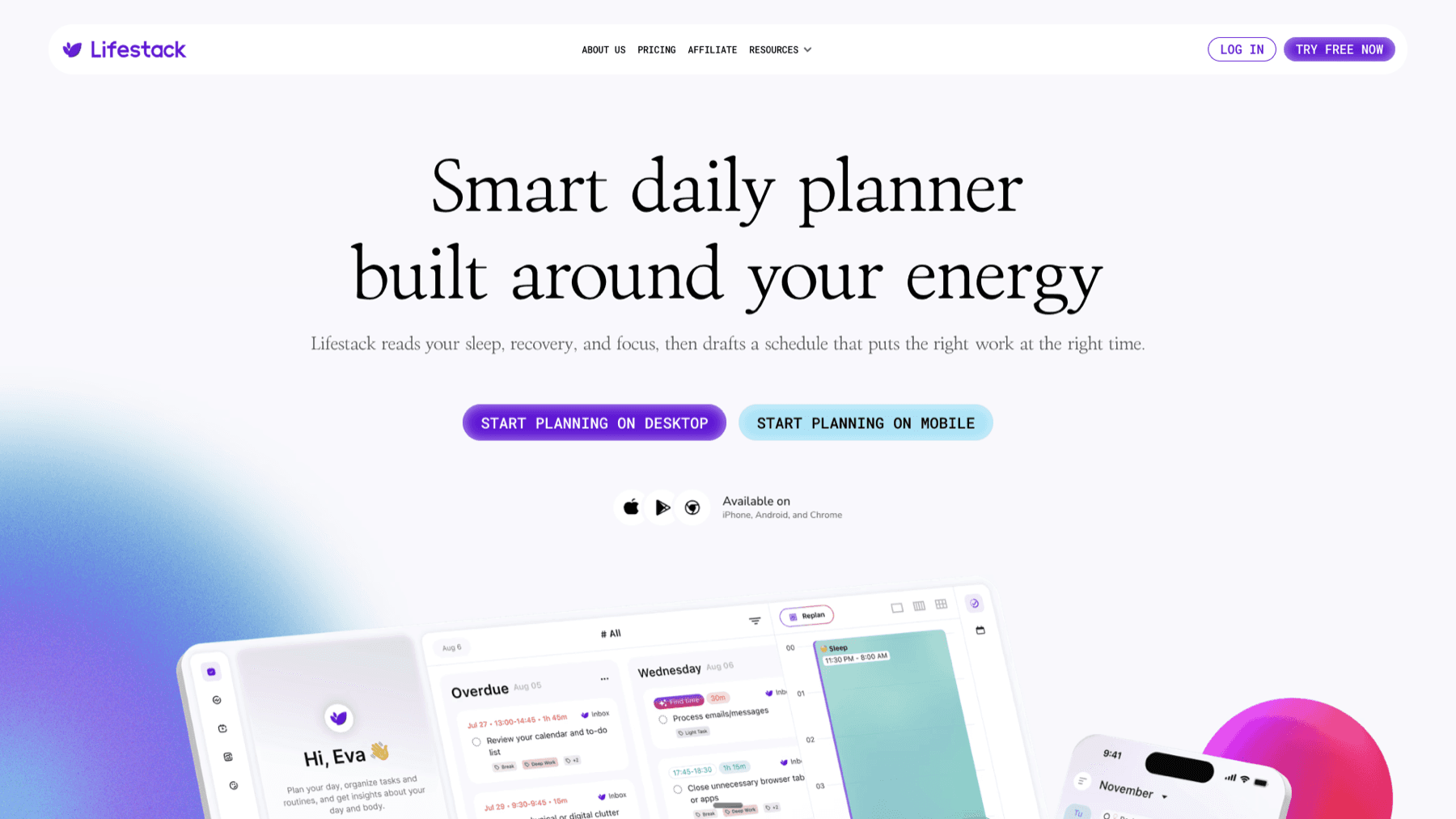
The gap most vision boards can't close is the distance between "I want this" and "I'm working on this today." That's a planning problem, not a motivation problem. Lifestack fills that gap with energy-based scheduling -- it matches your tasks to your natural capacity throughout the day, so the work that moves you toward your goals lands when you can actually do it well, not just when it's urgent.
If your vision board has a "build a fitness habit" section and your habit tracker has daily gym tasks, Lifestack can schedule those tasks at the times you're most energized for physical effort. The vision board stays aspirational; Lifestack makes it operational. It connects with your calendar and works alongside your Notion journal and planning system. Starting at $9.99/month or $49.99/year with a 7-day free trial.
Frequently Asked Questions
What is a Notion vision board template?
A Notion vision board template is a pre-built database structure in Notion that lets you organize your goals visually -- with images, categorized by life area, with properties to track progress over time. You can build one from scratch using a Gallery view database, or duplicate a template from the Notion template gallery and customize it. The advantage of building your own is that the structure fits your specific life areas and planning style.
Can you make a visual vision board in Notion?
Yes. Notion's Gallery view displays database cards as a grid of images, similar to a Pinterest board. Each card shows its cover photo at full size, and you can add images from Unsplash directly within Notion or upload your own. The result is a visual grid of goals that also has filterable properties and linked project tracking -- something a physical poster or pure Pinterest board can't do.
How do you add images to a Notion vision board?
Click on any gallery card, then click on the "Add cover" area at the top of the card page. From there you can upload an image from your device, paste a URL, or search Unsplash directly from within Notion. For the gallery to show images as card previews, go to the gallery's settings (three dots at the top right) and set "Card preview" to "Page cover."
Should a vision board be one database or multiple pages?
One database with a Life Area property and grouped views is cleaner than multiple separate pages. It lets you see everything together when you want the full picture, and filter to one area when you want to focus. If you're using a broader Notion template system, keep the vision board database in one place and link to it from other pages rather than duplicating it.
How often should you update your Notion vision board?
Review it quarterly and do light updates (status changes, adding new cards) monthly. A full rebuild every year at the start of the year is worth doing -- not because goals don't evolve, but because starting fresh with intentionality makes you more selective about what goes on the board. What you remove in a yearly review is often as revealing as what you add.
What's the difference between a Notion vision board and a Notion goal tracker?
A vision board is primarily visual and aspirational -- it captures where you want to go and how it feels. A goal tracker is operational -- it has specific metrics, deadlines, and progress fields. They work best together: the vision board holds the "what and why," the goal tracker (or daily planner) holds the "how and when." Keep them linked in your Notion workspace rather than treating them as the same thing.
Most vision boards get made once, looked at twice, and forgotten. The Pinterest board fills up. The poster on the wall fades into background noise. The problem isn't the idea -- visualizing where you want to go is genuinely useful. The problem is that most vision boards are static objects in a world where your goals shift constantly.
A Notion vision board can be different. Not because Notion is magic, but because Notion is already where many people spend their productive time. When your vision board lives in the same workspace as your daily dashboard and your weekly planner, it stops being a separate thing you have to remember to open and starts showing up naturally in your workflow.
This guide walks through exactly how to build one -- the layout, the sections, what to put in each one, and how to structure it so it's still useful six months from now.
Key Takeaways
A good Notion vision board has distinct sections for different life areas (career, health, relationships, personal growth) rather than one undifferentiated image dump
Gallery views with cover images make the board visual; linked databases connect it to your actual goals and projects
The board only stays useful if it's tied to something you act on -- quarterly reviews, weekly check-ins, or a daily planning tool that references your longer-term goals
What to Include in Your Notion Vision Board
Before touching Notion, decide on your life areas. The most common structure for a vision board that covers everything without getting bloated:
Career and work: Job titles, projects, income goals, skills to develop, companies you want to work at or build
Health and body: Fitness goals, sleep targets, nutrition habits, races or events you want to complete
Relationships: Who you want to spend more time with, the kind of friendships you want to cultivate, relationship intentions
Financial: Savings targets, purchases that represent freedom (a home, travel, early retirement), debt payoff milestones
Personal growth: Books to read, skills to build, habits to establish, creative projects, things that scare you that you want to do anyway
Experiences and travel: Places to go, events to attend, experiences that feel out of reach right now
Environment: Where you want to live, what your home looks and feels like, your workspace
You don't need all seven. Pick the areas that matter most to you right now. A focused board with four sections you care about is more useful than eight sections you feel obligated to fill.
Setting Up the Layout in Notion
The visual backbone of a Notion vision board is a Gallery view database. Here's how to set it up:
Create a new page in Notion. Title it "Vision Board" or "[Year] Vision."
Type
/databaseand select "Database - Inline" or "Gallery" view from the options.In the database view selector, switch to "Gallery" if it isn't already.
In Gallery settings, set "Card Preview" to "Page Cover" -- this makes each card show its full image.
Turn off "Card Size" to "Small" or "Medium" depending on how dense you want the grid.
Add a "Life Area" select property with your chosen sections as options (Career, Health, Relationships, etc.).
Use the Filter option to create grouped views by Life Area, or use the "Group by" option to separate your cards into columns.
Each card in the gallery becomes one vision item. Set the card's cover image to the visual that represents that goal (photos you've saved, Unsplash images, screenshots). Write a short description inside the card page explaining why this matters and what it looks like when it's achieved.
Adding Images to Your Notion Vision Board
The images are what make it a vision board rather than just a goal list. A few ways to add visuals that actually look good:
Unsplash (free): Click on a card's cover area and select "Gallery" -- Notion has Unsplash built in. Search for a visual that represents the goal and add it directly.
Upload your own: Screenshots from Instagram, photos from trips you want to take, product shots of things you're working toward. Upload as the card cover or as an inline image inside the card page.
Pexels or Pinterest: Download images and upload directly. Pexels images are free for personal use; Pinterest images require right-click save.
Canva exports: Design vision board collages in Canva (free tier works fine) and export as JPG to upload as card covers. Useful for creating composite images that capture a vibe rather than a single thing.
Avoid the temptation to spend two hours finding the perfect image for each card. Good enough images that capture the feeling are better than a perfect board you haven't finished. You can always update them later.
The Properties That Make It Functional
A vision board that's just images is a mood board. What makes the Notion version more useful is adding properties that connect visuals to trackable intentions. Add these to your database:
Life Area (Select): Career, Health, Relationships, etc. Lets you filter the board to focus on one area at a time.
Timeframe (Select): 1 Year, 3 Years, 5 Years+, Ongoing. Separates near-term goals from longer-horizon ones.
Status (Select): Not Started, In Progress, Achieved. Lets you mark wins without deleting cards.
Notes (Text): A short line inside each card for why this matters or what it would feel like to achieve it. The "why" keeps goals from becoming abstract aspirations.
With these in place, you can filter to "In Progress" items for your quarterly review, or switch to a "1 Year" filter to focus only on what's immediately relevant. The board becomes a living document instead of a static image.
Structuring the Board for Long-Term Use
The most common failure mode for vision boards: you build it in January, feel good, and don't open it again until November. Here are the structural choices that prevent that.
Add it to your Notion sidebar as a favorite. Out of sight is out of mind. If your vision board isn't one click away from wherever you do your daily work, it won't get opened.
Link it from your dashboard. Create a "Vision" callout or linked database view on your main Notion dashboard that shows 3-5 cards from the vision board. Even a filtered gallery showing only "In Progress" items keeps the board in peripheral view without overwhelming the workspace.
Schedule quarterly reviews. Add a recurring reminder to review and update the board every 3 months. Status changes (something becomes "Achieved"), priorities shift, new things get added. The board should evolve with you, not stay frozen at January-you's goals.
Pair it with a habit tracker. Your Notion habit tracker can sit alongside the vision board as the operational layer -- the board shows the destination, the habit tracker shows the daily actions getting you there. The connection between daily habits and long-term vision is what keeps both relevant. ADHD-friendly goal setting especially benefits from this pairing, since bridging the gap between big vision and today's tasks is where most planning breaks down.
Turning Vision into Daily Action
The gap most vision boards can't close is the distance between "I want this" and "I'm working on this today." That's a planning problem, not a motivation problem. Lifestack fills that gap with energy-based scheduling -- it matches your tasks to your natural capacity throughout the day, so the work that moves you toward your goals lands when you can actually do it well, not just when it's urgent.
If your vision board has a "build a fitness habit" section and your habit tracker has daily gym tasks, Lifestack can schedule those tasks at the times you're most energized for physical effort. The vision board stays aspirational; Lifestack makes it operational. It connects with your calendar and works alongside your Notion journal and planning system. Starting at $9.99/month or $49.99/year with a 7-day free trial.
Frequently Asked Questions
What is a Notion vision board template?
A Notion vision board template is a pre-built database structure in Notion that lets you organize your goals visually -- with images, categorized by life area, with properties to track progress over time. You can build one from scratch using a Gallery view database, or duplicate a template from the Notion template gallery and customize it. The advantage of building your own is that the structure fits your specific life areas and planning style.
Can you make a visual vision board in Notion?
Yes. Notion's Gallery view displays database cards as a grid of images, similar to a Pinterest board. Each card shows its cover photo at full size, and you can add images from Unsplash directly within Notion or upload your own. The result is a visual grid of goals that also has filterable properties and linked project tracking -- something a physical poster or pure Pinterest board can't do.
How do you add images to a Notion vision board?
Click on any gallery card, then click on the "Add cover" area at the top of the card page. From there you can upload an image from your device, paste a URL, or search Unsplash directly from within Notion. For the gallery to show images as card previews, go to the gallery's settings (three dots at the top right) and set "Card preview" to "Page cover."
Should a vision board be one database or multiple pages?
One database with a Life Area property and grouped views is cleaner than multiple separate pages. It lets you see everything together when you want the full picture, and filter to one area when you want to focus. If you're using a broader Notion template system, keep the vision board database in one place and link to it from other pages rather than duplicating it.
How often should you update your Notion vision board?
Review it quarterly and do light updates (status changes, adding new cards) monthly. A full rebuild every year at the start of the year is worth doing -- not because goals don't evolve, but because starting fresh with intentionality makes you more selective about what goes on the board. What you remove in a yearly review is often as revealing as what you add.
What's the difference between a Notion vision board and a Notion goal tracker?
A vision board is primarily visual and aspirational -- it captures where you want to go and how it feels. A goal tracker is operational -- it has specific metrics, deadlines, and progress fields. They work best together: the vision board holds the "what and why," the goal tracker (or daily planner) holds the "how and when." Keep them linked in your Notion workspace rather than treating them as the same thing.

FOLLOW ON
FOLLOW ON
FOLLOW ON


Copyright 2026 © Lifestack. All rights reserved
Copyright 2026 © Lifestack. All rights reserved

