
App
Sunsama Review: Is It Worth $22/Month in 2026?
Sunsama Review: Is It Worth $22/Month in 2026?

Most task managers treat each day the same. Add tasks, check them off, roll them over if they don't get done. Sunsama takes a different position: the problem isn't that you don't have a list, it's that you don't have a daily ritual for honestly confronting what you can and can't do today. The app is built around three structured phases that run every day: Start Calm, Stay Focused, End Confident.
At $22 per month (or $17 billed annually), Sunsama sits at the higher end of the productivity app market. The question isn't whether it has features, because it does, connecting to 20-plus tools including Asana, Linear, Notion, Gmail, and every major calendar. The question is whether the guided daily planning ritual justifies the price over a free alternative or a simpler $5/month task app.
After using Sunsama daily, here's an honest assessment of when it delivers and when it doesn't.
Key Takeaways
The daily planning ritual is the product's defining feature: three guided phases that force realistic time allocation, not just task capture
The integration depth is genuinely impressive, pulling tasks from Asana, Linear, Jira, Notion, Trello, and more into a unified daily plan with bi-directional sync
At $22/month, the value depends almost entirely on whether the ritual structure addresses your specific planning failure mode; if it does, it's worth it; if you just need a task list, it's not
What Is Sunsama?
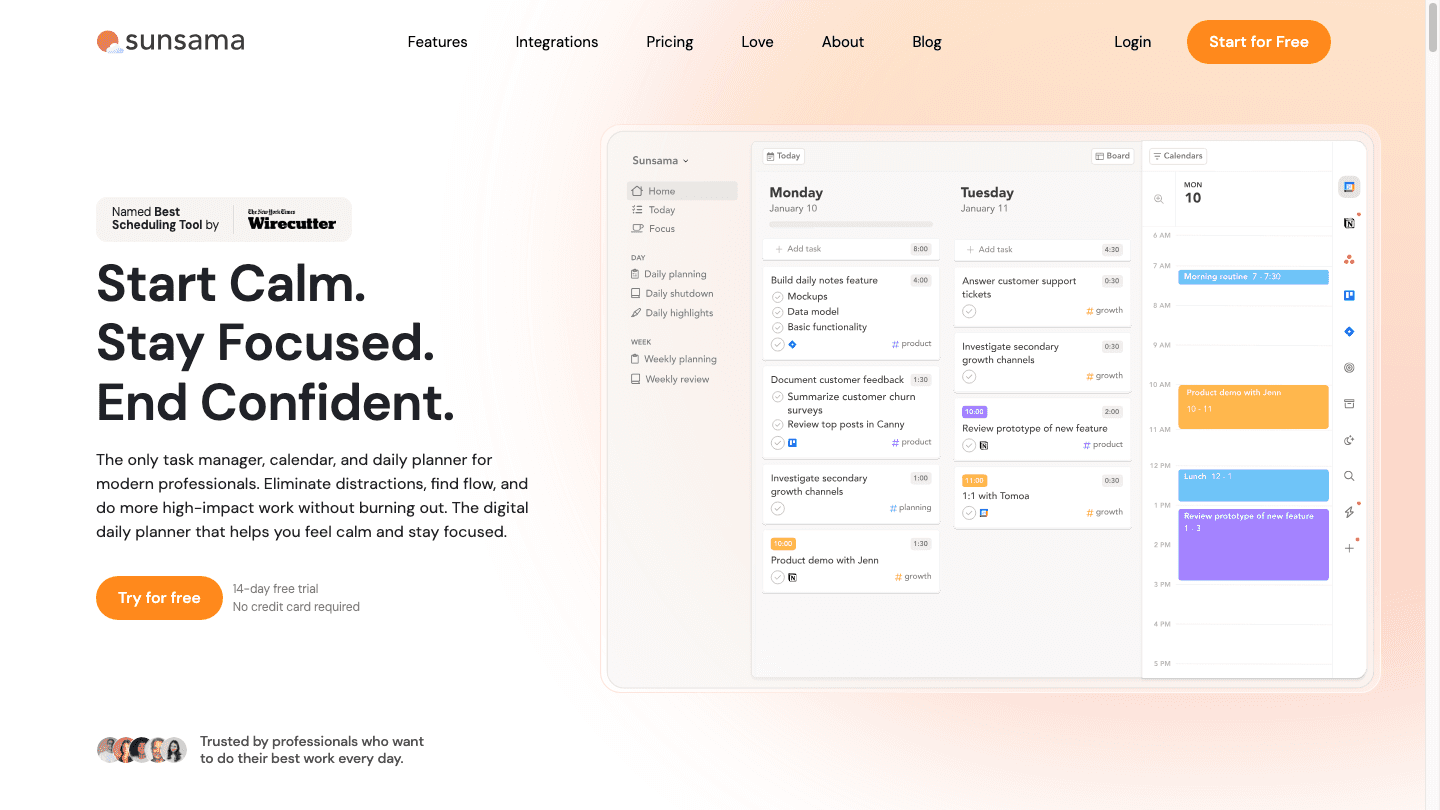
Sunsama is a daily planning tool, not a task manager. The distinction matters. Task managers like Todoist or Things give you a list. Sunsama gives you a structured process for deciding what to do today, how long each item will take, and how to close the day deliberately. The calendar is a first-class citizen in the interface: your tasks live next to your meetings, and the app shows you immediately when you've overcommitted the day's available hours.
The target user is a knowledge worker who has tasks spread across multiple tools and calendars, struggles to do realistic daily planning, and wants a single interface that connects them all. If you use Asana for project tracking, Linear for engineering tickets, Notion for personal tasks, and Google Calendar for meetings, Sunsama pulls everything into one daily workspace so you're not switching between four systems to build your plan.
The Daily Planning Ritual
Sunsama's three-phase ritual is the heart of the product:
Start Calm (morning): Guided prompts ask you to look at your meetings, pull in tasks from connected tools, estimate how long each item will take, and set a realistic daily target. The goal is to arrive at a plan you can actually execute, not an aspirational list that guarantees an evening of rolled-over tasks
Stay Focused (during the day): The app can mute distractions and surface your current task in focus mode. As you complete tasks, you mark them done and advance through the day's plan
End Confident (shutdown): A guided shutdown prompts you to review what you accomplished, roll over incomplete tasks thoughtfully, and close the day with a sense of clear completion rather than nagging guilt about the list you didn't finish
The shutdown ritual is the underrated piece. Most people end the workday by closing their laptop mid-task, mentally carrying the weight of the incomplete list into the evening. Sunsama's shutdown pushes you to explicitly review, decide, and close. Research on morning routine effectiveness and shutdown rituals consistently shows that deliberate closure improves both recovery quality and next-day productivity. Sunsama operationalizes this without requiring you to design the structure yourself.
Integrations
Sunsama's integration list is its most frequently cited strength in reviews:
Project management: Asana, ClickUp, Trello, Monday.com
Developer tools: Linear, Jira, GitHub
Documents and wikis: Notion
Communication: Slack, Gmail, Outlook
Calendars: Google Calendar, Outlook, Apple Calendar
Task managers: Todoist
Bi-directional sync means that when you complete a task in Sunsama, it marks done in the source tool too. When a new ticket is assigned in Linear or a task is created in Asana, it shows up in Sunsama's inbox for you to decide whether it belongs on today's plan. This is genuinely useful for teams where work originates in multiple systems and the challenge is consolidating without double-entry.
Time Tracking and Analytics
Sunsama includes built-in time tracking. You estimate time before starting a task, then track actual time as you work. At the end of the week, the analytics view shows how your time actually split across projects, tasks, and categories. For freelancers or anyone billing by the hour, this removes the need for a separate time tracker. For everyone else, the data answers a question most people can't honestly answer: where did my time actually go this week?
The time tracking is automatic once you start the focus timer on a task. You don't have to remember to start and stop a separate app. Over time, the gap between estimated and actual time on different types of work becomes a calibration tool: you'll discover that your "30-minute" code reviews consistently take 45, or that your estimate accuracy is excellent for writing but poor for meetings that run long.
What Works Well
The daily ritual genuinely changes planning behavior. People who chronically overcommit their days and end every week feeling behind tend to find Sunsama's time-estimation requirement uncomfortable at first, then clarifying. When the interface shows that your tasks plus your meetings consume 11 hours of a 7-hour workday, you're forced to make a decision: cut tasks, push meetings, or acknowledge that something won't get done today. That honesty is harder to avoid in Sunsama than in a plain task list.
The integrations work reliably. Pulling Linear tickets into a daily plan, syncing completion back to Linear, and having Google Calendar meetings visible alongside tasks in the same view is a workflow that many knowledge workers try to replicate with spreadsheets or manual copying. Sunsama handles it automatically.
The shutdown ritual is a real quality-of-life improvement. Teams that adopt Sunsama collectively often report that the shared shutdown practice changes how people discuss the workday, since everyone has a clearer sense of what they completed and what they're deferring, rather than vague feelings of being behind on an endless list.
Where Sunsama Falls Short
The daily ritual takes time. The morning planning session runs 10-20 minutes for most users. The shutdown is another 5-10 minutes. That's 15-30 minutes of structured reflection that some users find transformative and others find too expensive given the pace of their workday. If your work environment is reactive and interrupt-driven, a structured ritual may not survive contact with Monday morning.
Sunsama does not auto-schedule. It shows you your tasks and calendar together, but you manually decide when to do what. For time optimization tools that handle the scheduling automatically, you'd need to look at AI-first planners. Sunsama's philosophy is that human judgment about priority is non-negotiable: the app facilitates the decision, it doesn't make it for you.
Mobile experience is limited compared to the web app. The daily planning ritual is genuinely desktop-first, and users who need to manage tasks from their phone throughout the day find the mobile app a more constrained experience. If mobile-first task management is important, this is a meaningful limitation relative to apps built with mobile as the primary interface.
Sunsama Pricing
Monthly: $22/month
Annual: $17/month ($204/year, saving $60 versus monthly)
Free trial: 14 days, no credit card required, full feature access
Enterprise: Custom pricing with SSO, SAML, SCIM, and audit logs
At $22/month, Sunsama is more expensive than most weekly planner apps. Whether that's justified comes down to a single question: is the daily ritual worth the price? If the ritual changes your planning behavior in a way that saves 30 minutes of wasted time or prevents even one overcommitment-driven burnout episode per month, the math works. If you're disciplined enough to do realistic planning without guided prompts, a cheaper app probably serves you just as well.
Sunsama vs AI-Powered Scheduling

Sunsama and Lifestack solve adjacent problems. Sunsama gives you the structure to make better manual planning decisions each morning. Lifestack uses AI to auto-schedule your tasks around your meetings and energy levels, removing the planning burden from you entirely.
The right choice depends on how you prefer to plan. Sunsama rewards users who want deliberate agency: you review, you decide, you commit. Lifestack is better for users who want their tasks scheduled automatically based on priority, deadlines, and energy levels, without a daily ritual that demands 20 minutes of attention. For Reclaim alternatives or tools that lean AI-first on scheduling, Lifestack sits in that category. For people who want structure rather than automation, Sunsama is the cleaner answer.
Some users run both: Sunsama for the ritual and reflection layer, and an AI scheduler for blocking time automatically. But at $22/month for Sunsama plus whatever an AI scheduler costs, that combination adds up quickly and may create redundancy rather than synergy.
Who Should Use Sunsama
Multi-tool knowledge workers: If your tasks live in four different tools and you spend real time consolidating them manually each morning, Sunsama's integrations solve a genuine daily friction point
Chronic overcommitters: People who regularly end days with most tasks rolled over because they said yes to everything benefit most from the time estimation and capacity visualization that Sunsama builds into the planning ritual
Freelancers who bill by time: The built-in time tracking, combined with project-level analytics, removes the need for a separate time tracker and produces data useful for invoicing and pricing decisions
Teams who want shared planning culture: Sunsama has team features that allow visibility into what colleagues are working on each day, which can improve alignment without adding meetings
If you work from a single task manager, don't need integrations, or prefer your planning to be automatic rather than guided, Sunsama is probably more friction than it's worth. The 14-day free trial is long enough to test whether the ritual fits your workflow before committing to a recurring cost.
Frequently Asked Questions
Is Sunsama worth the money?
For knowledge workers with tasks spread across multiple tools who struggle with daily planning, yes. The daily ritual and integration depth are genuinely useful. For people who just need a simple task list or prefer automated scheduling over manual planning, the $22/month price is hard to justify against cheaper or free alternatives.
Does Sunsama have a free plan?
No. Sunsama offers a 14-day free trial with full feature access and no credit card required. After the trial, the only option is the $22/month or $17/month (annual) paid plan. There is no ongoing free tier.
How does Sunsama compare to Todoist or Notion?
Sunsama is a daily planner, not a task database. Todoist and Notion are better for capturing and organizing a large backlog of tasks and notes. Sunsama is better for the daily decision-making process of what to work on today and when. Many Sunsama users keep their task backlog in Notion or Asana and pull from it into Sunsama each morning via the integrations.
Can Sunsama replace a Google Calendar alternative?
No. Sunsama reads from and writes to your calendar, but it doesn't host your calendar. You'll still need Google Calendar or Outlook as your primary calendar. Sunsama displays your meetings alongside your tasks in a unified view, but it's not a calendar replacement.
How long does the Sunsama daily planning ritual take?
Most users spend 10-20 minutes on the morning planning ritual and 5-10 minutes on the shutdown review. The morning time varies based on how many tools you integrate and how much deliberation each task requires. Experienced users often trim this to 10-12 minutes once the habit is established, but it will always take more time than just opening a task list and starting the first item.
Does Sunsama have an app for iPhone or Android?
Yes, but the mobile experience is more limited than the desktop app. The daily planning ritual and integration-heavy workflow are optimized for desktop. The mobile app works for checking your plan and marking tasks complete, but building your daily plan from scratch on mobile is less efficient than the web interface. Sunsama is primarily a desktop tool.
Most task managers treat each day the same. Add tasks, check them off, roll them over if they don't get done. Sunsama takes a different position: the problem isn't that you don't have a list, it's that you don't have a daily ritual for honestly confronting what you can and can't do today. The app is built around three structured phases that run every day: Start Calm, Stay Focused, End Confident.
At $22 per month (or $17 billed annually), Sunsama sits at the higher end of the productivity app market. The question isn't whether it has features, because it does, connecting to 20-plus tools including Asana, Linear, Notion, Gmail, and every major calendar. The question is whether the guided daily planning ritual justifies the price over a free alternative or a simpler $5/month task app.
After using Sunsama daily, here's an honest assessment of when it delivers and when it doesn't.
Key Takeaways
The daily planning ritual is the product's defining feature: three guided phases that force realistic time allocation, not just task capture
The integration depth is genuinely impressive, pulling tasks from Asana, Linear, Jira, Notion, Trello, and more into a unified daily plan with bi-directional sync
At $22/month, the value depends almost entirely on whether the ritual structure addresses your specific planning failure mode; if it does, it's worth it; if you just need a task list, it's not
What Is Sunsama?
Sunsama is a daily planning tool, not a task manager. The distinction matters. Task managers like Todoist or Things give you a list. Sunsama gives you a structured process for deciding what to do today, how long each item will take, and how to close the day deliberately. The calendar is a first-class citizen in the interface: your tasks live next to your meetings, and the app shows you immediately when you've overcommitted the day's available hours.
The target user is a knowledge worker who has tasks spread across multiple tools and calendars, struggles to do realistic daily planning, and wants a single interface that connects them all. If you use Asana for project tracking, Linear for engineering tickets, Notion for personal tasks, and Google Calendar for meetings, Sunsama pulls everything into one daily workspace so you're not switching between four systems to build your plan.
The Daily Planning Ritual
Sunsama's three-phase ritual is the heart of the product:
Start Calm (morning): Guided prompts ask you to look at your meetings, pull in tasks from connected tools, estimate how long each item will take, and set a realistic daily target. The goal is to arrive at a plan you can actually execute, not an aspirational list that guarantees an evening of rolled-over tasks
Stay Focused (during the day): The app can mute distractions and surface your current task in focus mode. As you complete tasks, you mark them done and advance through the day's plan
End Confident (shutdown): A guided shutdown prompts you to review what you accomplished, roll over incomplete tasks thoughtfully, and close the day with a sense of clear completion rather than nagging guilt about the list you didn't finish
The shutdown ritual is the underrated piece. Most people end the workday by closing their laptop mid-task, mentally carrying the weight of the incomplete list into the evening. Sunsama's shutdown pushes you to explicitly review, decide, and close. Research on morning routine effectiveness and shutdown rituals consistently shows that deliberate closure improves both recovery quality and next-day productivity. Sunsama operationalizes this without requiring you to design the structure yourself.
Integrations
Sunsama's integration list is its most frequently cited strength in reviews:
Project management: Asana, ClickUp, Trello, Monday.com
Developer tools: Linear, Jira, GitHub
Documents and wikis: Notion
Communication: Slack, Gmail, Outlook
Calendars: Google Calendar, Outlook, Apple Calendar
Task managers: Todoist
Bi-directional sync means that when you complete a task in Sunsama, it marks done in the source tool too. When a new ticket is assigned in Linear or a task is created in Asana, it shows up in Sunsama's inbox for you to decide whether it belongs on today's plan. This is genuinely useful for teams where work originates in multiple systems and the challenge is consolidating without double-entry.
Time Tracking and Analytics
Sunsama includes built-in time tracking. You estimate time before starting a task, then track actual time as you work. At the end of the week, the analytics view shows how your time actually split across projects, tasks, and categories. For freelancers or anyone billing by the hour, this removes the need for a separate time tracker. For everyone else, the data answers a question most people can't honestly answer: where did my time actually go this week?
The time tracking is automatic once you start the focus timer on a task. You don't have to remember to start and stop a separate app. Over time, the gap between estimated and actual time on different types of work becomes a calibration tool: you'll discover that your "30-minute" code reviews consistently take 45, or that your estimate accuracy is excellent for writing but poor for meetings that run long.
What Works Well
The daily ritual genuinely changes planning behavior. People who chronically overcommit their days and end every week feeling behind tend to find Sunsama's time-estimation requirement uncomfortable at first, then clarifying. When the interface shows that your tasks plus your meetings consume 11 hours of a 7-hour workday, you're forced to make a decision: cut tasks, push meetings, or acknowledge that something won't get done today. That honesty is harder to avoid in Sunsama than in a plain task list.
The integrations work reliably. Pulling Linear tickets into a daily plan, syncing completion back to Linear, and having Google Calendar meetings visible alongside tasks in the same view is a workflow that many knowledge workers try to replicate with spreadsheets or manual copying. Sunsama handles it automatically.
The shutdown ritual is a real quality-of-life improvement. Teams that adopt Sunsama collectively often report that the shared shutdown practice changes how people discuss the workday, since everyone has a clearer sense of what they completed and what they're deferring, rather than vague feelings of being behind on an endless list.
Where Sunsama Falls Short
The daily ritual takes time. The morning planning session runs 10-20 minutes for most users. The shutdown is another 5-10 minutes. That's 15-30 minutes of structured reflection that some users find transformative and others find too expensive given the pace of their workday. If your work environment is reactive and interrupt-driven, a structured ritual may not survive contact with Monday morning.
Sunsama does not auto-schedule. It shows you your tasks and calendar together, but you manually decide when to do what. For time optimization tools that handle the scheduling automatically, you'd need to look at AI-first planners. Sunsama's philosophy is that human judgment about priority is non-negotiable: the app facilitates the decision, it doesn't make it for you.
Mobile experience is limited compared to the web app. The daily planning ritual is genuinely desktop-first, and users who need to manage tasks from their phone throughout the day find the mobile app a more constrained experience. If mobile-first task management is important, this is a meaningful limitation relative to apps built with mobile as the primary interface.
Sunsama Pricing
Monthly: $22/month
Annual: $17/month ($204/year, saving $60 versus monthly)
Free trial: 14 days, no credit card required, full feature access
Enterprise: Custom pricing with SSO, SAML, SCIM, and audit logs
At $22/month, Sunsama is more expensive than most weekly planner apps. Whether that's justified comes down to a single question: is the daily ritual worth the price? If the ritual changes your planning behavior in a way that saves 30 minutes of wasted time or prevents even one overcommitment-driven burnout episode per month, the math works. If you're disciplined enough to do realistic planning without guided prompts, a cheaper app probably serves you just as well.
Sunsama vs AI-Powered Scheduling
Sunsama and Lifestack solve adjacent problems. Sunsama gives you the structure to make better manual planning decisions each morning. Lifestack uses AI to auto-schedule your tasks around your meetings and energy levels, removing the planning burden from you entirely.
The right choice depends on how you prefer to plan. Sunsama rewards users who want deliberate agency: you review, you decide, you commit. Lifestack is better for users who want their tasks scheduled automatically based on priority, deadlines, and energy levels, without a daily ritual that demands 20 minutes of attention. For Reclaim alternatives or tools that lean AI-first on scheduling, Lifestack sits in that category. For people who want structure rather than automation, Sunsama is the cleaner answer.
Some users run both: Sunsama for the ritual and reflection layer, and an AI scheduler for blocking time automatically. But at $22/month for Sunsama plus whatever an AI scheduler costs, that combination adds up quickly and may create redundancy rather than synergy.
Who Should Use Sunsama
Multi-tool knowledge workers: If your tasks live in four different tools and you spend real time consolidating them manually each morning, Sunsama's integrations solve a genuine daily friction point
Chronic overcommitters: People who regularly end days with most tasks rolled over because they said yes to everything benefit most from the time estimation and capacity visualization that Sunsama builds into the planning ritual
Freelancers who bill by time: The built-in time tracking, combined with project-level analytics, removes the need for a separate time tracker and produces data useful for invoicing and pricing decisions
Teams who want shared planning culture: Sunsama has team features that allow visibility into what colleagues are working on each day, which can improve alignment without adding meetings
If you work from a single task manager, don't need integrations, or prefer your planning to be automatic rather than guided, Sunsama is probably more friction than it's worth. The 14-day free trial is long enough to test whether the ritual fits your workflow before committing to a recurring cost.
Frequently Asked Questions
Is Sunsama worth the money?
For knowledge workers with tasks spread across multiple tools who struggle with daily planning, yes. The daily ritual and integration depth are genuinely useful. For people who just need a simple task list or prefer automated scheduling over manual planning, the $22/month price is hard to justify against cheaper or free alternatives.
Does Sunsama have a free plan?
No. Sunsama offers a 14-day free trial with full feature access and no credit card required. After the trial, the only option is the $22/month or $17/month (annual) paid plan. There is no ongoing free tier.
How does Sunsama compare to Todoist or Notion?
Sunsama is a daily planner, not a task database. Todoist and Notion are better for capturing and organizing a large backlog of tasks and notes. Sunsama is better for the daily decision-making process of what to work on today and when. Many Sunsama users keep their task backlog in Notion or Asana and pull from it into Sunsama each morning via the integrations.
Can Sunsama replace a Google Calendar alternative?
No. Sunsama reads from and writes to your calendar, but it doesn't host your calendar. You'll still need Google Calendar or Outlook as your primary calendar. Sunsama displays your meetings alongside your tasks in a unified view, but it's not a calendar replacement.
How long does the Sunsama daily planning ritual take?
Most users spend 10-20 minutes on the morning planning ritual and 5-10 minutes on the shutdown review. The morning time varies based on how many tools you integrate and how much deliberation each task requires. Experienced users often trim this to 10-12 minutes once the habit is established, but it will always take more time than just opening a task list and starting the first item.
Does Sunsama have an app for iPhone or Android?
Yes, but the mobile experience is more limited than the desktop app. The daily planning ritual and integration-heavy workflow are optimized for desktop. The mobile app works for checking your plan and marking tasks complete, but building your daily plan from scratch on mobile is less efficient than the web interface. Sunsama is primarily a desktop tool.



FOLLOW ON
FOLLOW ON
FOLLOW ON


Copyright 2026 © Lifestack. All rights reserved
Copyright 2026 © Lifestack. All rights reserved

