
App
Things 3 Review: Pros, Cons, and Verdict
Things 3 Review: Pros, Cons, and Verdict

Things 3 by Cultured Code is a task manager that's been winning Apple Design Awards since 2009. The current version is a one-time purchase with no subscription, available separately for iPhone ($9.99), iPad ($19.99), and Mac ($49.99). It syncs across all three via Things Cloud at no additional cost.
The case for Things 3 in 2026 is essentially the same as it's always been: it's the most beautifully designed task manager on Apple platforms, it implements GTD-style organization without overwhelming you with settings, and it doesn't charge you monthly for the privilege. The case against it is equally consistent: it's Apple-only, there's no collaboration, and the automation tools are limited compared to web-first competitors like Todoist.
This review covers what Things 3 does well, where it falls short, and who it's actually the right tool for.
Key Takeaways
Things 3 is the best-designed personal task manager for Apple platforms; the UI is in a different class from most competitors
At $9.99 for iPhone, $49.99 for Mac, and no subscription, it's cheaper than Todoist Pro or OmniFocus over any multi-year period
It's the wrong choice if you work on Windows or Android, need real-time collaboration, or want tight third-party integrations
What is Things 3?

Things 3 is a personal task manager built exclusively for Apple platforms: iPhone, iPad, Mac, Apple Watch, and Vision Pro. It organizes tasks into Inbox, Today, Upcoming, Anytime, and Someday views, with Projects and Areas providing hierarchical structure. This maps closely to the GTD (Getting Things Done) methodology without requiring you to know GTD terminology.
The design language is distinctive. Things uses a light background, generous typography, and fluid animations throughout. Where most task managers feel like spreadsheets with checkboxes, Things feels like a product someone spent years getting right. That's because Cultured Code is a small team that ships infrequently but has maintained the app for over 15 years without abandoning it.
Things 3 Features
Today View. The Today view shows everything scheduled for today plus an optional list of items from your Inbox that you can drag down to the main list. This gives you one place to work from without hiding the rest of your tasks. It's cleaner than most daily planning views.
Projects and Areas. Projects are discrete efforts with a defined endpoint (write annual report, plan team offsite). Areas are ongoing responsibilities without an end date (work, finances, health). The distinction is important and Things 3 is one of the few apps that makes it feel natural rather than bureaucratic.
Headings inside Projects. Projects can contain heading sections that group related tasks. For a project like a product launch, you might have headings for "Research," "Design Review," and "Launch Prep." This allows real structure inside a project without creating sub-projects.
Natural Language Input. Typing "submit report next Friday" in the Quick Entry window creates a task with a correctly parsed due date. The natural language date parsing handles most common expressions without needing to open a date picker.
Apple Watch App. Things has the best-designed Apple Watch app of any task manager on watchOS. You can view your Today list, check off items, and add new tasks by voice or by typing. For quick reference during the day, it works without opening your phone.
Things Cloud. Free sync across all Apple devices. No account tier required, no bandwidth cap. It's fast enough that tasks appear on your Mac within seconds of adding them on your iPhone.
Shortcuts and Automation. Things supports Apple Shortcuts for creating tasks, completing tasks, and moving items between projects. The Shortcuts integration is functional but not as deep as Todoist's native automation rules or Omnifocus's scripting support.
What Things 3 Does Well
Interface quality: Two Apple Design Award wins are justified. Every interaction feels considered. The drag-and-drop behavior, the scheduling animations, the way checkboxes complete tasks, all of it is better than the competition.
Focus without distraction: Things gives you one task list to work from each day. It doesn't have dashboards, analytics, or gamification elements that pull your attention away from the work itself.
No subscription. Over three years of Todoist Pro ($48/year), you spend $144. Over three years with Things 3 on both iPhone and Mac, you spend $59.98 once. The math favors Things for long-term personal use.
Apple ecosystem integration: Calendar sync, Reminders import, Shortcuts, and Watch app all work reliably. If you're in the Apple ecosystem, Things fits naturally.
Performance: Things is fast on older hardware. The Mac app never hangs, the iOS app opens instantly. This matters more than it sounds when you're opening a task manager dozens of times per day.
Things 3 Limitations
Apple-only. No web app, no Android, no Windows. If you work across platforms or share a system with someone not on Apple, Things is effectively unusable.
No collaboration. Things is a personal task manager. You cannot share projects with others, assign tasks, or see team member activity. For collaboration, you'd need something else entirely.
No energy awareness. Things shows your tasks for today but doesn't know when you have energy to tackle deep work vs. routine tasks. This is where it falls short for people managing demanding schedules.
Limited integrations. There's no native Slack, Gmail, or project tool integration. Getting tasks from your email or calendar into Things requires third-party tools or manual entry.
Infrequent updates. Cultured Code ships slowly. Major features take years to arrive. This reliability can also mean things you want don't get built on a timeline you can predict.
Things 3 Pricing
iPhone app: $9.99 (one-time, includes Apple Watch)
iPad app: $19.99 (one-time)
Mac app: $49.99 (one-time)
Vision Pro app: Available separately
Subscription: None. Things Cloud sync is free.
Free trial: 15-day trial available for all versions.
The combined iPhone + Mac purchase is $59.98. For comparison, Todoist Pro is $48/year, meaning Things 3 pays itself back in under 18 months for a single platform user and within the first year for anyone buying both Mac and iPhone versions.
Who Should Use Things 3?
Things 3 is the right choice if you're an individual on Apple devices who wants a personal task manager that gets out of your way. The GTD structure suits knowledge workers, students, and freelancers managing multiple projects across different areas of life. If you've bounced between task apps and found most of them either too bare or too complicated, Things 3's calibration is worth trying.
It's not for teams, Windows users, or people who need heavy integrations with other tools. For those users, see our guide to personal task management apps for a broader comparison. If budget is a constraint, our free task management apps guide covers solid no-cost options.
Things 3 and Lifestack
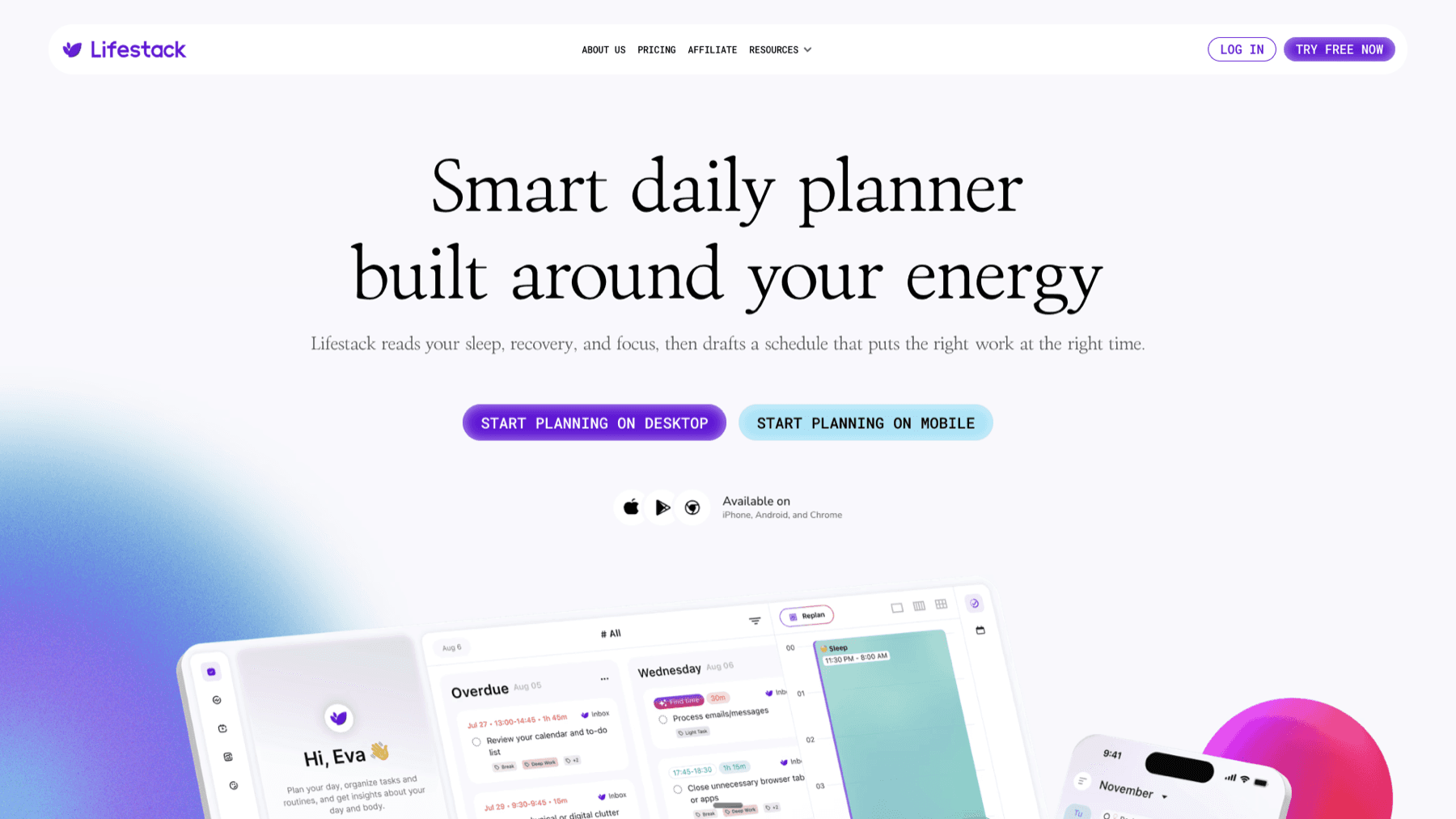
Things 3 is excellent at capturing and organizing tasks. Where it stops is scheduling: it shows your tasks for today but doesn't block time on your calendar or account for when you have energy to actually do them. Lifestack fills this gap. It reads your tasks, your calendar, and your wearable's recovery data, then schedules deep work and focus blocks in the parts of your day when you're genuinely capable of doing difficult work.
The combination works well: Things 3 is where tasks live, Lifestack decides when to schedule them. See more in our guide to task management for variable energy levels and our energy-based scheduling overview. Lifestack starts at $9.99/month or $49.99/year, with a 7-day free trial on the annual plan.
Frequently Asked Questions
Is Things 3 worth it in 2026?
Yes, if you're an Apple user who wants a personal task manager without a subscription. The one-time price of $9.99 for iPhone or $49.99 for Mac is cheaper than one year of most competing apps. The design and core UX remain best-in-class. The main limitations are platform exclusivity and no collaboration support.
Does Things 3 have a free trial?
Yes. All versions of Things 3 offer a 15-day free trial with all features unlocked. You don't need to enter payment information to start the trial. The trial is available directly from the Things website.
What is the difference between Things 3 for iPhone, iPad, and Mac?
The apps are sold separately and priced differently ($9.99, $19.99, $49.99 respectively), but they're the same product optimized for each platform. All three sync via Things Cloud for free. If you use Things on iPhone and Mac, you buy both apps separately; there's no bundle price.
Does Things 3 work on Android or Windows?
No. Things 3 is Apple-only: iPhone, iPad, Mac, Apple Watch, and Vision Pro. There is no web app, Android app, or Windows version. If cross-platform access is a requirement, Things 3 is not the right tool.
What is the best alternative to Things 3?
Todoist is the most direct alternative with cross-platform support and collaboration features. OmniFocus is more powerful but more complex and more expensive. For a simpler free option, the Notion task database setup handles basic task management without any additional cost beyond Notion's free tier.
Things 3 by Cultured Code is a task manager that's been winning Apple Design Awards since 2009. The current version is a one-time purchase with no subscription, available separately for iPhone ($9.99), iPad ($19.99), and Mac ($49.99). It syncs across all three via Things Cloud at no additional cost.
The case for Things 3 in 2026 is essentially the same as it's always been: it's the most beautifully designed task manager on Apple platforms, it implements GTD-style organization without overwhelming you with settings, and it doesn't charge you monthly for the privilege. The case against it is equally consistent: it's Apple-only, there's no collaboration, and the automation tools are limited compared to web-first competitors like Todoist.
This review covers what Things 3 does well, where it falls short, and who it's actually the right tool for.
Key Takeaways
Things 3 is the best-designed personal task manager for Apple platforms; the UI is in a different class from most competitors
At $9.99 for iPhone, $49.99 for Mac, and no subscription, it's cheaper than Todoist Pro or OmniFocus over any multi-year period
It's the wrong choice if you work on Windows or Android, need real-time collaboration, or want tight third-party integrations
What is Things 3?
Things 3 is a personal task manager built exclusively for Apple platforms: iPhone, iPad, Mac, Apple Watch, and Vision Pro. It organizes tasks into Inbox, Today, Upcoming, Anytime, and Someday views, with Projects and Areas providing hierarchical structure. This maps closely to the GTD (Getting Things Done) methodology without requiring you to know GTD terminology.
The design language is distinctive. Things uses a light background, generous typography, and fluid animations throughout. Where most task managers feel like spreadsheets with checkboxes, Things feels like a product someone spent years getting right. That's because Cultured Code is a small team that ships infrequently but has maintained the app for over 15 years without abandoning it.
Things 3 Features
Today View. The Today view shows everything scheduled for today plus an optional list of items from your Inbox that you can drag down to the main list. This gives you one place to work from without hiding the rest of your tasks. It's cleaner than most daily planning views.
Projects and Areas. Projects are discrete efforts with a defined endpoint (write annual report, plan team offsite). Areas are ongoing responsibilities without an end date (work, finances, health). The distinction is important and Things 3 is one of the few apps that makes it feel natural rather than bureaucratic.
Headings inside Projects. Projects can contain heading sections that group related tasks. For a project like a product launch, you might have headings for "Research," "Design Review," and "Launch Prep." This allows real structure inside a project without creating sub-projects.
Natural Language Input. Typing "submit report next Friday" in the Quick Entry window creates a task with a correctly parsed due date. The natural language date parsing handles most common expressions without needing to open a date picker.
Apple Watch App. Things has the best-designed Apple Watch app of any task manager on watchOS. You can view your Today list, check off items, and add new tasks by voice or by typing. For quick reference during the day, it works without opening your phone.
Things Cloud. Free sync across all Apple devices. No account tier required, no bandwidth cap. It's fast enough that tasks appear on your Mac within seconds of adding them on your iPhone.
Shortcuts and Automation. Things supports Apple Shortcuts for creating tasks, completing tasks, and moving items between projects. The Shortcuts integration is functional but not as deep as Todoist's native automation rules or Omnifocus's scripting support.
What Things 3 Does Well
Interface quality: Two Apple Design Award wins are justified. Every interaction feels considered. The drag-and-drop behavior, the scheduling animations, the way checkboxes complete tasks, all of it is better than the competition.
Focus without distraction: Things gives you one task list to work from each day. It doesn't have dashboards, analytics, or gamification elements that pull your attention away from the work itself.
No subscription. Over three years of Todoist Pro ($48/year), you spend $144. Over three years with Things 3 on both iPhone and Mac, you spend $59.98 once. The math favors Things for long-term personal use.
Apple ecosystem integration: Calendar sync, Reminders import, Shortcuts, and Watch app all work reliably. If you're in the Apple ecosystem, Things fits naturally.
Performance: Things is fast on older hardware. The Mac app never hangs, the iOS app opens instantly. This matters more than it sounds when you're opening a task manager dozens of times per day.
Things 3 Limitations
Apple-only. No web app, no Android, no Windows. If you work across platforms or share a system with someone not on Apple, Things is effectively unusable.
No collaboration. Things is a personal task manager. You cannot share projects with others, assign tasks, or see team member activity. For collaboration, you'd need something else entirely.
No energy awareness. Things shows your tasks for today but doesn't know when you have energy to tackle deep work vs. routine tasks. This is where it falls short for people managing demanding schedules.
Limited integrations. There's no native Slack, Gmail, or project tool integration. Getting tasks from your email or calendar into Things requires third-party tools or manual entry.
Infrequent updates. Cultured Code ships slowly. Major features take years to arrive. This reliability can also mean things you want don't get built on a timeline you can predict.
Things 3 Pricing
iPhone app: $9.99 (one-time, includes Apple Watch)
iPad app: $19.99 (one-time)
Mac app: $49.99 (one-time)
Vision Pro app: Available separately
Subscription: None. Things Cloud sync is free.
Free trial: 15-day trial available for all versions.
The combined iPhone + Mac purchase is $59.98. For comparison, Todoist Pro is $48/year, meaning Things 3 pays itself back in under 18 months for a single platform user and within the first year for anyone buying both Mac and iPhone versions.
Who Should Use Things 3?
Things 3 is the right choice if you're an individual on Apple devices who wants a personal task manager that gets out of your way. The GTD structure suits knowledge workers, students, and freelancers managing multiple projects across different areas of life. If you've bounced between task apps and found most of them either too bare or too complicated, Things 3's calibration is worth trying.
It's not for teams, Windows users, or people who need heavy integrations with other tools. For those users, see our guide to personal task management apps for a broader comparison. If budget is a constraint, our free task management apps guide covers solid no-cost options.
Things 3 and Lifestack
Things 3 is excellent at capturing and organizing tasks. Where it stops is scheduling: it shows your tasks for today but doesn't block time on your calendar or account for when you have energy to actually do them. Lifestack fills this gap. It reads your tasks, your calendar, and your wearable's recovery data, then schedules deep work and focus blocks in the parts of your day when you're genuinely capable of doing difficult work.
The combination works well: Things 3 is where tasks live, Lifestack decides when to schedule them. See more in our guide to task management for variable energy levels and our energy-based scheduling overview. Lifestack starts at $9.99/month or $49.99/year, with a 7-day free trial on the annual plan.
Frequently Asked Questions
Is Things 3 worth it in 2026?
Yes, if you're an Apple user who wants a personal task manager without a subscription. The one-time price of $9.99 for iPhone or $49.99 for Mac is cheaper than one year of most competing apps. The design and core UX remain best-in-class. The main limitations are platform exclusivity and no collaboration support.
Does Things 3 have a free trial?
Yes. All versions of Things 3 offer a 15-day free trial with all features unlocked. You don't need to enter payment information to start the trial. The trial is available directly from the Things website.
What is the difference between Things 3 for iPhone, iPad, and Mac?
The apps are sold separately and priced differently ($9.99, $19.99, $49.99 respectively), but they're the same product optimized for each platform. All three sync via Things Cloud for free. If you use Things on iPhone and Mac, you buy both apps separately; there's no bundle price.
Does Things 3 work on Android or Windows?
No. Things 3 is Apple-only: iPhone, iPad, Mac, Apple Watch, and Vision Pro. There is no web app, Android app, or Windows version. If cross-platform access is a requirement, Things 3 is not the right tool.
What is the best alternative to Things 3?
Todoist is the most direct alternative with cross-platform support and collaboration features. OmniFocus is more powerful but more complex and more expensive. For a simpler free option, the Notion task database setup handles basic task management without any additional cost beyond Notion's free tier.

FOLLOW ON
FOLLOW ON
FOLLOW ON



Copyright 2026 © Lifestack. All rights reserved
Copyright 2026 © Lifestack. All rights reserved

