
App
7 Best Personal Task Management Apps in 2026
7 Best Personal Task Management Apps in 2026

The best personal task management app is the one you'll actually use every day. That sounds obvious, but it narrows the field more than you'd think. Apps that are too powerful for your needs become maintenance chores. Apps that are too simple leave you managing overflow in your head anyway. The sweet spot is an app that fits your natural workflow and requires the minimum friction to keep current.
In 2026, personal task managers have split into two distinct camps. One camp focuses on simplicity and speed: capture fast, process daily, get out of the way. The other adds layers: AI scheduling, energy awareness, habit tracking, calendar sync. Both approaches work, but they work for different people and different ways of organizing your life.
We tested seven apps across capture speed, daily planning quality, cross-platform sync, and long-term usability. Here's what separates them.
Key Takeaways
Lifestack is the only personal task management app on this list that schedules tasks around your daily energy peaks, not just deadlines.
Things 3 and OmniFocus are the standout choices for Apple ecosystem users who want polished GTD without subscription fees.
TickTick and Any.do are the strongest cross-platform options for users who work across Android, iPhone, and web.
Quick Guide
Lifestack: best for energy-aware task scheduling tied to your calendar
Todoist: best all-around personal task manager with a great free tier
Things 3: best one-time purchase personal task manager for Apple users
TickTick: best cross-platform option with built-in calendar and habit tracking
Any.do: best simple mobile-first personal task manager
Microsoft To Do: best free task manager for Microsoft 365 users
OmniFocus: best powerful GTD system for Apple power users
How We Evaluated
Capture speed: how fast can you add a task from any device or context?
Daily planning tools: does the app help you decide what to do today?
Scheduling and reminders: due dates, times, recurring tasks, energy awareness
Cross-platform support: iOS, Android, Mac, Windows, web
Free tier quality and paid plan value
Learning curve and long-term maintenance overhead
1. Lifestack
Personal task management built around your energy, not just your to-do list

Most task managers treat all tasks as equal. Lifestack doesn't. It tracks your personal energy levels throughout the day and routes tasks to the windows when you're actually equipped to handle them. Deep work goes to your high-energy morning block. Low-stakes admin fills in the afternoon dip. The result is a schedule that respects not just your deadlines but your biology.
This energy-aware approach makes Lifestack the most distinctive personal task management app in this category. It integrates with Google Calendar and Apple Calendar, pulling in your commitments and building a daily plan around them automatically. If you've been struggling to stick with a traditional task manager, it may be because the system was ignoring the variable that matters most: when you're actually at your best. Lifestack's approach to time optimization is fundamentally different from apps that just let you assign due dates.
It also handles ADHD project management particularly well. The visual scheduling interface reduces the cognitive load of deciding what to do next, which is one of the biggest friction points for people with attention challenges.
Key Features
Energy-aware task scheduling that adapts to your daily performance patterns
Calendar integration with Google Calendar and Apple Calendar
Quick task capture on iOS, Android, and Chrome extension
ADHD-friendly visual planning with color-coded energy blocks
Integration with Apple Health, Strava, and MyFitnessPal for energy data
What Works
Energy-matching is genuinely useful, not just a novelty feature
Daily plan builds itself from your calendar plus your task list
Low maintenance once set up: the system does the heavy scheduling
Limitations
No analog for GTD-style project hierarchies (areas, projects, tasks)
Pattern learning takes a week or two to become accurate
Weaker note-taking features compared to apps like OmniFocus
Pricing: $7/month, $50/year, or $120 lifetime
Best for: People who want their task manager to schedule work around their energy, not just deadlines
2. Todoist
The most polished all-around personal task manager
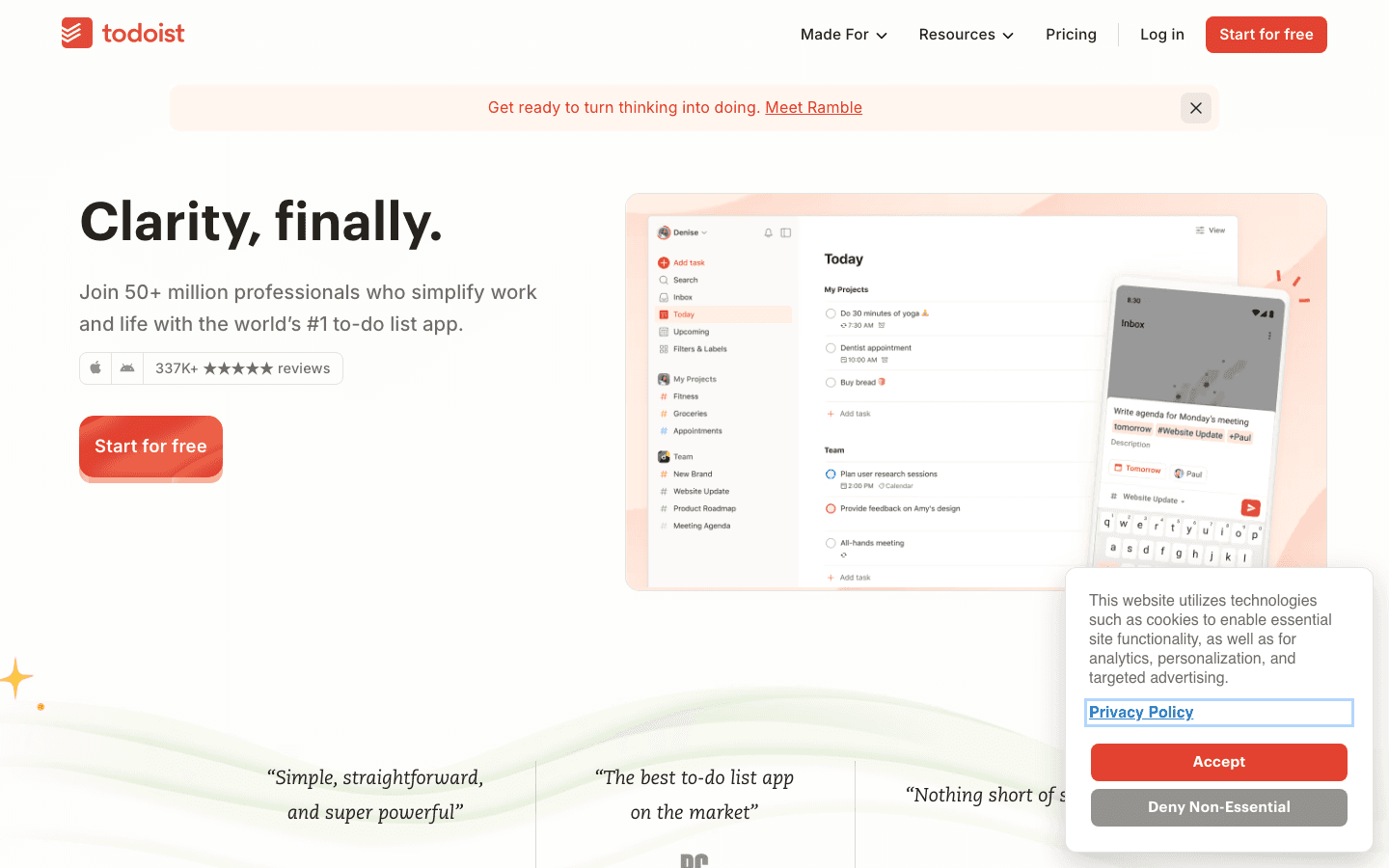
Todoist has earned its reputation as the default recommendation for personal task management. Natural language input handles date parsing neatly ("submit report next Friday at 2pm" creates the task with the correct due date), the free plan covers 5 projects which handles most personal use cases, and the cross-platform support is genuinely excellent across iOS, Android, Mac, Windows, and browser.
The Pro plan at $5/month adds reminders, file attachments, and 300 projects. Check our Todoist pricing breakdown to see whether the free tier covers your needs before upgrading. For most personal users, it does. The Karma gamification system adds a light engagement layer for productivity streaks, and the Google Calendar integration makes it a solid daily planner that syncs with Google Calendar.
Key Features
Natural language input with accurate date and time parsing
5 projects free; 300 on Pro plan
Recurring tasks, priority levels, labels, and filters
Google Calendar two-way sync
Available on iOS, Android, Mac, Windows, web, and browser extension
What Works
Best-in-class natural language input for quick task capture
Clean interface that stays out of the way
Cross-platform sync is fast and reliable
Limitations
No energy-aware scheduling or automatic daily planning
Free plan caps at 5 projects, which some users hit quickly
GTD workflows require workarounds (no native areas/contexts)
Pricing: Free (5 projects); Pro $5/month ($60/year); Business $8/user/month ($96/year)
Best for: Users who want a reliable, clean personal task manager with great natural language input
3. Things 3
Elegant personal task management with no subscription
Things 3 is the app most people recommend when someone asks for the best-designed personal task manager on Apple platforms. The interface is clean and intentional, the GTD structure (Areas, Projects, Tasks, Headings) is the right level of depth for most personal use, and the Today and Upcoming views make daily planning feel natural rather than forced. There are no subscriptions: you pay once per platform and receive all updates.
The one-time cost adds up if you want it on every Apple device, but compared to paying $5 to $10 per month indefinitely, most users break even quickly. Things 3 doesn't have a web app or Windows version, which is the main limitation. If your work spans platforms, this becomes a dealbreaker. For anyone who lives primarily in the Apple ecosystem, though, Things 3 is the most polished phone planner app in this category.
Key Features
Areas, Projects, Headings, and Tasks hierarchy for structured GTD
Today and Upcoming views for natural daily planning
Quick Entry shortcut for fast Mac capture
Calendar integration showing events alongside tasks
Available on iPhone, iPad, Mac, and Apple Watch
What Works
Best UI/UX of any task manager in this category, no exceptions
One-time purchase model avoids subscription fatigue
Today view makes deciding what to do each morning effortless
Limitations
Apple ecosystem only: no Android, no Windows, no web app
No energy-aware scheduling or AI-based prioritization
Collaboration features are limited to task sharing only
Pricing: One-time purchase: $9.99 (iPhone), $19.99 (iPad), $49.99 (Mac)
Best for: Apple users who want the most elegantly designed personal GTD system without recurring fees
4. TickTick
Cross-platform task management with built-in calendar and habits
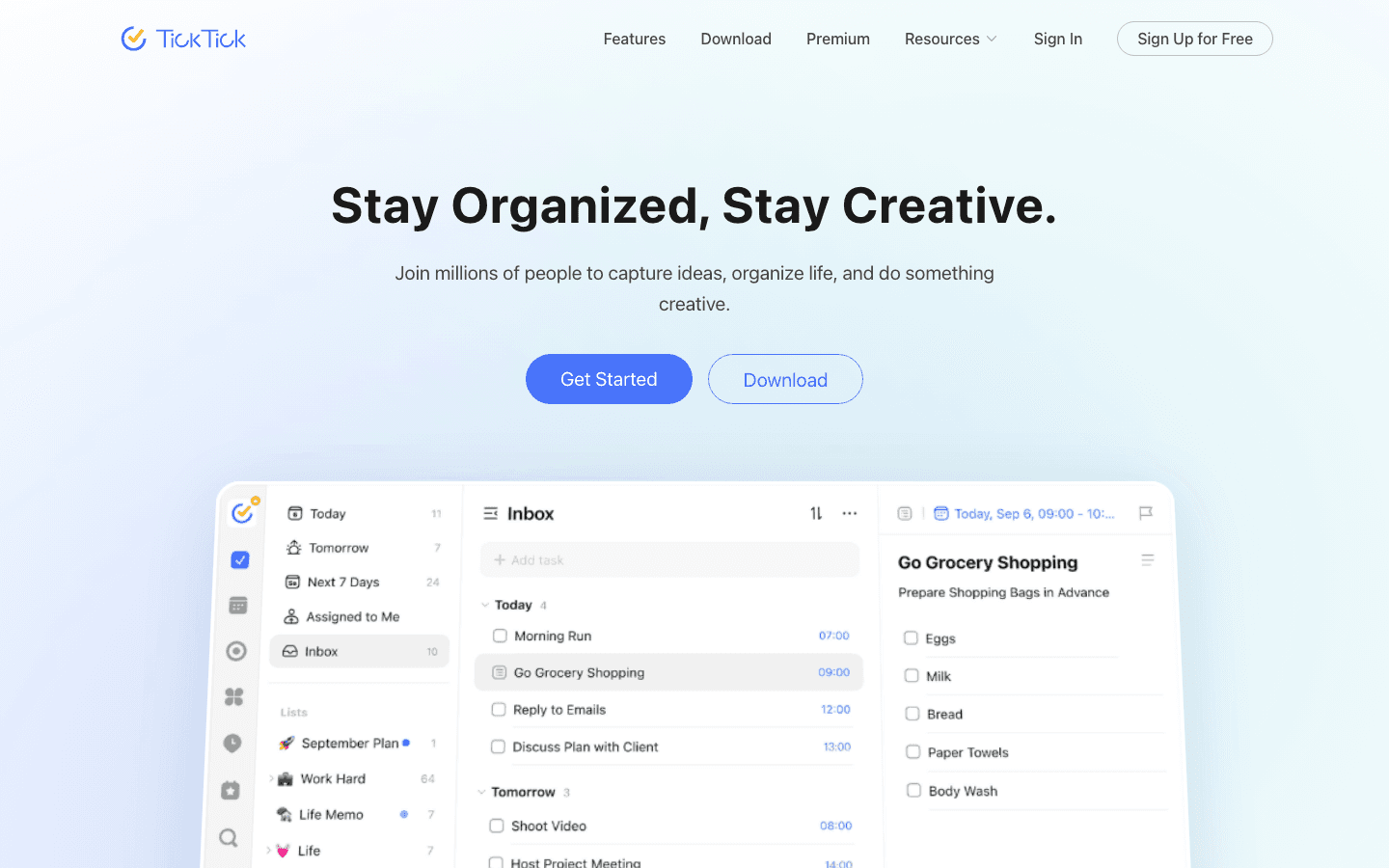
TickTick packs more features into its free plan than almost any other task manager in this category. You get a built-in Pomodoro timer, habit tracking, calendar view, and voice input alongside the core task management tools. The calendar view in particular is unusual: most task managers show tasks in a list; TickTick layers them onto a time-blocked calendar, giving you a clearer sense of what your day actually looks like.
For cross-platform users, TickTick is the strongest choice. It works consistently across iOS, Android, Mac, Windows, and web, with fast sync and a UI that doesn't change significantly between platforms. The habit tracking module connects naturally to a habit tracker workflow if you want to build consistent daily behaviors alongside your task lists. The Premium plan at $35.99/year is reasonably priced for what it unlocks.
Key Features
Built-in Pomodoro timer, habit tracker, and calendar view
Natural language input with smart date parsing
Recurring tasks, priorities, tags, and filters
Available on iOS, Android, Mac, Windows, web, and Apple Watch
Offline mode with full functionality
What Works
Calendar view gives better daily context than list-only task managers
Habit tracking built in means one less app to manage
Most feature-rich free plan in the category
Limitations
Interface feels busier than Things 3 or Todoist
No energy-aware scheduling or automatic daily plan generation
Some advanced features require Premium
Pricing: Free; Premium $35.99/year (~$3/month)
Best for: Cross-platform users who want tasks, calendar, and habit tracking in one app
5. Any.do
Simple mobile-first task management trusted by 40 million users
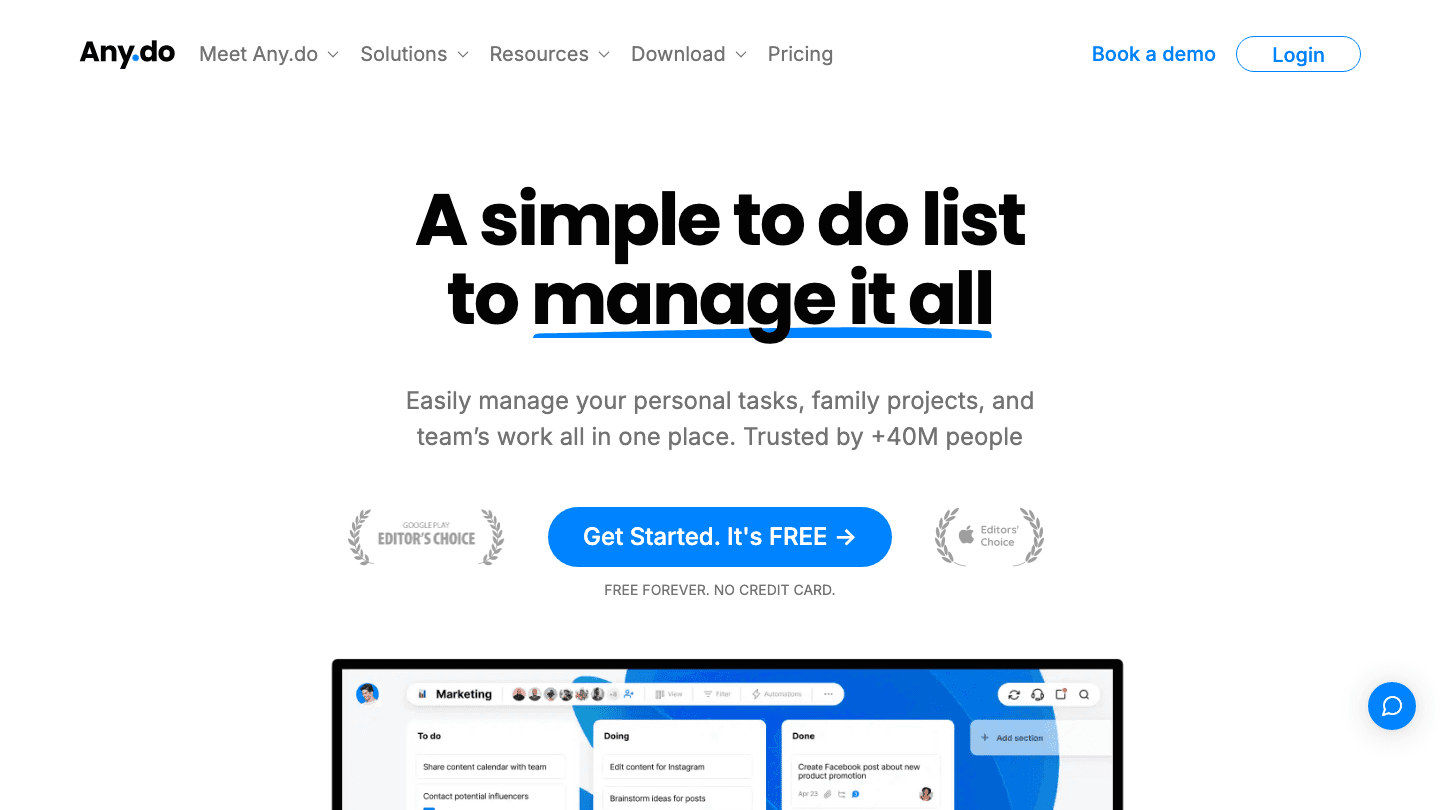
Any.do's strength is its focus on simplicity. The interface strips task management to its essentials: a list of things to do, organized by day. The "My Day" view prompts you each morning to review and commit to what you'll actually complete, which is a small but effective behavioral nudge. Voice input and AI-assisted task creation make capture fast on mobile.
The free plan is genuinely usable, covering personal tasks, one-time reminders, calendar integration, and cross-device sync without a paywall. The Premium upgrade at $2.99/month adds recurring reminders, color themes, and additional customization. Any.do works well for users who find Todoist or TickTick too feature-heavy and want something that matches the simplicity of Google Keep's checklist experience.
Key Features
My Day view with a daily review and focus ritual
AI-assisted task creation and voice input on mobile
Calendar integration with Google Calendar and Outlook
Smart grocery lists and shared lists for family use
Available on iOS, Android, Mac, Windows, and web
What Works
Daily review ritual is simple and effective for building a planning habit
Free plan covers all personal use cases for most users
Grocery list and family sharing features are genuinely useful
Limitations
Less depth than Todoist or OmniFocus for project-heavy workloads
No energy-aware scheduling or calendar-blocking features
AI features are useful but don't approach Lifestack's scheduling depth
Pricing: Free; Premium $2.99/month (annual) or $5.99/month
Best for: Users who want a clean, simple personal task manager without a steep learning curve
6. Microsoft To Do
The best free task manager for Microsoft users
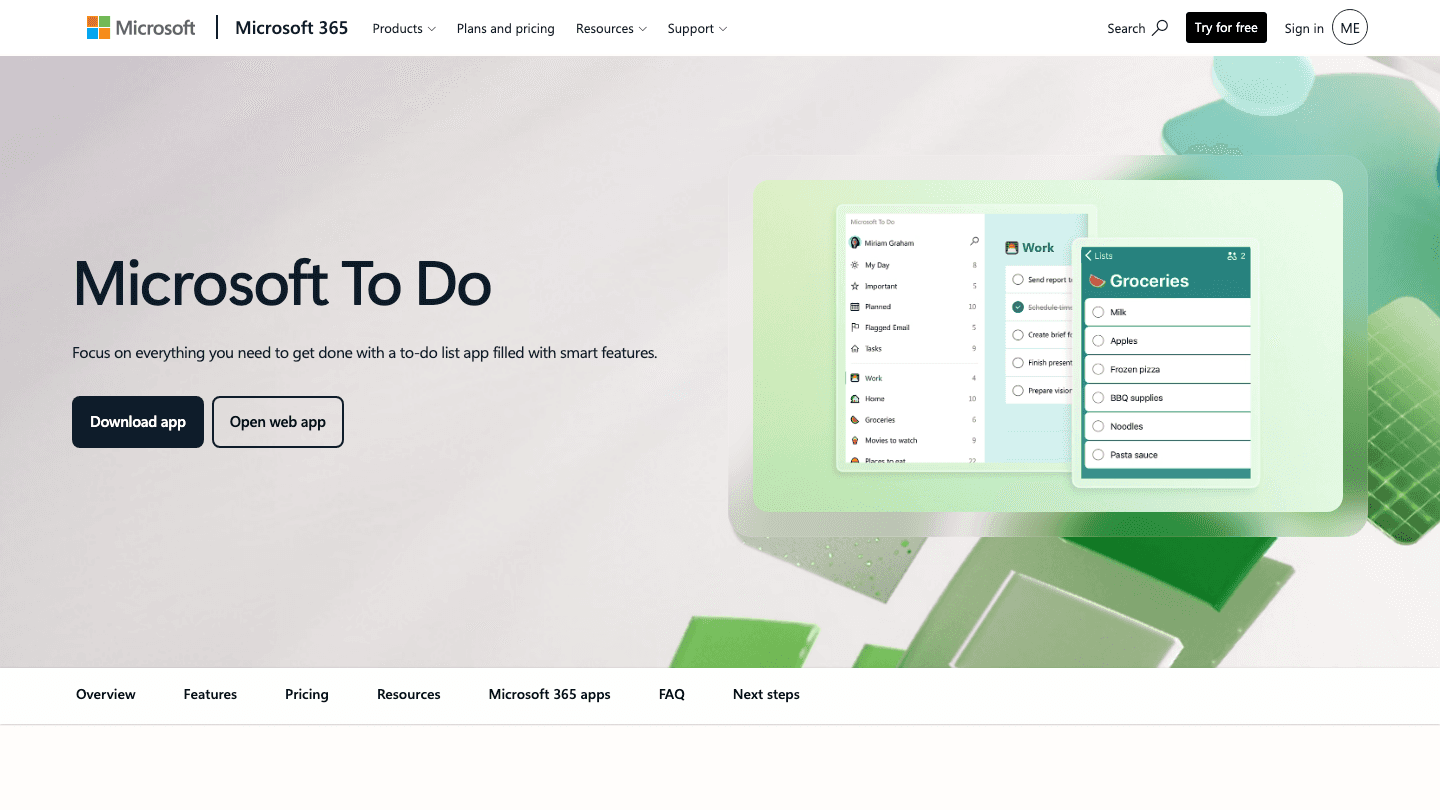
Microsoft To Do is the free task manager that most people overlook until they actually try it. It replaced Wunderlist after Microsoft's acquisition, and the core experience is clean and reliable. The "My Day" feature generates a daily list from flagged emails, reminders, and tasks you add manually. For Microsoft 365 users, it integrates tightly with Outlook Tasks, Teams, and Planner, making it a natural fit if those are already part of your workflow.
The app is entirely free with a Microsoft account. There are no paid tiers for individual use, which makes it the default recommendation for users already in the Microsoft ecosystem who want a personal task manager without adding another subscription. The mobile experience on both iOS and Android is polished and syncs quickly. For executive functioning support, the Outlook integration is particularly useful since it lets you turn flagged emails directly into tasks.
Key Features
My Day view with intelligent daily task suggestions
Full Outlook, Teams, and Microsoft Planner integration
Recurring tasks, due dates, reminders, and priorities
Available on iOS, Android, Mac, Windows, and web
Completely free with any Microsoft account
What Works
Outlook integration: turn flagged emails into tasks with one click
My Day suggestions reduce the friction of daily planning
Zero cost for the full personal feature set
Limitations
Best when you're already in the Microsoft ecosystem; weaker standalone
No energy-aware scheduling or calendar-blocking features
Limited filtering and advanced project management compared to OmniFocus or Todoist
Pricing: Free with any Microsoft account
Best for: Microsoft 365 users who want a free, well-integrated personal task manager
7. OmniFocus
The most powerful personal GTD system for Apple users
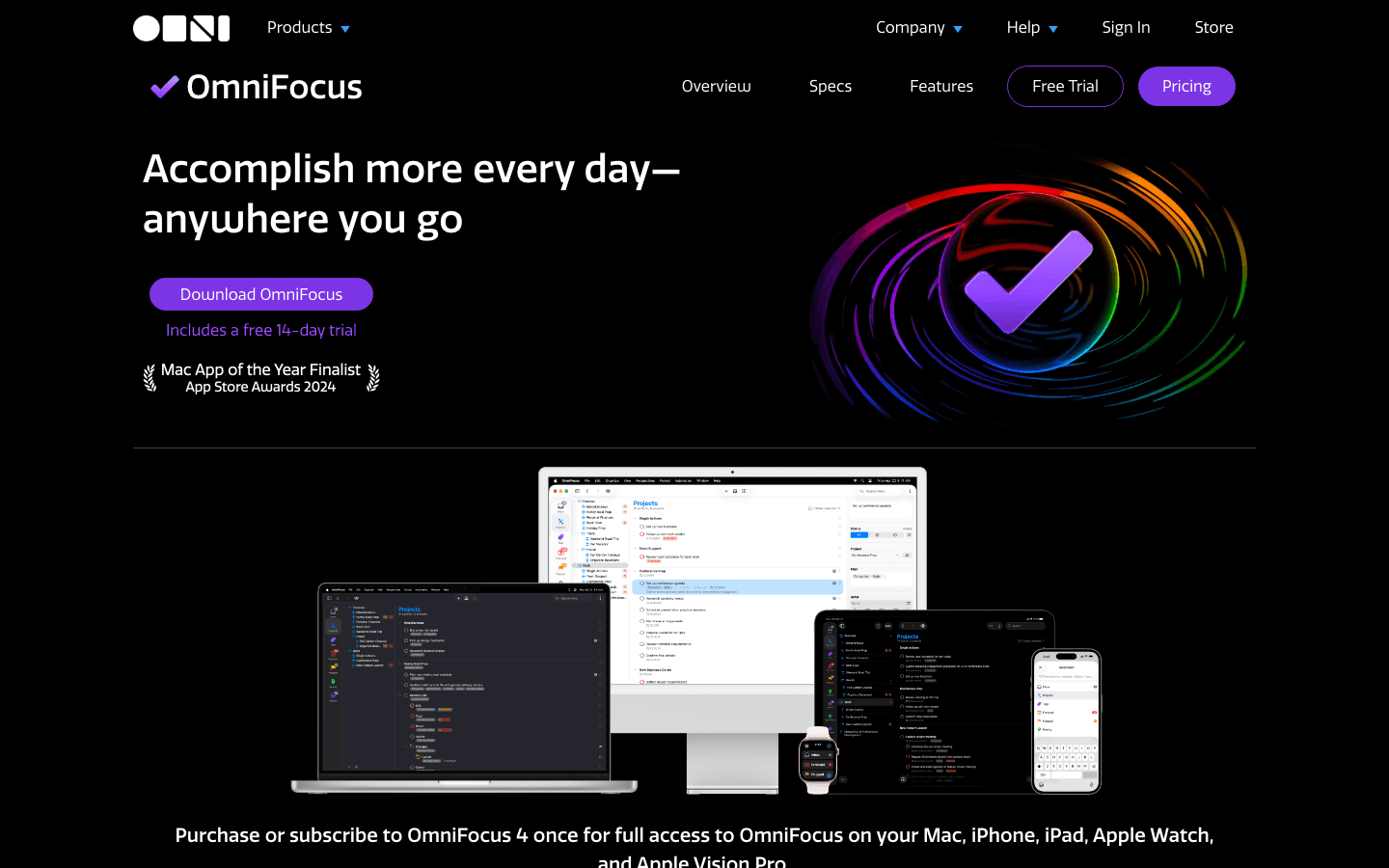
OmniFocus is the task manager for people who take personal productivity seriously. The GTD implementation is thorough: Folders, Projects, Tasks, Tags, Contexts, Perspectives, and custom views let you build exactly the workflow you want. For professionals managing complex personal and work project portfolios, nothing in this category comes close to OmniFocus's organizational depth.
The trade-off is complexity. OmniFocus rewards setup effort but punishes users who don't invest in learning the system. The price is also notably higher than everything else on this list. The subscription runs $9.99/month or $99.99/year; the one-time Standard license is $74.99, Pro is $149.99. For power users who want the most capable personal task management system available on Apple platforms, it's worth the cost. For everyone else, Todoist or Things 3 covers the same ground with less overhead.
Key Features
Full GTD implementation: Folders, Projects, Tags, Contexts, Perspectives
Forecast view combining tasks and calendar events
Custom perspectives and automation via Shortcuts and JavaScript
Available on iPhone, iPad, Mac, Apple Watch, and Apple Vision Pro
14-day free trial before purchase
What Works
Most powerful personal task management system on Apple platforms
Custom perspectives let you build views for any workflow
Forecast view makes daily planning more grounded in your actual calendar
Limitations
Steepest learning curve of any app on this list
Apple ecosystem only: no Android, Windows, or web app
Most expensive option by a wide margin
Pricing: $9.99/month or $99.99/year; perpetual license $74.99 (Standard) or $149.99 (Pro)
Best for: Apple users who want the most powerful personal GTD system available and are willing to invest in setup
Which Personal Task Management App Is Right for You?
You want automatic scheduling around your energy: Lifestack. It's the only app here that does this, and it's the most meaningful upgrade over traditional to-do lists for people whose productivity varies throughout the day.
You want the best all-around free option: Todoist's free plan or Microsoft To Do if you're in the Microsoft ecosystem.
You're on Apple and want the nicest-feeling app: Things 3, one-time purchase. No subscriptions, best design.
You work across Android and iPhone: TickTick or Any.do. Both sync reliably across all platforms.
You want the maximum power for complex projects: OmniFocus, but only if you're committed to learning the system.
You want habits plus tasks in one app: TickTick has built-in habit tracking that most competitors don't.
FAQ
What makes a good personal task management app?
The best personal task management apps share three qualities: fast capture (you can add a task before you forget it), a reliable daily planning view (the app helps you decide what to actually do today), and minimal maintenance overhead (you're not spending more time managing the system than doing work). Everything else is secondary.
Is a free personal task manager good enough?
Yes, for most users. Todoist's free plan, Microsoft To Do, and Any.do's free tier each cover the essential use cases: task lists, due dates, recurring reminders, and cross-device sync. You only need a paid plan if you run into specific limits like project count, reminder types, or collaboration needs.
What is the best personal task management app for ADHD?
Lifestack was designed with ADHD in mind. Energy-aware scheduling directly addresses one of the core ADHD challenges: task initiation at the wrong time. TickTick's Pomodoro timer and visual calendar view also work well for focus management. For more on this, see our guide to apps for executive functioning.
Should I use a task manager or a calendar for personal tasks?
The best approach uses both, connected. A task manager captures and organizes what you need to do. A calendar shows when you'll do it. Apps like Lifestack, Todoist, and TickTick all sync with Google Calendar, giving you a unified view of tasks and appointments. Lifestack goes furthest by actively scheduling tasks into your calendar based on available time and energy.
What's the difference between personal task management and project management?
Personal task management is optimized for individual use: fast capture, daily reviews, simple projects. Team project management adds assignment, dependencies, permissions, and collaborative workflows. The apps on this list are personal-first. If you need to coordinate work with a team, tools like Asana, Linear, or ClickUp serve that use case better.
Which personal task management app has the best mobile experience?
Any.do and TickTick are optimized for mobile-first use. Things 3 has the best iPhone and iPad experience on Apple. Todoist's mobile app is reliable on both iOS and Android. Lifestack's iOS app handles quick capture and daily planning well from the home screen widget.
The best personal task management app is the one you'll actually use every day. That sounds obvious, but it narrows the field more than you'd think. Apps that are too powerful for your needs become maintenance chores. Apps that are too simple leave you managing overflow in your head anyway. The sweet spot is an app that fits your natural workflow and requires the minimum friction to keep current.
In 2026, personal task managers have split into two distinct camps. One camp focuses on simplicity and speed: capture fast, process daily, get out of the way. The other adds layers: AI scheduling, energy awareness, habit tracking, calendar sync. Both approaches work, but they work for different people and different ways of organizing your life.
We tested seven apps across capture speed, daily planning quality, cross-platform sync, and long-term usability. Here's what separates them.
Key Takeaways
Lifestack is the only personal task management app on this list that schedules tasks around your daily energy peaks, not just deadlines.
Things 3 and OmniFocus are the standout choices for Apple ecosystem users who want polished GTD without subscription fees.
TickTick and Any.do are the strongest cross-platform options for users who work across Android, iPhone, and web.
Quick Guide
Lifestack: best for energy-aware task scheduling tied to your calendar
Todoist: best all-around personal task manager with a great free tier
Things 3: best one-time purchase personal task manager for Apple users
TickTick: best cross-platform option with built-in calendar and habit tracking
Any.do: best simple mobile-first personal task manager
Microsoft To Do: best free task manager for Microsoft 365 users
OmniFocus: best powerful GTD system for Apple power users
How We Evaluated
Capture speed: how fast can you add a task from any device or context?
Daily planning tools: does the app help you decide what to do today?
Scheduling and reminders: due dates, times, recurring tasks, energy awareness
Cross-platform support: iOS, Android, Mac, Windows, web
Free tier quality and paid plan value
Learning curve and long-term maintenance overhead
1. Lifestack
Personal task management built around your energy, not just your to-do list
Most task managers treat all tasks as equal. Lifestack doesn't. It tracks your personal energy levels throughout the day and routes tasks to the windows when you're actually equipped to handle them. Deep work goes to your high-energy morning block. Low-stakes admin fills in the afternoon dip. The result is a schedule that respects not just your deadlines but your biology.
This energy-aware approach makes Lifestack the most distinctive personal task management app in this category. It integrates with Google Calendar and Apple Calendar, pulling in your commitments and building a daily plan around them automatically. If you've been struggling to stick with a traditional task manager, it may be because the system was ignoring the variable that matters most: when you're actually at your best. Lifestack's approach to time optimization is fundamentally different from apps that just let you assign due dates.
It also handles ADHD project management particularly well. The visual scheduling interface reduces the cognitive load of deciding what to do next, which is one of the biggest friction points for people with attention challenges.
Key Features
Energy-aware task scheduling that adapts to your daily performance patterns
Calendar integration with Google Calendar and Apple Calendar
Quick task capture on iOS, Android, and Chrome extension
ADHD-friendly visual planning with color-coded energy blocks
Integration with Apple Health, Strava, and MyFitnessPal for energy data
What Works
Energy-matching is genuinely useful, not just a novelty feature
Daily plan builds itself from your calendar plus your task list
Low maintenance once set up: the system does the heavy scheduling
Limitations
No analog for GTD-style project hierarchies (areas, projects, tasks)
Pattern learning takes a week or two to become accurate
Weaker note-taking features compared to apps like OmniFocus
Pricing: $7/month, $50/year, or $120 lifetime
Best for: People who want their task manager to schedule work around their energy, not just deadlines
2. Todoist
The most polished all-around personal task manager
Todoist has earned its reputation as the default recommendation for personal task management. Natural language input handles date parsing neatly ("submit report next Friday at 2pm" creates the task with the correct due date), the free plan covers 5 projects which handles most personal use cases, and the cross-platform support is genuinely excellent across iOS, Android, Mac, Windows, and browser.
The Pro plan at $5/month adds reminders, file attachments, and 300 projects. Check our Todoist pricing breakdown to see whether the free tier covers your needs before upgrading. For most personal users, it does. The Karma gamification system adds a light engagement layer for productivity streaks, and the Google Calendar integration makes it a solid daily planner that syncs with Google Calendar.
Key Features
Natural language input with accurate date and time parsing
5 projects free; 300 on Pro plan
Recurring tasks, priority levels, labels, and filters
Google Calendar two-way sync
Available on iOS, Android, Mac, Windows, web, and browser extension
What Works
Best-in-class natural language input for quick task capture
Clean interface that stays out of the way
Cross-platform sync is fast and reliable
Limitations
No energy-aware scheduling or automatic daily planning
Free plan caps at 5 projects, which some users hit quickly
GTD workflows require workarounds (no native areas/contexts)
Pricing: Free (5 projects); Pro $5/month ($60/year); Business $8/user/month ($96/year)
Best for: Users who want a reliable, clean personal task manager with great natural language input
3. Things 3
Elegant personal task management with no subscription
Things 3 is the app most people recommend when someone asks for the best-designed personal task manager on Apple platforms. The interface is clean and intentional, the GTD structure (Areas, Projects, Tasks, Headings) is the right level of depth for most personal use, and the Today and Upcoming views make daily planning feel natural rather than forced. There are no subscriptions: you pay once per platform and receive all updates.
The one-time cost adds up if you want it on every Apple device, but compared to paying $5 to $10 per month indefinitely, most users break even quickly. Things 3 doesn't have a web app or Windows version, which is the main limitation. If your work spans platforms, this becomes a dealbreaker. For anyone who lives primarily in the Apple ecosystem, though, Things 3 is the most polished phone planner app in this category.
Key Features
Areas, Projects, Headings, and Tasks hierarchy for structured GTD
Today and Upcoming views for natural daily planning
Quick Entry shortcut for fast Mac capture
Calendar integration showing events alongside tasks
Available on iPhone, iPad, Mac, and Apple Watch
What Works
Best UI/UX of any task manager in this category, no exceptions
One-time purchase model avoids subscription fatigue
Today view makes deciding what to do each morning effortless
Limitations
Apple ecosystem only: no Android, no Windows, no web app
No energy-aware scheduling or AI-based prioritization
Collaboration features are limited to task sharing only
Pricing: One-time purchase: $9.99 (iPhone), $19.99 (iPad), $49.99 (Mac)
Best for: Apple users who want the most elegantly designed personal GTD system without recurring fees
4. TickTick
Cross-platform task management with built-in calendar and habits
TickTick packs more features into its free plan than almost any other task manager in this category. You get a built-in Pomodoro timer, habit tracking, calendar view, and voice input alongside the core task management tools. The calendar view in particular is unusual: most task managers show tasks in a list; TickTick layers them onto a time-blocked calendar, giving you a clearer sense of what your day actually looks like.
For cross-platform users, TickTick is the strongest choice. It works consistently across iOS, Android, Mac, Windows, and web, with fast sync and a UI that doesn't change significantly between platforms. The habit tracking module connects naturally to a habit tracker workflow if you want to build consistent daily behaviors alongside your task lists. The Premium plan at $35.99/year is reasonably priced for what it unlocks.
Key Features
Built-in Pomodoro timer, habit tracker, and calendar view
Natural language input with smart date parsing
Recurring tasks, priorities, tags, and filters
Available on iOS, Android, Mac, Windows, web, and Apple Watch
Offline mode with full functionality
What Works
Calendar view gives better daily context than list-only task managers
Habit tracking built in means one less app to manage
Most feature-rich free plan in the category
Limitations
Interface feels busier than Things 3 or Todoist
No energy-aware scheduling or automatic daily plan generation
Some advanced features require Premium
Pricing: Free; Premium $35.99/year (~$3/month)
Best for: Cross-platform users who want tasks, calendar, and habit tracking in one app
5. Any.do
Simple mobile-first task management trusted by 40 million users
Any.do's strength is its focus on simplicity. The interface strips task management to its essentials: a list of things to do, organized by day. The "My Day" view prompts you each morning to review and commit to what you'll actually complete, which is a small but effective behavioral nudge. Voice input and AI-assisted task creation make capture fast on mobile.
The free plan is genuinely usable, covering personal tasks, one-time reminders, calendar integration, and cross-device sync without a paywall. The Premium upgrade at $2.99/month adds recurring reminders, color themes, and additional customization. Any.do works well for users who find Todoist or TickTick too feature-heavy and want something that matches the simplicity of Google Keep's checklist experience.
Key Features
My Day view with a daily review and focus ritual
AI-assisted task creation and voice input on mobile
Calendar integration with Google Calendar and Outlook
Smart grocery lists and shared lists for family use
Available on iOS, Android, Mac, Windows, and web
What Works
Daily review ritual is simple and effective for building a planning habit
Free plan covers all personal use cases for most users
Grocery list and family sharing features are genuinely useful
Limitations
Less depth than Todoist or OmniFocus for project-heavy workloads
No energy-aware scheduling or calendar-blocking features
AI features are useful but don't approach Lifestack's scheduling depth
Pricing: Free; Premium $2.99/month (annual) or $5.99/month
Best for: Users who want a clean, simple personal task manager without a steep learning curve
6. Microsoft To Do
The best free task manager for Microsoft users
Microsoft To Do is the free task manager that most people overlook until they actually try it. It replaced Wunderlist after Microsoft's acquisition, and the core experience is clean and reliable. The "My Day" feature generates a daily list from flagged emails, reminders, and tasks you add manually. For Microsoft 365 users, it integrates tightly with Outlook Tasks, Teams, and Planner, making it a natural fit if those are already part of your workflow.
The app is entirely free with a Microsoft account. There are no paid tiers for individual use, which makes it the default recommendation for users already in the Microsoft ecosystem who want a personal task manager without adding another subscription. The mobile experience on both iOS and Android is polished and syncs quickly. For executive functioning support, the Outlook integration is particularly useful since it lets you turn flagged emails directly into tasks.
Key Features
My Day view with intelligent daily task suggestions
Full Outlook, Teams, and Microsoft Planner integration
Recurring tasks, due dates, reminders, and priorities
Available on iOS, Android, Mac, Windows, and web
Completely free with any Microsoft account
What Works
Outlook integration: turn flagged emails into tasks with one click
My Day suggestions reduce the friction of daily planning
Zero cost for the full personal feature set
Limitations
Best when you're already in the Microsoft ecosystem; weaker standalone
No energy-aware scheduling or calendar-blocking features
Limited filtering and advanced project management compared to OmniFocus or Todoist
Pricing: Free with any Microsoft account
Best for: Microsoft 365 users who want a free, well-integrated personal task manager
7. OmniFocus
The most powerful personal GTD system for Apple users
OmniFocus is the task manager for people who take personal productivity seriously. The GTD implementation is thorough: Folders, Projects, Tasks, Tags, Contexts, Perspectives, and custom views let you build exactly the workflow you want. For professionals managing complex personal and work project portfolios, nothing in this category comes close to OmniFocus's organizational depth.
The trade-off is complexity. OmniFocus rewards setup effort but punishes users who don't invest in learning the system. The price is also notably higher than everything else on this list. The subscription runs $9.99/month or $99.99/year; the one-time Standard license is $74.99, Pro is $149.99. For power users who want the most capable personal task management system available on Apple platforms, it's worth the cost. For everyone else, Todoist or Things 3 covers the same ground with less overhead.
Key Features
Full GTD implementation: Folders, Projects, Tags, Contexts, Perspectives
Forecast view combining tasks and calendar events
Custom perspectives and automation via Shortcuts and JavaScript
Available on iPhone, iPad, Mac, Apple Watch, and Apple Vision Pro
14-day free trial before purchase
What Works
Most powerful personal task management system on Apple platforms
Custom perspectives let you build views for any workflow
Forecast view makes daily planning more grounded in your actual calendar
Limitations
Steepest learning curve of any app on this list
Apple ecosystem only: no Android, Windows, or web app
Most expensive option by a wide margin
Pricing: $9.99/month or $99.99/year; perpetual license $74.99 (Standard) or $149.99 (Pro)
Best for: Apple users who want the most powerful personal GTD system available and are willing to invest in setup
Which Personal Task Management App Is Right for You?
You want automatic scheduling around your energy: Lifestack. It's the only app here that does this, and it's the most meaningful upgrade over traditional to-do lists for people whose productivity varies throughout the day.
You want the best all-around free option: Todoist's free plan or Microsoft To Do if you're in the Microsoft ecosystem.
You're on Apple and want the nicest-feeling app: Things 3, one-time purchase. No subscriptions, best design.
You work across Android and iPhone: TickTick or Any.do. Both sync reliably across all platforms.
You want the maximum power for complex projects: OmniFocus, but only if you're committed to learning the system.
You want habits plus tasks in one app: TickTick has built-in habit tracking that most competitors don't.
FAQ
What makes a good personal task management app?
The best personal task management apps share three qualities: fast capture (you can add a task before you forget it), a reliable daily planning view (the app helps you decide what to actually do today), and minimal maintenance overhead (you're not spending more time managing the system than doing work). Everything else is secondary.
Is a free personal task manager good enough?
Yes, for most users. Todoist's free plan, Microsoft To Do, and Any.do's free tier each cover the essential use cases: task lists, due dates, recurring reminders, and cross-device sync. You only need a paid plan if you run into specific limits like project count, reminder types, or collaboration needs.
What is the best personal task management app for ADHD?
Lifestack was designed with ADHD in mind. Energy-aware scheduling directly addresses one of the core ADHD challenges: task initiation at the wrong time. TickTick's Pomodoro timer and visual calendar view also work well for focus management. For more on this, see our guide to apps for executive functioning.
Should I use a task manager or a calendar for personal tasks?
The best approach uses both, connected. A task manager captures and organizes what you need to do. A calendar shows when you'll do it. Apps like Lifestack, Todoist, and TickTick all sync with Google Calendar, giving you a unified view of tasks and appointments. Lifestack goes furthest by actively scheduling tasks into your calendar based on available time and energy.
What's the difference between personal task management and project management?
Personal task management is optimized for individual use: fast capture, daily reviews, simple projects. Team project management adds assignment, dependencies, permissions, and collaborative workflows. The apps on this list are personal-first. If you need to coordinate work with a team, tools like Asana, Linear, or ClickUp serve that use case better.
Which personal task management app has the best mobile experience?
Any.do and TickTick are optimized for mobile-first use. Things 3 has the best iPhone and iPad experience on Apple. Todoist's mobile app is reliable on both iOS and Android. Lifestack's iOS app handles quick capture and daily planning well from the home screen widget.



FOLLOW ON
FOLLOW ON
FOLLOW ON


Copyright 2026 © Lifestack. All rights reserved
Copyright 2026 © Lifestack. All rights reserved

