
App
Best Today is the Day App Alternatives in 2026
Best Today is the Day App Alternatives in 2026

Today is the Day was built around a simple idea: just focus on what you need to get done today. For some people, that simplicity was exactly right. For others, the app's limitations eventually showed up in daily life: no energy awareness, limited integrations, weak support for anything beyond a basic task list.
If you've outgrown it or can no longer access it, you have better options now. The daily planning app market has matured significantly. The best alternatives don't just show you what to do today. They help you figure out what to do first, when you have the energy to do it, and how to protect the time that matters most.
We tested five alternatives. Here's what each one does well, where it falls short, and who it's built for.
Key Takeaways
Lifestack is the best Today is the Day alternative for people who want their daily plan to adapt to their energy, not just their calendar.
Sunsama excels at intentional daily planning with integrations across tools like Notion, Asana, and Jira, but at $25/month it's a significant cost jump.
TickTick and Any.do offer strong free tiers and are good picks if you want a familiar task manager with a today focus and no ongoing cost.
Quick Guide
Lifestack - Best for energy-aware scheduling that adapts to how you actually feel each day
Structured - Best for visual timeline daily planning on iOS
Sunsama - Best for knowledge workers integrating tasks from many tools
TickTick - Best all-in-one task manager with a strong free tier
Any.do - Best for simple daily task management across mobile and web
How We Evaluated
Daily planning workflow: does it help you decide what to work on today, and in what order?
Energy and context awareness: does the app adapt to your actual capacity, not just available time?
Integrations: calendar, task tools, health data
Pricing: free tier availability, value at the paid tier
Mobile experience: iOS and Android quality
1. Lifestack
The Today is the Day alternative that plans around your energy, not just your time.

Lifestack is built on a premise that most daily planners ignore: your cognitive capacity varies significantly day to day. A day after poor sleep is not the same as a well-rested Monday, and your task list shouldn't pretend otherwise. Lifestack reads your sleep, recovery, and focus data and builds your daily schedule around your actual energy curve, putting high-demand work in your peak window and routing lighter tasks to your low-energy hours.
For people coming from Today is the Day, the transition is straightforward. Tasks go in, priorities get set, and the app handles the scheduling. The difference is that Lifestack's schedule is dynamic: it adjusts when you're tired, rescheduling demanding work rather than letting you white-knuckle through a plan your body can't support.
Key Features: Energy-aware daily scheduling, sleep and recovery integration, calendar sync, task prioritization, Chrome extension, iOS and Android
What Works: The energy-based scheduling model is genuinely different from anything else in this category. Daily plans adapt to how recovered you are rather than assuming constant output. Lifestack also has one of the cleaner mobile experiences among AI-powered planners
Limitations: Less suited to teams or collaborative project management, primarily a personal planning tool
Pricing: $7/month, $50/year, or $120 lifetime
Best for: Anyone who wants their daily plan to actually reflect how they feel, not just what's on the calendar
2. Structured
The visual timeline daily planner for iOS users.
Structured takes a different approach to daily planning: your day is displayed as a visual timeline rather than a list. Events and tasks are placed on a visual schedule so you can see at a glance how much time you have, where you are in the day, and what's coming next. For people who think spatially about their time, this is a genuinely better interface than a flat task list.
The Structured alternative comparison is particularly relevant for Today is the Day users who liked the app's simplicity but want a richer visual layer. Structured syncs with your device calendar and supports recurring tasks, color-coding, and custom reminders.
Key Features: Visual timeline view, calendar integration, recurring tasks, color-coded blocks, iOS-native design
What Works: The visual timeline is the clearest representation of "today" available in any planner app. If you've ever sketched your day on paper as a timeline, Structured matches that mental model
Limitations: iOS-focused, fewer integrations than competitors, no energy or health data awareness
Pricing: Free plan available; Pro tier for advanced features
Best for: iOS users who want a visual, timeline-based view of their daily plan
3. Sunsama
The daily planning ritual for knowledge workers.
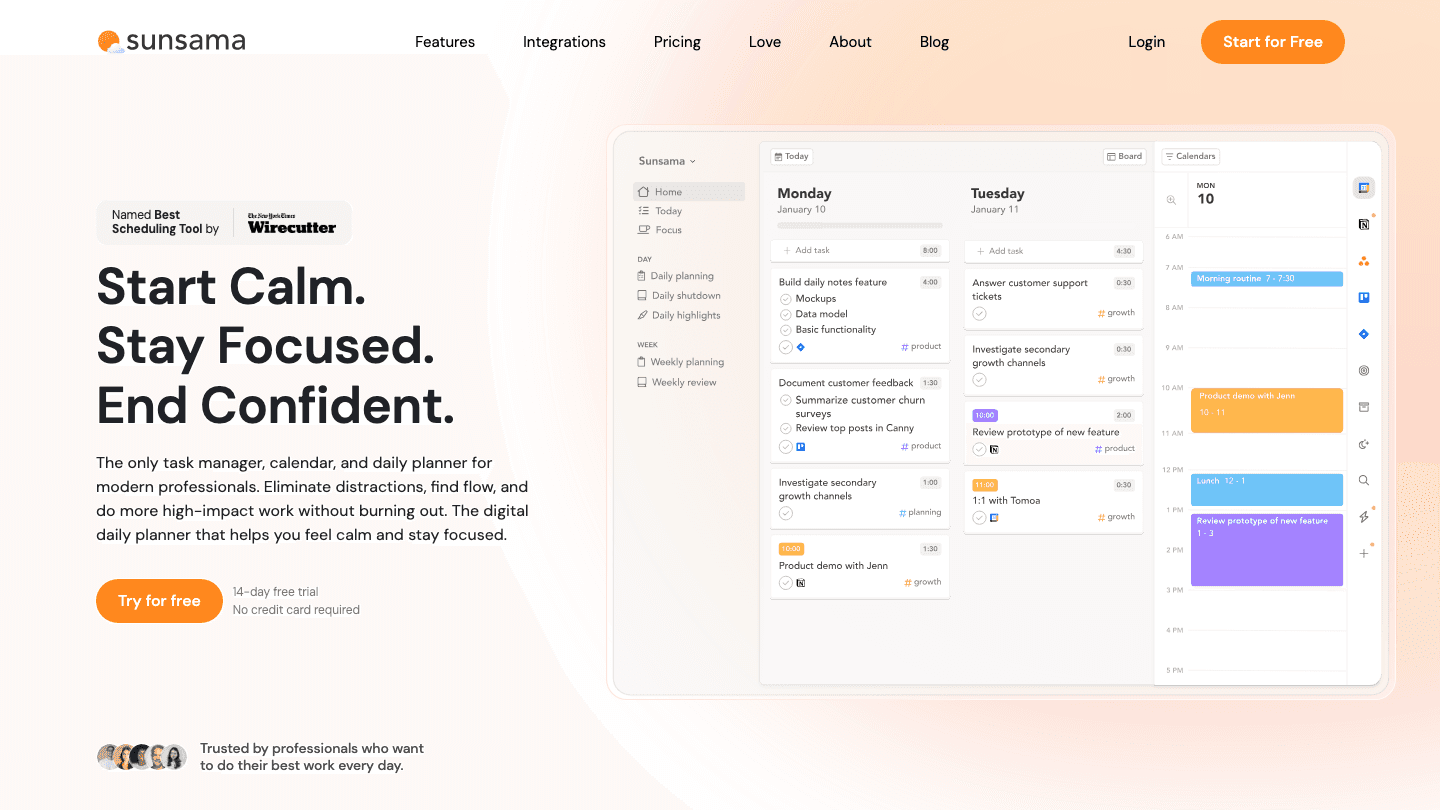
Sunsama is built around a structured daily planning ritual: each morning, you pull tasks from connected tools (Notion, Asana, Jira, Trello, GitHub, Linear, Todoist) into a single daily plan, estimate how long each will take, and commit to a focused day. At the end of the day, you reflect and roll unfinished tasks forward. The whole process is designed to be intentional and to prevent the overcommitting that makes most task managers feel stressful.
The catch is price. At $25/month, Sunsama's pricing is the highest in this category. For teams where the daily sync ritual replaces a standup meeting or for solopreneurs whose work spans many tools, the cost is defensible. For simple daily planning, it's hard to justify.
Key Features: Daily planning ritual with time estimates, integrations across 10+ tools, calendar sync, Kanban view, weekly review
What Works: The best multi-tool integration in the category. If your work lives across five different platforms, Sunsama is the only daily planner that pulls them all together cleanly
Limitations: $25/month with no free plan (14-day trial only), overkill for simple daily planning, no energy awareness
Pricing: $25/month or $20/month billed annually. 14-day free trial
Best for: Knowledge workers with tasks spread across Notion, Asana, Jira, or GitHub who want one unified daily planning surface
4. TickTick
The all-in-one task manager with a strong today view.

TickTick covers more ground than almost any other app in this comparison: task management, habit tracking, a Pomodoro timer, calendar integration, and a built-in "Today" view that collects everything due or scheduled for the current day. The free tier is genuinely usable rather than a stripped-down trial.
For Today is the Day users, TickTick is the widest drop-in replacement in terms of features. The today view gives you the focused daily list you're used to, while the rest of the app adds capabilities you can grow into. See the full TickTick pricing breakdown before upgrading.
Key Features: Today view, habits, Pomodoro timer, calendar view, tags, subtasks, Google Calendar integration
What Works: The breadth of features at the free tier is unmatched. The Pomodoro integration is particularly good for people who liked Today is the Day's focus on the present moment
Limitations: The volume of features can feel overwhelming if you only want simple daily planning. No energy awareness
Pricing: Free plan available; Premium required for calendar sync and advanced features
Best for: People who want a broader task management system with a good today view at minimal cost
5. Any.do
The clean, cross-platform daily planner with a morning planning moment.
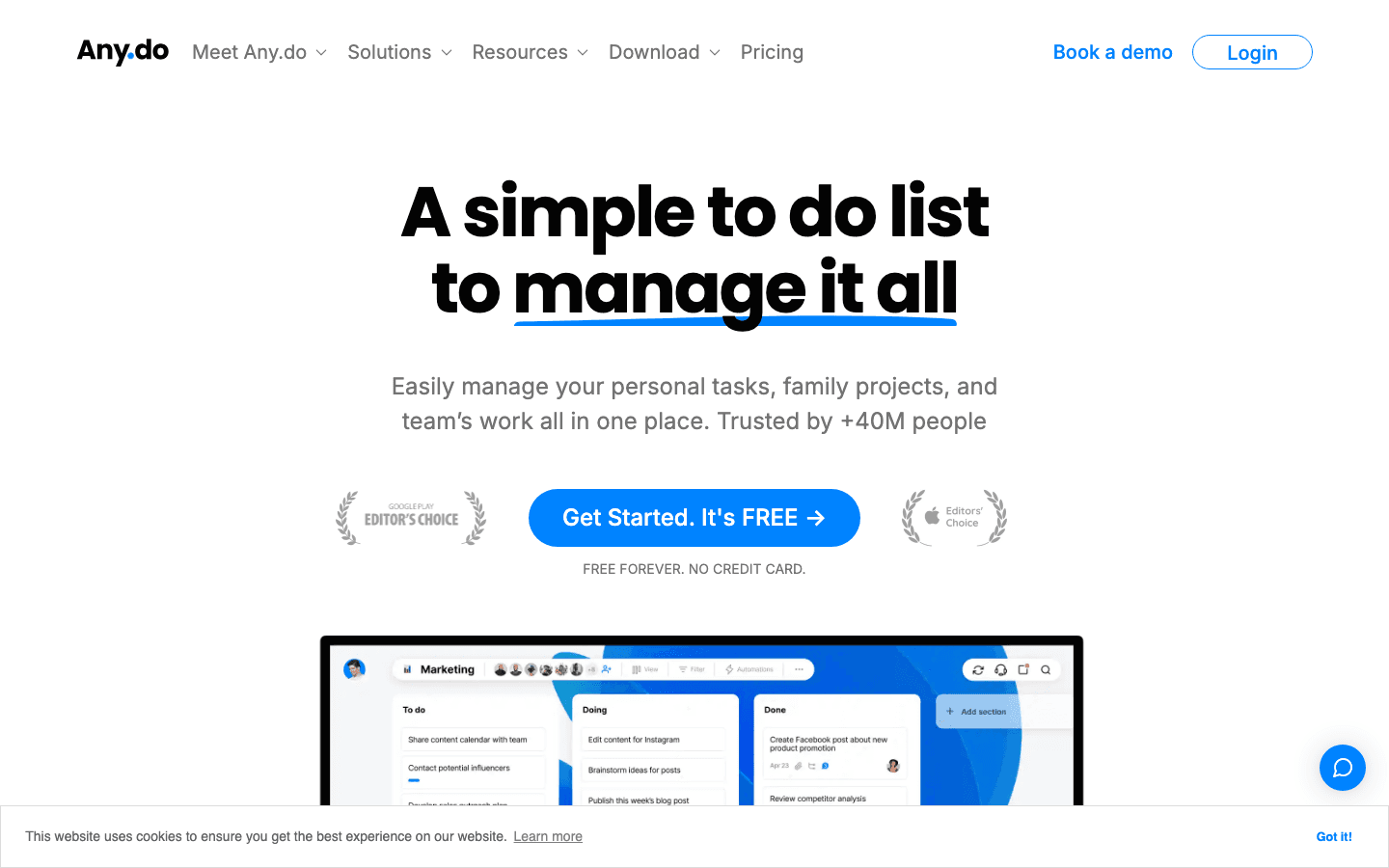
Any.do has built one of the more polished daily planning experiences in the market. The "My Day" view surfaces what's due, what's overdue, and what you've added for today. The app's "Moment" feature is a daily morning planning session that walks you through your list and lets you schedule each task: do it now, do it later, move it to tomorrow, or delete it. That ritual mirrors what Today is the Day users liked about their app.
Key Features: My Day view, morning planning Moment ritual, calendar integration, WhatsApp reminders (Premium), location reminders, family plan option
What Works: The morning Moment is the closest experience to Today is the Day's core loop. Any.do also has the cleanest cross-platform support (iOS, Android, Chrome, web) in this comparison
Limitations: Recurring tasks require Premium, no energy awareness, AI features are early-stage
Pricing: Free plan available. Premium $4.99/month billed annually ($7.99/month)
Best for: People who want the closest thing to Today is the Day's daily planning ritual with broad cross-platform support
Which Today is the Day Alternative Is Right for You?
If you want a plan that adapts to your energy: Lifestack. It's the only app here that treats your daily capacity as a variable rather than a constant
If you loved the visual, timeline-based approach: Structured. The best visual daily planner on iOS
If your work spans many tools (Notion, Jira, Asana): Sunsama, if the price fits your budget
If you want the most features at the lowest price: TickTick. Strong free tier with a broad feature set
If you want the most familiar ritual to Today is the Day: Any.do. The morning Moment is the closest equivalent
Frequently Asked Questions
What happened to the Today is the Day app?
The Today is the Day app's website has gone offline and it is no longer actively supported. Users looking for a working alternative should consider the apps in this list. Any.do and TickTick are the most direct replacements for simple daily planning, while Lifestack offers a more advanced approach with energy-aware scheduling.
What is the best free alternative to Today is the Day?
TickTick and Any.do both have free plans that cover core daily planning. TickTick's free tier is broader, including habits and a Pomodoro timer. Any.do's free tier has a cleaner interface and the morning Moment planning ritual. Both are worth trying before committing to a paid plan.
Is there a daily planner app that schedules around your energy?
Yes. Lifestack's energy-based planning approach is specifically designed to schedule your tasks around your actual daily energy levels rather than just assigning them to time slots. It's the most meaningful upgrade from a simple daily list app for people whose productivity varies significantly day to day.
What makes Sunsama different from other daily planners?
Sunsama's differentiator is its integration breadth. It pulls tasks from 10+ tools into a single daily plan, with a structured morning ritual for deciding what actually makes it onto today's list. The Sunsama alternative question is usually about price: at $25/month, it's the most expensive option here, which is hard to justify unless the multi-tool integration is genuinely valuable to you.
Today is the Day was built around a simple idea: just focus on what you need to get done today. For some people, that simplicity was exactly right. For others, the app's limitations eventually showed up in daily life: no energy awareness, limited integrations, weak support for anything beyond a basic task list.
If you've outgrown it or can no longer access it, you have better options now. The daily planning app market has matured significantly. The best alternatives don't just show you what to do today. They help you figure out what to do first, when you have the energy to do it, and how to protect the time that matters most.
We tested five alternatives. Here's what each one does well, where it falls short, and who it's built for.
Key Takeaways
Lifestack is the best Today is the Day alternative for people who want their daily plan to adapt to their energy, not just their calendar.
Sunsama excels at intentional daily planning with integrations across tools like Notion, Asana, and Jira, but at $25/month it's a significant cost jump.
TickTick and Any.do offer strong free tiers and are good picks if you want a familiar task manager with a today focus and no ongoing cost.
Quick Guide
Lifestack - Best for energy-aware scheduling that adapts to how you actually feel each day
Structured - Best for visual timeline daily planning on iOS
Sunsama - Best for knowledge workers integrating tasks from many tools
TickTick - Best all-in-one task manager with a strong free tier
Any.do - Best for simple daily task management across mobile and web
How We Evaluated
Daily planning workflow: does it help you decide what to work on today, and in what order?
Energy and context awareness: does the app adapt to your actual capacity, not just available time?
Integrations: calendar, task tools, health data
Pricing: free tier availability, value at the paid tier
Mobile experience: iOS and Android quality
1. Lifestack
The Today is the Day alternative that plans around your energy, not just your time.
Lifestack is built on a premise that most daily planners ignore: your cognitive capacity varies significantly day to day. A day after poor sleep is not the same as a well-rested Monday, and your task list shouldn't pretend otherwise. Lifestack reads your sleep, recovery, and focus data and builds your daily schedule around your actual energy curve, putting high-demand work in your peak window and routing lighter tasks to your low-energy hours.
For people coming from Today is the Day, the transition is straightforward. Tasks go in, priorities get set, and the app handles the scheduling. The difference is that Lifestack's schedule is dynamic: it adjusts when you're tired, rescheduling demanding work rather than letting you white-knuckle through a plan your body can't support.
Key Features: Energy-aware daily scheduling, sleep and recovery integration, calendar sync, task prioritization, Chrome extension, iOS and Android
What Works: The energy-based scheduling model is genuinely different from anything else in this category. Daily plans adapt to how recovered you are rather than assuming constant output. Lifestack also has one of the cleaner mobile experiences among AI-powered planners
Limitations: Less suited to teams or collaborative project management, primarily a personal planning tool
Pricing: $7/month, $50/year, or $120 lifetime
Best for: Anyone who wants their daily plan to actually reflect how they feel, not just what's on the calendar
2. Structured
The visual timeline daily planner for iOS users.
Structured takes a different approach to daily planning: your day is displayed as a visual timeline rather than a list. Events and tasks are placed on a visual schedule so you can see at a glance how much time you have, where you are in the day, and what's coming next. For people who think spatially about their time, this is a genuinely better interface than a flat task list.
The Structured alternative comparison is particularly relevant for Today is the Day users who liked the app's simplicity but want a richer visual layer. Structured syncs with your device calendar and supports recurring tasks, color-coding, and custom reminders.
Key Features: Visual timeline view, calendar integration, recurring tasks, color-coded blocks, iOS-native design
What Works: The visual timeline is the clearest representation of "today" available in any planner app. If you've ever sketched your day on paper as a timeline, Structured matches that mental model
Limitations: iOS-focused, fewer integrations than competitors, no energy or health data awareness
Pricing: Free plan available; Pro tier for advanced features
Best for: iOS users who want a visual, timeline-based view of their daily plan
3. Sunsama
The daily planning ritual for knowledge workers.
Sunsama is built around a structured daily planning ritual: each morning, you pull tasks from connected tools (Notion, Asana, Jira, Trello, GitHub, Linear, Todoist) into a single daily plan, estimate how long each will take, and commit to a focused day. At the end of the day, you reflect and roll unfinished tasks forward. The whole process is designed to be intentional and to prevent the overcommitting that makes most task managers feel stressful.
The catch is price. At $25/month, Sunsama's pricing is the highest in this category. For teams where the daily sync ritual replaces a standup meeting or for solopreneurs whose work spans many tools, the cost is defensible. For simple daily planning, it's hard to justify.
Key Features: Daily planning ritual with time estimates, integrations across 10+ tools, calendar sync, Kanban view, weekly review
What Works: The best multi-tool integration in the category. If your work lives across five different platforms, Sunsama is the only daily planner that pulls them all together cleanly
Limitations: $25/month with no free plan (14-day trial only), overkill for simple daily planning, no energy awareness
Pricing: $25/month or $20/month billed annually. 14-day free trial
Best for: Knowledge workers with tasks spread across Notion, Asana, Jira, or GitHub who want one unified daily planning surface
4. TickTick
The all-in-one task manager with a strong today view.
TickTick covers more ground than almost any other app in this comparison: task management, habit tracking, a Pomodoro timer, calendar integration, and a built-in "Today" view that collects everything due or scheduled for the current day. The free tier is genuinely usable rather than a stripped-down trial.
For Today is the Day users, TickTick is the widest drop-in replacement in terms of features. The today view gives you the focused daily list you're used to, while the rest of the app adds capabilities you can grow into. See the full TickTick pricing breakdown before upgrading.
Key Features: Today view, habits, Pomodoro timer, calendar view, tags, subtasks, Google Calendar integration
What Works: The breadth of features at the free tier is unmatched. The Pomodoro integration is particularly good for people who liked Today is the Day's focus on the present moment
Limitations: The volume of features can feel overwhelming if you only want simple daily planning. No energy awareness
Pricing: Free plan available; Premium required for calendar sync and advanced features
Best for: People who want a broader task management system with a good today view at minimal cost
5. Any.do
The clean, cross-platform daily planner with a morning planning moment.
Any.do has built one of the more polished daily planning experiences in the market. The "My Day" view surfaces what's due, what's overdue, and what you've added for today. The app's "Moment" feature is a daily morning planning session that walks you through your list and lets you schedule each task: do it now, do it later, move it to tomorrow, or delete it. That ritual mirrors what Today is the Day users liked about their app.
Key Features: My Day view, morning planning Moment ritual, calendar integration, WhatsApp reminders (Premium), location reminders, family plan option
What Works: The morning Moment is the closest experience to Today is the Day's core loop. Any.do also has the cleanest cross-platform support (iOS, Android, Chrome, web) in this comparison
Limitations: Recurring tasks require Premium, no energy awareness, AI features are early-stage
Pricing: Free plan available. Premium $4.99/month billed annually ($7.99/month)
Best for: People who want the closest thing to Today is the Day's daily planning ritual with broad cross-platform support
Which Today is the Day Alternative Is Right for You?
If you want a plan that adapts to your energy: Lifestack. It's the only app here that treats your daily capacity as a variable rather than a constant
If you loved the visual, timeline-based approach: Structured. The best visual daily planner on iOS
If your work spans many tools (Notion, Jira, Asana): Sunsama, if the price fits your budget
If you want the most features at the lowest price: TickTick. Strong free tier with a broad feature set
If you want the most familiar ritual to Today is the Day: Any.do. The morning Moment is the closest equivalent
Frequently Asked Questions
What happened to the Today is the Day app?
The Today is the Day app's website has gone offline and it is no longer actively supported. Users looking for a working alternative should consider the apps in this list. Any.do and TickTick are the most direct replacements for simple daily planning, while Lifestack offers a more advanced approach with energy-aware scheduling.
What is the best free alternative to Today is the Day?
TickTick and Any.do both have free plans that cover core daily planning. TickTick's free tier is broader, including habits and a Pomodoro timer. Any.do's free tier has a cleaner interface and the morning Moment planning ritual. Both are worth trying before committing to a paid plan.
Is there a daily planner app that schedules around your energy?
Yes. Lifestack's energy-based planning approach is specifically designed to schedule your tasks around your actual daily energy levels rather than just assigning them to time slots. It's the most meaningful upgrade from a simple daily list app for people whose productivity varies significantly day to day.
What makes Sunsama different from other daily planners?
Sunsama's differentiator is its integration breadth. It pulls tasks from 10+ tools into a single daily plan, with a structured morning ritual for deciding what actually makes it onto today's list. The Sunsama alternative question is usually about price: at $25/month, it's the most expensive option here, which is hard to justify unless the multi-tool integration is genuinely valuable to you.



FOLLOW ON
FOLLOW ON
FOLLOW ON



Copyright 2026 © Lifestack. All rights reserved
Copyright 2026 © Lifestack. All rights reserved

