
App
Best Virtual Assistant for Scheduling in 2026
Best Virtual Assistant for Scheduling in 2026
Managing work and personal life on separate calendars, across multiple tools, and without a central brain is a problem that gets worse as your schedule fills up. Something always slips. Meetings land on focus blocks. Personal commitments get pushed. Tasks without deadlines disappear into a list no one checks.
A virtual assistant for scheduling is the category of tools built to fix this. The best ones do not just display your schedule. They help you build it, protect it, and adapt it when plans change. Some use AI to auto-schedule tasks. Others use guided planning rituals. A few combine both approaches.
We tested five of the best virtual assistants for scheduling work and personal life in 2026, evaluating each for calendar integration, task management, AI smarts, and whether they actually reduce the cognitive load of planning. Here is what we found.
Key Takeaways
Lifestack stands out as the only scheduling assistant that adapts to your energy patterns, not just your available calendar slots.
Motion offers the most automation: add tasks with deadlines and it builds your schedule without further input.
TickTick is the best choice if you want a capable scheduler with a generous free tier and cross-platform support.
Quick Guide
1. Lifestack: Best overall. Energy-aware AI scheduling for work and personal life.
2. Motion: Best automation. AI fills your calendar based on deadlines with no manual input.
3. Akiflow: Best for multi-tool professionals. Unifies tasks from 2,000+ apps in one planner.
4. Sunsama: Best for intentional planning. Guided daily ritual for focus over volume.
5. TickTick: Best value. Full task + calendar tool with a generous free tier.
How We Evaluated
Calendar integration: Does it handle both work and personal calendars? Can it read and write to Google Calendar, Outlook, and Apple Calendar?
AI scheduling quality: Does the AI actually reduce planning time, or does it just surface suggestions that require manual action?
Energy awareness: Does the tool account for when you do your best work, or treat all time slots as equal?
Task management: Can you manage tasks in the same interface, or is it calendar-only?
Pricing and value: Is the cost justified by time saved? Is there a usable free tier?
For deeper context on the best scheduling apps and calendar management tools in 2026, those guides cover adjacent categories in more detail.
1. Lifestack: Best Virtual Assistant for Scheduling Overall
The only scheduling assistant that adapts to your energy, not just your calendar.

Lifestack is an AI-powered daily planner that goes beyond calendar management by understanding your energy patterns throughout the day. While most scheduling apps fill open slots based on availability, Lifestack asks a different question: when should this task happen given how you actually function? Deep work sessions go into high-energy windows. Routine tasks fill lower-energy slots. The result is a schedule built around your capacity, not just your calendar.
It integrates with Google Calendar and Outlook, handles both work and personal calendars, and runs on iOS, Android, Mac, and a Chrome extension. The AI scheduling recommendations improve over time as the system learns your patterns. (See how Lifestack compares against other AI planner apps.)
Key Features
Energy-aware task scheduling based on your daily cognitive patterns
AI auto-scheduling that adapts when meetings shift
Work and personal calendar integration in one view
Mobile and desktop apps with Chrome extension
What Works
Energy-awareness is a genuinely useful differentiator. Blocking deep work during your actual peak hours is more effective than blocking it during "available" time
Calendar integration handles both personal and work accounts cleanly
AI recommendations get more accurate over time
Limitations
Designed for individuals, not teams. No collaborative scheduling features
No native meeting transcription
Pricing: From $7/month, or $50/year with a 7-day free trial on the annual plan.
Best for: Individuals who want an AI scheduler that treats energy as a real constraint, not just calendar availability.
2. Motion: Best for Automated Scheduling
AI that fills your calendar automatically and rescheduled instantly when plans change.
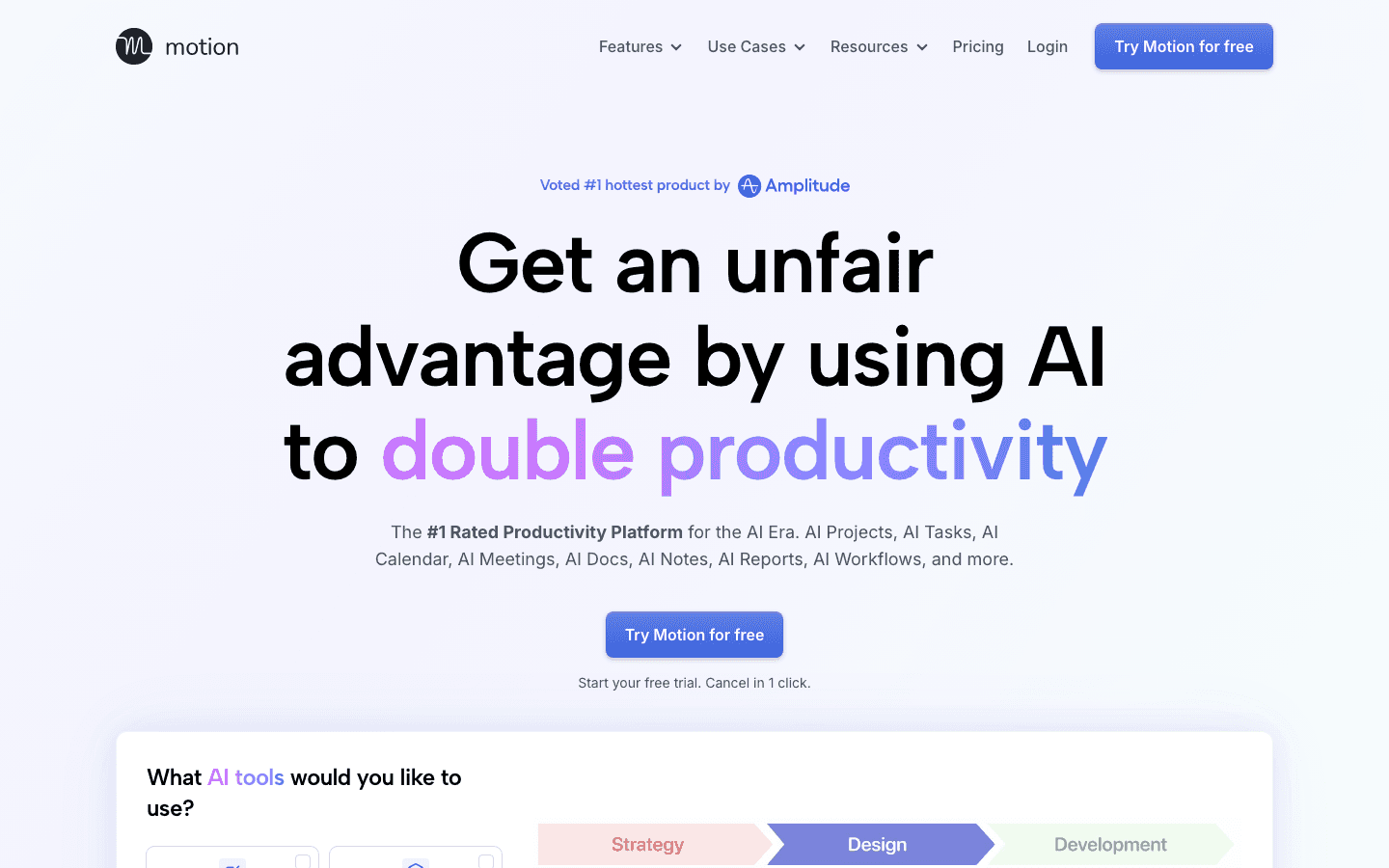
Motion is the most automated scheduler in this category. You add tasks with deadlines and priorities, and Motion places them in your calendar automatically, shifting blocks when meetings land on them and flagging you if a deadline is at risk. For people with high task volume and hard deadlines, the level of automation is unmatched.
The Business tier adds team capacity planning, workload visibility, and Gantt-style project views, making it one of the few individual scheduling tools that scales to team use. The AI also generates meeting agendas and handles project task dependencies.
Key Features
AI auto-scheduling with deadline and priority awareness
Automatic rescheduling when meetings conflict with task blocks
Team capacity planning and workload dashboards (Business tier)
AI-generated meeting agendas and project tasks
What Works
Automation level is best in class. Once tasks are loaded, very little manual planning is needed
Deadline tracking and rescheduling prevents tasks from falling through
Team tier adds genuine value for managers and project leads
Limitations
No energy awareness. Schedules by availability, not cognitive readiness
Can feel rigid if you prefer manual control over your time blocks
Among the more expensive options in the category
Pricing: $19/month, or approximately $12.73/month billed annually (save 33%).
Best for: Professionals with high task volume and hard deadlines who want maximum automation with minimal manual planning.
3. Akiflow: Best for Multi-Tool Professionals
One unified inbox for every task across 2,000+ apps, with AI to help you plan your day.
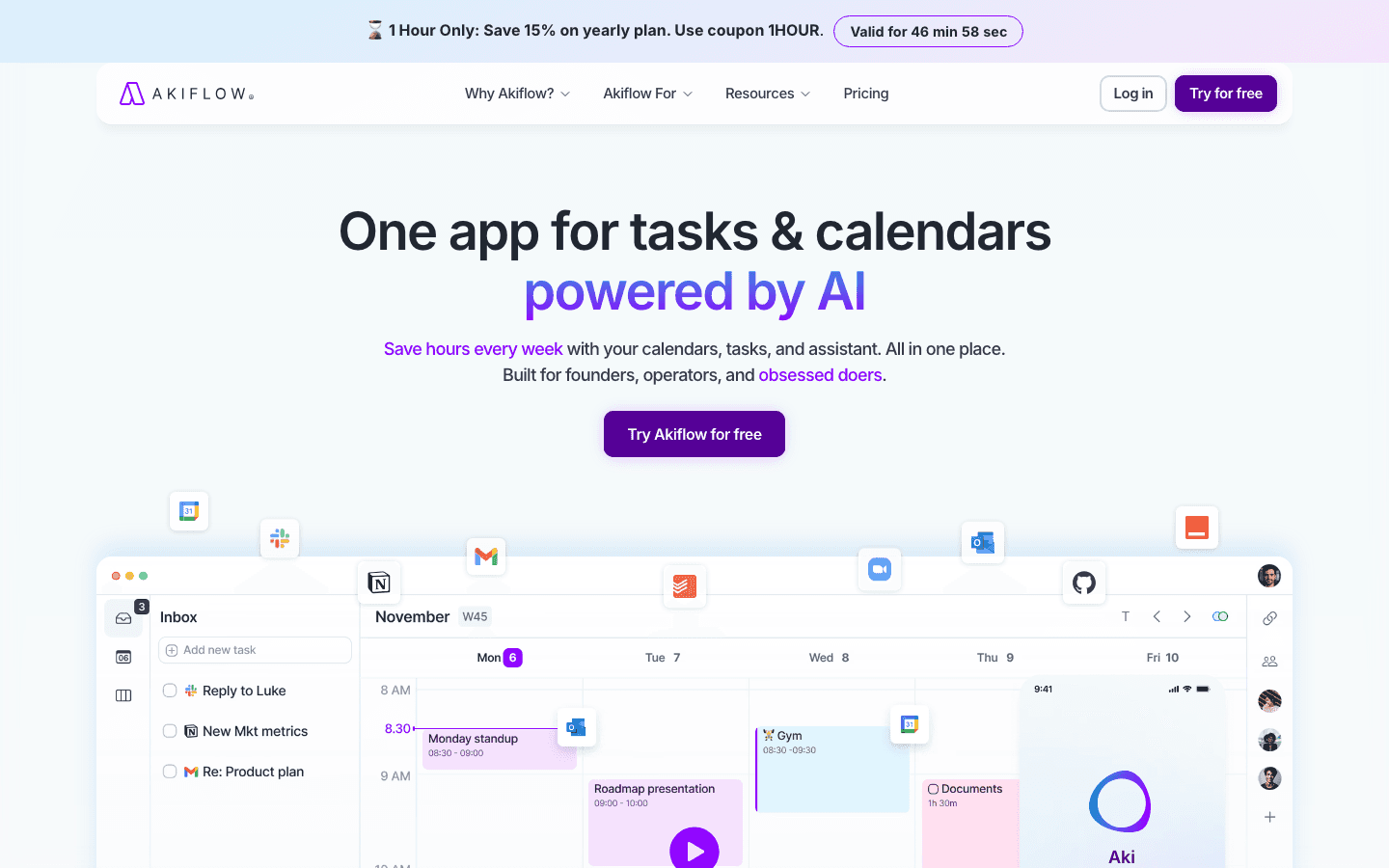
Akiflow solves a specific problem: when your tasks live across Jira, Notion, Gmail, Slack, Linear, and GitHub, you spend more time syncing lists than doing the work on them. Akiflow aggregates everything into a single unified inbox, lets you time-block tasks by dragging them onto a calendar, and provides an AI assistant (Aki) for natural language planning. The daily planning ritual, 10 to 15 minutes each morning, is well-designed and actually builds a consistent habit over time.
It is aimed at founders, operators, and senior professionals who live across many tools and cannot afford to miss a context switch. The AI task manager comparison shows how Akiflow positions against pure task tools.
Key Features
Universal task inbox from 2,000+ integrations
Drag-to-calendar time blocking with natural language scheduling
Aki AI assistant for planning and task management
Time tracking and daily planning ritual workflow
What Works
Best in category for professionals who work across many tools and need a single daily planning surface
Daily planning ritual design builds the habit of actual daily scheduling
AI assistant handles natural language commands quickly
Limitations
No energy awareness
Mobile experience is more limited than desktop
Monthly billing is expensive relative to alternatives
Pricing: $34/month, or $19/month billed annually, with a 7-day free trial.
Best for: Operators and founders who work across many tools and want one daily planning surface that aggregates everything.
4. Sunsama: Best for Intentional Planning
A guided daily planning ritual that helps you work less, finish more, and protect personal time.
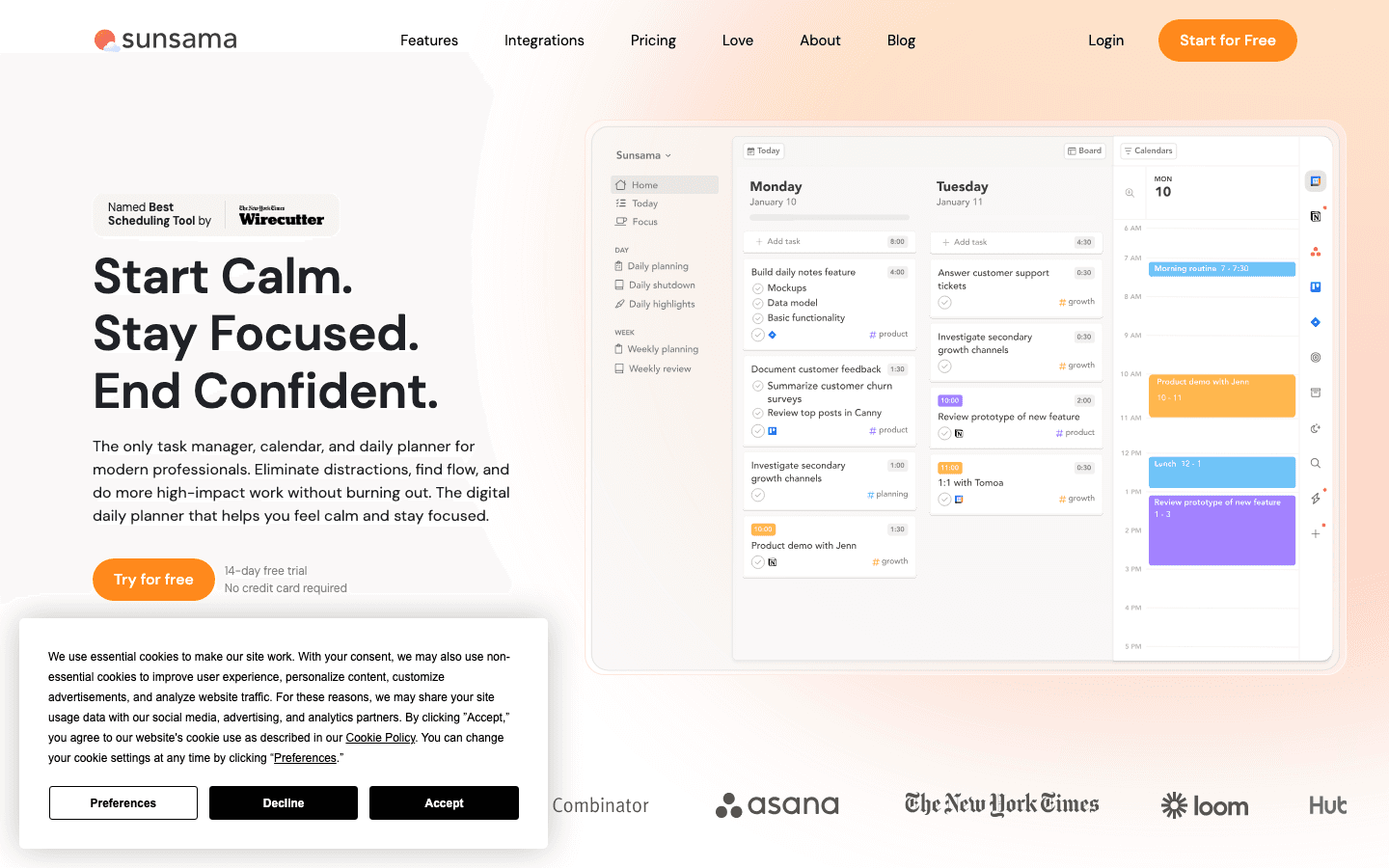
Sunsama takes a different approach from the AI automation tools above. Rather than filling your calendar automatically, it guides you through a 10 to 15 minute daily planning ritual each morning where you commit to what you will actually accomplish, estimate time, and protect personal commitments explicitly. The design is intentionally slower. That is the point.
It pulls tasks from Jira, Asana, Notion, Gmail, and Slack, surfaces them in a single view, and asks you to choose what today looks like rather than optimizing it. A weekly review workflow makes the system self-maintaining. There is no mobile app: Sunsama is web-only.
Key Features
Guided daily planning ritual with time estimation and daily intention
Multi-source task import (Jira, Asana, Notion, Gmail, Slack)
Weekly review workflow
Work and personal calendar integration
What Works
Planning ritual reduces over-scheduling by forcing realistic time estimates
Strong integration set pulls tasks from where they already live
Weekly review makes the system easy to maintain
Limitations
No AI auto-scheduling. Planning is intentional and manual
No energy awareness
Web-only. No mobile app
Pricing: $22/month, or $17/month billed annually, with a 14-day free trial.
Best for: Knowledge workers who want a structured daily planning practice and intentional protection of personal time, not automated scheduling.
5. TickTick: Best Value Scheduling Tool
Task management and calendar in one app, with a free tier that actually works.
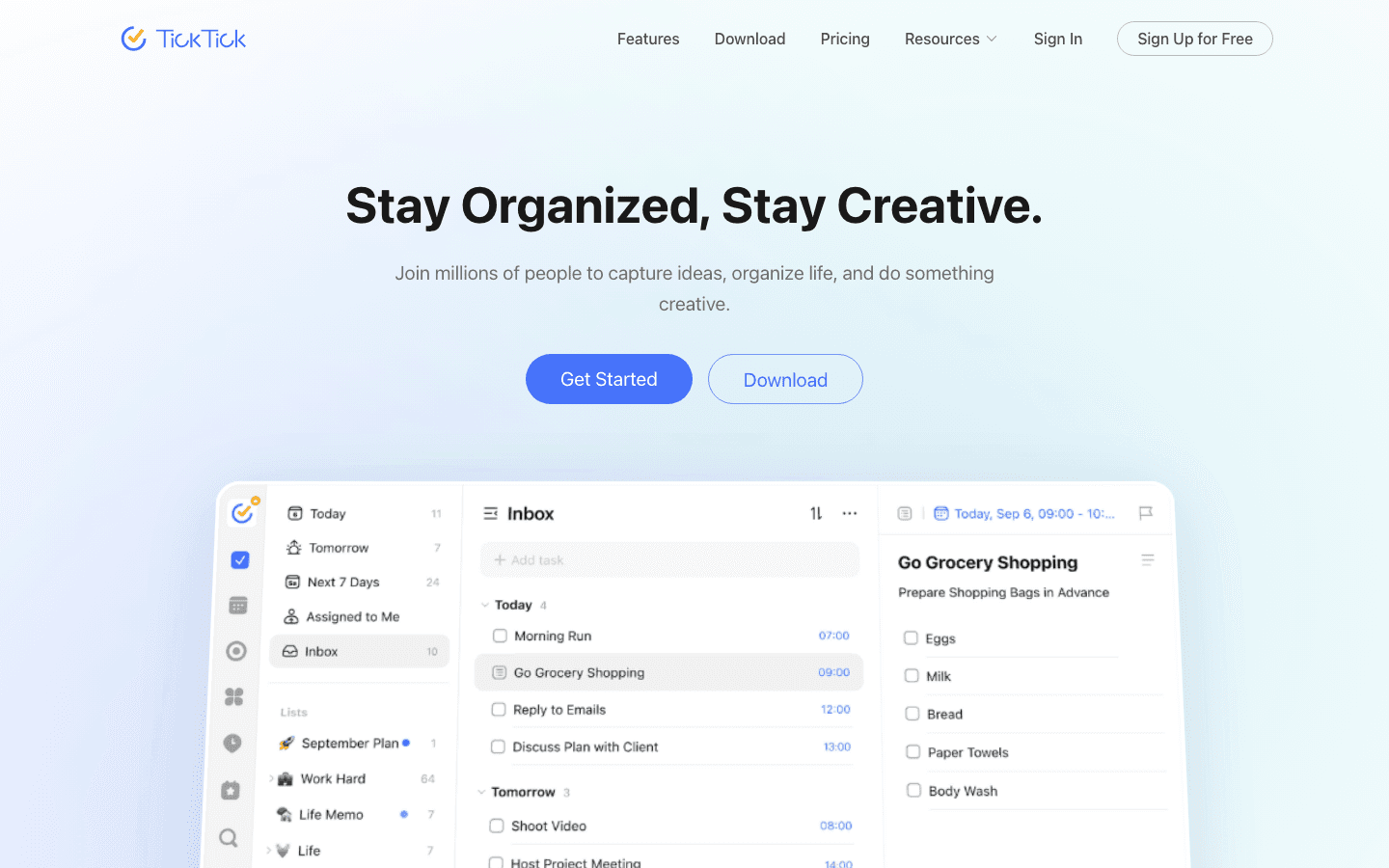
TickTick is a task manager with a built-in calendar view that has matured into a capable personal scheduling tool. Natural language task input ("team sync every Tuesday at 10am"), recurring tasks, habit tracking, a Pomodoro focus timer, and a thoughtful calendar integration make it a complete daily operations tool for people who do not need AI auto-scheduling.
The free tier is the most generous in this category. If you are an individual managing work and personal tasks without complex scheduling needs, TickTick covers the core use case for free and adds meaningful features at its low premium price. (How to use time blocking apps covers how to get more out of calendar-based task tools like TickTick.)
Key Features
Natural language task input with recurring task support
Built-in calendar view with time blocking
Habit tracker integrated with your task list
Built-in Pomodoro focus timer
What Works
Best free tier in this comparison. Generous enough to use daily without upgrading
Cross-platform support is excellent (iOS, Android, Mac, Windows, Web)
Habit tracking integration is a genuine differentiator for routine-builders
Limitations
No AI auto-scheduling
No energy awareness
Less suited to complex scheduling with many integrations or team features
Pricing: Free tier available. Premium: $49.99/year (approximately $4.17/month).
Best for: Individuals who want an affordable all-in-one task and calendar tool without paying for AI scheduling features.
Which Virtual Assistant for Scheduling Is Right for You?
Want AI that adapts to your energy peaks, not just open slots: Lifestack
Have hard deadlines and want maximum automation with minimal planning time: Motion
Work across many tools (Jira, Notion, Gmail) and need one unified planning surface: Akiflow
Prefer a structured daily planning ritual over automated scheduling: Sunsama
Want a capable free tool with habits, Pomodoro, and good mobile support: TickTick
Frequently Asked Questions
What is the best virtual assistant for scheduling work and personal life?
Lifestack ranks first because it is the only tool in this category that accounts for energy patterns when scheduling tasks. Most competitors schedule by availability. Lifestack schedules by when you actually function best, which makes a meaningful difference for people whose focus varies significantly across the day.
What is the difference between a scheduling app and a virtual assistant for scheduling?
A scheduling app typically manages calendar events and availability (showing you open slots, letting you book meetings). A virtual assistant for scheduling goes further: it takes your tasks and goals and actively builds a schedule around them, adapting when plans change and suggesting when specific work should happen.
Can these tools handle both work and personal calendars?
Yes. Lifestack, Motion, Akiflow, Sunsama, and TickTick all support multiple calendars and can read events from both work (Google Workspace, Outlook) and personal (Google Calendar, Apple Calendar) accounts simultaneously.
Do any of these tools have a free tier?
TickTick has the most capable free tier, with enough features for most personal scheduling use cases. Reclaim.ai also offers a free plan with limited features. Motion, Akiflow, and Sunsama are paid-only but offer free trials ranging from 7 to 14 days.
Is there an AI scheduling assistant that learns my preferences over time?
Lifestack's energy-aware scheduling model adapts as it learns your patterns across work sessions. Motion adjusts based on your task completion history and priority settings. Most tools in this category improve with usage, but the degree of personalization varies significantly.
Managing work and personal life on separate calendars, across multiple tools, and without a central brain is a problem that gets worse as your schedule fills up. Something always slips. Meetings land on focus blocks. Personal commitments get pushed. Tasks without deadlines disappear into a list no one checks.
A virtual assistant for scheduling is the category of tools built to fix this. The best ones do not just display your schedule. They help you build it, protect it, and adapt it when plans change. Some use AI to auto-schedule tasks. Others use guided planning rituals. A few combine both approaches.
We tested five of the best virtual assistants for scheduling work and personal life in 2026, evaluating each for calendar integration, task management, AI smarts, and whether they actually reduce the cognitive load of planning. Here is what we found.
Key Takeaways
Lifestack stands out as the only scheduling assistant that adapts to your energy patterns, not just your available calendar slots.
Motion offers the most automation: add tasks with deadlines and it builds your schedule without further input.
TickTick is the best choice if you want a capable scheduler with a generous free tier and cross-platform support.
Quick Guide
1. Lifestack: Best overall. Energy-aware AI scheduling for work and personal life.
2. Motion: Best automation. AI fills your calendar based on deadlines with no manual input.
3. Akiflow: Best for multi-tool professionals. Unifies tasks from 2,000+ apps in one planner.
4. Sunsama: Best for intentional planning. Guided daily ritual for focus over volume.
5. TickTick: Best value. Full task + calendar tool with a generous free tier.
How We Evaluated
Calendar integration: Does it handle both work and personal calendars? Can it read and write to Google Calendar, Outlook, and Apple Calendar?
AI scheduling quality: Does the AI actually reduce planning time, or does it just surface suggestions that require manual action?
Energy awareness: Does the tool account for when you do your best work, or treat all time slots as equal?
Task management: Can you manage tasks in the same interface, or is it calendar-only?
Pricing and value: Is the cost justified by time saved? Is there a usable free tier?
For deeper context on the best scheduling apps and calendar management tools in 2026, those guides cover adjacent categories in more detail.
1. Lifestack: Best Virtual Assistant for Scheduling Overall
The only scheduling assistant that adapts to your energy, not just your calendar.
Lifestack is an AI-powered daily planner that goes beyond calendar management by understanding your energy patterns throughout the day. While most scheduling apps fill open slots based on availability, Lifestack asks a different question: when should this task happen given how you actually function? Deep work sessions go into high-energy windows. Routine tasks fill lower-energy slots. The result is a schedule built around your capacity, not just your calendar.
It integrates with Google Calendar and Outlook, handles both work and personal calendars, and runs on iOS, Android, Mac, and a Chrome extension. The AI scheduling recommendations improve over time as the system learns your patterns. (See how Lifestack compares against other AI planner apps.)
Key Features
Energy-aware task scheduling based on your daily cognitive patterns
AI auto-scheduling that adapts when meetings shift
Work and personal calendar integration in one view
Mobile and desktop apps with Chrome extension
What Works
Energy-awareness is a genuinely useful differentiator. Blocking deep work during your actual peak hours is more effective than blocking it during "available" time
Calendar integration handles both personal and work accounts cleanly
AI recommendations get more accurate over time
Limitations
Designed for individuals, not teams. No collaborative scheduling features
No native meeting transcription
Pricing: From $7/month, or $50/year with a 7-day free trial on the annual plan.
Best for: Individuals who want an AI scheduler that treats energy as a real constraint, not just calendar availability.
2. Motion: Best for Automated Scheduling
AI that fills your calendar automatically and rescheduled instantly when plans change.
Motion is the most automated scheduler in this category. You add tasks with deadlines and priorities, and Motion places them in your calendar automatically, shifting blocks when meetings land on them and flagging you if a deadline is at risk. For people with high task volume and hard deadlines, the level of automation is unmatched.
The Business tier adds team capacity planning, workload visibility, and Gantt-style project views, making it one of the few individual scheduling tools that scales to team use. The AI also generates meeting agendas and handles project task dependencies.
Key Features
AI auto-scheduling with deadline and priority awareness
Automatic rescheduling when meetings conflict with task blocks
Team capacity planning and workload dashboards (Business tier)
AI-generated meeting agendas and project tasks
What Works
Automation level is best in class. Once tasks are loaded, very little manual planning is needed
Deadline tracking and rescheduling prevents tasks from falling through
Team tier adds genuine value for managers and project leads
Limitations
No energy awareness. Schedules by availability, not cognitive readiness
Can feel rigid if you prefer manual control over your time blocks
Among the more expensive options in the category
Pricing: $19/month, or approximately $12.73/month billed annually (save 33%).
Best for: Professionals with high task volume and hard deadlines who want maximum automation with minimal manual planning.
3. Akiflow: Best for Multi-Tool Professionals
One unified inbox for every task across 2,000+ apps, with AI to help you plan your day.
Akiflow solves a specific problem: when your tasks live across Jira, Notion, Gmail, Slack, Linear, and GitHub, you spend more time syncing lists than doing the work on them. Akiflow aggregates everything into a single unified inbox, lets you time-block tasks by dragging them onto a calendar, and provides an AI assistant (Aki) for natural language planning. The daily planning ritual, 10 to 15 minutes each morning, is well-designed and actually builds a consistent habit over time.
It is aimed at founders, operators, and senior professionals who live across many tools and cannot afford to miss a context switch. The AI task manager comparison shows how Akiflow positions against pure task tools.
Key Features
Universal task inbox from 2,000+ integrations
Drag-to-calendar time blocking with natural language scheduling
Aki AI assistant for planning and task management
Time tracking and daily planning ritual workflow
What Works
Best in category for professionals who work across many tools and need a single daily planning surface
Daily planning ritual design builds the habit of actual daily scheduling
AI assistant handles natural language commands quickly
Limitations
No energy awareness
Mobile experience is more limited than desktop
Monthly billing is expensive relative to alternatives
Pricing: $34/month, or $19/month billed annually, with a 7-day free trial.
Best for: Operators and founders who work across many tools and want one daily planning surface that aggregates everything.
4. Sunsama: Best for Intentional Planning
A guided daily planning ritual that helps you work less, finish more, and protect personal time.
Sunsama takes a different approach from the AI automation tools above. Rather than filling your calendar automatically, it guides you through a 10 to 15 minute daily planning ritual each morning where you commit to what you will actually accomplish, estimate time, and protect personal commitments explicitly. The design is intentionally slower. That is the point.
It pulls tasks from Jira, Asana, Notion, Gmail, and Slack, surfaces them in a single view, and asks you to choose what today looks like rather than optimizing it. A weekly review workflow makes the system self-maintaining. There is no mobile app: Sunsama is web-only.
Key Features
Guided daily planning ritual with time estimation and daily intention
Multi-source task import (Jira, Asana, Notion, Gmail, Slack)
Weekly review workflow
Work and personal calendar integration
What Works
Planning ritual reduces over-scheduling by forcing realistic time estimates
Strong integration set pulls tasks from where they already live
Weekly review makes the system easy to maintain
Limitations
No AI auto-scheduling. Planning is intentional and manual
No energy awareness
Web-only. No mobile app
Pricing: $22/month, or $17/month billed annually, with a 14-day free trial.
Best for: Knowledge workers who want a structured daily planning practice and intentional protection of personal time, not automated scheduling.
5. TickTick: Best Value Scheduling Tool
Task management and calendar in one app, with a free tier that actually works.
TickTick is a task manager with a built-in calendar view that has matured into a capable personal scheduling tool. Natural language task input ("team sync every Tuesday at 10am"), recurring tasks, habit tracking, a Pomodoro focus timer, and a thoughtful calendar integration make it a complete daily operations tool for people who do not need AI auto-scheduling.
The free tier is the most generous in this category. If you are an individual managing work and personal tasks without complex scheduling needs, TickTick covers the core use case for free and adds meaningful features at its low premium price. (How to use time blocking apps covers how to get more out of calendar-based task tools like TickTick.)
Key Features
Natural language task input with recurring task support
Built-in calendar view with time blocking
Habit tracker integrated with your task list
Built-in Pomodoro focus timer
What Works
Best free tier in this comparison. Generous enough to use daily without upgrading
Cross-platform support is excellent (iOS, Android, Mac, Windows, Web)
Habit tracking integration is a genuine differentiator for routine-builders
Limitations
No AI auto-scheduling
No energy awareness
Less suited to complex scheduling with many integrations or team features
Pricing: Free tier available. Premium: $49.99/year (approximately $4.17/month).
Best for: Individuals who want an affordable all-in-one task and calendar tool without paying for AI scheduling features.
Which Virtual Assistant for Scheduling Is Right for You?
Want AI that adapts to your energy peaks, not just open slots: Lifestack
Have hard deadlines and want maximum automation with minimal planning time: Motion
Work across many tools (Jira, Notion, Gmail) and need one unified planning surface: Akiflow
Prefer a structured daily planning ritual over automated scheduling: Sunsama
Want a capable free tool with habits, Pomodoro, and good mobile support: TickTick
Frequently Asked Questions
What is the best virtual assistant for scheduling work and personal life?
Lifestack ranks first because it is the only tool in this category that accounts for energy patterns when scheduling tasks. Most competitors schedule by availability. Lifestack schedules by when you actually function best, which makes a meaningful difference for people whose focus varies significantly across the day.
What is the difference between a scheduling app and a virtual assistant for scheduling?
A scheduling app typically manages calendar events and availability (showing you open slots, letting you book meetings). A virtual assistant for scheduling goes further: it takes your tasks and goals and actively builds a schedule around them, adapting when plans change and suggesting when specific work should happen.
Can these tools handle both work and personal calendars?
Yes. Lifestack, Motion, Akiflow, Sunsama, and TickTick all support multiple calendars and can read events from both work (Google Workspace, Outlook) and personal (Google Calendar, Apple Calendar) accounts simultaneously.
Do any of these tools have a free tier?
TickTick has the most capable free tier, with enough features for most personal scheduling use cases. Reclaim.ai also offers a free plan with limited features. Motion, Akiflow, and Sunsama are paid-only but offer free trials ranging from 7 to 14 days.
Is there an AI scheduling assistant that learns my preferences over time?
Lifestack's energy-aware scheduling model adapts as it learns your patterns across work sessions. Motion adjusts based on your task completion history and priority settings. Most tools in this category improve with usage, but the degree of personalization varies significantly.



FOLLOW ON
FOLLOW ON
FOLLOW ON


Copyright 2026 © Lifestack. All rights reserved
Copyright 2026 © Lifestack. All rights reserved

