
App
Evernote vs Bear: Which Note App Should You Use?
Evernote vs Bear: Which Note App Should You Use?

Evernote and Bear are both note apps. That's where the similarity ends. Evernote is a full workspace platform: tasks, schedules, web clipper, AI features, team collaboration. Bear is a minimal markdown editor that does one thing well and makes that one thing genuinely enjoyable.
People switch between them constantly. Evernote users leave when the product gets too complex or too expensive. Bear users outgrow it when they need web access, collaboration, or deeper organization across hundreds of notes. Both migrations are understandable, and both directions are reversible.
This comparison covers what each app actually does well, where each falls short, and the specific situations that make one clearly better than the other for different types of users.
Key Takeaways
Evernote is the stronger choice for users who want a full workspace: tasks, notes, web clipping, and cross-platform access in one place
Bear is better for writers and thinkers who want a beautiful, distraction-free markdown experience on Apple devices only
Bear Pro is significantly cheaper than any Evernote paid plan; Evernote's free tier has become very limited
Quick Verdict
Evernote: Best for power users who want tasks, notes, and web clipping in one cross-platform workspace
Bear: Best for Apple users who want a fast, beautiful markdown writing environment without complexity
Evernote
The all-in-one workspace that does more than most note apps
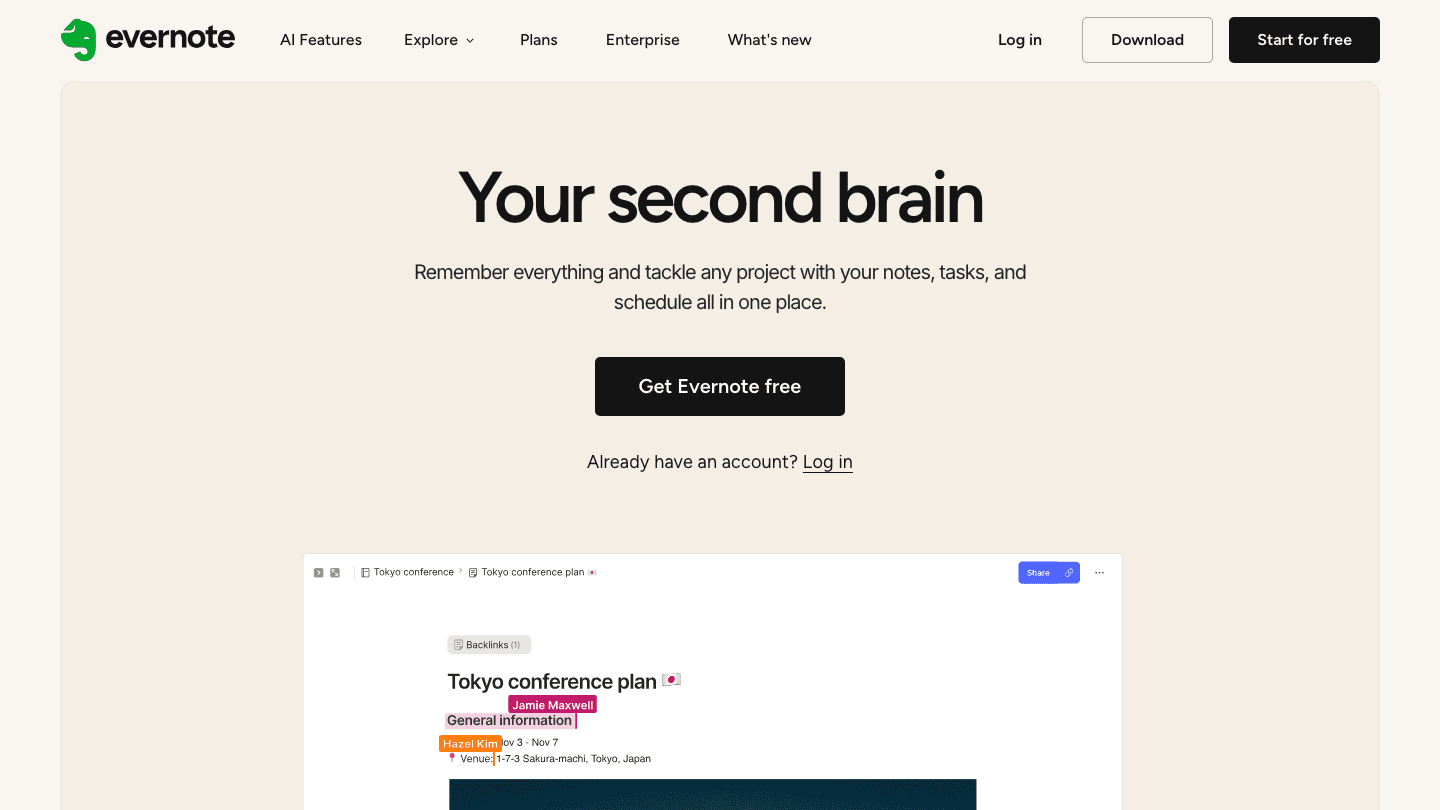
Evernote has been through significant changes over the past several years, including an acquisition by Bending Spoons in 2023, a major shift toward AI-assisted features, and substantial pruning of its free tier. The current version is leaner and more focused than the sprawling app it was in 2018, but it still does considerably more than most note apps.
The core proposition is a single workspace for capturing, organizing, and searching everything: notes, handwritten content, web clips, attached files, calendar events, and tasks. The web clipper remains one of the best in the category, and the AI search and summarization features added in recent releases are genuinely useful for people with large note libraries.
Key Features:
Unlimited note creation (on paid plans) with powerful organization via notebooks and tags
Web clipper for saving articles, screenshots, and page content directly to notebooks
Built-in tasks with due dates and reminders, integrated with calendar views
AI-powered search, summarization, and note generation across your note library
Cross-platform: iOS, Android, Mac, Windows, and web
What Works:
The search across attachments, handwriting, and note content remains best-in-class
The task and calendar integration makes it viable as a lightweight planner alongside notes
Cross-platform availability is a genuine advantage for users on mixed Windows/Mac/mobile setups
Limitations:
The free tier is now very restricted (50 notes, 1-device sync) and pushes users toward paid plans quickly
The app has grown complex over the years; finding a simple note-taking workflow takes deliberate setup
Paid plan pricing is not shown on their marketing pages; users must reach the checkout to see current rates. Check Evernote's plans page for current pricing
Best for: Cross-platform users who want tasks and notes in one place, heavy web clipper users, and anyone managing large organized note libraries with search-heavy workflows
Bear
The markdown editor for Apple users who value craft over features
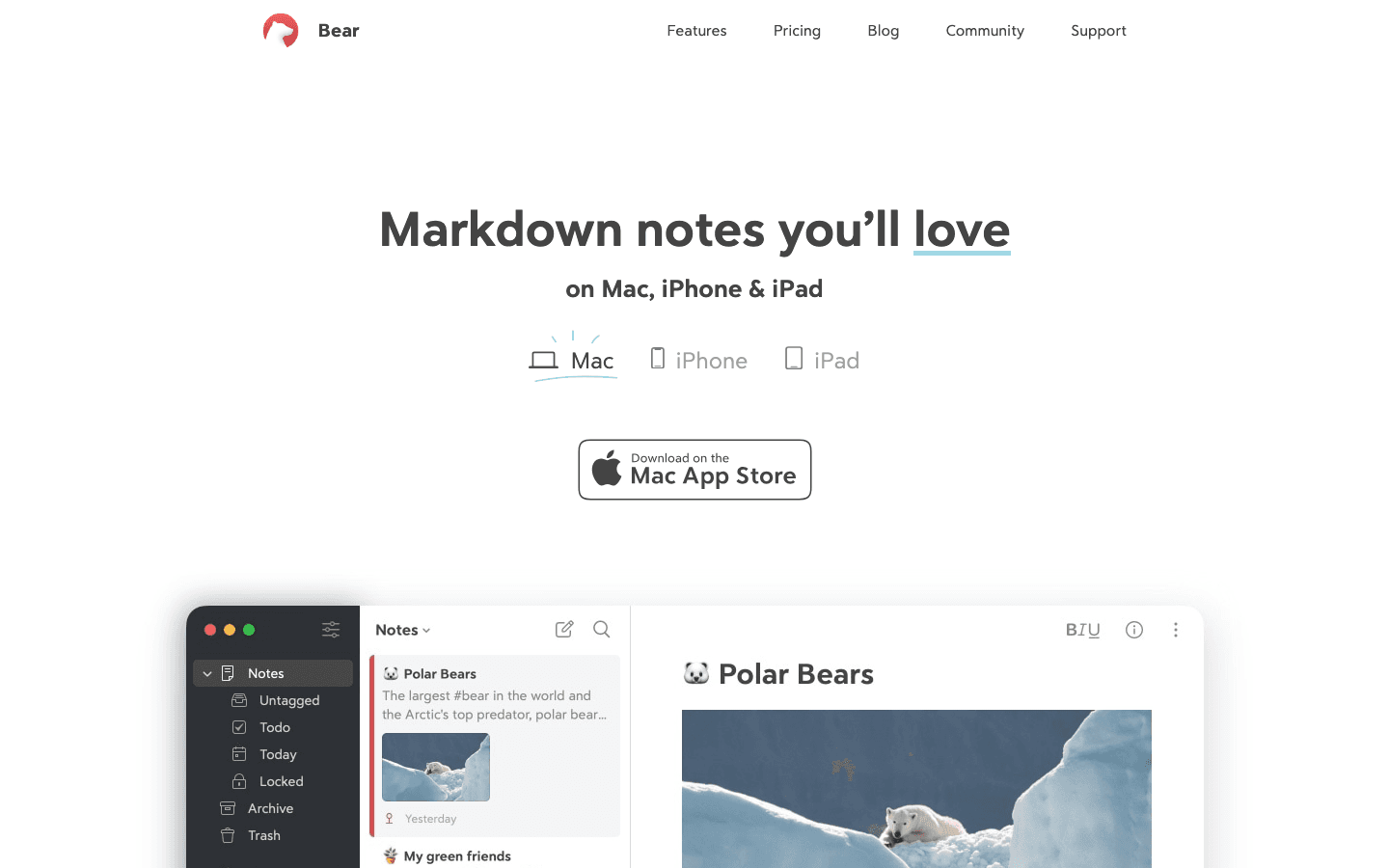
Bear is an Apple-native markdown note app that has built a devoted following since its 2016 release. It doesn't try to compete with Evernote's feature breadth. It focuses on making the writing and organizing experience feel effortless, and in that narrow lane it does something most note apps don't: it's actually enjoyable to use.
The design is what people notice first. Bear's editor is minimal and uncluttered, with elegant typography and well-considered details throughout. Markdown renders inline as you type rather than requiring a preview pane. The tag-based organization system scales from a handful of notes to thousands without becoming unwieldy.
Key Features:
Inline markdown rendering with support for code blocks, tables, headers, and todo items
Tag-based organization with nested tags and instant filtering
iCloud sync across Mac, iPhone, and iPad (Bear Pro)
Export to PDF, HTML, DOCX, Markdown, and other formats
Focus mode and customizable themes (28+ with Bear Pro)
What Works:
Writing in Bear is faster and more enjoyable than in almost any other note app
The tag system is more flexible than traditional folder structures for mixed-topic notes
Bear Pro is genuinely affordable relative to competitors
Limitations:
Apple only. No Android, no Windows, no web app.
No web clipper, no task management, no calendar integration
No collaboration features; sharing a note with someone else requires exporting it
iCloud sync requires Bear Pro; the free tier has no cross-device access
Pricing: Free (limited to local storage, no sync, 3 themes); Bear Pro at $2.99/month or $29.99/year with a 7-day free trial
Best for: Writers, students, and thinkers on Apple devices who want a fast, beautiful markdown writing environment without features they don't need
Head-to-Head Comparison
Writing experience: Bear wins. The markdown editor, typography, and UI design make Bear a more pleasant place to write than Evernote, which feels like a productivity tool first and a writing tool second.
Organization: Roughly tied, depending on your style. Evernote's notebooks and tags work well for large, structured knowledge bases. Bear's nested tags work better for users who want a flatter, more fluid organization where notes can belong to multiple conceptual areas.
Cross-platform: Evernote wins decisively. Bear is Apple-only. If you have any Windows devices, Android phone, or need web access, Bear is not an option.
Web clipping: Evernote wins. Bear has no web clipper at all.
Task management: Evernote wins. Bear has basic todo checkboxes in notes but no dedicated task system with due dates or reminders.
Price: Bear wins for paid plans. $29.99/year for Bear Pro versus Evernote's paid tiers (check their site for current pricing). Evernote's free tier is now severely limited.
Performance and app quality: Bear wins on Apple devices. The app is fast, polished, and maintained by a small team that ships thoughtful updates. Evernote has improved its performance significantly but still carries more overhead.
Collaboration: Evernote wins. Bear has no real-time collaboration or sharing features. Evernote supports shared notebooks and basic team access on paid plans.
Which Should You Choose?
Choose Evernote if:
You're not fully in the Apple ecosystem and need access across Windows, Android, or the web
You want a single place for notes, tasks, and web clips without switching between apps
You manage a large, searchable library of notes, documents, and attachments
You collaborate with others or share notes frequently
Choose Bear if:
You're on Apple devices exclusively and want the best markdown writing experience available
You want a note app that stays out of the way and lets you think clearly
You prefer a tag-based, non-hierarchical organizational approach
Price matters and you want a capable note app for under $30 per year
If you're currently doing a brain dump workflow and wondering which app supports it better, Bear's faster capture and inline markdown make it slightly better for that specific use case. For building and maintaining a structured knowledge base you'll search heavily, Evernote's search depth is harder to beat.
Neither app has strong built-in scheduling features. If you're using notes as part of a broader productivity system, integrating either with a dedicated digital planner app or time blocking tool fills that gap more reliably than stretching either note app into a scheduler. For task management specifically, a dedicated AI task manager handles recurring tasks, priorities, and scheduling in ways neither Evernote nor Bear was designed for.
One option worth knowing about if you're looking beyond notes and tasks: Lifestack is one of the best AI planner apps for approaching the daily planning problem differently, by scheduling your work around your actual energy levels rather than just organizing what you need to do. It doesn't replace a note app but pairs well with either Evernote or Bear for people who want their captured notes to translate into a realistic daily plan.
Frequently Asked Questions
Is Bear better than Evernote for writing?
For the writing experience itself, yes. Bear's inline markdown rendering, clean editor, and thoughtful typography make it a more enjoyable writing environment. Evernote is a stronger choice for workflows that combine writing with web clipping, task management, or cross-device access beyond Apple.
Can Bear replace Evernote?
For Apple-only users who primarily write and organize personal notes, yes. Bear cannot replace Evernote for users who need Windows or Android access, web clipping, real-time collaboration, or built-in task and calendar features.
Is Evernote free enough to use without paying?
Evernote's free tier is now limited to 50 notes and sync to just one device, which is too restrictive for most active users. New users are effectively pushed toward a paid plan quickly. Bear's free tier is more functional for local-only use on a single device, though it also requires a paid plan for iCloud sync across Apple devices.
Does Bear have a web clipper?
No. Bear has no web clipper. If web clipping is a significant part of your note-taking workflow, Bear is not a suitable replacement for Evernote. Evernote's web clipper is one of the strongest in the category and supports clipping full pages, articles, simplified views, and screenshots.
Which is better for students: Evernote or Bear?
Students on Apple devices who mainly take class notes and write papers tend to prefer Bear for its writing experience and lower cost. Students who need to clip research from the web, access notes on a university Windows computer, or organize a large research database often find Evernote more practical despite the higher price. Evernote also offers a student discount (40% off an annual Advanced subscription at the time of writing; check their site for current eligibility).
Evernote and Bear are both note apps. That's where the similarity ends. Evernote is a full workspace platform: tasks, schedules, web clipper, AI features, team collaboration. Bear is a minimal markdown editor that does one thing well and makes that one thing genuinely enjoyable.
People switch between them constantly. Evernote users leave when the product gets too complex or too expensive. Bear users outgrow it when they need web access, collaboration, or deeper organization across hundreds of notes. Both migrations are understandable, and both directions are reversible.
This comparison covers what each app actually does well, where each falls short, and the specific situations that make one clearly better than the other for different types of users.
Key Takeaways
Evernote is the stronger choice for users who want a full workspace: tasks, notes, web clipping, and cross-platform access in one place
Bear is better for writers and thinkers who want a beautiful, distraction-free markdown experience on Apple devices only
Bear Pro is significantly cheaper than any Evernote paid plan; Evernote's free tier has become very limited
Quick Verdict
Evernote: Best for power users who want tasks, notes, and web clipping in one cross-platform workspace
Bear: Best for Apple users who want a fast, beautiful markdown writing environment without complexity
Evernote
The all-in-one workspace that does more than most note apps
Evernote has been through significant changes over the past several years, including an acquisition by Bending Spoons in 2023, a major shift toward AI-assisted features, and substantial pruning of its free tier. The current version is leaner and more focused than the sprawling app it was in 2018, but it still does considerably more than most note apps.
The core proposition is a single workspace for capturing, organizing, and searching everything: notes, handwritten content, web clips, attached files, calendar events, and tasks. The web clipper remains one of the best in the category, and the AI search and summarization features added in recent releases are genuinely useful for people with large note libraries.
Key Features:
Unlimited note creation (on paid plans) with powerful organization via notebooks and tags
Web clipper for saving articles, screenshots, and page content directly to notebooks
Built-in tasks with due dates and reminders, integrated with calendar views
AI-powered search, summarization, and note generation across your note library
Cross-platform: iOS, Android, Mac, Windows, and web
What Works:
The search across attachments, handwriting, and note content remains best-in-class
The task and calendar integration makes it viable as a lightweight planner alongside notes
Cross-platform availability is a genuine advantage for users on mixed Windows/Mac/mobile setups
Limitations:
The free tier is now very restricted (50 notes, 1-device sync) and pushes users toward paid plans quickly
The app has grown complex over the years; finding a simple note-taking workflow takes deliberate setup
Paid plan pricing is not shown on their marketing pages; users must reach the checkout to see current rates. Check Evernote's plans page for current pricing
Best for: Cross-platform users who want tasks and notes in one place, heavy web clipper users, and anyone managing large organized note libraries with search-heavy workflows
Bear
The markdown editor for Apple users who value craft over features
Bear is an Apple-native markdown note app that has built a devoted following since its 2016 release. It doesn't try to compete with Evernote's feature breadth. It focuses on making the writing and organizing experience feel effortless, and in that narrow lane it does something most note apps don't: it's actually enjoyable to use.
The design is what people notice first. Bear's editor is minimal and uncluttered, with elegant typography and well-considered details throughout. Markdown renders inline as you type rather than requiring a preview pane. The tag-based organization system scales from a handful of notes to thousands without becoming unwieldy.
Key Features:
Inline markdown rendering with support for code blocks, tables, headers, and todo items
Tag-based organization with nested tags and instant filtering
iCloud sync across Mac, iPhone, and iPad (Bear Pro)
Export to PDF, HTML, DOCX, Markdown, and other formats
Focus mode and customizable themes (28+ with Bear Pro)
What Works:
Writing in Bear is faster and more enjoyable than in almost any other note app
The tag system is more flexible than traditional folder structures for mixed-topic notes
Bear Pro is genuinely affordable relative to competitors
Limitations:
Apple only. No Android, no Windows, no web app.
No web clipper, no task management, no calendar integration
No collaboration features; sharing a note with someone else requires exporting it
iCloud sync requires Bear Pro; the free tier has no cross-device access
Pricing: Free (limited to local storage, no sync, 3 themes); Bear Pro at $2.99/month or $29.99/year with a 7-day free trial
Best for: Writers, students, and thinkers on Apple devices who want a fast, beautiful markdown writing environment without features they don't need
Head-to-Head Comparison
Writing experience: Bear wins. The markdown editor, typography, and UI design make Bear a more pleasant place to write than Evernote, which feels like a productivity tool first and a writing tool second.
Organization: Roughly tied, depending on your style. Evernote's notebooks and tags work well for large, structured knowledge bases. Bear's nested tags work better for users who want a flatter, more fluid organization where notes can belong to multiple conceptual areas.
Cross-platform: Evernote wins decisively. Bear is Apple-only. If you have any Windows devices, Android phone, or need web access, Bear is not an option.
Web clipping: Evernote wins. Bear has no web clipper at all.
Task management: Evernote wins. Bear has basic todo checkboxes in notes but no dedicated task system with due dates or reminders.
Price: Bear wins for paid plans. $29.99/year for Bear Pro versus Evernote's paid tiers (check their site for current pricing). Evernote's free tier is now severely limited.
Performance and app quality: Bear wins on Apple devices. The app is fast, polished, and maintained by a small team that ships thoughtful updates. Evernote has improved its performance significantly but still carries more overhead.
Collaboration: Evernote wins. Bear has no real-time collaboration or sharing features. Evernote supports shared notebooks and basic team access on paid plans.
Which Should You Choose?
Choose Evernote if:
You're not fully in the Apple ecosystem and need access across Windows, Android, or the web
You want a single place for notes, tasks, and web clips without switching between apps
You manage a large, searchable library of notes, documents, and attachments
You collaborate with others or share notes frequently
Choose Bear if:
You're on Apple devices exclusively and want the best markdown writing experience available
You want a note app that stays out of the way and lets you think clearly
You prefer a tag-based, non-hierarchical organizational approach
Price matters and you want a capable note app for under $30 per year
If you're currently doing a brain dump workflow and wondering which app supports it better, Bear's faster capture and inline markdown make it slightly better for that specific use case. For building and maintaining a structured knowledge base you'll search heavily, Evernote's search depth is harder to beat.
Neither app has strong built-in scheduling features. If you're using notes as part of a broader productivity system, integrating either with a dedicated digital planner app or time blocking tool fills that gap more reliably than stretching either note app into a scheduler. For task management specifically, a dedicated AI task manager handles recurring tasks, priorities, and scheduling in ways neither Evernote nor Bear was designed for.
One option worth knowing about if you're looking beyond notes and tasks: Lifestack is one of the best AI planner apps for approaching the daily planning problem differently, by scheduling your work around your actual energy levels rather than just organizing what you need to do. It doesn't replace a note app but pairs well with either Evernote or Bear for people who want their captured notes to translate into a realistic daily plan.
Frequently Asked Questions
Is Bear better than Evernote for writing?
For the writing experience itself, yes. Bear's inline markdown rendering, clean editor, and thoughtful typography make it a more enjoyable writing environment. Evernote is a stronger choice for workflows that combine writing with web clipping, task management, or cross-device access beyond Apple.
Can Bear replace Evernote?
For Apple-only users who primarily write and organize personal notes, yes. Bear cannot replace Evernote for users who need Windows or Android access, web clipping, real-time collaboration, or built-in task and calendar features.
Is Evernote free enough to use without paying?
Evernote's free tier is now limited to 50 notes and sync to just one device, which is too restrictive for most active users. New users are effectively pushed toward a paid plan quickly. Bear's free tier is more functional for local-only use on a single device, though it also requires a paid plan for iCloud sync across Apple devices.
Does Bear have a web clipper?
No. Bear has no web clipper. If web clipping is a significant part of your note-taking workflow, Bear is not a suitable replacement for Evernote. Evernote's web clipper is one of the strongest in the category and supports clipping full pages, articles, simplified views, and screenshots.
Which is better for students: Evernote or Bear?
Students on Apple devices who mainly take class notes and write papers tend to prefer Bear for its writing experience and lower cost. Students who need to clip research from the web, access notes on a university Windows computer, or organize a large research database often find Evernote more practical despite the higher price. Evernote also offers a student discount (40% off an annual Advanced subscription at the time of writing; check their site for current eligibility).



FOLLOW ON
FOLLOW ON
FOLLOW ON


Copyright 2026 © Lifestack. All rights reserved
Copyright 2026 © Lifestack. All rights reserved

