
App
Best iPhone Organisation Apps in 2026
Best iPhone Organisation Apps in 2026

Your iPhone is the command centre for your day. Whether you are juggling work projects, personal errands, long-term goals, or all three at once, the right organisation app can mean the difference between feeling on top of things and feeling buried.
The problem is choice. The App Store has hundreds of productivity and task apps, and most of them look impressive in screenshots. We narrowed the field to six that are actually worth your time in 2026, covering a range of approaches from AI-powered energy-aware scheduling to beautifully simple task lists.
Lifestack leads the list because nothing else on iPhone matches its ability to schedule tasks around your natural energy levels. But depending on your workflow, one of the others may be a better fit.
Key Takeaways
Lifestack is the best choice for people who want their schedule to adapt to how they actually feel throughout the day
Todoist and TickTick are excellent for people who primarily need powerful task management with cross-platform sync
Things 3, Notion, and Google Calendar each serve a distinct niche: beautiful GTD, flexible workspaces, and shared calendars respectively
Quick Guide: Best iPhone Organisation Apps
1. Lifestack: AI scheduling that maps tasks to your energy levels throughout the day
2. Todoist: Reliable, cross-platform task management with natural language input
3. TickTick: Full-featured to-do list with built-in Pomodoro timer and calendar view
4. Things 3: The most beautiful task manager on iOS, built for GTD workflows
5. Notion: Flexible all-in-one workspace for notes, tasks, and databases
6. Google Calendar: The standard for shared calendar management, free and reliable
How We Evaluated These Apps
iPhone experience (native feel, widget support, Siri integration)
Task capture speed (how fast you can add something without breaking focus)
Calendar and scheduling integration
Energy awareness and smart scheduling features
Cross-platform availability
Pricing and value for individuals
1. Lifestack
AI planner that schedules around your energy, not just the clock

Lifestack takes a different approach to organisation than any other app on this list. Instead of asking you to fill a calendar manually, it analyses your personal energy patterns throughout the day and schedules your tasks into windows where you are actually capable of doing them. High-focus work goes in your peak hours. Low-energy tasks fill your afternoon dip. It is the difference between a plan that looks good on paper and one that you can actually follow.
The app connects to your existing calendars (Google Calendar, Apple Calendar) and pulls in your commitments, then layers your tasks on top in a way that respects your energy state at each point. It also includes a Chrome extension, so desktop users get the same schedule without switching apps. See how energy-based scheduling changes the way daily planning feels.
Key Features
Energy-aware auto-scheduling that places tasks in your peak windows
Connects to Google Calendar and Apple Calendar
iOS app, Android app, and Chrome extension
AI task prioritisation and time estimation
Focus mode with task-by-task guidance
What Works
The energy model actually changes how you plan: tasks in peak windows get done, tasks in low-energy windows get rescheduled rather than abandoned
Calendar integration is tight, so existing commitments are never ignored
Works particularly well for people with ADHD or variable energy patterns
Limitations
Less useful as a pure note-taking or database tool (Notion handles that better)
Requires some onboarding time to calibrate the energy model to your patterns
Pricing: $7/month or $50/year (7-day free trial on the annual plan)
Best for: Anyone whose productivity varies throughout the day and wants a plan that adapts to that
2. Todoist
The most polished cross-platform task manager you can get
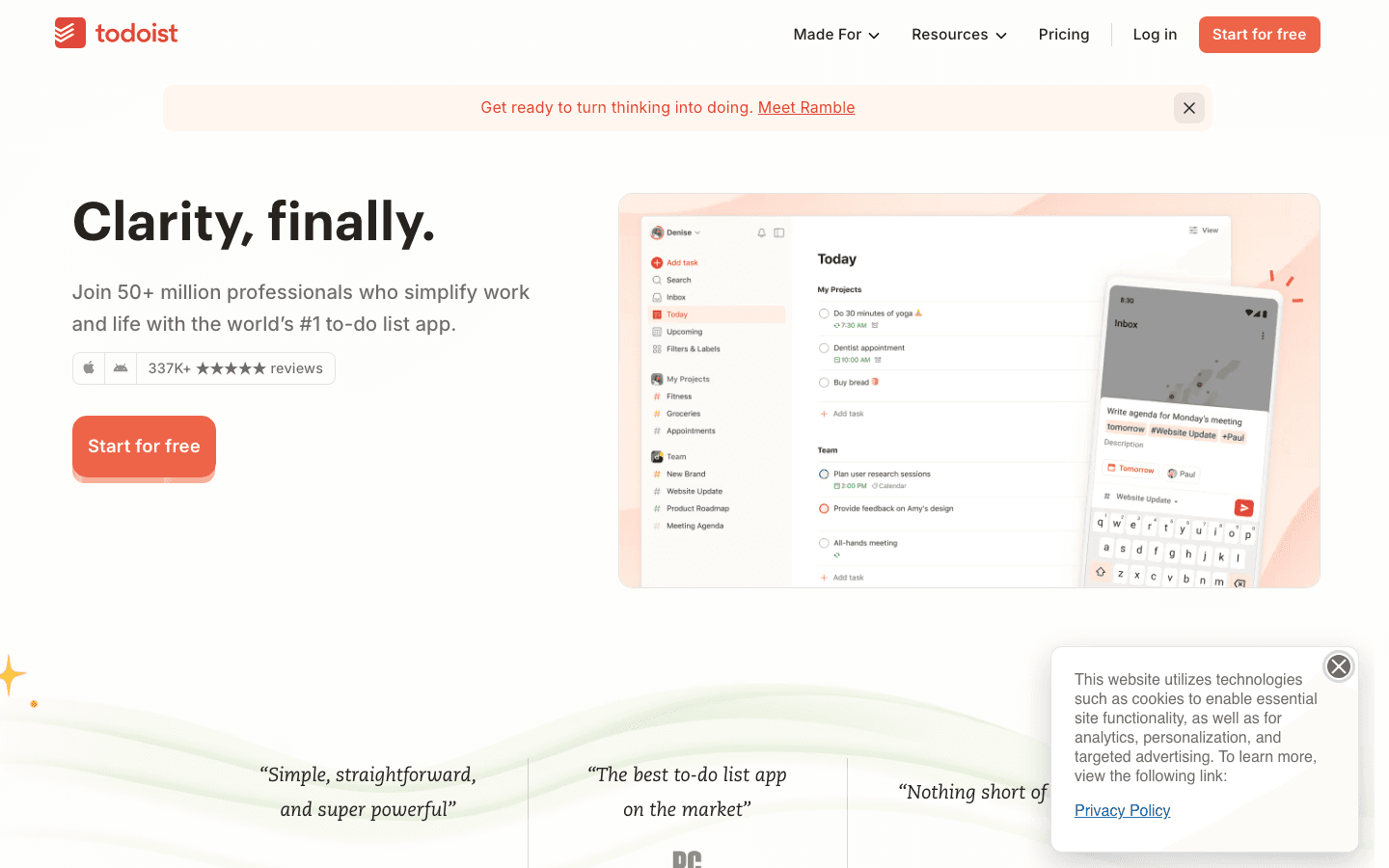
Todoist has been the benchmark for personal task management for over a decade, and it has earned that status. The iPhone app is fast, reliable, and native-feeling. You can add tasks with natural language ("Submit report Friday at 3pm") and Todoist parses the date, time, and project automatically.
It supports projects, sub-tasks, priority levels, filters, and labels. The Karma system gamifies productivity with points and streaks, which some people love and others ignore entirely. It syncs across every platform without friction.
Key Features
Natural language task entry
Projects, sub-tasks, priority flags, and filters
Collaboration and task delegation for teams
Available on every major platform
AI Filters for creating smart task views
What Works
Natural language entry is the best in class: it understands complex inputs reliably
The free tier is genuinely useful for individuals
iPhone widget and Siri integration are well implemented
Limitations
No energy awareness: tasks are prioritised by date and flag, not by your capacity at any given moment
Calendar view is available but scheduling is largely manual
Pricing: Free plan available. Pro plan at $6.99/month or $59.99/year
Best for: People who want a reliable, cross-platform task manager with excellent natural language input
3. TickTick
Task management plus built-in Pomodoro timer and calendar in one app

TickTick packs more features into its interface than almost any competitor. The free version includes a Pomodoro timer, habit tracker, calendar view, and voice input, all built in. The premium tier adds more calendar views, email reminders, and expanded task limits.
It is particularly strong for people who want one app that covers tasks, habits, and time-blocking. The iPhone widget is useful, and the app runs smoothly. The interface is denser than Things 3, but once you know where things are, the workflow is fast. Explore more options in our guide to weekly planner apps.
Key Features
Built-in Pomodoro timer and focus tracking
Habit tracker integrated alongside tasks
Calendar view with time-blocking
Voice input for quick task capture
Sub-tasks, tags, and multiple priority levels
What Works
The free tier is among the most generous of any app on this list
Built-in Pomodoro is convenient for focus sessions without a separate app
Habit tracking and tasks in one place reduces app switching
Limitations
No energy-aware scheduling: tasks are time-blocked manually
The interface can feel crowded for users who prefer minimalism
Pricing: Free plan available. Premium at $49.99/year (~$4.17/month)
Best for: People who want an all-in-one task, habit, and focus timer in a single app
4. Things 3
The most beautiful GTD-style task manager on iOS
Things 3 is the app people recommend when someone says they want a task manager that does not feel like work to use. The design is exceptional: clean, spacious, and carefully considered. It follows a GTD structure with Areas, Projects, and Tasks, and the "Today" view is one of the best implementations of a daily task list anywhere on iOS.
There is no web app and no Android version: it is iOS and Mac only. That is a dealbreaker for some people and irrelevant for committed Apple users. The one-time purchase model is refreshing in a world of subscriptions.
Key Features
GTD-style Areas, Projects, and Tasks hierarchy
Clean, minimal interface that Apple has given design awards to
Magic Plus button for fast task capture from anywhere
Today and Upcoming views for daily and weekly planning
Apple Calendar and Reminders integration
What Works
The iPhone experience is the best on this list from a pure design standpoint
One-time purchase means no monthly bill
Handles complex project structures without feeling heavy
Limitations
iOS and Mac only: no Android or web version
No energy-aware scheduling or AI features
Collaboration is minimal: this is a personal productivity tool
Pricing: $9.99 one-time purchase on iPhone (separate purchase for iPad and Mac)
Best for: Apple-ecosystem users who want a premium, beautifully designed GTD task manager
5. Notion
Flexible workspace for notes, tasks, databases, and everything in between

Notion is not a task manager in the traditional sense. It is a flexible workspace where you can build whatever system you want: a task database, a project tracker, a note repository, a personal wiki, or all of them linked together. That flexibility is its greatest strength and its steepest learning curve.
On iPhone, Notion works well for reading and quick edits, but the mobile experience is slower than apps built specifically for task capture. It is best used as a companion to a faster task-entry app rather than as your primary capture tool on the go. Check out more project management approaches if you need structured workflow support.
Key Features
Pages, databases, tasks, and wikis all in one workspace
Built-in AI for writing, summarising, and brainstorming
Available on all platforms including web
Powerful relational databases for complex project tracking
What Works
Unmatched flexibility: you can build the exact system you need
Free tier is genuinely capable for individuals
Notes and tasks in one place reduces the need for separate apps
Limitations
Mobile task capture is slower than purpose-built task apps
No energy-aware scheduling or calendar integration out of the box
Requires investment to set up a system that works for you
Pricing: Free for personal use. Plus plan at $10/member/month (discount available on annual billing)
Best for: People who want a flexible all-in-one workspace and are willing to invest time in building their system
6. Google Calendar
The standard for shared calendars, free and universally compatible

Google Calendar is not a task manager, but it belongs on this list because it underpins most people's scheduling. It is fast, reliable, universally compatible, and free. The iPhone app handles event creation, shared calendars, meeting scheduling, and calendar invites better than almost any alternative.
Its limitation is that it is purely a calendar: tasks are a secondary feature rather than a core one. For people who mostly need event management and shared visibility with colleagues or family, it is hard to beat. For a broader comparison, see our guide to Google Calendar alternatives and apps that work well alongside Google Calendar.
Key Features
Shared calendars with granular permissions
Meeting scheduling with availability suggestions
Integrates with virtually every productivity app
Works across all platforms
What Works
Free, fast, and reliable: no other calendar matches its ubiquity
Shared calendar support is best in class
iPhone app is well designed and has good widget support
Limitations
Task management is basic and an afterthought compared to dedicated apps
No energy-aware scheduling or AI task placement
Pricing: Free for personal use
Best for: Anyone who needs shared calendar management, works in a Google Workspace environment, or wants a reliable universal calendar
Which iPhone Organisation App Is Right for You?
Your energy and focus varies throughout the day: Lifestack
You want the most reliable cross-platform task manager: Todoist
You want tasks, habits, and a Pomodoro timer in one app: TickTick
You live in the Apple ecosystem and want a beautiful GTD app: Things 3
You want to build a custom system with notes and databases: Notion
You primarily need shared calendar management: Google Calendar
For most people with busy schedules, the combination of Lifestack (for scheduling and energy-aware planning) and either Notion or Todoist (for capturing notes and tasks in the moment) covers everything. The energy management framework that Lifestack is built on also makes it a particularly good fit for anyone exploring apps designed around ADHD or variable focus.
Frequently Asked Questions
What is the best free organisation app for iPhone?
For task management: Todoist (free tier is genuinely useful) or TickTick (free tier includes Pomodoro and habit tracking). For calendar: Google Calendar. For flexible workspaces: Notion. Lifestack offers a 7-day free trial on its annual plan.
Is Apple Reminders good enough for organisation?
For simple task lists and Siri integration, yes. Apple Reminders has improved significantly with iOS updates and is free. It falls short for users who need project structures, energy-aware scheduling, or cross-platform access beyond Apple devices. Most people outgrow it once their task volume increases.
What is the difference between a task manager and a calendar app?
A task manager stores and organises things you need to do. A calendar app manages when you will do them. The most effective systems combine both: a task manager for capturing and organising work, and a calendar (or a scheduling app like Lifestack) for deciding when each task actually gets done.
Do I need to pay for an organisation app on iPhone?
Not necessarily. Todoist, TickTick, Notion, and Google Calendar all have capable free tiers. The paid versions add features like better calendar views, more task limits, and advanced filters. Lifestack's energy-aware scheduling is the one paid-only feature that genuinely has no comparable free alternative.
Which iPhone organisation app is best for ADHD?
Lifestack is the strongest choice: its energy-aware scheduling directly addresses the variable focus and task initiation challenges that come with ADHD. TickTick is a good second option because its built-in Pomodoro timer helps with time-blindness. See our guide to ADHD focus apps for a broader comparison.
Your iPhone is the command centre for your day. Whether you are juggling work projects, personal errands, long-term goals, or all three at once, the right organisation app can mean the difference between feeling on top of things and feeling buried.
The problem is choice. The App Store has hundreds of productivity and task apps, and most of them look impressive in screenshots. We narrowed the field to six that are actually worth your time in 2026, covering a range of approaches from AI-powered energy-aware scheduling to beautifully simple task lists.
Lifestack leads the list because nothing else on iPhone matches its ability to schedule tasks around your natural energy levels. But depending on your workflow, one of the others may be a better fit.
Key Takeaways
Lifestack is the best choice for people who want their schedule to adapt to how they actually feel throughout the day
Todoist and TickTick are excellent for people who primarily need powerful task management with cross-platform sync
Things 3, Notion, and Google Calendar each serve a distinct niche: beautiful GTD, flexible workspaces, and shared calendars respectively
Quick Guide: Best iPhone Organisation Apps
1. Lifestack: AI scheduling that maps tasks to your energy levels throughout the day
2. Todoist: Reliable, cross-platform task management with natural language input
3. TickTick: Full-featured to-do list with built-in Pomodoro timer and calendar view
4. Things 3: The most beautiful task manager on iOS, built for GTD workflows
5. Notion: Flexible all-in-one workspace for notes, tasks, and databases
6. Google Calendar: The standard for shared calendar management, free and reliable
How We Evaluated These Apps
iPhone experience (native feel, widget support, Siri integration)
Task capture speed (how fast you can add something without breaking focus)
Calendar and scheduling integration
Energy awareness and smart scheduling features
Cross-platform availability
Pricing and value for individuals
1. Lifestack
AI planner that schedules around your energy, not just the clock
Lifestack takes a different approach to organisation than any other app on this list. Instead of asking you to fill a calendar manually, it analyses your personal energy patterns throughout the day and schedules your tasks into windows where you are actually capable of doing them. High-focus work goes in your peak hours. Low-energy tasks fill your afternoon dip. It is the difference between a plan that looks good on paper and one that you can actually follow.
The app connects to your existing calendars (Google Calendar, Apple Calendar) and pulls in your commitments, then layers your tasks on top in a way that respects your energy state at each point. It also includes a Chrome extension, so desktop users get the same schedule without switching apps. See how energy-based scheduling changes the way daily planning feels.
Key Features
Energy-aware auto-scheduling that places tasks in your peak windows
Connects to Google Calendar and Apple Calendar
iOS app, Android app, and Chrome extension
AI task prioritisation and time estimation
Focus mode with task-by-task guidance
What Works
The energy model actually changes how you plan: tasks in peak windows get done, tasks in low-energy windows get rescheduled rather than abandoned
Calendar integration is tight, so existing commitments are never ignored
Works particularly well for people with ADHD or variable energy patterns
Limitations
Less useful as a pure note-taking or database tool (Notion handles that better)
Requires some onboarding time to calibrate the energy model to your patterns
Pricing: $7/month or $50/year (7-day free trial on the annual plan)
Best for: Anyone whose productivity varies throughout the day and wants a plan that adapts to that
2. Todoist
The most polished cross-platform task manager you can get
Todoist has been the benchmark for personal task management for over a decade, and it has earned that status. The iPhone app is fast, reliable, and native-feeling. You can add tasks with natural language ("Submit report Friday at 3pm") and Todoist parses the date, time, and project automatically.
It supports projects, sub-tasks, priority levels, filters, and labels. The Karma system gamifies productivity with points and streaks, which some people love and others ignore entirely. It syncs across every platform without friction.
Key Features
Natural language task entry
Projects, sub-tasks, priority flags, and filters
Collaboration and task delegation for teams
Available on every major platform
AI Filters for creating smart task views
What Works
Natural language entry is the best in class: it understands complex inputs reliably
The free tier is genuinely useful for individuals
iPhone widget and Siri integration are well implemented
Limitations
No energy awareness: tasks are prioritised by date and flag, not by your capacity at any given moment
Calendar view is available but scheduling is largely manual
Pricing: Free plan available. Pro plan at $6.99/month or $59.99/year
Best for: People who want a reliable, cross-platform task manager with excellent natural language input
3. TickTick
Task management plus built-in Pomodoro timer and calendar in one app
TickTick packs more features into its interface than almost any competitor. The free version includes a Pomodoro timer, habit tracker, calendar view, and voice input, all built in. The premium tier adds more calendar views, email reminders, and expanded task limits.
It is particularly strong for people who want one app that covers tasks, habits, and time-blocking. The iPhone widget is useful, and the app runs smoothly. The interface is denser than Things 3, but once you know where things are, the workflow is fast. Explore more options in our guide to weekly planner apps.
Key Features
Built-in Pomodoro timer and focus tracking
Habit tracker integrated alongside tasks
Calendar view with time-blocking
Voice input for quick task capture
Sub-tasks, tags, and multiple priority levels
What Works
The free tier is among the most generous of any app on this list
Built-in Pomodoro is convenient for focus sessions without a separate app
Habit tracking and tasks in one place reduces app switching
Limitations
No energy-aware scheduling: tasks are time-blocked manually
The interface can feel crowded for users who prefer minimalism
Pricing: Free plan available. Premium at $49.99/year (~$4.17/month)
Best for: People who want an all-in-one task, habit, and focus timer in a single app
4. Things 3
The most beautiful GTD-style task manager on iOS
Things 3 is the app people recommend when someone says they want a task manager that does not feel like work to use. The design is exceptional: clean, spacious, and carefully considered. It follows a GTD structure with Areas, Projects, and Tasks, and the "Today" view is one of the best implementations of a daily task list anywhere on iOS.
There is no web app and no Android version: it is iOS and Mac only. That is a dealbreaker for some people and irrelevant for committed Apple users. The one-time purchase model is refreshing in a world of subscriptions.
Key Features
GTD-style Areas, Projects, and Tasks hierarchy
Clean, minimal interface that Apple has given design awards to
Magic Plus button for fast task capture from anywhere
Today and Upcoming views for daily and weekly planning
Apple Calendar and Reminders integration
What Works
The iPhone experience is the best on this list from a pure design standpoint
One-time purchase means no monthly bill
Handles complex project structures without feeling heavy
Limitations
iOS and Mac only: no Android or web version
No energy-aware scheduling or AI features
Collaboration is minimal: this is a personal productivity tool
Pricing: $9.99 one-time purchase on iPhone (separate purchase for iPad and Mac)
Best for: Apple-ecosystem users who want a premium, beautifully designed GTD task manager
5. Notion
Flexible workspace for notes, tasks, databases, and everything in between
Notion is not a task manager in the traditional sense. It is a flexible workspace where you can build whatever system you want: a task database, a project tracker, a note repository, a personal wiki, or all of them linked together. That flexibility is its greatest strength and its steepest learning curve.
On iPhone, Notion works well for reading and quick edits, but the mobile experience is slower than apps built specifically for task capture. It is best used as a companion to a faster task-entry app rather than as your primary capture tool on the go. Check out more project management approaches if you need structured workflow support.
Key Features
Pages, databases, tasks, and wikis all in one workspace
Built-in AI for writing, summarising, and brainstorming
Available on all platforms including web
Powerful relational databases for complex project tracking
What Works
Unmatched flexibility: you can build the exact system you need
Free tier is genuinely capable for individuals
Notes and tasks in one place reduces the need for separate apps
Limitations
Mobile task capture is slower than purpose-built task apps
No energy-aware scheduling or calendar integration out of the box
Requires investment to set up a system that works for you
Pricing: Free for personal use. Plus plan at $10/member/month (discount available on annual billing)
Best for: People who want a flexible all-in-one workspace and are willing to invest time in building their system
6. Google Calendar
The standard for shared calendars, free and universally compatible
Google Calendar is not a task manager, but it belongs on this list because it underpins most people's scheduling. It is fast, reliable, universally compatible, and free. The iPhone app handles event creation, shared calendars, meeting scheduling, and calendar invites better than almost any alternative.
Its limitation is that it is purely a calendar: tasks are a secondary feature rather than a core one. For people who mostly need event management and shared visibility with colleagues or family, it is hard to beat. For a broader comparison, see our guide to Google Calendar alternatives and apps that work well alongside Google Calendar.
Key Features
Shared calendars with granular permissions
Meeting scheduling with availability suggestions
Integrates with virtually every productivity app
Works across all platforms
What Works
Free, fast, and reliable: no other calendar matches its ubiquity
Shared calendar support is best in class
iPhone app is well designed and has good widget support
Limitations
Task management is basic and an afterthought compared to dedicated apps
No energy-aware scheduling or AI task placement
Pricing: Free for personal use
Best for: Anyone who needs shared calendar management, works in a Google Workspace environment, or wants a reliable universal calendar
Which iPhone Organisation App Is Right for You?
Your energy and focus varies throughout the day: Lifestack
You want the most reliable cross-platform task manager: Todoist
You want tasks, habits, and a Pomodoro timer in one app: TickTick
You live in the Apple ecosystem and want a beautiful GTD app: Things 3
You want to build a custom system with notes and databases: Notion
You primarily need shared calendar management: Google Calendar
For most people with busy schedules, the combination of Lifestack (for scheduling and energy-aware planning) and either Notion or Todoist (for capturing notes and tasks in the moment) covers everything. The energy management framework that Lifestack is built on also makes it a particularly good fit for anyone exploring apps designed around ADHD or variable focus.
Frequently Asked Questions
What is the best free organisation app for iPhone?
For task management: Todoist (free tier is genuinely useful) or TickTick (free tier includes Pomodoro and habit tracking). For calendar: Google Calendar. For flexible workspaces: Notion. Lifestack offers a 7-day free trial on its annual plan.
Is Apple Reminders good enough for organisation?
For simple task lists and Siri integration, yes. Apple Reminders has improved significantly with iOS updates and is free. It falls short for users who need project structures, energy-aware scheduling, or cross-platform access beyond Apple devices. Most people outgrow it once their task volume increases.
What is the difference between a task manager and a calendar app?
A task manager stores and organises things you need to do. A calendar app manages when you will do them. The most effective systems combine both: a task manager for capturing and organising work, and a calendar (or a scheduling app like Lifestack) for deciding when each task actually gets done.
Do I need to pay for an organisation app on iPhone?
Not necessarily. Todoist, TickTick, Notion, and Google Calendar all have capable free tiers. The paid versions add features like better calendar views, more task limits, and advanced filters. Lifestack's energy-aware scheduling is the one paid-only feature that genuinely has no comparable free alternative.
Which iPhone organisation app is best for ADHD?
Lifestack is the strongest choice: its energy-aware scheduling directly addresses the variable focus and task initiation challenges that come with ADHD. TickTick is a good second option because its built-in Pomodoro timer helps with time-blindness. See our guide to ADHD focus apps for a broader comparison.



FOLLOW ON
FOLLOW ON
FOLLOW ON


Copyright 2026 © Lifestack. All rights reserved
Copyright 2026 © Lifestack. All rights reserved

