
App
Todoist vs Things 3: Which Task Manager Wins?
Todoist vs Things 3: Which Task Manager Wins?

Todoist and Things 3 are the two most compared personal task managers on the market. Both have passionate user bases, long track records, and strong reputations. The decision between them isn't about which one is "better" in the abstract. It's about which one matches your working style.
Todoist is subscription-based, cross-platform, and built for power users who want Kanban boards, integrations, and collaborative features. Things 3 is a one-time purchase, Apple-only, and designed around elegant simplicity and focus. Pick the wrong one and you'll feel it every day.
Here's a genuine head-to-head across every dimension that matters.
Key Takeaways
Todoist wins on platform flexibility, integrations, and collaboration: it works everywhere and connects to almost everything
Things 3 wins on design, Apple ecosystem integration, and long-term cost (one payment, no subscription, best-in-class UX on Mac and iPhone)
Neither app schedules your tasks automatically or accounts for energy. They're both pure task managers, not planning systems
Quick Verdict
Todoist: Best for cross-platform users, teams, and people who want their task manager to integrate with everything
Things 3: Best for Mac-first users who value design above all else and prefer a one-time purchase over a subscription
Todoist Overview
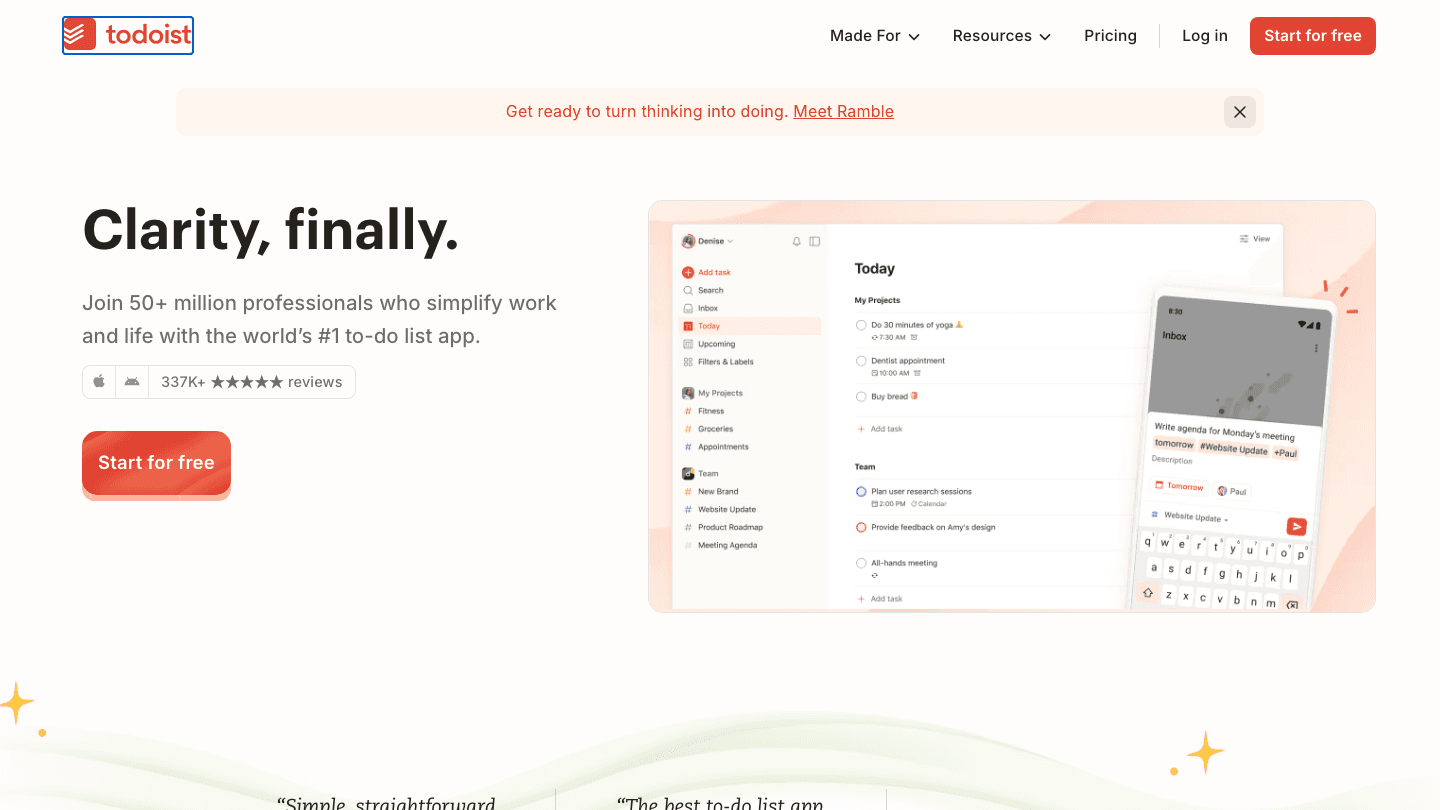
Todoist has been one of the most popular task managers for over a decade. It's available on every major platform (iOS, Android, Mac, Windows, web, Linux) and offers a free tier that's genuinely usable. The design philosophy is "clarity, finally": straightforward task entry with enough structure to handle complex projects.
The free plan limits you to 5 projects. The Pro plan ($5/month billed annually, or $7/month monthly) unlocks 300 projects, reminders, calendar view, and filters. There's also a Business plan for teams.
What Works
Natural language task entry that understands "every Monday at 9am" or "next Tuesday"
Strong integrations: Slack, Google Calendar, GitHub, Zapier, 60+ others
Works on every platform, including Android and Windows
Collaboration features: shared projects, task assignment, team workspaces
Karma system gamifies task completion (useful for motivation)
Limitations
Subscription required for most useful features
Free plan's 5-project limit is restrictive for most users
Design feels functional rather than delightful, not as refined as Things 3
No energy-aware scheduling or automatic day planning
Pricing: Free (5 projects), Pro at $5/month (annual) or $7/month, Business from $8/user/month
Best for: Cross-platform users, teams, power users who need integrations
Things 3 Overview
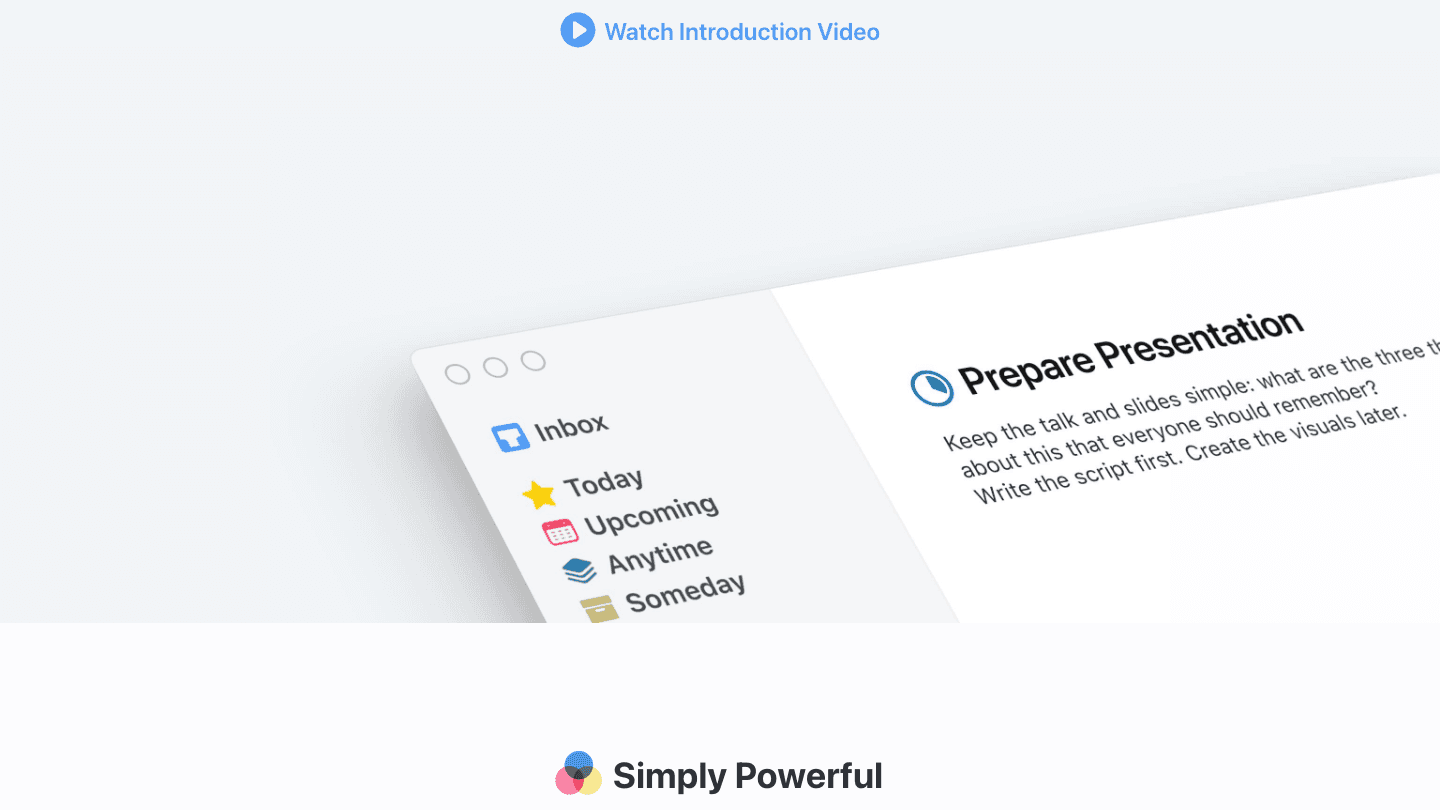
Things 3 is made by Cultured Code, a small German software company, and it's won Apple Design Awards multiple times. The app is Apple-exclusive (iPhone, iPad, Mac, Apple Watch) and uses a one-time purchase model rather than a subscription.
The experience is opinionated: it has its own planning philosophy built in (Inbox, Today, Upcoming, Anytime, Someday buckets) and is intentionally simpler than Todoist. No Kanban boards, no team collaboration, no Android app. What it does do, it does beautifully.
What Works
Considered the best-designed task manager on Mac: clean, fast, tactile
One-time purchase with no ongoing subscription cost
Excellent Apple integration: Shortcuts, Siri, Apple Watch, Reminders import
Thoughtful planning structure: Today, Upcoming, and Someday views guide weekly reviews naturally
Fast keyboard shortcuts on Mac; genuinely pleasant to use daily
Limitations
Apple-only: no Android, no Windows, no web app
No collaboration or team features
Limited integrations compared to Todoist
No energy-aware scheduling or automatic planning
Upfront cost can feel steep ($80 total for all platforms)
Pricing: One-time purchase: iPhone $9.99, iPad $19.99, Mac $49.99 (no subscription)
Best for: Mac-first users who value design and prefer paying once
Head-to-Head: Todoist vs Things 3
Platforms: Todoist wins. Available everywhere including Android and Windows. Things 3 is Apple-only
Design: Things 3 wins. Widely considered the most beautiful task manager on the Mac. Todoist is clean but not delightful
Pricing model: Things 3 wins for long-term users. One-time payment vs. ongoing subscription. At 2 years, Things 3 costs less total
Integrations: Todoist wins. 60+ integrations including Slack, GitHub, Google Calendar. Things 3 connects to Apple apps only
Collaboration: Todoist wins easily. Shared projects, task assignment, team workspaces. Things 3 has none of this
Natural language input: Todoist wins on this specific feature. "Every weekday at 8am" works natively. Things 3 relies on date pickers
Planning structure: Things 3 has the more considered approach. Its Today/Upcoming/Someday framework aligns with GTD naturally. Todoist leaves more of this to the user
Mobile experience: Both are excellent on iPhone. Things 3 has a slight edge on pure feel; Todoist wins on functionality
Which Should You Choose?
Choose Todoist if you use Android or Windows at all, if you need to share projects or assign tasks to others, or if you want your task manager to connect to your other tools. The Todoist pricing is reasonable given what you get, and the integrations ecosystem is hard to match.
Choose Things 3 if you're all-in on Apple devices, you work solo, and design matters to you. The task management experience is genuinely better-feeling than almost anything else on Mac. And paying once feels better than a subscription you might resent.
If you're on the fence: Todoist has a free plan you can try today. Things 3 has no free trial but a generous App Store refund window if you decide within a few days it's not for you.
One Alternative Worth Knowing About
Both Todoist and Things 3 are pure task managers. They organize what you need to do, but neither one tells you when to do it or adjusts based on your energy levels. If you find yourself frequently moving tasks without doing them, or struggling to turn your list into an actual daily schedule, neither app solves that problem.
Lifestack fills that gap. It takes your tasks and calendar, then builds an optimal daily schedule automatically, scheduling deep work during your peak hours and protecting focus time from meeting creep. It works alongside Google Calendar and major task managers, so you don't have to abandon your current setup. At $7/month or $50/year, it's a different category from both Todoist and Things 3: not just a list, but a full AI planning system.
Frequently Asked Questions
Is Todoist better than Things 3?
It depends entirely on your setup. Todoist is better if you use non-Apple devices, need team collaboration, or want deep integrations. Things 3 is better if you're Mac-first, work solo, and care about design quality. There's no universal answer.
Does Things 3 have a free plan?
No. Things 3 is a paid, one-time purchase: $9.99 for iPhone, $19.99 for iPad, $49.99 for Mac. There's no subscription and no ongoing fee. The App Store offers a return window if you want to try it risk-free for a short period.
Can Todoist and Things 3 sync with Google Calendar?
Todoist has a native Google Calendar integration that syncs tasks with due dates as calendar events. Things 3 does not integrate with Google Calendar directly. It connects to Apple Calendar and Apple Reminders only.
Is Things 3 available on Android or Windows?
No. Things 3 is Apple-only: iPhone, iPad, Mac, and Apple Watch. There is no Android version, no Windows version, and no web app. If you use Android or Windows, Todoist is the better choice.
How does Todoist vs Things 3 compare for ADHD?
Things 3's simpler, less overwhelming interface tends to work better for ADHD users who find cluttered apps paralyzing. The Today view creates a clear daily focus. Todoist's unlimited projects and filters can create decision fatigue. That said, both are passive lists. If task paralysis is a real issue, an auto-scheduling tool may help more than either.
Can Todoist and Things 3 be used together?
In theory yes, but it's redundant. Some people use Todoist for work (shared with teams) and Things 3 for personal tasks (Apple-only). If you're considering this, it's worth asking whether a single tool with better scheduling would serve both purposes better.
Todoist and Things 3 are the two most compared personal task managers on the market. Both have passionate user bases, long track records, and strong reputations. The decision between them isn't about which one is "better" in the abstract. It's about which one matches your working style.
Todoist is subscription-based, cross-platform, and built for power users who want Kanban boards, integrations, and collaborative features. Things 3 is a one-time purchase, Apple-only, and designed around elegant simplicity and focus. Pick the wrong one and you'll feel it every day.
Here's a genuine head-to-head across every dimension that matters.
Key Takeaways
Todoist wins on platform flexibility, integrations, and collaboration: it works everywhere and connects to almost everything
Things 3 wins on design, Apple ecosystem integration, and long-term cost (one payment, no subscription, best-in-class UX on Mac and iPhone)
Neither app schedules your tasks automatically or accounts for energy. They're both pure task managers, not planning systems
Quick Verdict
Todoist: Best for cross-platform users, teams, and people who want their task manager to integrate with everything
Things 3: Best for Mac-first users who value design above all else and prefer a one-time purchase over a subscription
Todoist Overview
Todoist has been one of the most popular task managers for over a decade. It's available on every major platform (iOS, Android, Mac, Windows, web, Linux) and offers a free tier that's genuinely usable. The design philosophy is "clarity, finally": straightforward task entry with enough structure to handle complex projects.
The free plan limits you to 5 projects. The Pro plan ($5/month billed annually, or $7/month monthly) unlocks 300 projects, reminders, calendar view, and filters. There's also a Business plan for teams.
What Works
Natural language task entry that understands "every Monday at 9am" or "next Tuesday"
Strong integrations: Slack, Google Calendar, GitHub, Zapier, 60+ others
Works on every platform, including Android and Windows
Collaboration features: shared projects, task assignment, team workspaces
Karma system gamifies task completion (useful for motivation)
Limitations
Subscription required for most useful features
Free plan's 5-project limit is restrictive for most users
Design feels functional rather than delightful, not as refined as Things 3
No energy-aware scheduling or automatic day planning
Pricing: Free (5 projects), Pro at $5/month (annual) or $7/month, Business from $8/user/month
Best for: Cross-platform users, teams, power users who need integrations
Things 3 Overview
Things 3 is made by Cultured Code, a small German software company, and it's won Apple Design Awards multiple times. The app is Apple-exclusive (iPhone, iPad, Mac, Apple Watch) and uses a one-time purchase model rather than a subscription.
The experience is opinionated: it has its own planning philosophy built in (Inbox, Today, Upcoming, Anytime, Someday buckets) and is intentionally simpler than Todoist. No Kanban boards, no team collaboration, no Android app. What it does do, it does beautifully.
What Works
Considered the best-designed task manager on Mac: clean, fast, tactile
One-time purchase with no ongoing subscription cost
Excellent Apple integration: Shortcuts, Siri, Apple Watch, Reminders import
Thoughtful planning structure: Today, Upcoming, and Someday views guide weekly reviews naturally
Fast keyboard shortcuts on Mac; genuinely pleasant to use daily
Limitations
Apple-only: no Android, no Windows, no web app
No collaboration or team features
Limited integrations compared to Todoist
No energy-aware scheduling or automatic planning
Upfront cost can feel steep ($80 total for all platforms)
Pricing: One-time purchase: iPhone $9.99, iPad $19.99, Mac $49.99 (no subscription)
Best for: Mac-first users who value design and prefer paying once
Head-to-Head: Todoist vs Things 3
Platforms: Todoist wins. Available everywhere including Android and Windows. Things 3 is Apple-only
Design: Things 3 wins. Widely considered the most beautiful task manager on the Mac. Todoist is clean but not delightful
Pricing model: Things 3 wins for long-term users. One-time payment vs. ongoing subscription. At 2 years, Things 3 costs less total
Integrations: Todoist wins. 60+ integrations including Slack, GitHub, Google Calendar. Things 3 connects to Apple apps only
Collaboration: Todoist wins easily. Shared projects, task assignment, team workspaces. Things 3 has none of this
Natural language input: Todoist wins on this specific feature. "Every weekday at 8am" works natively. Things 3 relies on date pickers
Planning structure: Things 3 has the more considered approach. Its Today/Upcoming/Someday framework aligns with GTD naturally. Todoist leaves more of this to the user
Mobile experience: Both are excellent on iPhone. Things 3 has a slight edge on pure feel; Todoist wins on functionality
Which Should You Choose?
Choose Todoist if you use Android or Windows at all, if you need to share projects or assign tasks to others, or if you want your task manager to connect to your other tools. The Todoist pricing is reasonable given what you get, and the integrations ecosystem is hard to match.
Choose Things 3 if you're all-in on Apple devices, you work solo, and design matters to you. The task management experience is genuinely better-feeling than almost anything else on Mac. And paying once feels better than a subscription you might resent.
If you're on the fence: Todoist has a free plan you can try today. Things 3 has no free trial but a generous App Store refund window if you decide within a few days it's not for you.
One Alternative Worth Knowing About
Both Todoist and Things 3 are pure task managers. They organize what you need to do, but neither one tells you when to do it or adjusts based on your energy levels. If you find yourself frequently moving tasks without doing them, or struggling to turn your list into an actual daily schedule, neither app solves that problem.
Lifestack fills that gap. It takes your tasks and calendar, then builds an optimal daily schedule automatically, scheduling deep work during your peak hours and protecting focus time from meeting creep. It works alongside Google Calendar and major task managers, so you don't have to abandon your current setup. At $7/month or $50/year, it's a different category from both Todoist and Things 3: not just a list, but a full AI planning system.
Frequently Asked Questions
Is Todoist better than Things 3?
It depends entirely on your setup. Todoist is better if you use non-Apple devices, need team collaboration, or want deep integrations. Things 3 is better if you're Mac-first, work solo, and care about design quality. There's no universal answer.
Does Things 3 have a free plan?
No. Things 3 is a paid, one-time purchase: $9.99 for iPhone, $19.99 for iPad, $49.99 for Mac. There's no subscription and no ongoing fee. The App Store offers a return window if you want to try it risk-free for a short period.
Can Todoist and Things 3 sync with Google Calendar?
Todoist has a native Google Calendar integration that syncs tasks with due dates as calendar events. Things 3 does not integrate with Google Calendar directly. It connects to Apple Calendar and Apple Reminders only.
Is Things 3 available on Android or Windows?
No. Things 3 is Apple-only: iPhone, iPad, Mac, and Apple Watch. There is no Android version, no Windows version, and no web app. If you use Android or Windows, Todoist is the better choice.
How does Todoist vs Things 3 compare for ADHD?
Things 3's simpler, less overwhelming interface tends to work better for ADHD users who find cluttered apps paralyzing. The Today view creates a clear daily focus. Todoist's unlimited projects and filters can create decision fatigue. That said, both are passive lists. If task paralysis is a real issue, an auto-scheduling tool may help more than either.
Can Todoist and Things 3 be used together?
In theory yes, but it's redundant. Some people use Todoist for work (shared with teams) and Things 3 for personal tasks (Apple-only). If you're considering this, it's worth asking whether a single tool with better scheduling would serve both purposes better.



FOLLOW ON
FOLLOW ON
FOLLOW ON


Copyright 2026 © Lifestack. All rights reserved
Copyright 2026 © Lifestack. All rights reserved

