
App
Morgen Pricing: Is It Worth It?
Morgen Pricing: Is It Worth It?

Morgen has been making waves as an AI-powered calendar and task planner. It pulls together Google Calendar, Outlook, Apple Calendar, and task tools like Notion and ClickUp, then builds your daily schedule automatically. It sounds like a productivity dream. But the price tag catches a lot of people off guard.
At $30 per month billed monthly, or $15 per month on an annual plan, Morgen sits in a premium tier where expectations are high. No free plan means you're committing from day one. The 14-day trial gives you a window, but there are real questions about whether the features justify the cost, especially when solid alternatives exist at a fraction of the price.
This guide breaks down every Morgen plan, what you actually get, where the value holds up, and where it falls short. We'll also look at a more affordable option worth considering if Morgen's price doesn't fit your budget.
Key Takeaways
Morgen Pro costs $15/month (annual) or $30/month (monthly) with no free tier.
The Team plan starts at $10/seat/month (annual) for groups of two or more.
If Morgen's price feels steep, Lifestack offers AI scheduling with energy-aware planning for as low as $4.17/month.
How Much Does Morgen Cost?
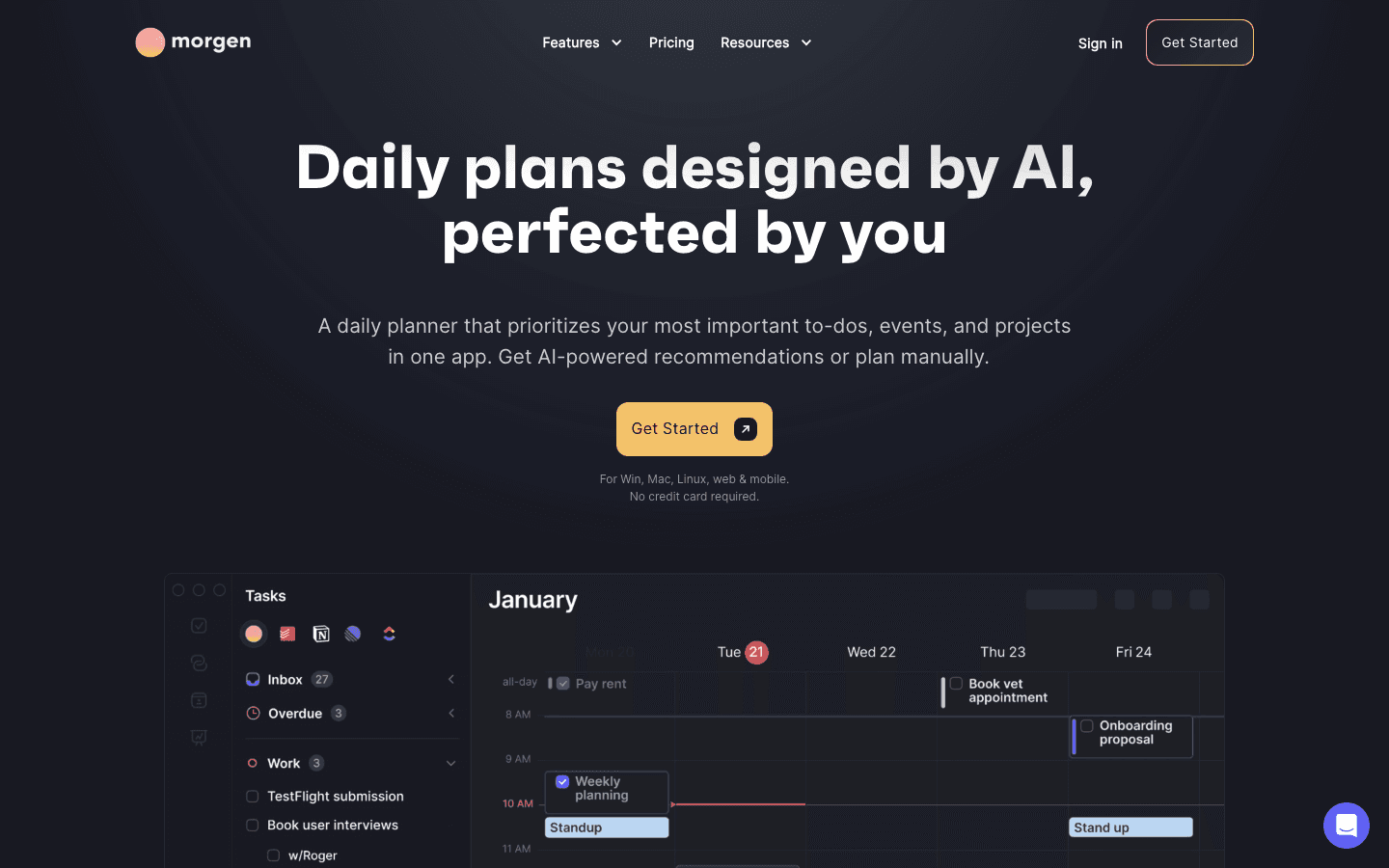
Morgen offers two main pricing tracks: Individual and Team. There is no free plan, though both come with a 14-day trial that requires no credit card. A 30-day money-back guarantee applies after purchase.
Pro Monthly: $30/month
Pro Annual: $15/month, billed as $180/year (50% savings)
Team Monthly: $25/seat/month (minimum 2 seats)
Team Annual: $10/seat/month, billed yearly (60% savings)
Morgen Pro: $30/Month or $15/Month Annual
The Pro plan is the entry point for individual users. At $15/month on the annual plan, you get access to everything Morgen offers: AI Planner time-blocking, unlimited calendar connections, all task integrations, calendar automations (like automatic travel time buffers), booking links, and apps for Windows, macOS, Linux, mobile, and browser.
The $30/month billing option is available if you want to pay month-to-month, though it doubles your cost. Most users who decide Morgen is right for them go annual, since the 50% discount is significant. But that's still $180 upfront before you know whether the workflow clicks for you.
Morgen's AI Planner is the main draw. It analyzes your tasks and calendar events, then proposes a daily schedule. You can accept its recommendations or adjust them manually. The system also handles recurring automations, like adding prep time before meetings or blocking focus windows in the morning. For people juggling multiple calendars and task tools, this kind of automatic coordination has real value. For people with a simpler setup, it may be more than needed.
Morgen Team: $10-$25/Seat Per Month
The Team plan is aimed at small groups who want shared scheduling visibility. At $10/seat/month on the annual plan (or $25/seat/month monthly), you get everything in Pro plus team availability views. This means you can see when teammates are free without the back-and-forth of calendar invites.
For a team of five on the annual plan, that's $600 per year. It's a reasonable cost if scheduling coordination is a genuine bottleneck. It's hard to justify if the team mostly works independently or already uses a shared calendar tool inside their project management software.
Does Morgen Have a Free Plan?
No. Morgen does not offer a free tier. The only way to use it without paying is through the 14-day trial. After that, you need a Pro or Team subscription to continue.
This is a real limitation compared to tools like Google Calendar or Todoist, which offer usable free plans. If you want AI-assisted scheduling without a financial commitment, you'll need to look elsewhere. Some Morgen alternatives offer free tiers or significantly lower price points.
Is Morgen Worth the Price?
For power users with complex calendar needs, yes. If you run multiple calendars across different platforms, manage tasks in several tools, and want one place that stitches it all together with AI recommendations, Morgen's Pro plan earns its price.
For most people, the value proposition is harder to make. The core AI scheduling works well, but at $15/month on the lower end and $30/month if you're month-to-month, you're paying a premium for features you may only partially use.
There are also some notable gaps. Morgen doesn't read your energy levels or sleep data to influence scheduling. It doesn't adapt your plan based on how you actually feel on a given day. That matters if you do energy-based planning rather than pure time-blocking. The AI is good at calendar math, but it doesn't know when you do your best work.
No free plan, even for basic features
Annual billing means a $180 upfront commitment
No energy or health data integration
App is feature-dense, which can feel heavy if your workflow is simpler
Who Should Use Morgen
Morgen is a strong fit for people who live across multiple productivity tools. If your work pulls tasks from Linear, ClickUp, or Notion, and your calendar is spread across Google and Outlook, Morgen's integrations solve a real problem. The cross-platform apps are a genuine advantage for teams that work across Windows and macOS.
It's a less natural fit for individuals who want a lighter planning experience, or anyone who wants their schedule to account for physical energy and recovery. A simpler calendar management tool or a purpose-built time-blocking app may get you further for less money.
If you're specifically drawn to AI scheduling because of focus or energy challenges, there are apps designed around that problem more directly.
A More Affordable Alternative: Lifestack

Lifestack is an AI daily planner built around your energy, not just your calendar. It reads your wearable data (Oura, WHOOP, Garmin, Fitbit, Apple Watch) and uses sleep and recovery scores to schedule demanding tasks when your body and brain are ready for them. That's a fundamentally different approach from Morgen's time-based logic.
Pricing is where Lifestack pulls away. The annual plan runs $50/year, which is about $4.17/month. A monthly option is available at $7/month. There's also a one-time lifetime plan at $120 for people who don't want ongoing subscriptions. That's dramatically cheaper than Morgen's $15/month minimum, and for users who care about finding the best AI planner app, the gap in cost is hard to ignore.
Lifestack isn't trying to be a universal task hub like Morgen. It focuses on daily scheduling quality and sustainable productivity. If Morgen's integration breadth is what you need, it earns its price. But if you want an AI planner that actually knows when you're at your best, Lifestack is a more thoughtful and affordable choice.
Frequently Asked Questions
How much does Morgen cost per month?
Morgen Pro costs $30/month billed monthly, or $15/month when billed annually ($180/year). The Team plan starts at $25/seat/month or $10/seat/month annually.
Does Morgen have a free plan?
No. Morgen doesn't offer a free tier. There is a 14-day free trial with no credit card required, plus a 30-day money-back guarantee after purchase.
Is Morgen worth it for individuals?
It depends on your setup. If you manage multiple calendars and task tools and want AI to coordinate them automatically, the annual plan at $15/month offers real value. If your workflow is simpler, it may be more than you need.
What is included in Morgen Pro?
Morgen Pro includes the AI Planner, unlimited calendar and task integrations, calendar automations, booking and scheduling links, and apps for all major platforms including Windows, macOS, Linux, mobile, and browser.
What is a cheaper alternative to Morgen?
Lifestack offers AI-powered daily scheduling for $50/year (about $4.17/month), making it one of the most affordable options in the category. Its energy-aware scheduling is also a feature Morgen doesn't offer. See more Morgen alternatives for a broader comparison.
How does Morgen pricing compare to Motion?
Morgen's annual plan ($15/month) is similar to Motion's pricing, which also sits in the premium tier. Both offer AI scheduling, though they take different approaches to task management and automation. Neither offers a free plan.
Morgen has been making waves as an AI-powered calendar and task planner. It pulls together Google Calendar, Outlook, Apple Calendar, and task tools like Notion and ClickUp, then builds your daily schedule automatically. It sounds like a productivity dream. But the price tag catches a lot of people off guard.
At $30 per month billed monthly, or $15 per month on an annual plan, Morgen sits in a premium tier where expectations are high. No free plan means you're committing from day one. The 14-day trial gives you a window, but there are real questions about whether the features justify the cost, especially when solid alternatives exist at a fraction of the price.
This guide breaks down every Morgen plan, what you actually get, where the value holds up, and where it falls short. We'll also look at a more affordable option worth considering if Morgen's price doesn't fit your budget.
Key Takeaways
Morgen Pro costs $15/month (annual) or $30/month (monthly) with no free tier.
The Team plan starts at $10/seat/month (annual) for groups of two or more.
If Morgen's price feels steep, Lifestack offers AI scheduling with energy-aware planning for as low as $4.17/month.
How Much Does Morgen Cost?
Morgen offers two main pricing tracks: Individual and Team. There is no free plan, though both come with a 14-day trial that requires no credit card. A 30-day money-back guarantee applies after purchase.
Pro Monthly: $30/month
Pro Annual: $15/month, billed as $180/year (50% savings)
Team Monthly: $25/seat/month (minimum 2 seats)
Team Annual: $10/seat/month, billed yearly (60% savings)
Morgen Pro: $30/Month or $15/Month Annual
The Pro plan is the entry point for individual users. At $15/month on the annual plan, you get access to everything Morgen offers: AI Planner time-blocking, unlimited calendar connections, all task integrations, calendar automations (like automatic travel time buffers), booking links, and apps for Windows, macOS, Linux, mobile, and browser.
The $30/month billing option is available if you want to pay month-to-month, though it doubles your cost. Most users who decide Morgen is right for them go annual, since the 50% discount is significant. But that's still $180 upfront before you know whether the workflow clicks for you.
Morgen's AI Planner is the main draw. It analyzes your tasks and calendar events, then proposes a daily schedule. You can accept its recommendations or adjust them manually. The system also handles recurring automations, like adding prep time before meetings or blocking focus windows in the morning. For people juggling multiple calendars and task tools, this kind of automatic coordination has real value. For people with a simpler setup, it may be more than needed.
Morgen Team: $10-$25/Seat Per Month
The Team plan is aimed at small groups who want shared scheduling visibility. At $10/seat/month on the annual plan (or $25/seat/month monthly), you get everything in Pro plus team availability views. This means you can see when teammates are free without the back-and-forth of calendar invites.
For a team of five on the annual plan, that's $600 per year. It's a reasonable cost if scheduling coordination is a genuine bottleneck. It's hard to justify if the team mostly works independently or already uses a shared calendar tool inside their project management software.
Does Morgen Have a Free Plan?
No. Morgen does not offer a free tier. The only way to use it without paying is through the 14-day trial. After that, you need a Pro or Team subscription to continue.
This is a real limitation compared to tools like Google Calendar or Todoist, which offer usable free plans. If you want AI-assisted scheduling without a financial commitment, you'll need to look elsewhere. Some Morgen alternatives offer free tiers or significantly lower price points.
Is Morgen Worth the Price?
For power users with complex calendar needs, yes. If you run multiple calendars across different platforms, manage tasks in several tools, and want one place that stitches it all together with AI recommendations, Morgen's Pro plan earns its price.
For most people, the value proposition is harder to make. The core AI scheduling works well, but at $15/month on the lower end and $30/month if you're month-to-month, you're paying a premium for features you may only partially use.
There are also some notable gaps. Morgen doesn't read your energy levels or sleep data to influence scheduling. It doesn't adapt your plan based on how you actually feel on a given day. That matters if you do energy-based planning rather than pure time-blocking. The AI is good at calendar math, but it doesn't know when you do your best work.
No free plan, even for basic features
Annual billing means a $180 upfront commitment
No energy or health data integration
App is feature-dense, which can feel heavy if your workflow is simpler
Who Should Use Morgen
Morgen is a strong fit for people who live across multiple productivity tools. If your work pulls tasks from Linear, ClickUp, or Notion, and your calendar is spread across Google and Outlook, Morgen's integrations solve a real problem. The cross-platform apps are a genuine advantage for teams that work across Windows and macOS.
It's a less natural fit for individuals who want a lighter planning experience, or anyone who wants their schedule to account for physical energy and recovery. A simpler calendar management tool or a purpose-built time-blocking app may get you further for less money.
If you're specifically drawn to AI scheduling because of focus or energy challenges, there are apps designed around that problem more directly.
A More Affordable Alternative: Lifestack
Lifestack is an AI daily planner built around your energy, not just your calendar. It reads your wearable data (Oura, WHOOP, Garmin, Fitbit, Apple Watch) and uses sleep and recovery scores to schedule demanding tasks when your body and brain are ready for them. That's a fundamentally different approach from Morgen's time-based logic.
Pricing is where Lifestack pulls away. The annual plan runs $50/year, which is about $4.17/month. A monthly option is available at $7/month. There's also a one-time lifetime plan at $120 for people who don't want ongoing subscriptions. That's dramatically cheaper than Morgen's $15/month minimum, and for users who care about finding the best AI planner app, the gap in cost is hard to ignore.
Lifestack isn't trying to be a universal task hub like Morgen. It focuses on daily scheduling quality and sustainable productivity. If Morgen's integration breadth is what you need, it earns its price. But if you want an AI planner that actually knows when you're at your best, Lifestack is a more thoughtful and affordable choice.
Frequently Asked Questions
How much does Morgen cost per month?
Morgen Pro costs $30/month billed monthly, or $15/month when billed annually ($180/year). The Team plan starts at $25/seat/month or $10/seat/month annually.
Does Morgen have a free plan?
No. Morgen doesn't offer a free tier. There is a 14-day free trial with no credit card required, plus a 30-day money-back guarantee after purchase.
Is Morgen worth it for individuals?
It depends on your setup. If you manage multiple calendars and task tools and want AI to coordinate them automatically, the annual plan at $15/month offers real value. If your workflow is simpler, it may be more than you need.
What is included in Morgen Pro?
Morgen Pro includes the AI Planner, unlimited calendar and task integrations, calendar automations, booking and scheduling links, and apps for all major platforms including Windows, macOS, Linux, mobile, and browser.
What is a cheaper alternative to Morgen?
Lifestack offers AI-powered daily scheduling for $50/year (about $4.17/month), making it one of the most affordable options in the category. Its energy-aware scheduling is also a feature Morgen doesn't offer. See more Morgen alternatives for a broader comparison.
How does Morgen pricing compare to Motion?
Morgen's annual plan ($15/month) is similar to Motion's pricing, which also sits in the premium tier. Both offer AI scheduling, though they take different approaches to task management and automation. Neither offers a free plan.



FOLLOW ON
FOLLOW ON
FOLLOW ON


Copyright 2026 © Lifestack. All rights reserved
Copyright 2026 © Lifestack. All rights reserved

