
App
Pomofocus Review: Free Pomodoro Timer Explained
Pomofocus Review: Free Pomodoro Timer Explained

Pomofocus is a free, browser-based Pomodoro timer that's become one of the most recommended focus tools on the web. It's not loaded with features. You get a countdown timer, a task list beneath it, and a record of your sessions. That's most of it.
The appeal is the frictionlessness. You open the site, add a task, and click Start. No account required, no app to download, no tutorial. Within 10 seconds you're in a focus session. For many people, that zero-setup quality is the whole reason they keep coming back.
But Pomofocus has a Pro tier now, and some things that used to be free aren't anymore. This review covers what you actually get, what the paid plan adds, and whether this is still the right tool for you in 2026.
Key Takeaways
Free tier covers the core timer and basic task list, with a cap of 3 saved templates
Pro is $3/month, $18/year, or $54 lifetime and adds projects, CSV reports, Todoist sync, and unlimited templates
Pomofocus works best as a focus trigger, not a full productivity system. It pairs well with a planning tool that handles the scheduling layer
What Is Pomofocus?
Pomofocus is built around the Pomodoro Technique, a time management method developed by Francesco Cirillo in the late 1980s. The system is simple: work for 25 minutes, take a 5-minute break, repeat four times, then take a longer 15-20 minute break. Each 25-minute block is called a Pomodoro.
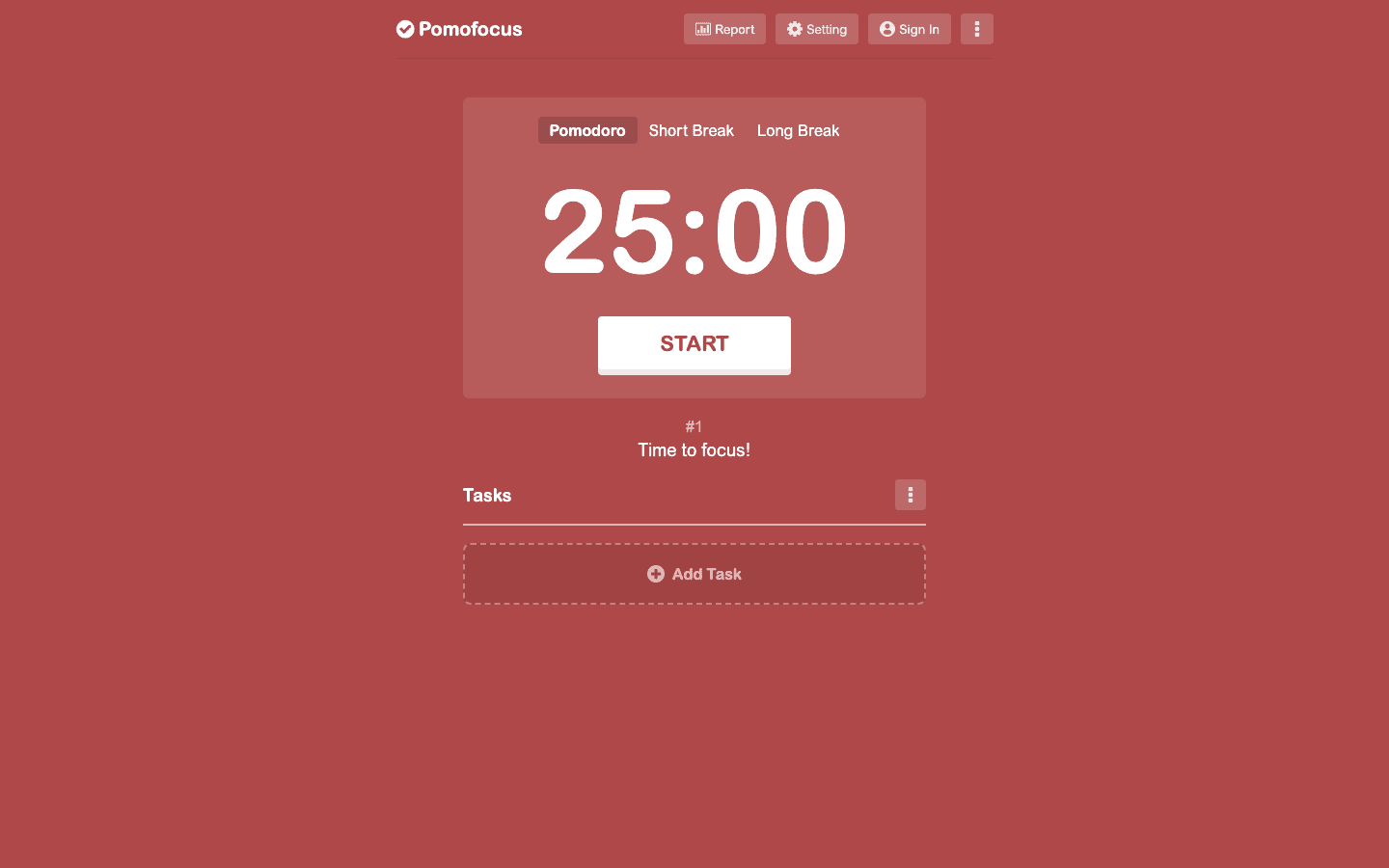
The site is entirely browser-based. The main screen shows three tabs (Pomodoro, Short Break, Long Break), a large countdown timer, and a task section below. You can add tasks, estimate how many Pomodoros each will take, and check them off as you go. The interface changes color based on which mode you're in: red for focus, green for breaks.
Desktop apps are available for Mac, Windows, and Linux, but they're essentially the same web interface wrapped in a native container. Most users just keep a browser tab open.
Core Features (Free)
The free tier covers everything you need to run Pomodoro sessions.
Customizable intervals: change the work period, short break, and long break to any duration you prefer
Task list: add tasks below the timer, estimate Pomodoro counts, and mark them complete
Session tracking: Pomofocus counts your completed sessions and shows your daily total
Basic reports: daily, weekly, and monthly views of total focus time
Alarm sounds and background audio: choose the alarm tone that plays at the end of each session, and optionally play white noise or ambient sounds while working
Up to 3 saved templates for recurring task sets
One thing worth noting: you don't need an account for the timer itself, but session history and templates only persist if you're signed in. Without an account, data resets when you close the tab.
What Pro Adds
The Pro plan ($3/month, $18/year, or $54 one-time lifetime) unlocks a meaningful set of extras for heavier users.
Projects: organize tasks into named projects with color labels
Unlimited templates (free caps at 3)
Yearly reports with more detail than the basic daily/weekly/monthly views
CSV export for session data
Todoist integration to pull tasks directly into Pomofocus from your Todoist inbox
Zapier and webhook support for connecting Pomofocus to other tools
Ad-free experience
The Todoist integration is the most practical Pro feature for anyone who already uses Todoist as their task manager. It removes the step of manually re-entering tasks into Pomofocus. If you're on a different task system, this feature has no value for you.
How Pomofocus Compares to Other Pomodoro Timers
If you've looked at the best Pomodoro timers available, you know Pomofocus sits in a specific lane: clean, minimal, free-to-start, no gamification. Tools like Forest add tree-growing mechanics and social accountability. Session (Mac-only) integrates with the system calendar and has tighter Apple Watch support. Toggl Track buries the Pomodoro timer inside a full time-tracking product.
Pomofocus is the right choice when you want a timer that gets out of the way. It's the wrong choice when you need a tool that manages your task backlog, connects to a calendar, or gives you energy-based scheduling. It tracks that you did 6 Pomodoros today; it doesn't help you figure out which tasks to put in them or when your best focus windows are.
For a broader comparison, see our roundup of the best apps for time intervals and task timer apps that cover more options in the space.
Where Pomofocus Falls Short
No mobile app beyond the mobile browser version. If you use your phone during the day, the browser experience works but isn't as polished as a native app. The lack of a proper iOS or Android app is a real gap compared to alternatives.
No calendar integration. Pomofocus doesn't know your schedule, your meeting blocks, or your energy patterns. You have to manually decide what to work on and when. That's a fine tradeoff for a simple timer, but it means you're still doing the planning work somewhere else.
Analytics are limited on the free plan. The basic report shows you how many Pomodoros you completed, which is useful but shallow. If you want to know which projects are eating the most time, or spot patterns over months, you need Pro for CSV exports or to use a separate focus tracking tool.
Pomofocus also has no concept of energy or recovery. It runs the same 25/5 cadence regardless of whether it's 9 AM or 3 PM, whether you slept well or didn't. That's fine for the tool's scope, but it means the Pomodoro count isn't the whole picture of a productive day.
Pairing Pomofocus with a Planning Layer

Pomofocus handles the execution: you're in a session, the timer is running, you're not checking email. What it doesn't handle is the planning that comes before: which tasks go in today's sessions, in what order, and when your best focus windows actually are.
That's where a tool like Lifestack fits. Lifestack reads your health and sleep data from wearables (Apple Watch, Oura, Garmin) and uses it to auto-schedule time blocks in your calendar during your cognitive peak hours. Instead of starting a Pomodoro session at a random point in the morning, you know you have a 90-minute deep work block at 9:30 because that's when your energy data says you're sharpest.
The two tools work well together: Lifestack handles when and what, Pomofocus handles the interval structure during the session. If you're interested in focusing on one thing at a time, starting with energy-aware scheduling makes the Pomodoro sessions more effective because you're doing them at the right time.
Pricing Summary
Free: core timer, task list, 3 templates, basic reports
Pro Monthly: $3/month
Pro Annual: $18/year ($1.50/month)
Pro Lifetime: $54 one-time
The annual plan is the best value if you use Pomofocus regularly. The lifetime option pays for itself in 3 years and is worth it if you're confident Pomofocus will stay part of your workflow. Check the best focus apps list if you're evaluating multiple tools before committing.
Who Should Use Pomofocus
Pomofocus is a great fit if you know the Pomodoro Technique works for you and want the cleanest possible implementation of it. Writers, coders, and students who need a timer and nothing else consistently rate it highly.
It's less suited to people who want help with the planning side: task prioritization, calendar blocking, energy management. Those needs require something built for them. Pomofocus is a timer, and a good one, but it's not a productivity system.
If you're new to timed focus sessions, start with the free tier. It's fully functional for learning the technique. Upgrade to Pro if you find yourself wishing for project tracking, more templates, or Todoist sync after a few weeks of regular use.
Frequently Asked Questions
Is Pomofocus free?
Yes. The free tier includes the core Pomodoro timer, task list, basic reports, and up to 3 saved templates. No account is required to start a session. Signing in preserves your history between sessions.
What does Pomofocus Pro add?
Pro adds projects, unlimited templates, yearly reports, CSV export, Todoist integration, Zapier/webhook support, and removes ads. It's $3/month, $18/year, or $54 lifetime.
Does Pomofocus have a mobile app?
Not a native one. Pomofocus works in mobile browsers, and there are desktop apps for Mac, Windows, and Linux. If you need a dedicated iOS or Android Pomodoro app, look at alternatives in our focus apps roundup.
How does Pomofocus compare to Forest?
Forest adds a gamification layer where you grow virtual trees during focus sessions, with options to donate to real tree planting. Pomofocus is more minimal, web-based (no app required), and free without any gamification. Both are solid; the choice comes down to whether you find gamification motivating or distracting.
What is the Pomodoro Technique?
The Pomodoro Technique is a time management method where you work in 25-minute intervals (Pomodoros) with 5-minute breaks between them, and take a longer 15-20 minute break after every four intervals. The structure reduces mental fatigue and makes large tasks feel more approachable by breaking them into fixed-length chunks.
Can I use Pomofocus with other productivity apps?
Pro users can connect Pomofocus to Todoist directly, and Zapier support enables connections to hundreds of other tools. For energy-aware scheduling that works alongside any timer, Lifestack syncs with your calendar and health data to plan your focus sessions around your peak cognitive hours.
Pomofocus is a free, browser-based Pomodoro timer that's become one of the most recommended focus tools on the web. It's not loaded with features. You get a countdown timer, a task list beneath it, and a record of your sessions. That's most of it.
The appeal is the frictionlessness. You open the site, add a task, and click Start. No account required, no app to download, no tutorial. Within 10 seconds you're in a focus session. For many people, that zero-setup quality is the whole reason they keep coming back.
But Pomofocus has a Pro tier now, and some things that used to be free aren't anymore. This review covers what you actually get, what the paid plan adds, and whether this is still the right tool for you in 2026.
Key Takeaways
Free tier covers the core timer and basic task list, with a cap of 3 saved templates
Pro is $3/month, $18/year, or $54 lifetime and adds projects, CSV reports, Todoist sync, and unlimited templates
Pomofocus works best as a focus trigger, not a full productivity system. It pairs well with a planning tool that handles the scheduling layer
What Is Pomofocus?
Pomofocus is built around the Pomodoro Technique, a time management method developed by Francesco Cirillo in the late 1980s. The system is simple: work for 25 minutes, take a 5-minute break, repeat four times, then take a longer 15-20 minute break. Each 25-minute block is called a Pomodoro.
The site is entirely browser-based. The main screen shows three tabs (Pomodoro, Short Break, Long Break), a large countdown timer, and a task section below. You can add tasks, estimate how many Pomodoros each will take, and check them off as you go. The interface changes color based on which mode you're in: red for focus, green for breaks.
Desktop apps are available for Mac, Windows, and Linux, but they're essentially the same web interface wrapped in a native container. Most users just keep a browser tab open.
Core Features (Free)
The free tier covers everything you need to run Pomodoro sessions.
Customizable intervals: change the work period, short break, and long break to any duration you prefer
Task list: add tasks below the timer, estimate Pomodoro counts, and mark them complete
Session tracking: Pomofocus counts your completed sessions and shows your daily total
Basic reports: daily, weekly, and monthly views of total focus time
Alarm sounds and background audio: choose the alarm tone that plays at the end of each session, and optionally play white noise or ambient sounds while working
Up to 3 saved templates for recurring task sets
One thing worth noting: you don't need an account for the timer itself, but session history and templates only persist if you're signed in. Without an account, data resets when you close the tab.
What Pro Adds
The Pro plan ($3/month, $18/year, or $54 one-time lifetime) unlocks a meaningful set of extras for heavier users.
Projects: organize tasks into named projects with color labels
Unlimited templates (free caps at 3)
Yearly reports with more detail than the basic daily/weekly/monthly views
CSV export for session data
Todoist integration to pull tasks directly into Pomofocus from your Todoist inbox
Zapier and webhook support for connecting Pomofocus to other tools
Ad-free experience
The Todoist integration is the most practical Pro feature for anyone who already uses Todoist as their task manager. It removes the step of manually re-entering tasks into Pomofocus. If you're on a different task system, this feature has no value for you.
How Pomofocus Compares to Other Pomodoro Timers
If you've looked at the best Pomodoro timers available, you know Pomofocus sits in a specific lane: clean, minimal, free-to-start, no gamification. Tools like Forest add tree-growing mechanics and social accountability. Session (Mac-only) integrates with the system calendar and has tighter Apple Watch support. Toggl Track buries the Pomodoro timer inside a full time-tracking product.
Pomofocus is the right choice when you want a timer that gets out of the way. It's the wrong choice when you need a tool that manages your task backlog, connects to a calendar, or gives you energy-based scheduling. It tracks that you did 6 Pomodoros today; it doesn't help you figure out which tasks to put in them or when your best focus windows are.
For a broader comparison, see our roundup of the best apps for time intervals and task timer apps that cover more options in the space.
Where Pomofocus Falls Short
No mobile app beyond the mobile browser version. If you use your phone during the day, the browser experience works but isn't as polished as a native app. The lack of a proper iOS or Android app is a real gap compared to alternatives.
No calendar integration. Pomofocus doesn't know your schedule, your meeting blocks, or your energy patterns. You have to manually decide what to work on and when. That's a fine tradeoff for a simple timer, but it means you're still doing the planning work somewhere else.
Analytics are limited on the free plan. The basic report shows you how many Pomodoros you completed, which is useful but shallow. If you want to know which projects are eating the most time, or spot patterns over months, you need Pro for CSV exports or to use a separate focus tracking tool.
Pomofocus also has no concept of energy or recovery. It runs the same 25/5 cadence regardless of whether it's 9 AM or 3 PM, whether you slept well or didn't. That's fine for the tool's scope, but it means the Pomodoro count isn't the whole picture of a productive day.
Pairing Pomofocus with a Planning Layer
Pomofocus handles the execution: you're in a session, the timer is running, you're not checking email. What it doesn't handle is the planning that comes before: which tasks go in today's sessions, in what order, and when your best focus windows actually are.
That's where a tool like Lifestack fits. Lifestack reads your health and sleep data from wearables (Apple Watch, Oura, Garmin) and uses it to auto-schedule time blocks in your calendar during your cognitive peak hours. Instead of starting a Pomodoro session at a random point in the morning, you know you have a 90-minute deep work block at 9:30 because that's when your energy data says you're sharpest.
The two tools work well together: Lifestack handles when and what, Pomofocus handles the interval structure during the session. If you're interested in focusing on one thing at a time, starting with energy-aware scheduling makes the Pomodoro sessions more effective because you're doing them at the right time.
Pricing Summary
Free: core timer, task list, 3 templates, basic reports
Pro Monthly: $3/month
Pro Annual: $18/year ($1.50/month)
Pro Lifetime: $54 one-time
The annual plan is the best value if you use Pomofocus regularly. The lifetime option pays for itself in 3 years and is worth it if you're confident Pomofocus will stay part of your workflow. Check the best focus apps list if you're evaluating multiple tools before committing.
Who Should Use Pomofocus
Pomofocus is a great fit if you know the Pomodoro Technique works for you and want the cleanest possible implementation of it. Writers, coders, and students who need a timer and nothing else consistently rate it highly.
It's less suited to people who want help with the planning side: task prioritization, calendar blocking, energy management. Those needs require something built for them. Pomofocus is a timer, and a good one, but it's not a productivity system.
If you're new to timed focus sessions, start with the free tier. It's fully functional for learning the technique. Upgrade to Pro if you find yourself wishing for project tracking, more templates, or Todoist sync after a few weeks of regular use.
Frequently Asked Questions
Is Pomofocus free?
Yes. The free tier includes the core Pomodoro timer, task list, basic reports, and up to 3 saved templates. No account is required to start a session. Signing in preserves your history between sessions.
What does Pomofocus Pro add?
Pro adds projects, unlimited templates, yearly reports, CSV export, Todoist integration, Zapier/webhook support, and removes ads. It's $3/month, $18/year, or $54 lifetime.
Does Pomofocus have a mobile app?
Not a native one. Pomofocus works in mobile browsers, and there are desktop apps for Mac, Windows, and Linux. If you need a dedicated iOS or Android Pomodoro app, look at alternatives in our focus apps roundup.
How does Pomofocus compare to Forest?
Forest adds a gamification layer where you grow virtual trees during focus sessions, with options to donate to real tree planting. Pomofocus is more minimal, web-based (no app required), and free without any gamification. Both are solid; the choice comes down to whether you find gamification motivating or distracting.
What is the Pomodoro Technique?
The Pomodoro Technique is a time management method where you work in 25-minute intervals (Pomodoros) with 5-minute breaks between them, and take a longer 15-20 minute break after every four intervals. The structure reduces mental fatigue and makes large tasks feel more approachable by breaking them into fixed-length chunks.
Can I use Pomofocus with other productivity apps?
Pro users can connect Pomofocus to Todoist directly, and Zapier support enables connections to hundreds of other tools. For energy-aware scheduling that works alongside any timer, Lifestack syncs with your calendar and health data to plan your focus sessions around your peak cognitive hours.



FOLLOW ON
FOLLOW ON
FOLLOW ON


Copyright 2026 © Lifestack. All rights reserved
Copyright 2026 © Lifestack. All rights reserved

