
App
Wrike Pricing in 2026: Plans, Costs, and Best Value
Wrike Pricing in 2026: Plans, Costs, and Best Value

Wrike is a project management platform built for teams that need more than a basic task list. It handles Gantt charts, custom workflows, resource management, approvals, and AI-driven automation, and its pricing reflects that range. Understanding which plan actually covers what your team needs, and what costs appear only after you sign up, matters a lot when evaluating it against alternatives.
Wrike's pricing has five tiers: Free, Team, Business, Pinnacle, and the newly added Apex. The first three have published prices. The top two require contacting sales. Here's what each tier includes, who it's designed for, and what to watch out for before committing.
Key Takeaways
Wrike's free plan is genuinely usable for small teams with basic task management needs, with no artificial limits on tasks or projects.
The Team plan at $10/user/month is the sweet spot for most small teams: it adds Gantt charts, AI features, and shareable dashboards without the jump to enterprise pricing.
The Business plan at $25/user/month is where Wrike's full customization and workflow automation lives, but the cost scales fast with headcount.
Wrike Pricing Overview
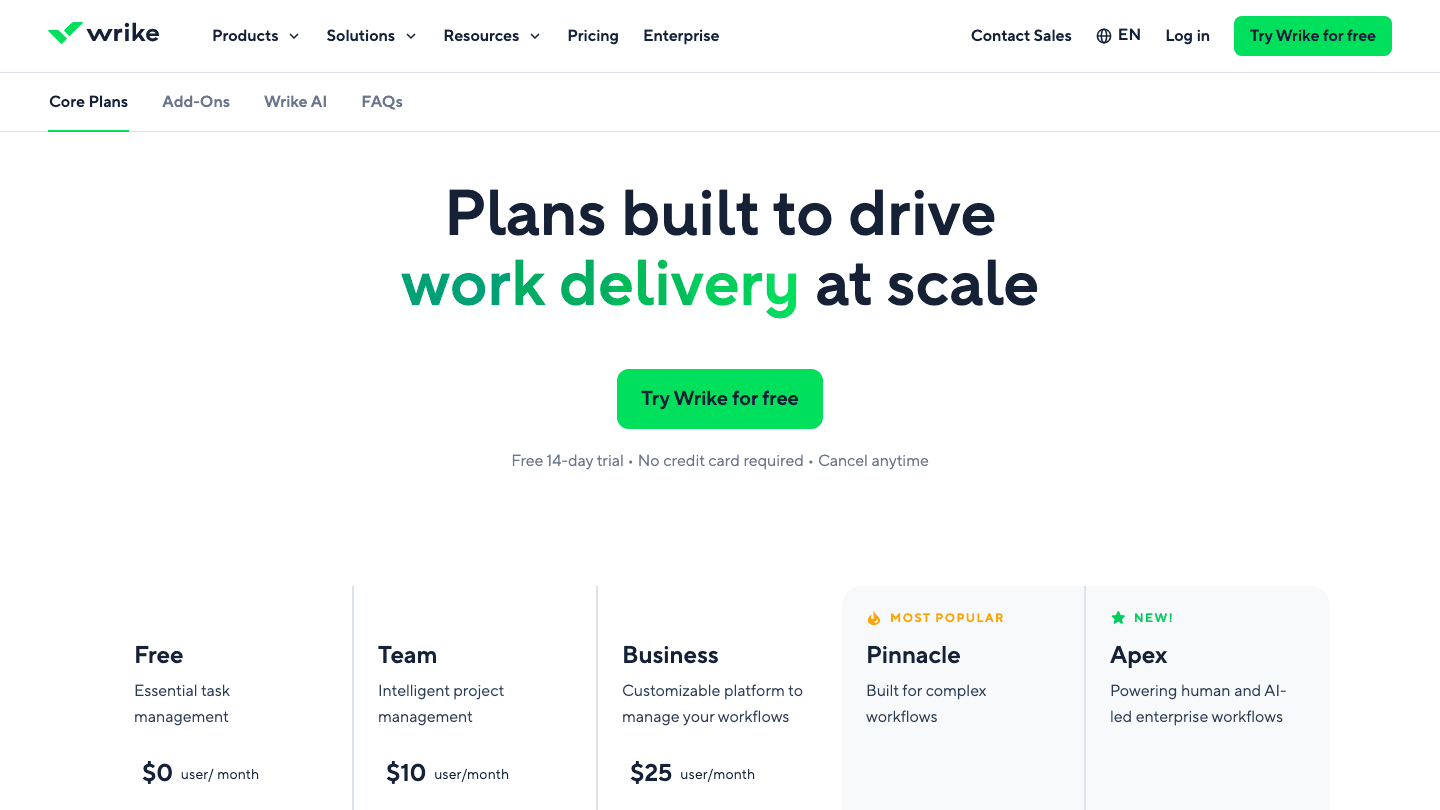
Free: $0/user/month (unlimited users)
Team: $10/user/month (2-15 users)
Business: $25/user/month (5-200 users)
Pinnacle: Contact sales (no user cap listed)
Apex: Contact sales (enterprise AI-led workflows)
All paid plans are billed annually. Monthly billing is available at higher rates. Wrike offers a 14-day free trial of paid plans with no credit card required.
Free Plan ($0/user/month)
Wrike's free plan is more capable than many competitors' free tiers. It includes unlimited users, web and mobile apps, basic project and task management, board view (Kanban), and table view. There are no task count limits, which is unusual at this price point.
What's missing: Gantt charts, time tracking, automations, reporting dashboards, and integrations beyond basic connections. Guest access is limited. The free plan works well for solo users or very small teams with simple project needs, but it runs into walls quickly for any team doing real coordination work. Most teams trying Wrike for the first time will need to be on a paid plan within a few weeks to use the features that make Wrike worth choosing.
Best for: Very small teams or solo users exploring Wrike before committing to a paid tier
Team Plan ($10/user/month)
The Team plan is where Wrike becomes a real project management tool. It adds interactive Gantt charts for timeline planning, shareable dashboards, and AI Essentials, which include an onboarding assistant, AI content editing, comment summarization, and inbox prioritization. The user cap is 2-15 people, which makes it explicitly a small team product.
At $10/user/month billed annually, a five-person team pays $50/month or $600/year. A fifteen-person team pays $150/month or $1,800/year. That's not trivial, but the Gantt charts and AI features represent meaningful value for teams that need visual project timelines and some automation support. For teams doing real project work with deadlines and dependencies, this tier delivers what the free plan promises but can't provide.
Best for: Small teams of 2-15 who need Gantt charts, basic AI assistance, and collaborative dashboards
Business Plan ($25/user/month)
The Business plan is Wrike's most feature-complete publicly priced tier. It adds custom fields and workflows, custom item types, advanced reporting, folder structure management, approval workflows, resource management and workload charts, time tracking, and access to Wrike's AI Elite starter features for workflow automation with AI agents.
At $25/user/month, costs escalate fast: a 20-person team is $500/month or $6,000/year. The user range is 5-200, which makes this squarely a mid-market team offering. The Business plan is where Wrike's differentiation from simpler tools like Asana or Trello becomes clearest: the custom workflows, approval chains, and resource management features are harder to find at this price point elsewhere. Compare it to Asana's Business tier or ClickUp's Business plan if you're evaluating across platforms.
Best for: Teams of 5-200 that need custom workflows, approvals, resource management, and detailed reporting
Pinnacle Plan (Contact Sales)
Pinnacle is designed for organizations with complex operational workflows. It includes everything in Business, plus three times more AI Elite actions per month, advanced resource and capacity planning, budgeting and financial tracking, and advanced business intelligence and reporting. The "most popular" label on Wrike's pricing page suggests many enterprise customers land here.
No public price is available. Contact sales for a quote. Budget for significantly more than the Business plan per seat, with pricing that varies based on seat count and contract terms. At this tier, the conversation is less about per-seat cost and more about total contract value and what's negotiable.
Best for: Large organizations running complex, multi-team workflows with budget and capacity planning needs
Apex Plan (Contact Sales)
Apex is Wrike's newest tier, positioned for enterprises running human-and-AI-led workflows at scale. It includes ten times more AI Elite actions than Business, unlimited Whiteboards, and access to Wrike Integrate and Wrike Sync for connecting external systems. This tier exists for organizations where AI agents are embedded into core operations, not just available as tools.
Contact sales for pricing. Apex is an enterprise-only product at this stage, and the per-seat cost will reflect that.
Best for: Enterprise organizations investing in AI-driven workflow automation at scale
What to Watch for in Wrike's Pricing
User caps on lower tiers: Team is limited to 15 users. If you grow past that, you're on Business at $25/seat.
Add-ons: Wrike offers paid add-ons for advanced capabilities like marketing proofing, performance analytics, and resource management at certain tiers. These cost extra beyond the base plan.
Annual commitment: Published prices assume annual billing. Monthly billing is higher. Factor in the commitment before signing a contract.
Storage limits: Vary by plan. Free and Team plans have more limited storage than Business and above.
How Wrike Compares to Alternatives
Wrike's pricing is similar to Asana and ClickUp at the team and business tiers. It's significantly more expensive than simpler tools like Trello or Basecamp, and more affordable at the enterprise level than some larger platforms. The differentiation is in the workflow customization and resource management features, which are more developed in Wrike than in most competitors at the same price.
For individual contributors or small personal teams inside larger organizations, Wrike's team-centric pricing doesn't address the personal scheduling layer. Lifestack fills that gap: it reads your energy from wearables and auto-schedules your tasks into your real high-output windows, making it a natural personal productivity companion to team tools like Wrike. Individual plans start at $7/month ($50/year with a 7-day trial). It integrates with Google Calendar and Outlook, so it works alongside whatever your team is using for project management. For a broader look at team scheduling options, see our calendar management tools comparison and the AI project management tools overview.
Frequently Asked Questions
Does Wrike have a free plan?
Yes. Wrike's free plan supports unlimited users and includes basic project and task management, Kanban board view, and table view. It doesn't include Gantt charts, automations, time tracking, or advanced reporting. It's functional for simple personal task management or very small teams with basic needs, but most teams doing real project work will need a paid plan.
How much does Wrike cost per month?
Wrike's published pricing starts at $10/user/month for the Team plan and $25/user/month for the Business plan, both billed annually. The Pinnacle and Apex plans require contacting sales for pricing. A five-person team on the Team plan would pay $50/month ($600/year). A ten-person team on Business would pay $250/month ($3,000/year).
Is Wrike worth the price?
For teams that need Gantt charts, custom workflows, resource management, and approval processes, Wrike delivers strong value at the Business tier compared to alternatives. For teams with simpler needs, the free tier or Team plan may be enough, but simpler tools like workflow management software with lower price points may cover the same ground. The value judgment depends heavily on whether you're using the advanced features that justify the Business-tier cost.
What is the difference between Wrike's Team and Business plans?
The Team plan covers Gantt charts, AI Essentials, shareable dashboards, and basic collaboration for up to 15 users. The Business plan adds custom fields and workflows, custom item types, approval workflows, resource and workload management, time tracking, advanced reporting, and AI Elite starter features for workflow automation. The Business plan is substantially more capable but at two and a half times the per-seat cost.
Does Wrike integrate with other tools?
Yes. Wrike integrates with common business tools including Google Workspace, Microsoft 365, Salesforce, Slack, and many others. The depth of integration access varies by plan, with the Business and Pinnacle tiers offering more extensive integration capabilities. Native calendar sync works with Google Calendar and Outlook, and Wrike Integrate (available at the Apex tier) enables custom integration with external systems. For AI task management tools that complement Wrike's team scheduling, Lifestack is one of the stronger individual-level options.
Wrike is a project management platform built for teams that need more than a basic task list. It handles Gantt charts, custom workflows, resource management, approvals, and AI-driven automation, and its pricing reflects that range. Understanding which plan actually covers what your team needs, and what costs appear only after you sign up, matters a lot when evaluating it against alternatives.
Wrike's pricing has five tiers: Free, Team, Business, Pinnacle, and the newly added Apex. The first three have published prices. The top two require contacting sales. Here's what each tier includes, who it's designed for, and what to watch out for before committing.
Key Takeaways
Wrike's free plan is genuinely usable for small teams with basic task management needs, with no artificial limits on tasks or projects.
The Team plan at $10/user/month is the sweet spot for most small teams: it adds Gantt charts, AI features, and shareable dashboards without the jump to enterprise pricing.
The Business plan at $25/user/month is where Wrike's full customization and workflow automation lives, but the cost scales fast with headcount.
Wrike Pricing Overview
Free: $0/user/month (unlimited users)
Team: $10/user/month (2-15 users)
Business: $25/user/month (5-200 users)
Pinnacle: Contact sales (no user cap listed)
Apex: Contact sales (enterprise AI-led workflows)
All paid plans are billed annually. Monthly billing is available at higher rates. Wrike offers a 14-day free trial of paid plans with no credit card required.
Free Plan ($0/user/month)
Wrike's free plan is more capable than many competitors' free tiers. It includes unlimited users, web and mobile apps, basic project and task management, board view (Kanban), and table view. There are no task count limits, which is unusual at this price point.
What's missing: Gantt charts, time tracking, automations, reporting dashboards, and integrations beyond basic connections. Guest access is limited. The free plan works well for solo users or very small teams with simple project needs, but it runs into walls quickly for any team doing real coordination work. Most teams trying Wrike for the first time will need to be on a paid plan within a few weeks to use the features that make Wrike worth choosing.
Best for: Very small teams or solo users exploring Wrike before committing to a paid tier
Team Plan ($10/user/month)
The Team plan is where Wrike becomes a real project management tool. It adds interactive Gantt charts for timeline planning, shareable dashboards, and AI Essentials, which include an onboarding assistant, AI content editing, comment summarization, and inbox prioritization. The user cap is 2-15 people, which makes it explicitly a small team product.
At $10/user/month billed annually, a five-person team pays $50/month or $600/year. A fifteen-person team pays $150/month or $1,800/year. That's not trivial, but the Gantt charts and AI features represent meaningful value for teams that need visual project timelines and some automation support. For teams doing real project work with deadlines and dependencies, this tier delivers what the free plan promises but can't provide.
Best for: Small teams of 2-15 who need Gantt charts, basic AI assistance, and collaborative dashboards
Business Plan ($25/user/month)
The Business plan is Wrike's most feature-complete publicly priced tier. It adds custom fields and workflows, custom item types, advanced reporting, folder structure management, approval workflows, resource management and workload charts, time tracking, and access to Wrike's AI Elite starter features for workflow automation with AI agents.
At $25/user/month, costs escalate fast: a 20-person team is $500/month or $6,000/year. The user range is 5-200, which makes this squarely a mid-market team offering. The Business plan is where Wrike's differentiation from simpler tools like Asana or Trello becomes clearest: the custom workflows, approval chains, and resource management features are harder to find at this price point elsewhere. Compare it to Asana's Business tier or ClickUp's Business plan if you're evaluating across platforms.
Best for: Teams of 5-200 that need custom workflows, approvals, resource management, and detailed reporting
Pinnacle Plan (Contact Sales)
Pinnacle is designed for organizations with complex operational workflows. It includes everything in Business, plus three times more AI Elite actions per month, advanced resource and capacity planning, budgeting and financial tracking, and advanced business intelligence and reporting. The "most popular" label on Wrike's pricing page suggests many enterprise customers land here.
No public price is available. Contact sales for a quote. Budget for significantly more than the Business plan per seat, with pricing that varies based on seat count and contract terms. At this tier, the conversation is less about per-seat cost and more about total contract value and what's negotiable.
Best for: Large organizations running complex, multi-team workflows with budget and capacity planning needs
Apex Plan (Contact Sales)
Apex is Wrike's newest tier, positioned for enterprises running human-and-AI-led workflows at scale. It includes ten times more AI Elite actions than Business, unlimited Whiteboards, and access to Wrike Integrate and Wrike Sync for connecting external systems. This tier exists for organizations where AI agents are embedded into core operations, not just available as tools.
Contact sales for pricing. Apex is an enterprise-only product at this stage, and the per-seat cost will reflect that.
Best for: Enterprise organizations investing in AI-driven workflow automation at scale
What to Watch for in Wrike's Pricing
User caps on lower tiers: Team is limited to 15 users. If you grow past that, you're on Business at $25/seat.
Add-ons: Wrike offers paid add-ons for advanced capabilities like marketing proofing, performance analytics, and resource management at certain tiers. These cost extra beyond the base plan.
Annual commitment: Published prices assume annual billing. Monthly billing is higher. Factor in the commitment before signing a contract.
Storage limits: Vary by plan. Free and Team plans have more limited storage than Business and above.
How Wrike Compares to Alternatives
Wrike's pricing is similar to Asana and ClickUp at the team and business tiers. It's significantly more expensive than simpler tools like Trello or Basecamp, and more affordable at the enterprise level than some larger platforms. The differentiation is in the workflow customization and resource management features, which are more developed in Wrike than in most competitors at the same price.
For individual contributors or small personal teams inside larger organizations, Wrike's team-centric pricing doesn't address the personal scheduling layer. Lifestack fills that gap: it reads your energy from wearables and auto-schedules your tasks into your real high-output windows, making it a natural personal productivity companion to team tools like Wrike. Individual plans start at $7/month ($50/year with a 7-day trial). It integrates with Google Calendar and Outlook, so it works alongside whatever your team is using for project management. For a broader look at team scheduling options, see our calendar management tools comparison and the AI project management tools overview.
Frequently Asked Questions
Does Wrike have a free plan?
Yes. Wrike's free plan supports unlimited users and includes basic project and task management, Kanban board view, and table view. It doesn't include Gantt charts, automations, time tracking, or advanced reporting. It's functional for simple personal task management or very small teams with basic needs, but most teams doing real project work will need a paid plan.
How much does Wrike cost per month?
Wrike's published pricing starts at $10/user/month for the Team plan and $25/user/month for the Business plan, both billed annually. The Pinnacle and Apex plans require contacting sales for pricing. A five-person team on the Team plan would pay $50/month ($600/year). A ten-person team on Business would pay $250/month ($3,000/year).
Is Wrike worth the price?
For teams that need Gantt charts, custom workflows, resource management, and approval processes, Wrike delivers strong value at the Business tier compared to alternatives. For teams with simpler needs, the free tier or Team plan may be enough, but simpler tools like workflow management software with lower price points may cover the same ground. The value judgment depends heavily on whether you're using the advanced features that justify the Business-tier cost.
What is the difference between Wrike's Team and Business plans?
The Team plan covers Gantt charts, AI Essentials, shareable dashboards, and basic collaboration for up to 15 users. The Business plan adds custom fields and workflows, custom item types, approval workflows, resource and workload management, time tracking, advanced reporting, and AI Elite starter features for workflow automation. The Business plan is substantially more capable but at two and a half times the per-seat cost.
Does Wrike integrate with other tools?
Yes. Wrike integrates with common business tools including Google Workspace, Microsoft 365, Salesforce, Slack, and many others. The depth of integration access varies by plan, with the Business and Pinnacle tiers offering more extensive integration capabilities. Native calendar sync works with Google Calendar and Outlook, and Wrike Integrate (available at the Apex tier) enables custom integration with external systems. For AI task management tools that complement Wrike's team scheduling, Lifestack is one of the stronger individual-level options.



FOLLOW ON
FOLLOW ON
FOLLOW ON


Copyright 2026 © Lifestack. All rights reserved
Copyright 2026 © Lifestack. All rights reserved

