
App
Akiflow vs Sunsama: Which Planner Wins in 2026?
Akiflow vs Sunsama: Which Planner Wins in 2026?

Both Akiflow and Sunsama promise to fix your chaotic workday. Both pull tasks and calendars into a single view. Both have devoted users who swear by them. And both cost more than most people expect to pay for a planner.
The difference isn't in what they do at a surface level. It's in how they think about your day. Akiflow is a power tool built for speed: rapid task capture, keyboard shortcuts, aggressive integrations. Sunsama takes a slower, more intentional approach, asking you to plan deliberately at the start of each day and reflect at the end.
Neither is universally better. But one of them is almost certainly better for you, based on how you actually work. This breakdown covers both apps in detail, including current pricing, so you can make the call without testing both yourself.
Key Takeaways
Akiflow is built for high-volume task managers who want speed, integrations, and AI scheduling
Sunsama is built for deliberate daily planning and intentional shutdown routines, not raw throughput
Akiflow costs roughly $19/month (annual), Sunsama costs $17/month (annual); both are at the premium end of the market
Quick Verdict
Akiflow: Best for power users managing large task lists across multiple tools who want AI-assisted scheduling and deep integrations
Sunsama: Best for professionals who want to slow down, plan intentionally, and avoid working past their planned hours
Akiflow: Overview

Akiflow positions itself as a single inbox for all your tasks and calendar events. You connect tools like Notion, Asana, Linear, Todoist, and Google Tasks, and Akiflow pulls everything into one place. The AI assistant (Aki) can help schedule tasks automatically based on your available calendar slots.
The keyboard-first design is where Akiflow earns its reputation. You can capture, schedule, and complete tasks almost entirely without touching your mouse. For people who live at their keyboard and manage hundreds of tasks across several systems, this feels like a significant upgrade over anything they've used before.
Mobile is available but clearly secondary. Akiflow is a desktop-first app, and the mobile experience reflects that. It works, but it doesn't have the same polish as the web version.
Pulls tasks from 30+ integrations into a unified inbox
Aki AI assistant schedules tasks into open calendar slots
Keyboard shortcut system for near-zero-click workflows
Time blocking built into the calendar view
Weekly planner and day view in one interface
What Works: Speed of capture, integration depth, the unified inbox model, and the AI scheduling are all genuinely good. If you're juggling tasks from four different project management tools, the consolidation alone pays for itself.
Limitations: The $34/month price tag for monthly billing is steep. There's no built-in reflection or shutdown ritual. If your problem is volume, Akiflow helps. If your problem is focus and intentionality, it doesn't directly address that.
Pricing: $19/month billed annually ($228/year), or $34/month billed monthly. 7-day free trial. See more on Akiflow's pricing breakdown or explore Akiflow alternatives.
Sunsama: Overview
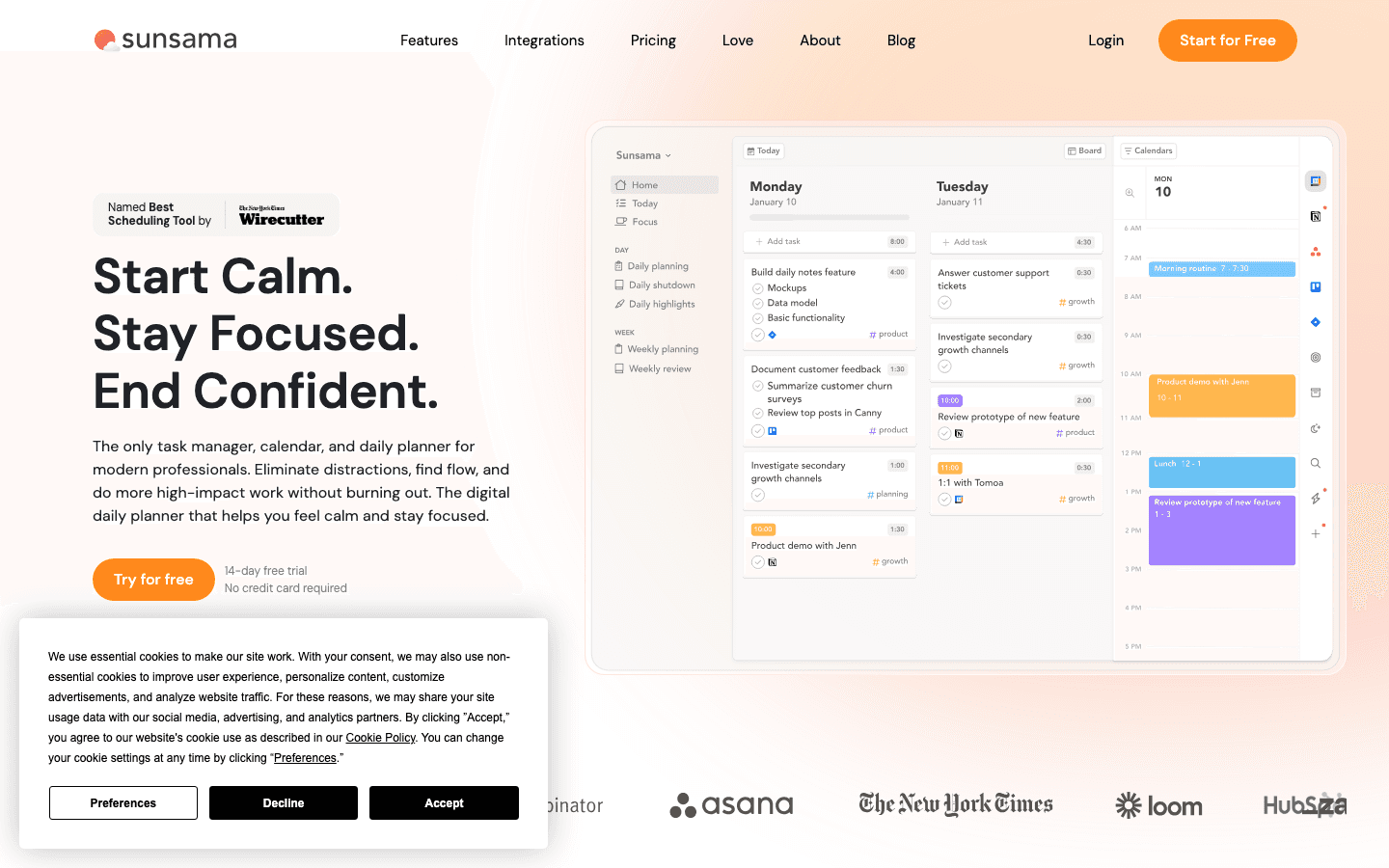
Sunsama's daily planning ritual is the product. Every morning, you sit down, import tasks from your connected tools, set a realistic daily goal in hours, and decide what you're actually doing today. Every evening, there's a shutdown workflow that closes the day and sets up tomorrow. The whole app is designed around this cadence.
That intentionality is either its core value or its biggest friction, depending on your work style. People who already want to slow down and plan deliberately love it. People who want to quickly dump tasks and get back to work find the daily ritual tedious.
The integrations are solid: Linear, Asana, Todoist, GitHub, Notion, and all major calendar systems. But Sunsama doesn't try to replace your project management tool. It's the daily layer on top of whatever system you already use.
Guided morning planning ritual with daily goal-setting
Evening shutdown workflow with time tracking per task
Pulls from integrations but keeps them as-is (tasks stay in source systems)
Weekly planning view alongside the daily planner
Timeboxing with time estimates per task
What Works: The planning ritual genuinely helps people who otherwise skip planning and regret it. The shutdown feature builds a habit of actually finishing work rather than trailing off. The 14-day free trial (no credit card required) is a standout in a market where most apps require payment details upfront.
Limitations: No AI scheduling. The ritual is non-negotiable. If you want to use Sunsama on a deadline morning where you have no time to plan, it fights you. Mobile app is minimal.
Pricing: $17/month billed annually ($204/year), or $22/month billed monthly. 14-day free trial, no credit card required. See the full Sunsama pricing breakdown.
Head-to-Head Comparison
Task capture speed: Akiflow wins. Keyboard shortcuts and a universal inbox make it faster for high-volume users.
Planning ritual: Sunsama wins. Its morning and evening workflows are purpose-built for this.
AI scheduling: Akiflow. Sunsama has no AI scheduling.
Integrations: Roughly tied. Both support 15-30 tools. Akiflow pulls tasks into its own system; Sunsama keeps them in the source.
Pricing: Sunsama is slightly cheaper annually ($17/mo vs $19/mo). Monthly billing favors Sunsama significantly ($22 vs $34).
Mobile: Both are weak. Akiflow has more features on mobile; Sunsama has a cleaner but minimal app.
Learning curve: Sunsama is gentler. Akiflow's power-user feature set takes real time to learn.
Free trial: Sunsama's 14-day no-CC trial is more generous than Akiflow's 7-day trial.
Which Should You Choose?
Choose Akiflow if you manage tasks across four or more tools, live at your keyboard, and want AI to handle the scheduling math. The power-user feature set pays off when you have the volume to justify it.
Choose Sunsama if you want to build a planning ritual, you're trying to work fewer but more intentional hours, and you don't need AI to do the scheduling for you. The shutdown workflow alone has changed how a lot of people think about ending their workday.
If you're not sure, start with Sunsama's 14-day free trial since you don't need a credit card. You'll know quickly whether the daily ritual feels valuable or feels like extra friction.
Neither app accounts for your energy. They both assume you have the same capacity at 9am as you do at 3pm, which isn't true for most people. If you want your daily plan to adapt to when you actually have mental energy, a different tool handles that more directly.
One More Option Worth Knowing
If the main thing missing from both Akiflow and Sunsama is awareness of your energy levels, Lifestack is worth a look. It reads your sleep and recovery data, then schedules tasks into the windows when you actually have capacity. The idea is to stop planning against an idealized version of your day and start planning against what your body is actually ready to handle. You can read more in the Lifestack overview and see why energy-based planning outperforms time blocking for a lot of people.
Frequently Asked Questions
Is Akiflow or Sunsama better for ADHD?
Sunsama's structured daily ritual can be helpful for ADHD because it creates external scaffolding. Akiflow's speed and integrations also appeal to ADHD users who need to capture tasks fast. The right choice depends on whether your struggle is focus (Sunsama) or task volume and capture (Akiflow). For more on ADHD-specific planners, see the best daily planners for ADHD.
Can I use Akiflow for free?
There's a 7-day free trial, but no permanent free tier. After the trial, you need a paid plan starting at $19/month (annual billing).
Does Sunsama have an AI scheduling feature?
No. Sunsama doesn't include AI scheduling. You manually pull tasks into your daily plan and arrange them yourself. This is intentional. The product is designed around human decision-making at planning time, not automation.
Which is better for teams: Akiflow or Sunsama?
Both are designed primarily for individual planners, not team project management. Sunsama has a team pricing option ($25/seat/month), but it doesn't include shared project views or team-level features. If you need actual team task management, you're better served by a dedicated PM tool with Sunsama or Akiflow layered on top.
How does Akiflow compare to Motion?
Both Akiflow and Motion do AI scheduling, but Motion is more aggressive about it. Motion automatically reschedules everything when something moves. Akiflow's Aki assistant is more suggestion-based. If you want full autopilot, Motion goes further. See a deeper comparison on the best AI planner apps for more options.
What's the best alternative if neither fits?
It depends on why they don't fit. If you want better energy awareness, look at energy-based schedulers. If you want something cheaper, there are strong free options in the daily planner app roundup. If you want stronger AI, check the best scheduling apps list.
Both Akiflow and Sunsama promise to fix your chaotic workday. Both pull tasks and calendars into a single view. Both have devoted users who swear by them. And both cost more than most people expect to pay for a planner.
The difference isn't in what they do at a surface level. It's in how they think about your day. Akiflow is a power tool built for speed: rapid task capture, keyboard shortcuts, aggressive integrations. Sunsama takes a slower, more intentional approach, asking you to plan deliberately at the start of each day and reflect at the end.
Neither is universally better. But one of them is almost certainly better for you, based on how you actually work. This breakdown covers both apps in detail, including current pricing, so you can make the call without testing both yourself.
Key Takeaways
Akiflow is built for high-volume task managers who want speed, integrations, and AI scheduling
Sunsama is built for deliberate daily planning and intentional shutdown routines, not raw throughput
Akiflow costs roughly $19/month (annual), Sunsama costs $17/month (annual); both are at the premium end of the market
Quick Verdict
Akiflow: Best for power users managing large task lists across multiple tools who want AI-assisted scheduling and deep integrations
Sunsama: Best for professionals who want to slow down, plan intentionally, and avoid working past their planned hours
Akiflow: Overview
Akiflow positions itself as a single inbox for all your tasks and calendar events. You connect tools like Notion, Asana, Linear, Todoist, and Google Tasks, and Akiflow pulls everything into one place. The AI assistant (Aki) can help schedule tasks automatically based on your available calendar slots.
The keyboard-first design is where Akiflow earns its reputation. You can capture, schedule, and complete tasks almost entirely without touching your mouse. For people who live at their keyboard and manage hundreds of tasks across several systems, this feels like a significant upgrade over anything they've used before.
Mobile is available but clearly secondary. Akiflow is a desktop-first app, and the mobile experience reflects that. It works, but it doesn't have the same polish as the web version.
Pulls tasks from 30+ integrations into a unified inbox
Aki AI assistant schedules tasks into open calendar slots
Keyboard shortcut system for near-zero-click workflows
Time blocking built into the calendar view
Weekly planner and day view in one interface
What Works: Speed of capture, integration depth, the unified inbox model, and the AI scheduling are all genuinely good. If you're juggling tasks from four different project management tools, the consolidation alone pays for itself.
Limitations: The $34/month price tag for monthly billing is steep. There's no built-in reflection or shutdown ritual. If your problem is volume, Akiflow helps. If your problem is focus and intentionality, it doesn't directly address that.
Pricing: $19/month billed annually ($228/year), or $34/month billed monthly. 7-day free trial. See more on Akiflow's pricing breakdown or explore Akiflow alternatives.
Sunsama: Overview
Sunsama's daily planning ritual is the product. Every morning, you sit down, import tasks from your connected tools, set a realistic daily goal in hours, and decide what you're actually doing today. Every evening, there's a shutdown workflow that closes the day and sets up tomorrow. The whole app is designed around this cadence.
That intentionality is either its core value or its biggest friction, depending on your work style. People who already want to slow down and plan deliberately love it. People who want to quickly dump tasks and get back to work find the daily ritual tedious.
The integrations are solid: Linear, Asana, Todoist, GitHub, Notion, and all major calendar systems. But Sunsama doesn't try to replace your project management tool. It's the daily layer on top of whatever system you already use.
Guided morning planning ritual with daily goal-setting
Evening shutdown workflow with time tracking per task
Pulls from integrations but keeps them as-is (tasks stay in source systems)
Weekly planning view alongside the daily planner
Timeboxing with time estimates per task
What Works: The planning ritual genuinely helps people who otherwise skip planning and regret it. The shutdown feature builds a habit of actually finishing work rather than trailing off. The 14-day free trial (no credit card required) is a standout in a market where most apps require payment details upfront.
Limitations: No AI scheduling. The ritual is non-negotiable. If you want to use Sunsama on a deadline morning where you have no time to plan, it fights you. Mobile app is minimal.
Pricing: $17/month billed annually ($204/year), or $22/month billed monthly. 14-day free trial, no credit card required. See the full Sunsama pricing breakdown.
Head-to-Head Comparison
Task capture speed: Akiflow wins. Keyboard shortcuts and a universal inbox make it faster for high-volume users.
Planning ritual: Sunsama wins. Its morning and evening workflows are purpose-built for this.
AI scheduling: Akiflow. Sunsama has no AI scheduling.
Integrations: Roughly tied. Both support 15-30 tools. Akiflow pulls tasks into its own system; Sunsama keeps them in the source.
Pricing: Sunsama is slightly cheaper annually ($17/mo vs $19/mo). Monthly billing favors Sunsama significantly ($22 vs $34).
Mobile: Both are weak. Akiflow has more features on mobile; Sunsama has a cleaner but minimal app.
Learning curve: Sunsama is gentler. Akiflow's power-user feature set takes real time to learn.
Free trial: Sunsama's 14-day no-CC trial is more generous than Akiflow's 7-day trial.
Which Should You Choose?
Choose Akiflow if you manage tasks across four or more tools, live at your keyboard, and want AI to handle the scheduling math. The power-user feature set pays off when you have the volume to justify it.
Choose Sunsama if you want to build a planning ritual, you're trying to work fewer but more intentional hours, and you don't need AI to do the scheduling for you. The shutdown workflow alone has changed how a lot of people think about ending their workday.
If you're not sure, start with Sunsama's 14-day free trial since you don't need a credit card. You'll know quickly whether the daily ritual feels valuable or feels like extra friction.
Neither app accounts for your energy. They both assume you have the same capacity at 9am as you do at 3pm, which isn't true for most people. If you want your daily plan to adapt to when you actually have mental energy, a different tool handles that more directly.
One More Option Worth Knowing
If the main thing missing from both Akiflow and Sunsama is awareness of your energy levels, Lifestack is worth a look. It reads your sleep and recovery data, then schedules tasks into the windows when you actually have capacity. The idea is to stop planning against an idealized version of your day and start planning against what your body is actually ready to handle. You can read more in the Lifestack overview and see why energy-based planning outperforms time blocking for a lot of people.
Frequently Asked Questions
Is Akiflow or Sunsama better for ADHD?
Sunsama's structured daily ritual can be helpful for ADHD because it creates external scaffolding. Akiflow's speed and integrations also appeal to ADHD users who need to capture tasks fast. The right choice depends on whether your struggle is focus (Sunsama) or task volume and capture (Akiflow). For more on ADHD-specific planners, see the best daily planners for ADHD.
Can I use Akiflow for free?
There's a 7-day free trial, but no permanent free tier. After the trial, you need a paid plan starting at $19/month (annual billing).
Does Sunsama have an AI scheduling feature?
No. Sunsama doesn't include AI scheduling. You manually pull tasks into your daily plan and arrange them yourself. This is intentional. The product is designed around human decision-making at planning time, not automation.
Which is better for teams: Akiflow or Sunsama?
Both are designed primarily for individual planners, not team project management. Sunsama has a team pricing option ($25/seat/month), but it doesn't include shared project views or team-level features. If you need actual team task management, you're better served by a dedicated PM tool with Sunsama or Akiflow layered on top.
How does Akiflow compare to Motion?
Both Akiflow and Motion do AI scheduling, but Motion is more aggressive about it. Motion automatically reschedules everything when something moves. Akiflow's Aki assistant is more suggestion-based. If you want full autopilot, Motion goes further. See a deeper comparison on the best AI planner apps for more options.
What's the best alternative if neither fits?
It depends on why they don't fit. If you want better energy awareness, look at energy-based schedulers. If you want something cheaper, there are strong free options in the daily planner app roundup. If you want stronger AI, check the best scheduling apps list.



FOLLOW ON
FOLLOW ON
FOLLOW ON


Copyright 2026 © Lifestack. All rights reserved
Copyright 2026 © Lifestack. All rights reserved

