
App
Best Google Tasks Desktop Apps in 2026: 5 Ranked
Best Google Tasks Desktop Apps in 2026: 5 Ranked

There is no official Google Tasks desktop app. Google Tasks lives inside Gmail, Google Calendar, and the web at tasks.google.com. That is by design: Google built Tasks as a companion feature, not a standalone productivity tool.
That leaves a gap. If you spend most of your day on a desktop and want something better than a sidebar panel, you have two options. You can use an app that wraps Google Tasks in a better interface (keeping your tasks in Google's ecosystem), or you can use an app that replaces Google Tasks entirely with a stronger desktop experience.
We tested five of the best Google Tasks desktop apps available in 2026. Some sync directly with Google Tasks. Others offer a better overall desktop workflow that makes the Google Tasks sidebar feel redundant. All five are worth knowing about depending on how you work. If you are also weighing Google Tasks vs. Google Keep, that comparison is a useful starting point before diving into third-party apps.
Key Takeaways
There is no official Google Tasks desktop app; the best options are web apps and third-party tools that sync with Google Tasks or replace it
Tasksboard gives you a full-screen Google Tasks experience on desktop without leaving the Google ecosystem
Lifestack provides a richer desktop calendar and task experience, adding energy-aware AI scheduling that Google Tasks cannot do
Quick Guide: Google Tasks Desktop Apps at a Glance
Lifestack - Best overall desktop experience with AI scheduling and energy awareness, $9.99/month
Tasksboard - Best Google Tasks desktop app that keeps data in Google Tasks, free tier available
TickTick - Best native desktop app with the widest feature set, $49.99/year
Motion - Best AI-powered desktop scheduler for heavy workloads, $19/month
Todoist - Best simple desktop task manager with a solid free tier, free
How We Evaluated
Desktop quality: Is there a native desktop app or a strong web experience?
Google Tasks sync: Does it sync directly with Google Tasks?
Scheduling: Does it help you plan when to do tasks, not just what to do?
Pricing: Is there a free tier, and what does paid unlock?
1. Lifestack - Best Desktop App for AI-Scheduled Task Management
Google Tasks plus an AI that knows when you do your best work.
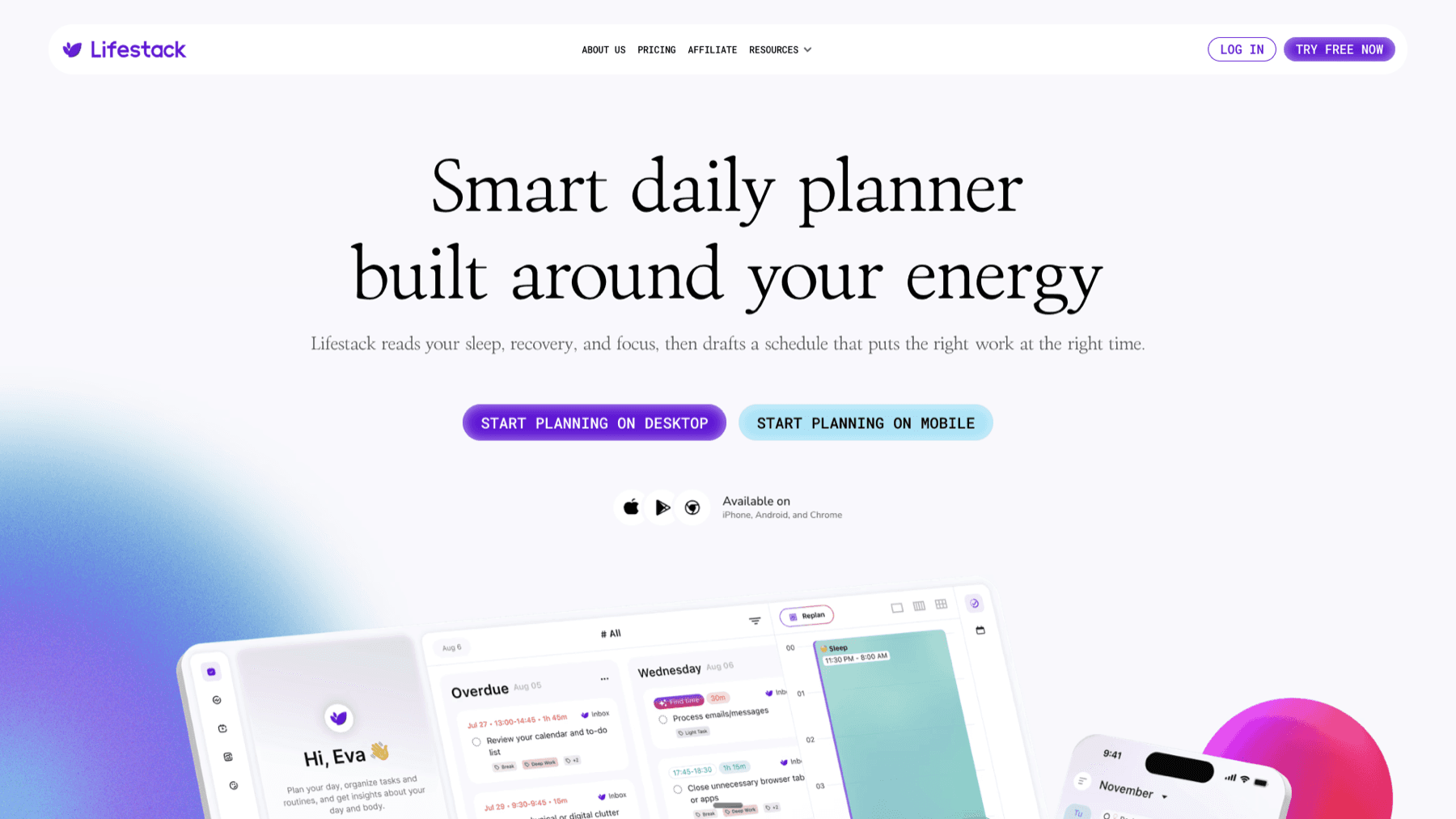
Lifestack is the best desktop experience on this list for anyone who wants more than a task list. It is a calendar-first AI planner that tracks your energy patterns and schedules tasks into the right time blocks. You do not just see what you need to do; you see when to do it, matched to the times of day when you are actually capable of focused work.
On desktop, Lifestack runs as a web app that integrates with Google Calendar. Tasks you add are scheduled automatically onto your calendar, and when meetings shift, the AI reschedules around them. If you have been searching for a Google Tasks desktop replacement that handles the planning step, this is it. For people with ADHD-style task challenges, the energy-aware scheduling is particularly useful. It is also covered in depth in the guide to task management apps for inconsistent energy levels.
AI scheduling matches tasks to energy peaks throughout the day
Google Calendar integration with two-way sync
Web app works on any desktop browser; Chrome extension for quick capture
iOS and Android apps for mobile continuity
What Works
Energy-aware scheduling is a genuine differentiator vs every other app here
Desktop web app is fast and calendar-focused
Automatic rescheduling around meetings saves real planning time
Limitations
No free tier; $9.99/month is the starting price
Does not offer a direct Google Tasks data sync
Pricing: $9.99/month or $49.99/year (7-day free trial on annual plan)
Best for: Desktop users who want their Google Calendar and task list managed by an AI that understands their energy
2. Tasksboard - Best Google Tasks Desktop Interface
The simplest way to give Google Tasks a full-screen desktop upgrade.

Tasksboard is the most direct answer to "I want a Google Tasks desktop app." It is a web app that connects to your Google account, pulls your existing task lists, and displays them as a full-screen kanban board. Everything syncs in real time. No data migration, no new system to learn. You sign in with Google and your tasks are already there.
The kanban view makes it easy to work across columns, label tasks by project, and share lists with teammates. For people who live in Google Workspace, Tasksboard is the logical first upgrade. It is also the most affordable option here, with a free tier that covers most individual users. See how it compares to other options in our full Google Tasks apps roundup.
Full-screen kanban board backed by real Google Tasks data
Real-time sync with Google Tasks, Gmail, and Google Calendar
Chrome extension available for quick task capture
Team sharing and collaboration features
Export to Google Sheets
What Works
No data migration needed; connects to existing Google Tasks
Free tier is generous for individual use
Setup takes under two minutes
Limitations
No AI scheduling or energy awareness
Web-only; no native Mac or Windows desktop app
Pricing: Free; Pro $4.79/month (annual); Team $4.99/user/month (annual)
Best for: Google Workspace users who want a kanban board on desktop without leaving the Google ecosystem
3. TickTick - Best Native Desktop App with Full Feature Set
A native Mac and Windows app with more features than most people will ever use.

TickTick has native desktop apps for Mac and Windows, which puts it ahead of most web-only tools when it comes to feel and performance on a desktop. The free tier covers most users, and Premium at $49.99/year unlocks calendar views, AI features, and significantly higher task limits. For a detailed look, see the TickTick review.
TickTick does not natively sync with Google Tasks, but it covers so much ground (kanban, calendar, Pomodoro, habit tracking) that many users migrate away from Google Tasks entirely rather than trying to maintain two systems. If you currently use Google Tasks and are ready for more, TickTick is the most feature-complete upgrade path.
Native Mac and Windows desktop apps alongside iOS and Android
Kanban, list, calendar, and timeline views
Built-in Pomodoro timer and habit tracker
Natural language task entry with smart due date parsing
AI features on Premium tier
What Works
Native desktop app is polished and fast
Best feature-to-price ratio in this list
Works great for ADHD users who need multiple views
Limitations
No direct Google Tasks sync
No energy-aware scheduling
Pricing: Free; Premium $49.99/year
Best for: Users who want the best native desktop app and do not mind migrating away from Google Tasks
4. Motion - Best AI Desktop Scheduler for Packed Calendars
An AI that fills your calendar so you do not have to.

Motion is a full AI scheduling platform with native desktop apps for Mac and Windows. You add tasks with deadlines and time estimates, and Motion fills your calendar automatically. When meetings land, it reshuffles. The result is a calendar that always reflects what you need to do next. See the Motion calendar review for the full breakdown.
The tradeoff is cost: $19/month per seat is steep compared to Tasksboard or TickTick. Motion also does not sync with Google Tasks natively, so you would manage tasks inside Motion rather than your existing Google Tasks lists. That said, for desktop users with complex project loads and back-to-back meetings, Motion does something none of the others here can match.
AI fills calendar automatically based on task priority and deadlines
Native Mac and Windows desktop apps
Auto-rescheduling when meetings shift
Projects, docs, and meeting notes in one workspace
What Works
Best pure auto-scheduling engine on desktop
Native desktop app is polished
Handles complex project hierarchies well
Limitations
Most expensive option on this list
No energy-aware scheduling
No native Google Tasks sync
Pricing: Pro AI $19/seat/month; Business AI $29/seat/month (33% off with annual billing)
Best for: Desktop users with heavy project loads and dense calendars who want AI to handle scheduling entirely
5. Todoist - Best Free Desktop Task Manager
The classic task manager, available on every platform you use.

Todoist has native desktop apps for Mac and Windows alongside solid web and mobile apps. The free tier is the most useful of any app in this list, covering most individual needs without payment. The Pro plan at $5/month (annual) adds reminders, file uploads, and a productivity dashboard. For the full picture, see the Todoist review.
Todoist does not sync natively with Google Tasks, but its quick-capture experience on desktop is excellent. The natural language input lets you type things like "Call Sarah tomorrow at 3pm" and get a properly scheduled task. For users who want to compare options before committing, the free task management apps guide and the TickTick vs. Todoist comparison are both worth reading.
Native Mac and Windows apps alongside web and mobile
Natural language task entry with smart scheduling
Over 80 integrations including Slack, Google Calendar, and GitHub
Shared projects and task delegation for teams
What Works
Best free tier of any app in this list
Native desktop apps are fast and reliable
Great for teams who need shared task lists with no learning curve
Limitations
No energy-aware scheduling
No native Google Tasks sync
AI features do not place tasks on a calendar
Pricing: Free; Pro $5/month (annual) or $7/month; Business $8/month per user (annual)
Best for: Desktop users who want a reliable, free-to-start task manager with strong third-party integrations
Which Google Tasks Desktop App Should You Use?
You want to keep your tasks in Google Tasks and get a better desktop view: Tasksboard is the obvious pick. Two-minute setup, free tier, kanban board backed by real Google Tasks data.
You want AI scheduling and energy awareness on desktop: Lifestack is the only option here that schedules tasks based on when you have the energy to do them. It is built for the problem Google Tasks does not solve.
You want the best native desktop app with the most features: TickTick at $49.99/year includes kanban, calendar, Pomodoro, and habit tracking with polished Mac and Windows apps.
Your calendar is packed and deadlines are constant: Motion handles dense schedules better than any other tool here.
You need something free that works everywhere: Todoist's free tier is the most capable of any app in this category, and the native desktop app is reliable.
FAQ
Is there an official Google Tasks desktop app?
No. Google Tasks does not have an official standalone desktop app. You can access it at tasks.google.com, inside Gmail, or through Google Calendar. For a full desktop app experience, third-party tools like Tasksboard or TickTick are the best options.
Can I use Google Tasks on a Mac or Windows desktop?
Yes, via the web. You can open tasks.google.com in any browser on Mac or Windows. Some users also install it as a Progressive Web App (PWA) from Chrome to get a standalone window. Tasksboard adds a full-screen kanban interface on top of this same data.
What is the best app for Google Tasks on desktop?
Tasksboard is the best option if you want to stay in the Google ecosystem and get a proper desktop UI. For more advanced scheduling and AI features, Lifestack is the strongest option, though it does not natively sync Google Tasks data.
Does Tasksboard work as a desktop app?
Tasksboard is a web app, not a native desktop app. It runs in your browser and works best on desktop. You can install it as a PWA from Chrome to get a standalone window. It syncs with your Google Tasks data in real time.
What replaces Google Tasks for heavy desktop users?
TickTick and Lifestack both replace Google Tasks for heavy desktop users. TickTick offers native Mac and Windows apps with the widest feature set. Lifestack adds AI scheduling that places tasks on your calendar automatically based on your energy levels, which is a step further than Google Tasks was ever designed to go.
What is the best free Google Tasks desktop alternative?
Todoist and Tasksboard both have strong free tiers. Tasksboard is the better choice if you want to keep your existing Google Tasks data. Todoist is better if you want a full-featured task manager and do not mind starting fresh. See the free task management apps guide for a broader comparison.
There is no official Google Tasks desktop app. Google Tasks lives inside Gmail, Google Calendar, and the web at tasks.google.com. That is by design: Google built Tasks as a companion feature, not a standalone productivity tool.
That leaves a gap. If you spend most of your day on a desktop and want something better than a sidebar panel, you have two options. You can use an app that wraps Google Tasks in a better interface (keeping your tasks in Google's ecosystem), or you can use an app that replaces Google Tasks entirely with a stronger desktop experience.
We tested five of the best Google Tasks desktop apps available in 2026. Some sync directly with Google Tasks. Others offer a better overall desktop workflow that makes the Google Tasks sidebar feel redundant. All five are worth knowing about depending on how you work. If you are also weighing Google Tasks vs. Google Keep, that comparison is a useful starting point before diving into third-party apps.
Key Takeaways
There is no official Google Tasks desktop app; the best options are web apps and third-party tools that sync with Google Tasks or replace it
Tasksboard gives you a full-screen Google Tasks experience on desktop without leaving the Google ecosystem
Lifestack provides a richer desktop calendar and task experience, adding energy-aware AI scheduling that Google Tasks cannot do
Quick Guide: Google Tasks Desktop Apps at a Glance
Lifestack - Best overall desktop experience with AI scheduling and energy awareness, $9.99/month
Tasksboard - Best Google Tasks desktop app that keeps data in Google Tasks, free tier available
TickTick - Best native desktop app with the widest feature set, $49.99/year
Motion - Best AI-powered desktop scheduler for heavy workloads, $19/month
Todoist - Best simple desktop task manager with a solid free tier, free
How We Evaluated
Desktop quality: Is there a native desktop app or a strong web experience?
Google Tasks sync: Does it sync directly with Google Tasks?
Scheduling: Does it help you plan when to do tasks, not just what to do?
Pricing: Is there a free tier, and what does paid unlock?
1. Lifestack - Best Desktop App for AI-Scheduled Task Management
Google Tasks plus an AI that knows when you do your best work.
Lifestack is the best desktop experience on this list for anyone who wants more than a task list. It is a calendar-first AI planner that tracks your energy patterns and schedules tasks into the right time blocks. You do not just see what you need to do; you see when to do it, matched to the times of day when you are actually capable of focused work.
On desktop, Lifestack runs as a web app that integrates with Google Calendar. Tasks you add are scheduled automatically onto your calendar, and when meetings shift, the AI reschedules around them. If you have been searching for a Google Tasks desktop replacement that handles the planning step, this is it. For people with ADHD-style task challenges, the energy-aware scheduling is particularly useful. It is also covered in depth in the guide to task management apps for inconsistent energy levels.
AI scheduling matches tasks to energy peaks throughout the day
Google Calendar integration with two-way sync
Web app works on any desktop browser; Chrome extension for quick capture
iOS and Android apps for mobile continuity
What Works
Energy-aware scheduling is a genuine differentiator vs every other app here
Desktop web app is fast and calendar-focused
Automatic rescheduling around meetings saves real planning time
Limitations
No free tier; $9.99/month is the starting price
Does not offer a direct Google Tasks data sync
Pricing: $9.99/month or $49.99/year (7-day free trial on annual plan)
Best for: Desktop users who want their Google Calendar and task list managed by an AI that understands their energy
2. Tasksboard - Best Google Tasks Desktop Interface
The simplest way to give Google Tasks a full-screen desktop upgrade.
Tasksboard is the most direct answer to "I want a Google Tasks desktop app." It is a web app that connects to your Google account, pulls your existing task lists, and displays them as a full-screen kanban board. Everything syncs in real time. No data migration, no new system to learn. You sign in with Google and your tasks are already there.
The kanban view makes it easy to work across columns, label tasks by project, and share lists with teammates. For people who live in Google Workspace, Tasksboard is the logical first upgrade. It is also the most affordable option here, with a free tier that covers most individual users. See how it compares to other options in our full Google Tasks apps roundup.
Full-screen kanban board backed by real Google Tasks data
Real-time sync with Google Tasks, Gmail, and Google Calendar
Chrome extension available for quick task capture
Team sharing and collaboration features
Export to Google Sheets
What Works
No data migration needed; connects to existing Google Tasks
Free tier is generous for individual use
Setup takes under two minutes
Limitations
No AI scheduling or energy awareness
Web-only; no native Mac or Windows desktop app
Pricing: Free; Pro $4.79/month (annual); Team $4.99/user/month (annual)
Best for: Google Workspace users who want a kanban board on desktop without leaving the Google ecosystem
3. TickTick - Best Native Desktop App with Full Feature Set
A native Mac and Windows app with more features than most people will ever use.
TickTick has native desktop apps for Mac and Windows, which puts it ahead of most web-only tools when it comes to feel and performance on a desktop. The free tier covers most users, and Premium at $49.99/year unlocks calendar views, AI features, and significantly higher task limits. For a detailed look, see the TickTick review.
TickTick does not natively sync with Google Tasks, but it covers so much ground (kanban, calendar, Pomodoro, habit tracking) that many users migrate away from Google Tasks entirely rather than trying to maintain two systems. If you currently use Google Tasks and are ready for more, TickTick is the most feature-complete upgrade path.
Native Mac and Windows desktop apps alongside iOS and Android
Kanban, list, calendar, and timeline views
Built-in Pomodoro timer and habit tracker
Natural language task entry with smart due date parsing
AI features on Premium tier
What Works
Native desktop app is polished and fast
Best feature-to-price ratio in this list
Works great for ADHD users who need multiple views
Limitations
No direct Google Tasks sync
No energy-aware scheduling
Pricing: Free; Premium $49.99/year
Best for: Users who want the best native desktop app and do not mind migrating away from Google Tasks
4. Motion - Best AI Desktop Scheduler for Packed Calendars
An AI that fills your calendar so you do not have to.
Motion is a full AI scheduling platform with native desktop apps for Mac and Windows. You add tasks with deadlines and time estimates, and Motion fills your calendar automatically. When meetings land, it reshuffles. The result is a calendar that always reflects what you need to do next. See the Motion calendar review for the full breakdown.
The tradeoff is cost: $19/month per seat is steep compared to Tasksboard or TickTick. Motion also does not sync with Google Tasks natively, so you would manage tasks inside Motion rather than your existing Google Tasks lists. That said, for desktop users with complex project loads and back-to-back meetings, Motion does something none of the others here can match.
AI fills calendar automatically based on task priority and deadlines
Native Mac and Windows desktop apps
Auto-rescheduling when meetings shift
Projects, docs, and meeting notes in one workspace
What Works
Best pure auto-scheduling engine on desktop
Native desktop app is polished
Handles complex project hierarchies well
Limitations
Most expensive option on this list
No energy-aware scheduling
No native Google Tasks sync
Pricing: Pro AI $19/seat/month; Business AI $29/seat/month (33% off with annual billing)
Best for: Desktop users with heavy project loads and dense calendars who want AI to handle scheduling entirely
5. Todoist - Best Free Desktop Task Manager
The classic task manager, available on every platform you use.
Todoist has native desktop apps for Mac and Windows alongside solid web and mobile apps. The free tier is the most useful of any app in this list, covering most individual needs without payment. The Pro plan at $5/month (annual) adds reminders, file uploads, and a productivity dashboard. For the full picture, see the Todoist review.
Todoist does not sync natively with Google Tasks, but its quick-capture experience on desktop is excellent. The natural language input lets you type things like "Call Sarah tomorrow at 3pm" and get a properly scheduled task. For users who want to compare options before committing, the free task management apps guide and the TickTick vs. Todoist comparison are both worth reading.
Native Mac and Windows apps alongside web and mobile
Natural language task entry with smart scheduling
Over 80 integrations including Slack, Google Calendar, and GitHub
Shared projects and task delegation for teams
What Works
Best free tier of any app in this list
Native desktop apps are fast and reliable
Great for teams who need shared task lists with no learning curve
Limitations
No energy-aware scheduling
No native Google Tasks sync
AI features do not place tasks on a calendar
Pricing: Free; Pro $5/month (annual) or $7/month; Business $8/month per user (annual)
Best for: Desktop users who want a reliable, free-to-start task manager with strong third-party integrations
Which Google Tasks Desktop App Should You Use?
You want to keep your tasks in Google Tasks and get a better desktop view: Tasksboard is the obvious pick. Two-minute setup, free tier, kanban board backed by real Google Tasks data.
You want AI scheduling and energy awareness on desktop: Lifestack is the only option here that schedules tasks based on when you have the energy to do them. It is built for the problem Google Tasks does not solve.
You want the best native desktop app with the most features: TickTick at $49.99/year includes kanban, calendar, Pomodoro, and habit tracking with polished Mac and Windows apps.
Your calendar is packed and deadlines are constant: Motion handles dense schedules better than any other tool here.
You need something free that works everywhere: Todoist's free tier is the most capable of any app in this category, and the native desktop app is reliable.
FAQ
Is there an official Google Tasks desktop app?
No. Google Tasks does not have an official standalone desktop app. You can access it at tasks.google.com, inside Gmail, or through Google Calendar. For a full desktop app experience, third-party tools like Tasksboard or TickTick are the best options.
Can I use Google Tasks on a Mac or Windows desktop?
Yes, via the web. You can open tasks.google.com in any browser on Mac or Windows. Some users also install it as a Progressive Web App (PWA) from Chrome to get a standalone window. Tasksboard adds a full-screen kanban interface on top of this same data.
What is the best app for Google Tasks on desktop?
Tasksboard is the best option if you want to stay in the Google ecosystem and get a proper desktop UI. For more advanced scheduling and AI features, Lifestack is the strongest option, though it does not natively sync Google Tasks data.
Does Tasksboard work as a desktop app?
Tasksboard is a web app, not a native desktop app. It runs in your browser and works best on desktop. You can install it as a PWA from Chrome to get a standalone window. It syncs with your Google Tasks data in real time.
What replaces Google Tasks for heavy desktop users?
TickTick and Lifestack both replace Google Tasks for heavy desktop users. TickTick offers native Mac and Windows apps with the widest feature set. Lifestack adds AI scheduling that places tasks on your calendar automatically based on your energy levels, which is a step further than Google Tasks was ever designed to go.
What is the best free Google Tasks desktop alternative?
Todoist and Tasksboard both have strong free tiers. Tasksboard is the better choice if you want to keep your existing Google Tasks data. Todoist is better if you want a full-featured task manager and do not mind starting fresh. See the free task management apps guide for a broader comparison.

FOLLOW ON
FOLLOW ON
FOLLOW ON



Copyright 2026 © Lifestack. All rights reserved
Copyright 2026 © Lifestack. All rights reserved

