
App
Todoist vs Apple Reminders: Which to Use?
Todoist vs Apple Reminders: Which to Use?

Both apps show up in every "best to-do list" roundup, but they're built for very different people. Todoist is a full-featured task management system used by over 50 million people. Apple Reminders is free, lives natively on every Apple device, and has quietly gotten very good in recent years.
The choice usually comes down to one question: do you need power and cross-platform flexibility, or do you want something that just works inside the Apple ecosystem without any setup? Those are genuinely different use cases, and the right answer depends on who you are.
We tested both apps daily across iPhone, Mac, and iPad. Here's the honest breakdown of where each one wins, where it falls short, and who each is actually built for.
Key Takeaways
Todoist wins on features: filters, projects, labels, priority levels, and cross-platform support make it the more capable app
Apple Reminders wins on simplicity and price: free, Siri-native, and works instantly across every Apple device
Neither app understands your energy levels or capacity -- if that matters to you, see the closing section on Lifestack
Quick Verdict
Todoist: Best for power users who want structure, projects, and cross-platform flexibility
Apple Reminders: Best for Apple-only users who want something that works out of the box, integrates with Siri, and costs nothing
Todoist Overview
The gold standard for personal task management

Todoist has been the go-to task manager for serious productivity people for over a decade. It's available on every platform (iOS, Android, Mac, Windows, web, Apple Watch, Gmail, Outlook) and handles everything from a simple shopping list to a GTD-style system with hundreds of tasks across dozens of projects.
The standout feature is natural language input: type "buy milk every Thursday" and it sets up the recurring task. The full Todoist review goes deeper, but the short version is that it rewards investment. The more structure you bring to it, the more useful it becomes. That's a feature for some people and a friction point for others.
Key Features
Natural language input for due dates and recurring tasks
Projects, sections, sub-tasks, and labels
Priority levels (P1-P4) with color coding
Kanban board view alongside list view
AI-powered task suggestions and scheduling
Cross-platform: iOS, Android, Mac, Windows, web, Apple Watch, Gmail, Outlook
60+ integrations including Google Calendar, Slack, and Zapier
Shared projects for team collaboration
What Works
Quick capture from anywhere -- Siri shortcuts, widgets, the app, even email forwarding
Natural language date parsing is excellent and fast to learn
The GTD workflow maps cleanly to Todoist's project and label structure
Offline mode works reliably on mobile
Filter system is powerful once you invest a little time learning it
Limitations
Full power requires the Pro plan at $5/month -- the free tier has real limits
No understanding of your energy levels or how much capacity you actually have
Setup and configuration take real time -- it's not an open-and-use app
Can feel like overkill if your task volume is low
Pricing: Free plan available. Pro is $5/month billed annually ($7/month otherwise). Business is $8/user/month billed annually.
Best for: Anyone who wants a serious task management system that works across all devices and platforms.
Apple Reminders Overview
The sleeper app that got quietly great

Apple Reminders has gone from a barely-usable note app to a genuinely capable to-do list since the iOS 16 and 17 updates. Smart Lists automatically filter tasks by date, priority, or flag. You can add sub-tasks, attach files, set time and location reminders, and share lists with family or colleagues. For many people, that's everything they actually need.
The killer advantage is the depth of Apple integration. Siri support is native and instant. It syncs across every Apple device without setup. It surfaces in Calendar widgets and Focus Modes. It knows your location. If you ask Siri to "remind me to call mom when I leave the office," it just works -- no extra app needed. See the best Apple Reminders setup guide for tips on getting the most out of it.
Key Features
Smart Lists: Today, Scheduled, All, Flagged, Completed views
Sub-tasks and grouped task sections
Time-based and location-based reminders
Shared lists for household and family use
Native Siri integration -- best in class for voice capture
Tags for flexible filtering across lists
Syncs across iPhone, iPad, Mac, Apple Watch, and iCloud.com
What Works
Zero setup -- works immediately on every Apple device the moment you turn it on
Siri capture is the best hands-free task input available anywhere
Location reminders work reliably and consistently
Family sharing is easy and completely free
Recent updates (Smart Lists, sub-tasks, sections) cover most real use cases
Limitations
Apple ecosystem only -- no Android, no Windows (web access via iCloud.com is limited)
No integrations with tools like Slack, Gmail, or Zapier
No Kanban board view
Advanced filtering is clunkier than Todoist's native filter system
No energy awareness or AI scheduling
Pricing: Free -- included with every iPhone, iPad, and Mac.
Best for: Apple users with everyday task needs who want something that works instantly, integrates with Siri, and costs nothing.
Head-to-Head: Todoist vs Apple Reminders
Here's how the two apps stack up across the features that matter most:
Platforms: Todoist wins -- available on every platform. Reminders is Apple-only.
Price: Reminders wins -- completely free. Todoist's full feature set requires a $5/month Pro plan.
Siri support: Reminders wins -- native OS-level integration. Todoist supports Siri shortcuts but requires extra configuration.
Natural language dates: Even -- both handle "every Monday" or "next Tuesday at 3pm" well.
Sub-tasks: Even -- both support them, both work well.
Filters and views: Todoist wins -- custom filters, priority flags, and Kanban board add real flexibility.
Integrations: Todoist wins by a lot -- Google Calendar, Slack, Zapier, and 60+ tools. Reminders integrates with nothing outside Apple.
Location reminders: Reminders wins -- geofencing is built in and reliable. Todoist requires the Pro plan.
Collaboration: Even for simple sharing; Todoist wins for team and work contexts.
Learning curve: Reminders wins -- open it, start typing. Todoist rewards investment but demands it too.
Which Should You Choose?
Choose Todoist if:
You work across Apple and non-Apple devices
You want projects, priority levels, and powerful custom filters
You have a lot of tasks and need structure to stay on top of them
You want your task manager to integrate with your calendar, email, or team tools
You're following a productivity system like GTD
Choose Apple Reminders if:
You're fully in the Apple ecosystem and have no cross-platform needs
Your main use case is shopping lists, household tasks, and time or location reminders
Siri capture is a priority -- it's genuinely the best hands-free experience
You want zero cost and zero setup
You tried Todoist and found it too much for your actual needs
Also worth checking: apps that pair well with Apple Reminders and apps that work with Todoist -- both apps get more powerful with the right companions.
What If You Want AI Scheduling?
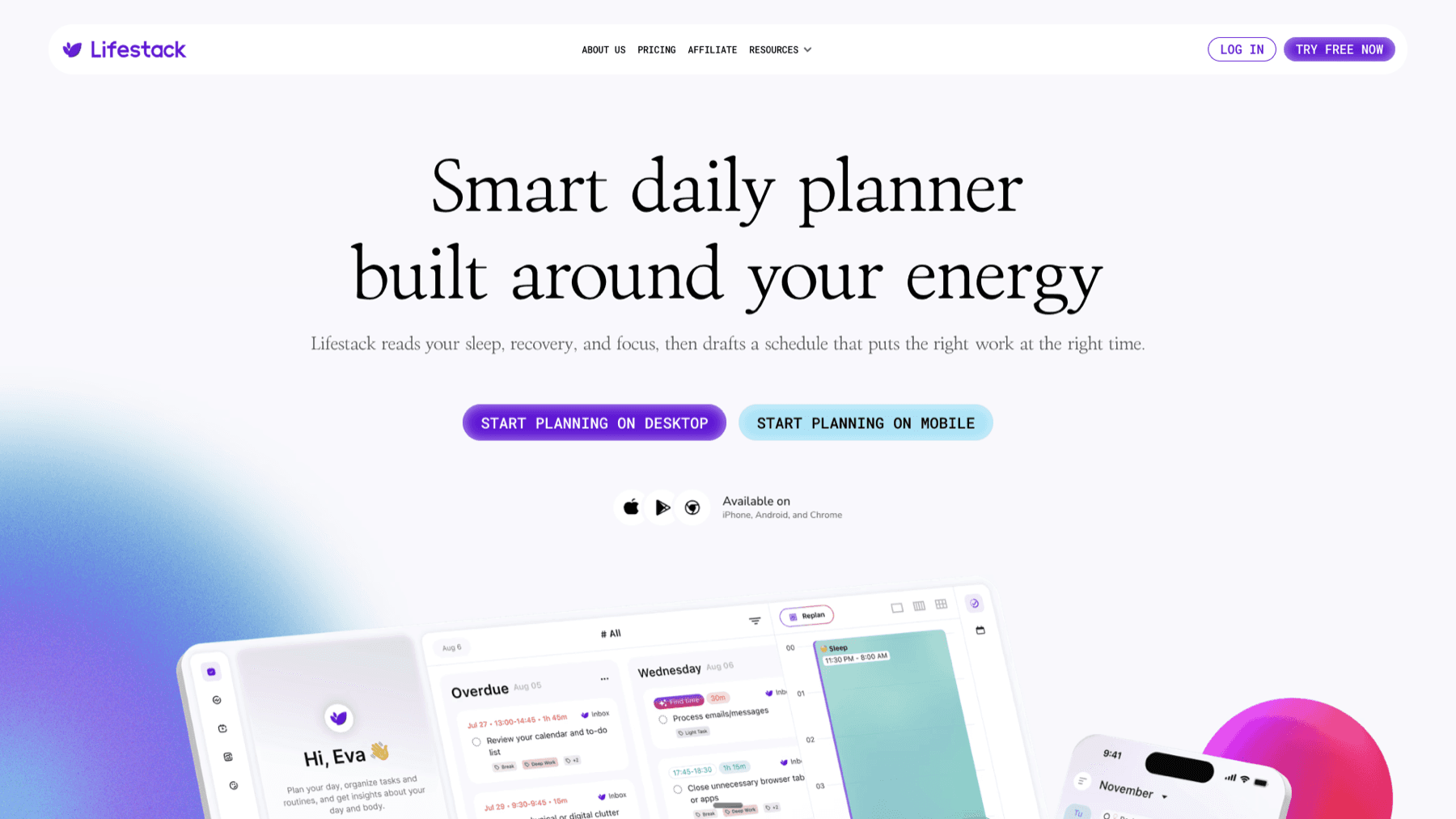
Both Todoist and Apple Reminders share one significant blind spot: neither one knows how much energy you actually have. They'll schedule a hard creative task at 8am on a Monday after a rough weekend without blinking. They treat all tasks as equally doable at any time, which is not how human energy works.
Lifestack takes a different approach. It uses energy-based scheduling to match your tasks to your natural capacity -- putting demanding work when you're at your best and lighter tasks when you're winding down. For people with fluctuating energy, ADHD, or demanding schedules, that distinction matters. It also integrates with your existing calendar and pairs well with Todoist if you want to keep both. Lifestack starts at $9.99/month or $49.99/year (with a 7-day free trial).
Frequently Asked Questions
Is Apple Reminders good enough for most people?
Yes, for most people. If your task management needs are everyday -- shopping lists, chores, reminders before appointments, shared household tasks -- Reminders handles all of it well and costs nothing. It becomes limiting when you need advanced filters, integrations with other tools, or cross-platform access.
Can you use Todoist and Apple Reminders together?
You can, and some people do -- using Reminders for quick Siri capture and location-based alerts, and Todoist for structured project work. Syncing tools can bridge the gap, though there's no native two-way sync between them.
Does Todoist integrate with Apple Calendar?
Yes. Todoist has a two-way sync with Google Calendar, and it also supports a calendar feed (ICS) that you can subscribe to in Apple Calendar. It won't appear as a native Apple Calendar calendar, but all your Todoist tasks with due dates will show up. See the ADHD calendar guide for setup tips that apply here too.
What's the difference between Todoist free and paid?
The free plan limits you to 5 active projects, no filters, no reminders, and no AI features. The Pro plan ($5/month billed annually) unlocks unlimited projects, custom filters, task reminders, calendar sync, and Todoist AI. For most serious users, the free plan feels constrained pretty quickly. Full Todoist pricing breakdown here.
Is there a good alternative to both with AI scheduling?
Yes. The best AI task managers go beyond simple to-do lists by scheduling your work intelligently. Lifestack specifically focuses on energy-aware planning, which is different from the simple priority-and-deadline model both Todoist and Reminders use.
Which app is better for ADHD?
It depends on the type of ADHD challenge. For task paralysis, Reminders' simplicity can help -- fewer options means less friction. For people who need more structure and project management, Todoist's features and task initiation tools are worth the learning curve. The full ADHD task manager guide compares more options.
Both apps show up in every "best to-do list" roundup, but they're built for very different people. Todoist is a full-featured task management system used by over 50 million people. Apple Reminders is free, lives natively on every Apple device, and has quietly gotten very good in recent years.
The choice usually comes down to one question: do you need power and cross-platform flexibility, or do you want something that just works inside the Apple ecosystem without any setup? Those are genuinely different use cases, and the right answer depends on who you are.
We tested both apps daily across iPhone, Mac, and iPad. Here's the honest breakdown of where each one wins, where it falls short, and who each is actually built for.
Key Takeaways
Todoist wins on features: filters, projects, labels, priority levels, and cross-platform support make it the more capable app
Apple Reminders wins on simplicity and price: free, Siri-native, and works instantly across every Apple device
Neither app understands your energy levels or capacity -- if that matters to you, see the closing section on Lifestack
Quick Verdict
Todoist: Best for power users who want structure, projects, and cross-platform flexibility
Apple Reminders: Best for Apple-only users who want something that works out of the box, integrates with Siri, and costs nothing
Todoist Overview
The gold standard for personal task management
Todoist has been the go-to task manager for serious productivity people for over a decade. It's available on every platform (iOS, Android, Mac, Windows, web, Apple Watch, Gmail, Outlook) and handles everything from a simple shopping list to a GTD-style system with hundreds of tasks across dozens of projects.
The standout feature is natural language input: type "buy milk every Thursday" and it sets up the recurring task. The full Todoist review goes deeper, but the short version is that it rewards investment. The more structure you bring to it, the more useful it becomes. That's a feature for some people and a friction point for others.
Key Features
Natural language input for due dates and recurring tasks
Projects, sections, sub-tasks, and labels
Priority levels (P1-P4) with color coding
Kanban board view alongside list view
AI-powered task suggestions and scheduling
Cross-platform: iOS, Android, Mac, Windows, web, Apple Watch, Gmail, Outlook
60+ integrations including Google Calendar, Slack, and Zapier
Shared projects for team collaboration
What Works
Quick capture from anywhere -- Siri shortcuts, widgets, the app, even email forwarding
Natural language date parsing is excellent and fast to learn
The GTD workflow maps cleanly to Todoist's project and label structure
Offline mode works reliably on mobile
Filter system is powerful once you invest a little time learning it
Limitations
Full power requires the Pro plan at $5/month -- the free tier has real limits
No understanding of your energy levels or how much capacity you actually have
Setup and configuration take real time -- it's not an open-and-use app
Can feel like overkill if your task volume is low
Pricing: Free plan available. Pro is $5/month billed annually ($7/month otherwise). Business is $8/user/month billed annually.
Best for: Anyone who wants a serious task management system that works across all devices and platforms.
Apple Reminders Overview
The sleeper app that got quietly great
Apple Reminders has gone from a barely-usable note app to a genuinely capable to-do list since the iOS 16 and 17 updates. Smart Lists automatically filter tasks by date, priority, or flag. You can add sub-tasks, attach files, set time and location reminders, and share lists with family or colleagues. For many people, that's everything they actually need.
The killer advantage is the depth of Apple integration. Siri support is native and instant. It syncs across every Apple device without setup. It surfaces in Calendar widgets and Focus Modes. It knows your location. If you ask Siri to "remind me to call mom when I leave the office," it just works -- no extra app needed. See the best Apple Reminders setup guide for tips on getting the most out of it.
Key Features
Smart Lists: Today, Scheduled, All, Flagged, Completed views
Sub-tasks and grouped task sections
Time-based and location-based reminders
Shared lists for household and family use
Native Siri integration -- best in class for voice capture
Tags for flexible filtering across lists
Syncs across iPhone, iPad, Mac, Apple Watch, and iCloud.com
What Works
Zero setup -- works immediately on every Apple device the moment you turn it on
Siri capture is the best hands-free task input available anywhere
Location reminders work reliably and consistently
Family sharing is easy and completely free
Recent updates (Smart Lists, sub-tasks, sections) cover most real use cases
Limitations
Apple ecosystem only -- no Android, no Windows (web access via iCloud.com is limited)
No integrations with tools like Slack, Gmail, or Zapier
No Kanban board view
Advanced filtering is clunkier than Todoist's native filter system
No energy awareness or AI scheduling
Pricing: Free -- included with every iPhone, iPad, and Mac.
Best for: Apple users with everyday task needs who want something that works instantly, integrates with Siri, and costs nothing.
Head-to-Head: Todoist vs Apple Reminders
Here's how the two apps stack up across the features that matter most:
Platforms: Todoist wins -- available on every platform. Reminders is Apple-only.
Price: Reminders wins -- completely free. Todoist's full feature set requires a $5/month Pro plan.
Siri support: Reminders wins -- native OS-level integration. Todoist supports Siri shortcuts but requires extra configuration.
Natural language dates: Even -- both handle "every Monday" or "next Tuesday at 3pm" well.
Sub-tasks: Even -- both support them, both work well.
Filters and views: Todoist wins -- custom filters, priority flags, and Kanban board add real flexibility.
Integrations: Todoist wins by a lot -- Google Calendar, Slack, Zapier, and 60+ tools. Reminders integrates with nothing outside Apple.
Location reminders: Reminders wins -- geofencing is built in and reliable. Todoist requires the Pro plan.
Collaboration: Even for simple sharing; Todoist wins for team and work contexts.
Learning curve: Reminders wins -- open it, start typing. Todoist rewards investment but demands it too.
Which Should You Choose?
Choose Todoist if:
You work across Apple and non-Apple devices
You want projects, priority levels, and powerful custom filters
You have a lot of tasks and need structure to stay on top of them
You want your task manager to integrate with your calendar, email, or team tools
You're following a productivity system like GTD
Choose Apple Reminders if:
You're fully in the Apple ecosystem and have no cross-platform needs
Your main use case is shopping lists, household tasks, and time or location reminders
Siri capture is a priority -- it's genuinely the best hands-free experience
You want zero cost and zero setup
You tried Todoist and found it too much for your actual needs
Also worth checking: apps that pair well with Apple Reminders and apps that work with Todoist -- both apps get more powerful with the right companions.
What If You Want AI Scheduling?
Both Todoist and Apple Reminders share one significant blind spot: neither one knows how much energy you actually have. They'll schedule a hard creative task at 8am on a Monday after a rough weekend without blinking. They treat all tasks as equally doable at any time, which is not how human energy works.
Lifestack takes a different approach. It uses energy-based scheduling to match your tasks to your natural capacity -- putting demanding work when you're at your best and lighter tasks when you're winding down. For people with fluctuating energy, ADHD, or demanding schedules, that distinction matters. It also integrates with your existing calendar and pairs well with Todoist if you want to keep both. Lifestack starts at $9.99/month or $49.99/year (with a 7-day free trial).
Frequently Asked Questions
Is Apple Reminders good enough for most people?
Yes, for most people. If your task management needs are everyday -- shopping lists, chores, reminders before appointments, shared household tasks -- Reminders handles all of it well and costs nothing. It becomes limiting when you need advanced filters, integrations with other tools, or cross-platform access.
Can you use Todoist and Apple Reminders together?
You can, and some people do -- using Reminders for quick Siri capture and location-based alerts, and Todoist for structured project work. Syncing tools can bridge the gap, though there's no native two-way sync between them.
Does Todoist integrate with Apple Calendar?
Yes. Todoist has a two-way sync with Google Calendar, and it also supports a calendar feed (ICS) that you can subscribe to in Apple Calendar. It won't appear as a native Apple Calendar calendar, but all your Todoist tasks with due dates will show up. See the ADHD calendar guide for setup tips that apply here too.
What's the difference between Todoist free and paid?
The free plan limits you to 5 active projects, no filters, no reminders, and no AI features. The Pro plan ($5/month billed annually) unlocks unlimited projects, custom filters, task reminders, calendar sync, and Todoist AI. For most serious users, the free plan feels constrained pretty quickly. Full Todoist pricing breakdown here.
Is there a good alternative to both with AI scheduling?
Yes. The best AI task managers go beyond simple to-do lists by scheduling your work intelligently. Lifestack specifically focuses on energy-aware planning, which is different from the simple priority-and-deadline model both Todoist and Reminders use.
Which app is better for ADHD?
It depends on the type of ADHD challenge. For task paralysis, Reminders' simplicity can help -- fewer options means less friction. For people who need more structure and project management, Todoist's features and task initiation tools are worth the learning curve. The full ADHD task manager guide compares more options.

FOLLOW ON
FOLLOW ON
FOLLOW ON



Copyright 2026 © Lifestack. All rights reserved
Copyright 2026 © Lifestack. All rights reserved

